

Most developers and server administrators run their applications on unmanaged VPS hosting because it gives them full control of the server.
That’s the upside.
This guide to running unmanaged VPS is intended to give the reader an insight into the day to day tasks of running such a system, what tasks are best suited to it.
Alternatively, even when evaluating unmanaged VPS providers for the first time and running everything yourself, the choice of host is one of the most important decisions you will make for several years.
Unmanaged vs managed VPS hosting plans compared
Unmanaged VPS hosting is a service where the hosting provider will supply you with the necessary hardware, the Hypervisor (i.e. Virtualization Software) and the network infrastructure down to the rack. Everything above that is yours to manage (i.e. install software, apply security patches, configure, etc., maintenance, etc., as if it were your own server).
First month $1
Then the normal monthly price. One per customer. No setup fee, and a 30-day performance guarantee on your first order.
See the plans“Very satisfied with the service. The server was provided quickly, and everything worked perfectly. Fast response, reliable service, and great overal experience!”
What is an unmanaged VPS hosting solution?
A Virtual Private Server (VPS) is a virtual server carved out of a physical server and allocated a fixed amount of resources. An unmanaged server is the opposite of a managed server in that the provider's responsibility for the isolation of your server ends there. You are given a root login and a clean OS install, that is it. See Virtual private server on Wikipedia for background.
This hosting solution is for developers and sysadmins that want full control of a server.
How server configurations differ from shared server hosting
With Shared hosting you typically have everything abstracted away from you, a control panel to manage things, pre-installed applications and often even a technical support team that handles all the updates and maintenance for you. Unmanaged VPS on the other hand completely flips this model on its head.
- No pre-configured software stack imposed on you.
- No shared resource contention from neighboring accounts.
- No restrictions on packages, runtimes or daemons you can run.
The trade-off is clear: more control means more responsibility.
Full root access and what it means in practice
Full root access is the highest level of server access and means you can install any package, modify any config file, and run any process the kernel will allow. This level of access enables custom configurations tailored precisely to your application's requirements and performance goals.
This autonomy extends to software installation, where you can deploy specialized tools, libraries, or runtime environments without provider restrictions or approval workflows. Many users use this freedom to optimize disk I/O by configuring SSD storage with custom file systems like ZFS or Btrfs for enhanced data integrity.
Each of the plans offered by BuyVPS comes with root access to your own kernel and KVM isolated. Each plan includes enterprise-grade SSD storage to ensure fast disk I/O performance for database operations and application workloads.
How unmanaged VPS hosting works

Unmanaged VPS hosting places the virtual private server under your control as soon as it boots. The VPS hosting provider manages the physical layer (the hardware, network, and storage) and you manage all software. This division of management is the core of the unmanaged VPS hosting model. Modern unmanaged plans typically provision instances with fast SSD storage to ensure optimal disk I/O performance for database operations and application workloads.
Managed hosting vs unmanaged VPS: what is the difference?
Managed hosting means the hosting provider is responsible for maintaining the OS and services, and for fixing problems. On the other hand, with unmanaged hosting you are responsible for everything. You have root access, you get a clean install of Linux, and that is it.
The hosting provider has less overhead than they would with managed hosting, which means they can put more resources per server, and you have more control over your server. These reduced operational expenses translate directly into cost savings that make unmanaged plans attractive for technically proficient teams.
Operating system selection and server management setup
You can choose from a variety of Linux distributions including Ubuntu, Debian, AlmaLinux, Rocky Linux, CentOS Stream and Fedora after provisioning your server. The images provision in under a minute, and you have live SSH access immediately after the first boot. You can start configuring packages, users and firewall rules right away.
While the OS images deploy automatically, all subsequent software setup and service hardening requires manual configuration through the command line. Each software installation must be performed manually using package managers like apt or dnf, giving you precise control over versions and dependencies. Modern deployments benefit from SSD storage, which dramatically reduces boot times and accelerates package installation compared to traditional spinning disks.
How resources and isolation work
Our VPS hosting plans at BuyVPS enforce hard memory caps per node and use low node density, meaning you can flex resources up and down as required without ever needing an IP rotation or move. This architecture supports flexible resource scaling while maintaining consistent performance across all workloads on the platform.
This low-density approach ensures that each client benefits from a robust infrastructure designed for reliability and consistent uptime. Clients can depend on this infrastructure to deliver stable uptime even during traffic spikes or resource-intensive operations. All nodes are equipped with enterprise-grade SSD storage to ensure fast disk I/O and minimal latency for database operations and file access.
| Layer | Provider responsibility | Your responsibility |
|---|---|---|
| Hardware & network | ✓ Managed by provider | , |
| Hypervisor & uptime | ✓ KVM, run by us | , |
| OS, software, security | , | ✓ Fully yours |
We have servers in two data center locations: Amsterdam and New York. This allows you to place your applications closest to your users, without having to deal with different providers and different management interfaces. If you’re comfortable with the command line, unmanaged VPS is the fastest way to a full server, with complete administration control. But is this the best way for you to go, versus a managed VPS?
Unmanaged VPS vs managed VPS: key differences
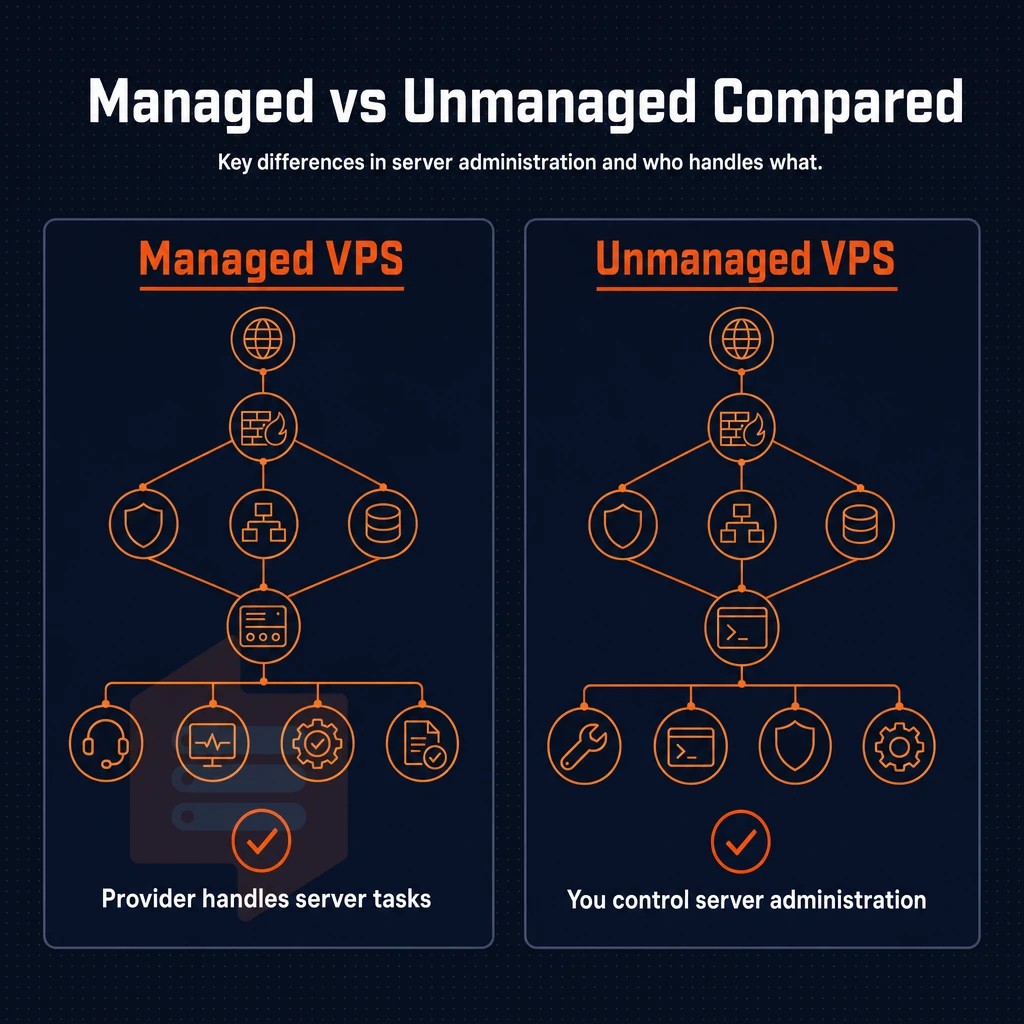
The core difference between unmanaged and managed VPS hosting is server administration. Understanding this split will help you to choose the correct service level for your needs before you purchase any VPS hosting plans.
What each model covers
Unmanaged VPS plans are completely self-managed. This means that you are responsible for applying security patches, managing the firewall, installing software, and managing the server for ongoing maintenance. The provider will supply you with the hardware, network and virtualization, and that is it.
On Fully managed VPS hosting we add a layer of managed services on top of the VPS hosting. So the provider will update the OS, harden the server for security, monitor the server, and solve server related issues for you. The downside is that you will have less control on the server then unmanaged VPS hosting, but the big upside is that you have less work to do, less overhead to manage the server.
| Dimension | Unmanaged VPS | Managed VPS |
|---|---|---|
| Control level | Full root access, every decision is yours | Provider enforces baseline config |
| Technical knowledge required | High, Linux administration essential | Low, provider fills the skills gap |
| Support scope | Infrastructure only | Infrastructure plus OS and software |
| Customisation | Unrestricted | May be limited by provider policy |
Do i need technical knowledge to use an unmanaged VPS?
Yes, significant technical knowledge is required. You will need to be able to manage a Linux server from the command line for example managing firewall rules, applying patches as well as being able to troubleshoot issues that occur. Proficiency in these technical skills separates those who can successfully operate an unmanaged environment from those who should consider alternatives.
Unmanaged VPS suits experienced users and system administrators who want complete control over their stack. Managed VPS options suit teams without in-house Linux expertise. Learn more about managed VPS hosting if your team needs that support layer.
Note: Choosing unmanaged to cut costs only pays off if you have the skills. An unpatched server costs far more in downtime than managed services ever would. BuyVPS engineer support is available either way, but server administration on unmanaged VPS plans remains your responsibility. When issues arise beyond your expertise, having access to reliable assistance can prevent costly mistakes and extended outages. Organizations that accurately assess their internal capabilities can realize substantial cost savings by avoiding unnecessary managed service fees while maintaining system reliability.
Pros and cons of unmanaged VPS hosting
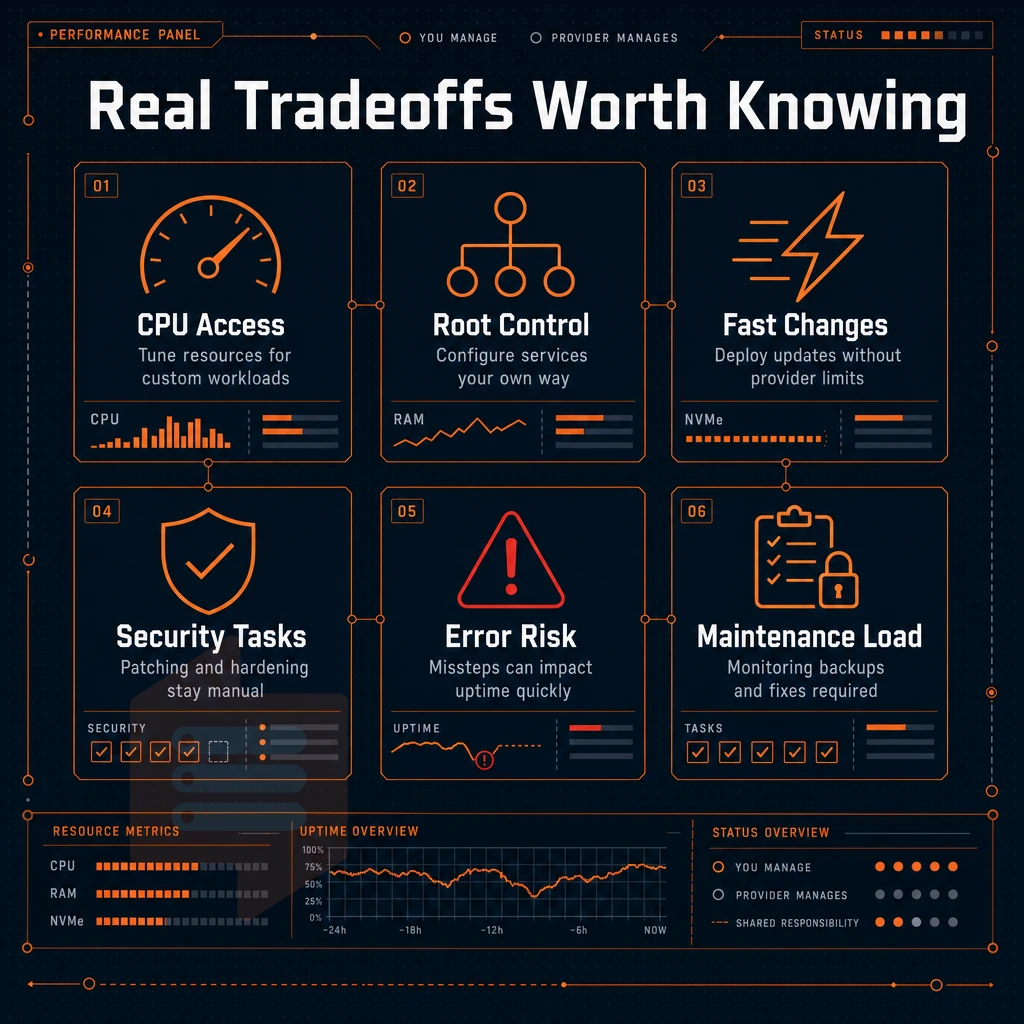
With unmanaged VPS hosting you’re in full control but that’s not without its trade-offs.
Full control over your server environment
Full root access lets you control every level of the stack.
All changes happen instantly without waiting for support personnel to process an upgrade request.
Install custom software and build your own stack
Unmanaged hosting removes the guardrails. Unmanaged hosting is particularly well suited for non-standard workloads such as custom compilers, proprietary agents, or very niche frameworks that a managed VPS environment would block due to restrictive server security policies.
Full control is most valuable when your stack is not the standard, and diverges from the mainstream. Running standard LAMP or LEMP reduces the gap.
What operating systems can i run on an unmanaged VPS?
BuyVPS supports Ubuntu, Debian, AlmaLinux, Rocky Linux, CentOS Stream and Fedora out of the box. On every server plan you can upload your own ISO to boot any Linux distribution or even a BSD.
The real costs: security and server management
The Cons are Real.
Note that you’ll also lose the managed support “safety net” here. In our managed support we cover the core infrastructure for you, but once you’re into the OS and application layers then that’s all on you.
Once you have established the trade-offs for your specific situation, it is time to figure out whether your team and workload are the right match for unmanaged VPS providers or a more hands-off managed approach.
Who should use an unmanaged VPS?

Unmanaged VPS hosting is designed for the Linux command line power user. If you require control of a server such as kernel settings, packages and services (daemons), then unmanaged hosting is perfect for you. We assume that you have the required Linux administration skills to manage your server.
The right audience for maximum cost savings
The primary users of Habitat will be developers, system administrators and DevOps engineers. They don’t need a hosting provider to apply updates and to fix security issues for them.
In addition to those requiring unrestricted server resources, experienced users managing their own self-managed infrastructure also benefit from Airflow. A solo developer running a SaaS application for their own projects, a team of a few running a CI/CD pipeline for their own projects. Alternatively, an engineer building and deploying custom software stacks for customers and internal projects benefits from Airflow running on server resources they fully control, handling their own server maintenance and shaping the environment to their exact needs.
Common use cases
Unmanaged VPS can handle more loads than what shared hosting can handle.
- Web application hosting with custom runtimes (Node.js, Python, Go, Ruby).
- DNS and authoritative nameserver deployments.
- Reverse proxy and VPN gateway configurations.
- Game servers requiring low-latency, persistent processes.
- CI/CD runners and build pipelines that need to install custom software freedom.
- We have isolated test environments for a dedicated server setup.
BuyVPS offers KVM-based VPS servers in two locations, Amsterdam and New York. Our VPS servers offer root access and custom ISO's, to let you build a server stack that is perfectly suited for your needs.
Is unmanaged VPS hosting cheaper than managed VPS hosting?
Yes, every month consistently.
The trade off is obvious, you save money but then you have to do the work.
If your team lacks Linux experience or in-house capacity to maintain a server, unmanaged is not the right choice. Consider managed VPS hosting instead, the added support overhead is worth it when the alternative is downtime you can't diagnose. Once you've confirmed the fit, the next decision is evaluating which provider is worth trusting with your infrastructure.
What to look for in an unmanaged VPS provider
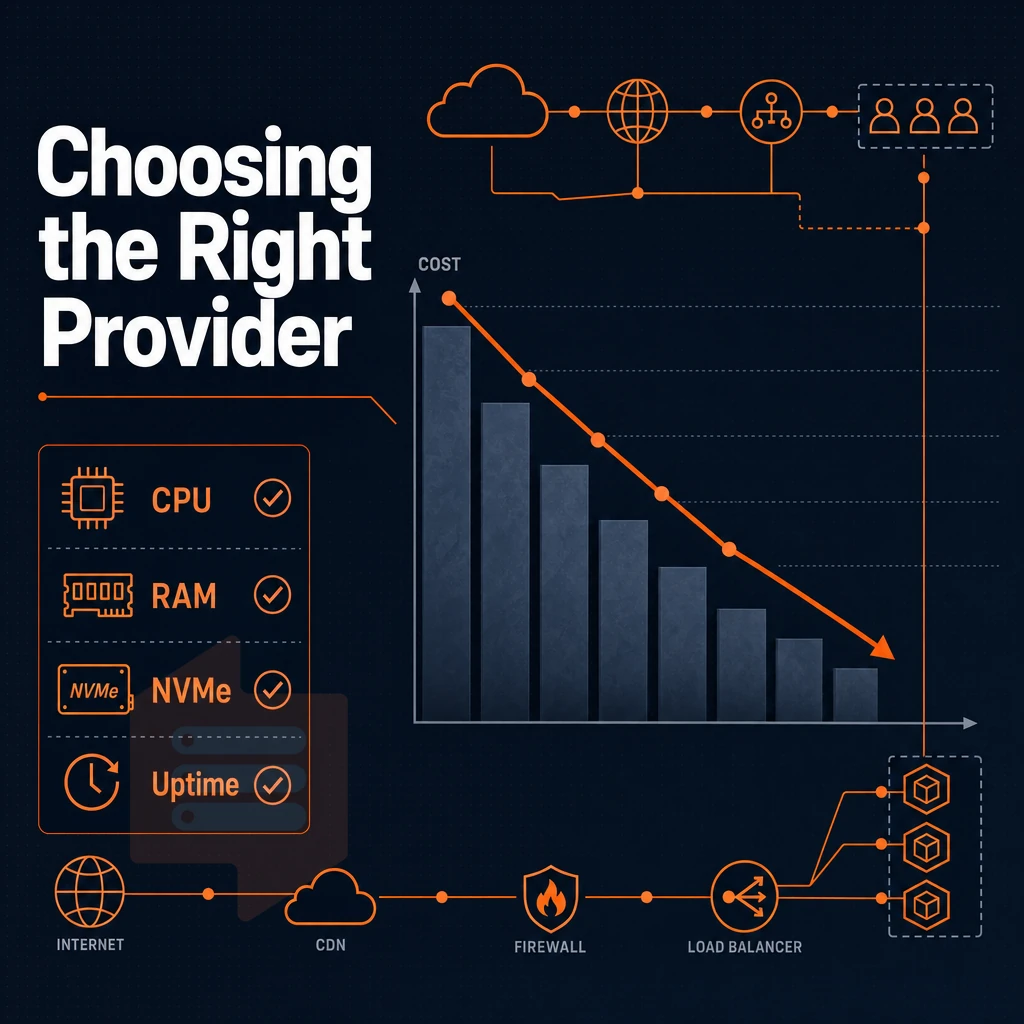
All unmanaged VPS providers are not created equal. Before committing to an unmanaged VPS plan it would be wise to hold all potential providers up against these criteria for building a VPS: hardware, storage, network, virtualization. Additionally, the technical expertise and flexibility to ensure that your VPS provider places you on a quality server with scalable resources built to last, rather than a cheap commodity box oversold with many other accounts sharing the very same hardware.
Hardware, storage, and reliable performance
check the servers vCPUs are shared or pinned (shared cores are fine for bursty workloads but for super low latency apps you want pinned dedicated cores to CPU neighbor noise). for storage, NVMe RAID10 will murder SATA SSD performance by an order of magnitude or better. BuyVPS reports 122,959 4K read IOPS on their NVMe array for example. Also, RAID protection (as opposed to single drive) is required for production work.
Network quality and DDoS protection
DDoS protection at edge should also be included (and not sold as an afterthought as some providers do).
Virtualization, OS flexibility, and scalable resources
KVM allows us to give each VPS its own kernel which gives it a lot stronger isolation than you would get with a container-based virtualization solution. We support the standard Linux distributions such as Ubuntu, Debian, AlmaLinux and Rocky Linux, with server settings ready to go, as well as the ability to upload a custom ISO to perform a fresh install of the VPS from any other ISO.
We support in-place upgrades of the VPS across multiple data center locations without any IP address changes, so no technical expertise in IP rotation is required and there is no need to update DNS or firewall rules for the VPS.
What does "full root access" mean on an unmanaged VPS?
Full root access to your Linux server means you connect as the superuser of that server.
Unlike our managed support option, you would not have a layer of managed support, and have full control of your server. Our provider manages the hypervisor running on their servers, you have full control of everything on top of it.
| Criterion | What to verify | BuyVPS position |
|---|---|---|
| CPU type | Shared vCPU or pinned cores | Both: EPYC Milan (shared) and EPYC Genoa (pinned) |
| Storage | NVMe with RAID protection | NVMe RAID10, PCIe direct, 122,959 IOPS measured |
| Upgrades | In-place vs. migration | In-place, no IP rotation |
| Pricing | Transparent pricing | No hidden fees |
These are the technical details for your shopping list.
Setting up and securing your unmanaged VPS
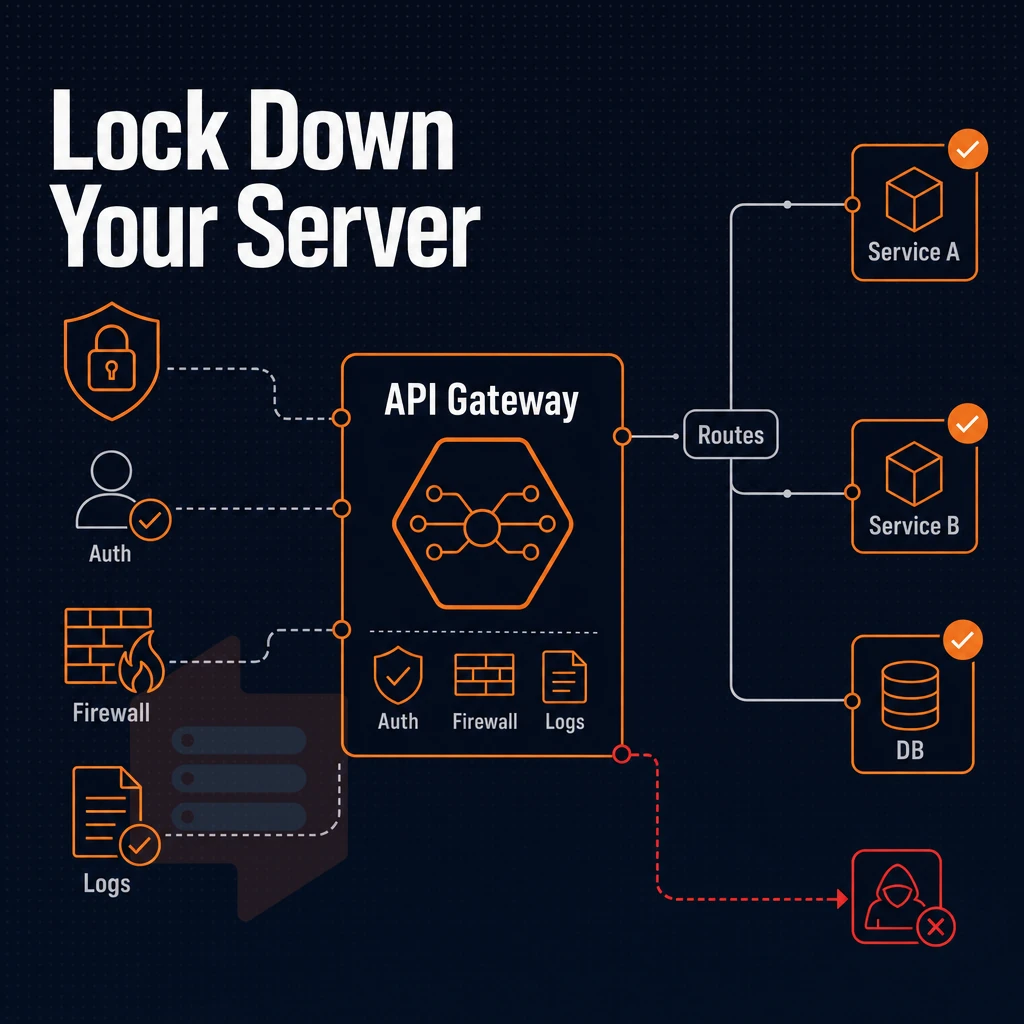
Provisioning an unmanaged VPS is similar to being handed a blank server with root access to a blank server. What you do in the first hour or so with a newly provisioned unmanaged VPS will determine the long term stability of the server and the server’s security. Here are some basic steps that you should follow in order to set up an unmanaged VPS server without the use of any managed tools.
Initial access and user hardening
- Log in via SSH and change the root password. Use your provisioning credentials to connect, then run
passwdimmediately. A strong, unique password limits exposure if the default was ever logged. - Create a non-root sudo user. Run
adduser yournamefollowed byusermod -aG sudo yourname. Direct root logins are a common attack vector, this step closes it. Confirm the new user works before proceeding. - Disable root SSH login. Edit
/etc/ssh/sshd_config, setPermitRootLogin no, and restart the SSH daemon. Pair this with key-based authentication by copying your public key viassh-copy-id.
Note: Disable password authentication only after confirming your SSH key works. Locking yourself out requires VNC console recovery, BuyVPS includes an in-browser VNC console for exactly this scenario.
Configuring firewalls and patching the OS
- Set firewall rules. Configuring firewalls with
ufwornftablestakes under five minutes. Allow only ports you actively use, SSH (22 or a custom port), HTTP/HTTPS if serving web traffic, and nothing else by default. - Apply security patches. Run
apt update && apt upgrade -y(Debian/Ubuntu) or the equivalent on AlmaLinux or Rocky Linux. Unpatched kernels are the leading cause of compromise on unmanaged plans. - Install fail2ban which will monitor auth logs and after a number of failures ban the IP for a time period. By default fail2ban will protect SSH but can be configured to protect other services as well.
Can i upgrade my unmanaged VPS without losing my IP address or data?
Upgrades on BuyVPS are done in place, meaning no change to your IP address, operating system, or software that you have installed. The upgrade affects all hosting plans under the Standard, Dedicated and High Memory tiers.
Basic performance optimization
- Add a swap file if you have low RAM. A 1-2 GB swap file will prevent out-of-memory kills on light plans, although it is no substitute for RAM and only helps during spikes to keep service up and running.
- Tune kernel parameters. Adjust
vm.swappinessandnet.core.somaxconnin/etc/sysctl.confto optimize performance for your workload, database servers and web servers have different ideal values.
These steps are somewhat technical but can be accomplished with standard repository code, no custom software required. The security settings for the server are applied here and become the default for all subsequent services. This means that once your server has been hardened, BuyVPS is a great choice for your underlying infrastructure.
Why choose BuyVPS for unmanaged VPS hosting
BuyVPS is built for engineers who want full root access and complete control over their unmanaged VPS environment, no managed services layered on top, no hidden constraints.
- True KVM isolation: Every unmanaged VPS server runs its own kernel. No shared kernel risk, no noisy-neighbor bleed.
- Three tiers, one goal: Standard CPU (AMD EPYC Milan, shared vCPU), Dedicated CPU (EPYC Genoa, pinned cores, DDR5 ECC), and High Memory, each giving you full root access to match the workload.
- NVMe RAID10 storage: 122,959 4K read IOPS measured. Fast enough for database-heavy server configurations and high-throughput custom software stacks.
- No-oversell policy: Hard memory caps and low node density protect your dedicated resources and deliver reliable performance under real load.
- Amsterdam and New York: Identical hardware, server setup, and pricing in both locations, choose EU or US East Coast without trade-offs.
- In-place upgrades: Scale server resources with no migration and no IP rotation. Your server environment stays intact.
Engineer-staffed support handles infrastructure questions when you need it, without pushing you toward managed hosting you didn't ask for. Reach us at info@buyvps.com or compare our unmanaged VPS plans at BuyVPS.com. Still have questions about how self-managed hosting works in practice? The section below covers the ones that come up most often.
Unmanaged VPS hosting: common questions answered

Unmanaged VPS hosting, as opposed to managed VPS hosting, brings a number of questions to the minds of developers and sysadmins weighing the merits of VPS hosting versus other types of hosting. The answers to these questions can be pretty straightforward: control, responsibility, and whether or not the hosting fits your specific needs.
What does an unmanaged VPS actually include?
An self-managed VPS hosting solution is a provisioned virtual machine, set up for you and granted root access. This is where we stop and you begin. We will manage the physical servers, network and the hypervisor that sits on top of them. Everything above the operating system (OS) will be your responsibility to manage, including applying patches to applications, installing and managing software, configuring server settings such as firewall rules, and making your own backups.
All VPS hosting plans at BuyVPS are built on the same solid foundation: KVM isolation with each VPS having its own kernel, NVMe storage in RAID10, and an IPv4+IPv6 dual-stack network.
How does it differ from managed VPS hosting?
In Managed VPS hosting we bundle tasks like server management (OS updates, security hardening, etc.), server monitoring into the overall hosting service that you are purchasing.
Unmanaged VPS server hosting, on the other hand, takes all of the above out of the hosting service in order to keep overhead down to a minimum and allow you full control over the server. With managed VPS hosting, should an incident occur, the incident will be handled by your provider’s team. With an unmanaged VPS server, you handle the incident.
Managed VPS is for teams that don’t have dedicated ops staff. Unmanaged VPS is for developers who want to run whatever stack they like without interference from your hosting company.
Who should choose unmanaged VPS?
This could be end users of typical sysadmins.
- Developers running custom application stacks.
- Les agences hébergent plusieurs environnements clients sous une même racine.
- Teams migrating from shared infrastructure and want full control.
As long as you have team members able to set up Nginx, manage ssh keys, and write a cron-based backup script, then DIY VPS hosting is more capable and cost effective for your organization.
The core advantages of unmanaged VPS hosting
An self-administered VPS hosting solution provides you with full root access to your server, giving you complete control over the server environment. This type of hosting allows you to install any software you need, without restriction.
The key difference between unmanaged VPS service and managed VPS service is that with unmanaged servers, you are responsible for all decisions, including making changes to the firewall and deciding what operating system to use. This type of hosting is very cost effective and can result in a very stable and fast hosting platform, provided you have the necessary technical expertise to manage the server.
Choosing the right VPS provider matters as much as choosing the right plan. BuyVPS delivers self-managed VPS plans on AMD EPYC hardware with NVMe SSD storage, full root access, and no-oversell infrastructure across Amsterdam and New York. Prefer a hands-off approach? Explore managed VPS hosting instead.
self-managed virtual server hosting provides you with full root access to your server, allowing you to fully configure the box as you require without any services that you do not need. However, it does require some level of Linux administration in order to manage. This type of hosting is perfect for the developer. Sysadmin or IT department that wants to run their own server and configure their stack as they see fit, without incurring the cost of a managed hosting service.
unmanaged virtual server is a matter of tradeoffs: lower cost and more flexibility versus your responsibility to update, apply security patches and keep it up and running.
If you're ready to take control, BuyVPS offers KVM-based self-administered VPS plans on AMD EPYC hardware with full root access, NVMe RAID10 storage, and engineer-led support, deployed in Amsterdam or New York. Browse the plans and find the tier that fits your workload.