
In order to choose the right tools for your business, you first need to have a good understanding of the basics and how they work. For the growing company with a large number of users from all over the world there are two main tools of the trade: VPS and VPN. Both of these tools are called "Virtual Private" but they are two very different tools that serve two very different purposes.
When setting up a virtual private architecture for your growing company, business or organization it is very important to consider the positive and negative effects of your choices regarding your VPS and VPN options. Your architecture choices can greatly affect your applications, the data protection as required by law for your company and the safety of your developers while they are working abroad. So, to make sure you choose the right architecture and spend the right amounts of money for recovery from failures, you need to have a good understanding of the characteristics of the many available VPS and VPN options.
There's a huge difference between running a company and running a server. Every minute that a server is down could be losing your company hundreds of thousands of dollars. Every data breach could be destroying a decade's worth of brand equity in seconds. IT infrastructure is not just another line item in a company's budget; it is the lifeblood of the company. Learning to use the vast array of tools at our disposal to reach our goals is what will determine whether or not a company is able to keep up with the market.
The "Virtual Private" Confusion: Why These Acronyms Are Mixed Up
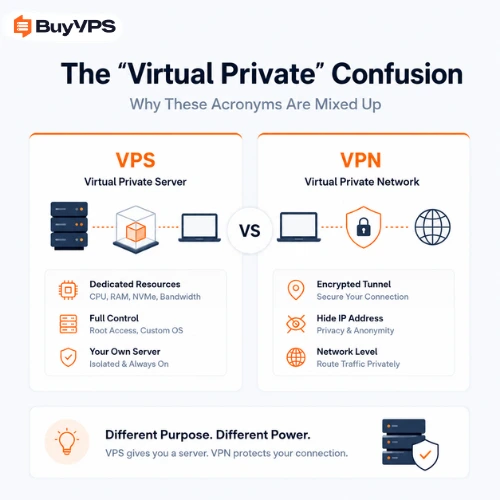
The confusion between VPS services and VPN services is caused by the fact that both of these technologies are referred to as Virtual Private. The Virtual Private in VPS services refers to the hardware virtualization, the Virtual Private in VPN services refers to the virtual network that is created and the virtual private paths (tunnels) that are created through that network.
For readers who want to run their own VPN rather than rent one, we have a hands-on guide to a WireGuard and Tailscale VPS, including the CGNAT case where your home connection has no public IPv4. Read the guide.
As with VPS technologies there are also advanced software layers at work here to create your virtual network. This 'virtualization' in the case of VPN technologies (as opposed to VPS technologies) is for virtualizing the local transit routes for data within your network. So in essence when you create a virtual private network, you are creating a virtual network. Therefore there is a huge distinction between VPS (virtual private server) and VPN (virtual private network) technologies, the difference is that with VPS technologies you virtualize hardware (servers, etc.) to create virtual servers, in VPN technologies you create virtual networks by virtualizing the local routes for data in your network.
The Evolution of Virtualization Technology
When discussing VPS vs VPN, it is helpful to have a background on the evolution of IT infrastructure over the last couple of decades. At the start of the internet, physical servers for databases and applications were extremely expensive for companies. In addition to this, companies had to invest in large IT rooms which required cold rooms for the servers to prevent overheating and high electricity costs to power them.
The technology for Virtualization was invented in the early days of Hardware Virtualization. This technology was first used to trick one physical server into thinking it was many servers. In the early days of the Internet, companies would spend huge amounts of money on physical servers for databases and applications. These servers would be housed in big air-conditioned rooms to keep them from overheating and would consume huge amounts of power. In many cases, the servers would be idle for long periods of time to handle spikes in usage. Virtualization allows companies to use the 100% capacity of their servers, and to add or remove servers as needed. The same technology used for Hardware Virtualization was later used for Network Virtualization. Network Virtualization uses software to create isolated layers of logic on network cables to create secure, invisible tunnels through the open Internet. Because both VPS and VPN use Virtualization, they share the "Virtual Private" name.
The Big Picture: VPS vs VPN. Key Differences Between VPS and VPN at a Glance
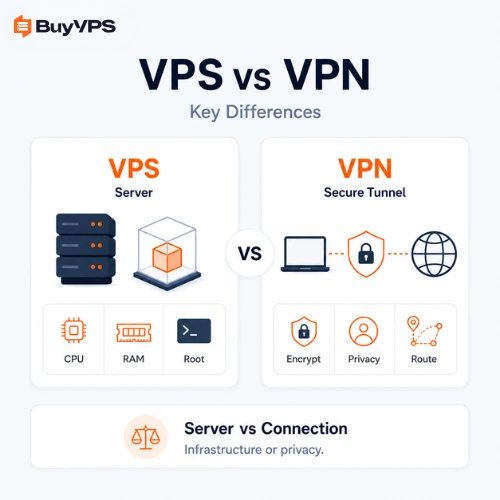
A VPS is a fixed destination (on your server), a VPN service provides a secure tunnel to reach a destination (on the internet).
A VPS is a dedicated server environment, situated in a physical data center. Here you can host databases, web applications (e.g. Magento, WordPress, ...) or custom software. In contrast to a VPN connection, which encrypts all the data transferred by your local computer to the internet so that no third party (e.g. your ISP, hackers who sniff internet packets) can read this data, a VPS is a physical host or a Virtual environment on a physical host. The VPN connection is used to safely transfer employee data, while the VPS is the environment to host the applications that process this data.
On the one hand you have the VPS, in which you develop and run databases, web applications and custom software on your very own server. This VPS is set up in a top data center and is therefore very secure. On the other hand, you have the VPN connection, which you use to safely transport all data of you and your employees over the internet. In short: one fortress to house your digital assets and an armored transport vehicle to transport all employee data safely over the internet. Two completely different tasks, that are both solved by VPS hosting. However, the solutions are very different from each other.
What is a Virtual Private Server (VPS)?
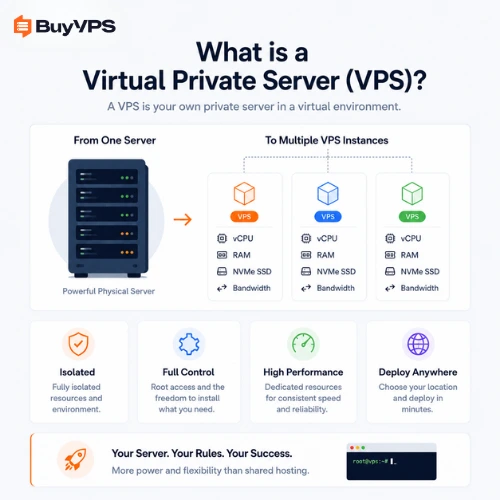
VPS is an acronym for Virtual Private Server. A VPS is a virtual machine (VM) which is hosted on a server (or multiple servers) sharing the physical and/or virtual hardware with other VPSes. On each VPS you have your own resources such as CPU power, memory, disk space, etc.. Most hosting providers have a huge server (or servers) on which they can host many VPSes, each with their own resources. On a VPS, you can host any software you need for your server. Most hosting providers offer root access (also called administrator access) to the VPSes. This means you have full control over your VPS, you can fully administer it as you see fit. This is a big difference with shared hosting, on which you have very little control and you are at the complete mercy of your hosting provider.
Modern hardware virtualization has made it possible for any company to make use of the same amount of computing power that large corporations and very expensive enterprises had to pay for just a few years ago. With VPS hosting, companies can rent the computing power they need for their databases and applications on a month to month basis. They can set up a complete private server environment on a single server with the required hardware and amount of redundancy. In no time at all, they can be up and running with a large and flexible server environment.
How a VPS Works: Hypervisors and Resource Isolation
On another note, to build a VPS you need to rely on a very low level of software, typically in the form of a hypervisor (a program that virtualizes servers). In a business hosting environment the most typical of these are Type 1 or 'bare metal' hypervisors. The best examples of this sort of software are KVM (on Linux servers), VMware's ESXi, or Microsoft Hyper-V.
All servers at Premium Infrastructure are running on a highly secured, climate-controlled data center and are provided with dedicated server resources. This means there are a lot of physical resources available on the server, and the hypervisor (the software layer that manages the servers) can split up these resources and allocate them to the virtual servers in a very precise and mathematical way. As a result, the VPS is provided with exactly the amount of CPU cores and of memory that was reserved for the VPS when it was created. This is exactly the same as with a dedicated server. And as with a dedicated server, each VPS is completely independent, and there is no need to share any of the resources with other VPSes. This is a huge difference to the normal shared hosting platforms, where resources are pooled and are shared between all users in a dynamic way. There are also a lot of cheaper shared servers, where all the memory of the server is pooled and then divided up among all users in an arbitrary way. As
Another reason why a VPS is so much more secure than shared hosting is that each server is in its own separate environment and is not affected by other servers. Each VPS exists on its own in the rack where the servers are located. This means that if one of the servers on the rack begins to max out its resources for unusual traffic reasons or is hit by a DDoS attack, this would not affect the other servers in the rack. This is because servers on the same rack are isolated from each other at the kernel level and therefore are unable to "leech" or "borrow" resources from other servers on the same rack.
Top Enterprise Use Cases for a VPS
High-performance VPS Hosting is used by enterprises and large organizations from all over the world to host their critical workloads in premium data centers. High-traffic sites, which need to be able to scale up or down in order to cope with growth, are also ideal candidates for VPS Hosting. Applications that need to be run 24/7 by automated scripts are also a good fit. For such sites, VPS Hosting is the undisputed choice for high-performance hosting.
In terms of its applications, a VPS (High-Performance VPS) is suitable for a range of applications that are extremely resource-intensive. Firstly, there are the many Software-as-a-Service products, which in many cases are not able to be run from a shared server. This is because there are simply too many users and not enough server resources to provide each user with the level of performance required. Online shops with very large databases are also often run from a VPS. For example, thousands of transactions per minute could be processed from such a database. In addition, there are also very large websites, which are comprised of many different containers. These websites are managed by a tool for the orchestration of containers (e.g. Kubernetes), and therefore they require a lot of computing power in order to function properly. Finally, there are the Development and Operations teams. These teams require a VPS in order to create a pixel-perfect replica of a production site for development and testing purposes. Last but not least, there are also the many websites, which are run from special hosting tools and therefore require an isolated sandbox in order to test new code on a replica of the live site for customers.
Advantages and Limitations of VPS Hosting
A Virtual Private Server (VPS) can be managed in virtually every respect as if it were a server in a data center. There is absolutely no restriction on what type of server software may be installed or how it may be configured. All types of applications can be optimized for the maximum performance, because as opposed to shared servers, VPS's have a guaranteed fixed portion of resources. Root access to a VPS is granted to its administrators and to the administrators of the servers on which the instances of which are running as VPSes.
A VPS allows you to have your very own virtual server which you can use as you see fit and install as many applications as you want and as many instances of them as you want. Because you lease the virtual server from a hosting company they will usually supply you with the server and then you can then do as you wish with it and use it to do as you see fit. This usually means you have full root access to the VPS and admin access as well which means you can install your own operating system on the server and set it up in the way that you see fit. You can for example use the VPS to install your very own web server (like Apache or IIS) and host your very own websites off of it (or thousands of them for that matter). Other examples of uses for a VPS could include a game server, a VoIP server, a Mail server, a database server (like MySQL) and lots of other types of servers as well. The uses are endless for a Virtual Private Server (VPS).
The main benefit of a VPS server is that of administrative freedom. With your VPS you have the same control as you would with a dedicated server, and the ability to administer a VPS is far greater than that of a shared server. By leasing a VPS you will be granted root access and admin access to your server(s) and will be able to install your chosen operating system and configure the server(s) to your liking, including in-depth kernel tweaks and other such fine-grained server administration.
While having the ability to configure your VPS as you see fit is great, it also means you will have to manage it as well. Therefore an unmanaged hosting plan is better suits people with lots of technical expertise as they can lock down a server, set up a firewall, apply latest security patches to fix security bugs and even complete command line config for applications that you wish to host on your VPS.
Deep Dive: Unmanaged vs Managed Cloud Compute
While premium managed services are a key offering from many infrastructure providers, there are also many organizations that utilize unmanaged server hosting and demand to have the organization's internal technical expertise for securing an unmanaged server and for administration. An unmanaged VPS can be installed with an operating system of the lessee's choice. In addition to root access to the virtual private server, the lessee also has admin access and is able to install any software on the server, as well as change server settings in whatever way desired. With unmanaged hosting, the customer's IT staff is responsible for managing a VPS 24/7/365. This means that the organization is responsible for administering the server to correct problems as they occur. This could be a memory leak which requires fixing at 3 am. The customer bears the responsibility for solving these problems on an around-the-clock basis.
On the other hand the provider can offer a fully managed hosting solution. This means that the provider's highly trained and certified engineers work for you as your IT department. They will proactively apply security patches, set up server, services and other software that is required for your website. Also they monitor 24/7/365 for any kind of failure of your server. This way your developers can work on your software product (website, web application) without worrying about the Linux server that hosts your work.
What is a Virtual Private Network (VPN)?
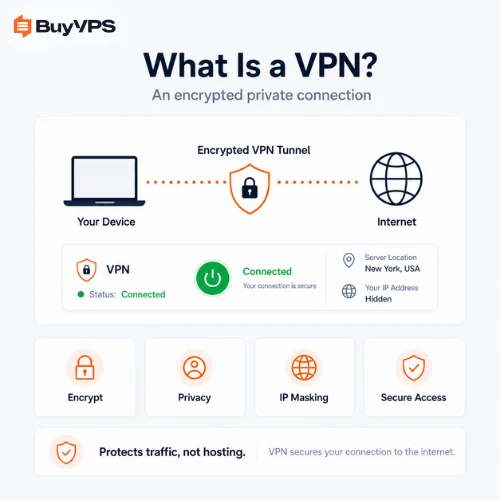
A VPS (Virtual Private Server) is basically a physical server on which your applications are running. In addition to this, your hosting provider will also offer you a VPN service (Virtual Private Network). A VPN will create a secure connection (a so called tunnel) between your location and your VPS server. This VPN service is a layer of security on top of your already pretty safe connection to your VPS.
Data passing through a VPN connection is then protected at the Layer 3/4 level of the OSI model (where web applications run at Layer 7/ the Application layer) by means of encryption. This means that regardless of the application running on a user's computer that has generated the data passing through it, all such data will be protected against potential interception by other people and against reading or even modifying by such unauthorized third parties while traveling across the Internet in encrypted form.
How a VPN Secures Data in Transit (Encryption Tunnels)
The VPN software on an employee's physical device forms a connection to the remote VPN server on the company's network. All data that is transmitted from the local network is secured (see below for more details on how data is secured) and sent over the Internet to the remote network. The VPN server on the remote network decrypts the data and forwards it to the intended recipient on the remote network. Data that is sent from the remote network to the Internet (e.g. a web server, mail server etc) is sent with the remote network's IP address as the source of the data rather than the local network's IP address. Therefore, an internet service provider, or competing company, will not be able to tell that an employee has connected to the company's network whilst on the move.
Traffic going through the tunnel is fully encrypted and is traversing the public network as fully obfuscated packages. It will be processed by VPN servers, which are generally found in very secure data centers. Each package is being sent with the VPN server's public IP address instead of the user's local network's IP address. Therefore, the local internet service provider, as well as any competing companies or malicious individuals on the same network as the user, will not be able to log, read or manipulate the internet traffic of that user.
Corporate Use Cases for a VPN
It is recommended to set up a corporate VPN for a highly distributed work environment in order to secure business, to support a so called zero-trust-architecture as well as to fulfill safety of data obligations. This tutorial describes public Wi-Fi security using a VPN on public networks like those found in airports, hotels and coffee shops around the world in order to safeguard data on such untrusted networks.
Public Wi-Fi security involves protecting personal data from interception on unverified networks using a VPN. As more and more companies adopt policies of allowing employees to work remotely from anywhere, Public Wi-Fi security solutions have become a vital component of business continuity. The Virtual Private Network (VPN) solution for public Wi-Fi security provides secure remote access for globally distributed remote workers sitting on inherently unsecured public wi fi networks in airports, hotels, or coffee shops. This allows them to access internal corporate intranets, legacy billing platforms, and proprietary source-code databases exactly as if they were physically sitting on the highly secure office local network.
Of course, there are also many benefits of global VPN servers for other users. For example, the QA department of a web application can test the application on different VPS servers around the world. This way they can test a localized version of a web application, for example a version in Spanish for Spanish speaking users. They can test how the currency is converted to the local currency, how geographically restricted a website is and how the website is translated to the local language. All this can be tested by the QA department by routing through a local server. As already mentioned, using a public wi fi network such as the ones found in airports, in hotels and in coffee shops to connect to the servers of a company to access applications and data would be a huge security risk. It would not be acceptable for any industry and would immediately fail to meet the requirements of any number of industry specific auditors such as the requirements for SOC2 or HIPAA compliance.
Advantages and Limitations of VPN Infrastructure
Immediate benefits of a VPN for a company are related to and increase of security of the network of a company. Since more and more employees are working outside of the premises of a company, the risk of attacks by means of public networks is growing. The risk of attacks by means of public networks can be reduced significantly by using a VPN. Furthermore the use of a VPN does not causes any disadvantage for employees. All applications and services are available in the same way as before. As a result, there is no negative impact on the productivity of employees.
All in all, there is a slight delay in the transmission of data, due to the large amount of data that needs to be processed by the VPN. However, this is a small price to pay for all the extra security that your data will receive. Large numbers of users may find that they are able to find a cheap VPN service that has a huge pool of servers. However, the slow VPN connection from these servers can result in a slow internet connection that will occasionally drop. In these cases, it may be better to set up your own VPN gateway, that is made up of dedicated hardware that has been configured to handle a lot of traffic.
VPS vs VPN: The Head-to-Head Comparison
To secure your long term investment (server / hosting) you need to get a grip on the key features and the differences between two products like VPS hosting and VPN services. There's a lot of misleading marketing going on regarding both subjects. To help you with that we compare VPS with VPN on a number of key features to find out how they process key components of network traffic.
First month $1
Then the normal monthly price. One per customer. No setup fee, and a 30-day performance guarantee on your first order.
See the plans“BuyVPS offers simple and reliable VPS hosting solutions for different online needs.”
| Feature | Virtual Private Server (VPS) | Virtual Private Network (VPN) |
|---|---|---|
| Core Purpose | Hosting applications, running scripts, and managing databases. | Encrypting internet traffic and hiding origin IP addresses. |
| Primary Output | Raw compute power (CPU, RAM, NVMe Storage). | Network privacy and secure data transit over the public internet. |
| IP Address Handling | Provides a static, public ip address to host external services. | Masks your real ip address with the VPN server's ip address. |
| Data Protection | Secures data at rest within the virtual server's storage. | Secures data in motion by encrypting the information within a virtual tunnel. |
| Target User | The developer, system administrator and business owner who hosts applications and data on virtual servers. | The remote worker, privacy-conscious surfer and the IT security team that requires to browse the Internet securely and wants to hide their real IP address. |
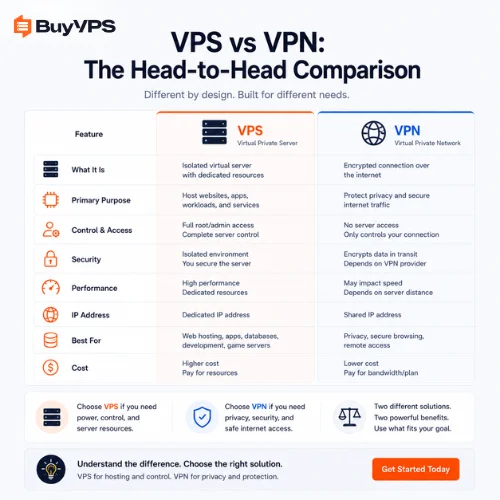
Core Purpose: Compute Power vs. Network Security
Server VPS is very different from VPNs. The core purpose of Server VPS (Virtual Private Server) is to supply hosting of applications, running of scripts and of databases. The core function of Server VPS is to supply raw computing power (in the form of processing ability, of RAM as well as of NVMe Storage) in order to be able to host applications and to run scripts and databases. These are then used in order to generate revenue for a company or for a person. VPNs on the other hand supply network security.
A VPN serves to secure the connection of remote users to the intranet of a company. A VPN therefore forms a virtual private network which is a private network and is read by no malicious actors, automated botnets or packet-sniffing algorithms as if it were a public network. Unlike a VPS or a dedicated server (which are both engines of creation for applications and thus process application logic and store data), a VPN does not process any application logic and does not store any data. What it does is using virtualization to create a secure, encrypted tunnel through the public internet for the data transmitted over it to travel.
How They Handle Data Privacy
In regards to data protection in a hosting environment, the VM does an excellent job of securing data at rest within a controlled server environment. Mathematically enforced hypervisor partitioning at the bare metal hardware level of servers provides the best possible solution in securing data. The Virtual Machine is locked down to the allocated resources on the server, and the risk of compromise from a neighboring server (on same hosting environment) server is minimal. For example, even if a security breach or virus occurred on a neighboring VM, the attacker would not be able to 'bridge the gap' and access files and memory on the compromised server or data on your instance.
A VPN will be able to protect data in motion, or information traveling over public networks or the Internet. The VPN will create an encrypted "tunnel" between your remote users and the corporate network, ensuring that no one is able to read your information. To protect data at rest, a VPS would be used.
Performance Impact and Network Latency
Increasing the quality of your web hosting can greatly improve the performance of your applications, especially legacy applications. These have requirements for disk I/O (read and write) and processing power, which are often throttled when running on a shared hosting server. Other tenants on your server can be 'noisy neighbors' using up all of the server resources. By hosting your Virtual Servers on separate physical servers or in separate virtualized environments, you can be sure that you are not being affected by other users.
As already alluded to above, VPNs do add latency. This is because the data packets must travel to the VPN server where they are then encrypted and decrypted before being sent on to their end destination. In effect, there are more hops for the data to travel on and therefore there is more scope for packet delay. The delay is generally small and many VPNs have a negligible effect on performance, but it can be a problem for applications that are highly sensitive to latency, such as video conferencing and VOIP applications. In these cases, the user experience needs to be taken into account when determining whether or not to use a VPN.
Deployment and Maintenance Requirements
Deploying a VPS typically involves hardcore engineering and provisioning of hardware, installing an OS (such as Linux or Windows Server) and creating and administering files, setting up web server(s) (daemons) and their config(s) and ensuring the back-end is up to date with latest security patches to prevent getting hit with so-called 'zero-day' exploits. This is the sort of job that would typically be assigned to an IT Professional and can be very time-consuming requiring a high level of knowledge and constant daily monitoring.
With VPNs there is typically much less to install as well as less to manage. Most Virtual Private Networks (VPN) are set up by installing an application (program) from a provider's website. This can be an OpenVPN application, a SSL VPN, a PPTP VPN, an L2TP VPN, or even a Cisco SSL VPN for example. In most cases end-users can simply download a VPN program from a website, and then install it on their computer. Once the application is installed they can log into the VPN by inputting a username and password, and then clicking a connect button to establish a connection to the VPN. Most Virtual Private Networks also allow for the connection to be disconnected, or "deactivated" as well. In addition to this, most VPNs now also allow for the VPN to connect automatically when a user starts up their computer. This is very desirable for employees working remotely from home, or from public work locations. The employee can then connect to the VPN automatically every time they start up their computer, without needing to do nothing at all.
Cost, Scalability, and Administrative Overhead
The costs of servers like VPS's are generally speaking charged on a fixed basis each month and on the basis of the total amount of resources you have 'booked' i.e. the total 'cloud' reserved for your use. This results in the costs being extremely easy to budget and predict on an ongoing basis. For example booking 16 cores with 64GB of RAM for a VPS will result in you being charged a fixed amount each month regardless of whether you actually use all of those resources or not.
Enterprise VPN solutions provided as Software as a Service (SaaS) are usually charged by the number of users. Therefore when in Human Resources department of a company hire's new staff or of-shoots departing employees of the company the IT department has to spend a lot of time adjusting the budget to accommodate the new or off-shooted staff. Therefore in such large organizations it is usually best to host their own network solutions.
The Overlap: What VPS and VPN Have in Common
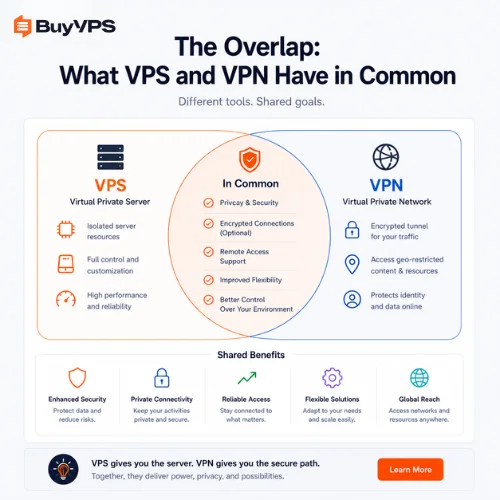
Up until this point, we have worked with two completely different types of server technologies within the company's datacenter environment. In the meantime, there is considerable overlap between the two different services and accordingly a great deal of common ground. Companies operating globally in every corner of the world are highly dependent upon a highly secure, flexible, and deployable environment for the processing of information. A host of compliance-based data regulations then demand corresponding measures of servers and corresponding solutions of a Virtual Private Network nature. Such services then allow VPS hosting to also include VPN services within the virtual server hosting package for customers that are planning to store data online.
The Foundation of Virtualization
There are a few different aspects of the VPN technology that have been touched on already. Virtualization of servers is one such point of reference for example. While VPS technology can be used for a host of different tasks, some more than others, there are certain solutions where the virtualization of servers, for example, allows for far greater capabilities and uses than others. With Virtual Private Servers, for example, it is not uncommon for a single server to host dozens of virtual servers, each virtual server granted its own partition of resources, such as the RAM of the server, and the CPU power of the server. In the vast majority of circumstances, each virtual server can then be configured and run independently. In addition to providing far greater flexibility when it comes to how servers are configured and used, virtual servers can also be provisioned in a matter of seconds or less, the process in many cases having been fully automated. Automated not only in the sense of having been set up to be automated in advance, but also in many cases managed via software and the Internet. A VPN, or Virtual Private Network, for example, also relies on virtualization of the network in order to allow users to access a group of resources on the internal network of a company as if they were directly on the local network. A user with a VPN set up would be able to access the internal servers and intranet of a company for example from any location in the world, the resources appearing to be local to the user's computer.
Like the VPN, the VPS (Virtual Private Server) serves a number of purposes that are to do with virtualization. The VPN tunnels a user's location so that they appear to be coming from somewhere else on the Internet (e.g. from a different location or even a different country). A VPS, on the other hand, tricks the hardware into believing that there are many different servers running on that hardware (as if they were in separate data centers around the world). In practice, a VPS is a physical server (i.e. box with a server running in it) that has been abstracted so that it can be divided up to create multiple servers, each with its own IP address and with complete control over the partitioned out server resources (i.e. the allocated out RAM, the allocated out CPU, the allocated out hard disk space, etc.). This is a fundamental component of modern cloud computing, and the powerful VPS allow for huge flexibility in the matter of seconds by way of code.
Controlled Access and Remote Architecture
A VPS and VPN solution are both used for remote access to your IT servers. In the case of a VPS a senior system administrator will use an encrypted SSH connection from a remote location to access the virtual server(s). The servers are typically housed in a large data center(s) and are guarded by armed security. As the administrator of the server(s) the administrator can also manage all of the various services that have been hosted on the VPS.
A VPS server can also be used by a senior system administrator who works for a company and requires secure remote access to internal staging servers. The senior system administrator rents a VPS server in a datacenter on the other side of the world. He logs in to his VPS server with an encrypted SSH connection and then logs in to all of the internal staging servers from within his company from anywhere in the world.
Advanced Architecture: Combining VPS and VPN
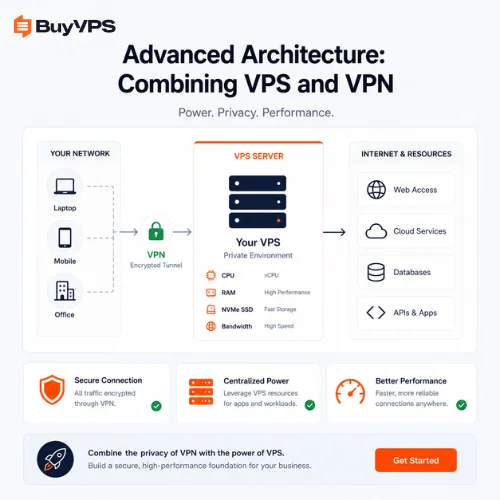
Intelligent utilization of an infrastructure can reveal its full potential. Instead of treating VPS and VPN solutions as separate issues for a company, it is recommended to look for ways to combine both technologies to create a secure, impenetrable environment. These solutions for advanced VPS VPN deployments are available as well.
Hosting a Private Enterprise VPN on a Bare Metal VPS
There is a huge risk of using a commercial VPN service. First of all you have no idea what server logging policies the VPN service has in place. Then there is the risk that the VPN service can intentionally throttle your bandwidth at any time. If you host your own Private Enterprise VPN on a high-performance VPS from a reputable enterprise provider, you have complete control over your server. You can install whatever VPN software you want, and you can have complete control over your access logging. If you host your own VPS and use it to filter and manage all of the internet traffic that your employees go on to perform while at work, then you can run your own VPN to bypass restrictions on public Internet access and protect your employees' data.
Hosting a Private Enterprise VPN on a Bare Metal VPS. Ultimate Security for the Enterprise. When you host a Private Enterprise VPN on a Bare Metal VPS, you have complete visibility to the server's internal server logging policies and you have full control over the server's bandwidth. The root access to the server also gives you the ability to filter and manage all internal internet traffic on the VPS. This means you can build your own VPN to bypass public restrictions and guarantee data privacy on your enterprise's servers. The enterprise VPN will run on your own hardware, giving you complete control, without the need to worry about a third-party data broker logging your activity.
Securing VPS Server Access with a Corporate VPN
A way to secure a VPS would be to use a corporate VPN to connect to the server. By using a VPN to connect to a VPS, the access to the VPS could be locked down to only allow access from within a company's network. For example a firewall on the VPS could be set up to allow only traffic from a company's fixed and static network address on certain ports. This would allow the administrator to connect to the VPS using the VPN from within the company's network, while locking down the server to prevent outside attacks. This is the way companies using Zero Trust architecture lock down their servers and also protect themselves from any possible breaches.
As mentioned earlier, it is recommended to set up your VPS to be completely invisible to the public internet by having it drop all incoming traffic on the management ports (such as SSH) unless the traffic is coming from the organization's network (such as the company office). This can be achieved by having the server's firewall (such as iptables on Linux) configured to only allow traffic from the organization's static network address on the management ports. In this way, even if the VPS were to be compromised by an external attack (such as a botnet or brute-force attack), the attacker would not be able to access the management ports on the server in order to take control of it. The organization's Virtual Private
Beyond VPS and VPN: Introducing the Virtual Private Cloud (VPC)
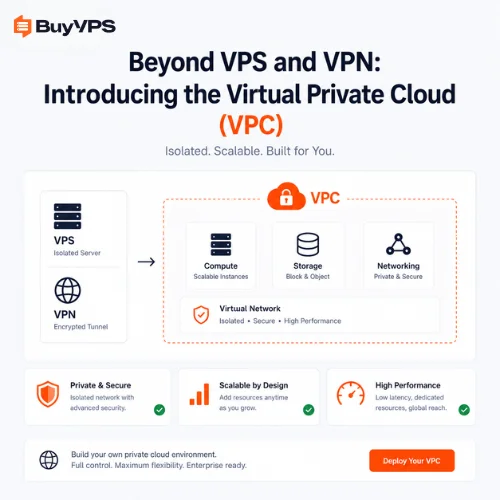
As an organization grows from having a few servers, managed by one team, to having a complex, micro services-based application, with many load-balanced applications, it will eventually need to start virtualizing its own infrastructure and use enterprise networking concepts, such as Virtual Private Clouds (VPCs).
How a VPC Isolates Cloud Infrastructure
A VPC (Virtual Private Cloud) is used by systems administrators to group together one or more VPS instances within a virtual network, within a physical data center of a cloud provider. The VPC is like a fenced off area within a larger fenced off area. The network administrator of the VPS instances can create subnets, assign IP addresses, and set up routing for the VPC. Essentially, a VPC is a virtual data center that functions exactly like a physical data center on a company's own premises.
Why Enterprise Architectures Choose VPCs
In the end, it is the enterprise systems architect that heavily uses a VPC to create a number of highly isolated security tiers within a system. By hosting the lightweight front-end web servers for a site in a public facing subnet that accepts inbound traffic from all over the globe, and then placing highly sensitive, private data such as customer databases in a sub-net that has no routes to the public internet, they can create a system where the amount of exposed surface area has been dramatically reduced. The web servers for a site can then query databases internally, but external sources cannot attempt to directly manipulate the data in those databases.
The database servers housing customer data (sensitive and therefore of value to competitors) would be placed on an internal subnet with no routes to the Internet. The database would be accessed via the web servers which would be hosted on a public facing subnet (front-end servers) and designed to handle global web traffic. The web servers would provide local connections to the database servers on the internal subnets allowing queries to be performed whilst exposing the data to minimal threat of external manipulation. Should the web servers be compromised, the threat to manipulate database data would be dramatically reduced.
Connecting Your Ecosystem: VPCs, Gateways, and VPNs
If VPN Connections are used to manage servers within Virtual Private Clouds then VPN Connections are also used to manage servers behind firewalls. This means that engineers at an office location will install a VPN hardware gateway. That VPN gateway will connect to a VPN gateway provided by a cloud provider in a datacenter. That VPN gateway can then be used to manage all servers within the Virtual Private Cloud even though they are located on the other side of the planet and even though they are managed over the Internet. Management interfaces on the servers are not exposed to the open web.
How to Choose the Right Solution for Your Business
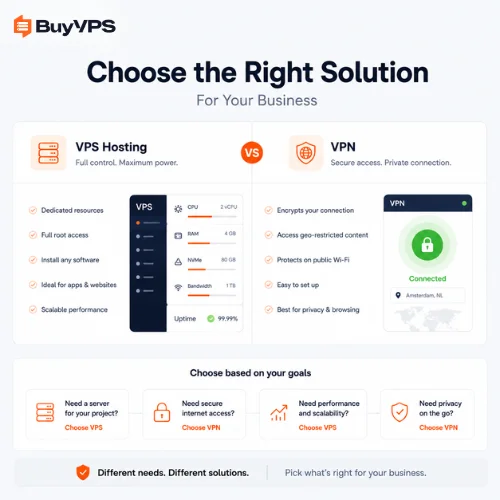
Choosing the best technology to implement at your company can be a very complex process, but at its core it must be aligned with your current problems and your long term goals, as well as your organizations security requirements for security, compliance, and budget.
When Your Business Needs a VPS
A VPS is a must have if your business is focused on generating money from online assets and you have revenue being generated from your website. For organizations that host websites that consistently receive high volumes of traffic such as around holiday time, and in the worst cases cause the site to go down due to shared server overload. For developers that need a complete administration of a server to allow for compilation of custom software. For the highest performing applications that need to be run on the most powerful of servers, a dedicated server, or VPS, is the solution that they require.
When Your Business Needs a VPN
When Your Business Needs a VPN. You absolutely need to invest in a virtual private network if your primary organizational goal is securing human user connectivity. If your executive team frequently uses highly unsecured public wi fi in international airports, if your remote developers need to bypass regional firewalls to remain completely anonymous online while testing localized code, or if your organization handles regulated sensitive data that legally mandates an encrypted connection during all global transit, a VPN service is an absolute necessity.
When Your Business Needs Both a VPS and a VPN
But for those rapidly growing, forward thinking companies, where security is paramount, the only correct architecture is a VPS and VPN solution, in tandem. They need a powerful VPS, running highly scalable applications, hosting dynamic websites, running large databases. And they need a VPN solution that provides a robust, secure, server-based solution, for their employees' secure access to said VPS', from anywhere in the world.
Frequently Asked Questions (FAQs)
Is a VPS better than a VPN?
VPN vs VPS. These are two different technologies with different goals. A VPS (Virtual Private Server) is a virtual machine on a server in a data center. You can use VPS's to host your websites, databases and applications that need more power. A VPN (Virtual Private Network) is a way to create an encrypted tunnel between two points on the internet. In short, it's a way to encrypt your internet connection so that your IP address is hidden from other people on the internet. It's not possible to host a dynamic website on a VPN service intended for consumers. And on the other hand, a VPS does not encrypt your internet connection on your local laptop.
Do I need a VPN if I have a VPS?
However, for administrative access to your VPS, we do recommend using a VPN. The VPN would need to be set up on your laptop and then you would connect to your corporate VPN server. From there, you would then login to your VPS via SSH or whatever method you use to connect to your VPS. Root passwords would be encrypted on your local machine and safe from being sniffed on unsecured networks such as those found in airports.
Can I use a VPS as a proxy?
Yes. Since you have 100% admin access to a VPS you can install and deploy a VPN server (even an open source one) and have your users connect to your VPS via a VPN client and then access other servers and resources from your VPS as if they were connected directly to it.
Can a VPS be traced?
Contrarily, a VPS can be traced by the hosting provider as well as external entities. A commercial VPN service is typically set up to hide the identity of the individual user and/or to destroy all access logs. A VPS is set up and managed by a formal hosting account (as opposed to a freelance VPN administrator). This account has a static public IP address as well as corresponding financial billing information. If a VPS is used for illegal activity or network abuse, the activity can be traced back to the account owner.
What is the impact of VPS and VPN architecture on the ability of a company to achieve SOC2 or HIPAA compliance?
The fact that certain countries have strict regulations regarding storage of sensitive data and its transmission across borders creates significant challenges for companies with offices all over the world. It is not enough for an enterprise to create an isolate its computing resources in a single datacenter (for example, in Singapore and thus in the country). An additional step must be taken, namely deployment of a corporate VPN which enables all of its employees to perform SRA (secure remote access) engineering on the isolated computing resources, via heavily encrypted connection. Such proof is demanded by security auditors, who are tasked with ascertaining whether an enterprise is in compliance with the relevant laws and regulations or not.
Will a VPN connection protect your virtual machine(s) from DDoS attacks?
A VPN on a VPS can offer protection to internal management paths, but does not offer protection for public facing hosted services. Services hosted on a VPS are exposed to the Internet and can be discovered by botnets which scan the Internet for open services. These open services can be used to launch a Denial of Service (DoS) attack or a Distributed Denial of Service (DDoS) attack. In order to mitigate DDoS attacks for public services, customers can rely on their hosting provider's network-level Layer 3 and Layer 4 DDoS mitigation.
What is the effect of data center peering on the network latency of my own VPN hosted on a VPS?
In general, latency of a server depends on a couple of things: the location of the server and the quality of the upstream internet connection at the datacenter where the server is hosted. If a server is used to host a VPN and that VPN is going to be used by people all over the world, then the latency of the network will be that of the hosting provider's uplinks. That means that if the datacenter where you host your server does not have good peering with the major internet backbones around the world, then there will be significant latency for users around the globe regardless of your VPN. This can be very problematic for companies that have geographically dispersed teams of engineers and need to work together in real time. Therefore, when selecting a hosting provider for a VPN, you should choose a high-quality hosting provider that can offer you dedicated server resources with premium, unthrottled Tier-1 network transit.
Can my local internet provider see what I am doing if I route my traffic through a isolated infrastructure?
No. Because the VPN connection is encrypted the local ISP cannot see what the user is doing. However, the Datacenter hosting the VPS can see the outgoing data unencrypted. Therefore a company relies on a hosting provider who is trusted, security-aware and has a good reputation.