

Evaluating cloud VPS hosting does not have to be a long list of options.
Reach a ceiling when more server resources are required, or discover that a provider's 99.9% uptime promise is based on a virtual machine sitting on a shared server that is already fully loaded.
Get real high-performance VPS hosting and find out what actually separates the best VPS hosting from the average ones. Learn what really matters in web hosting hardware and network for your VPS, and use a framework that helps match the required amount of power to your workload at the right tier. Like shared vCPU for cost efficiency, pinned dedicated cores for low latency, high-memory VPS hosting for in-memory databases and big analytics workloads.
Dedicated cores deliver consistent processing power for compute-intensive tasks like video encoding, machine learning inference, and real-time data transformation pipelines. High-memory configurations are particularly effective for resource intensive applications that demand substantial RAM allocation for optimal operation.
BuyVPS offers high-performance KVM-based VPS hosting for multiple users, running on top-tier servers in Amsterdam and New York, powered by AMD EPYC CPUs and fast NVMe RAID10 storage. We start with the basics: what is cloud VPS hosting? How does it differ from dedicated server hosting, shared hosting and cloud hosting?
What is a cloud virtual private server hosting plan?
Virtual private server hosting is between shared hosting and dedicated hosting in terms of resources. VPS hosting provides a user with isolated compute resources, memory and storage which is divided from a physical server. The user is not renting an entire server. See Virtual private server on Wikipedia for background.
First month $1
Then the normal monthly price. One per customer. No setup fee, and a 30-day performance guarantee on your first order.
See the plans“Great experience with BuyVPN! The service is easy to use, the connection has been smooth and reliable, and the overall experience has been really good. The pricing is also reasonable…”
Development teams often use a fixed-price server for CI; our CI runner VPS guide explains self-hosted GitHub Actions and GitLab runners and the disk they need.
How a physical server becomes many virtual private server units
A hypervisor can partition a single physical server into multiple isolated environments or ‘tenants’ where each runs its own OS, processes and file systems. This virtualization layer abstracts the physical hardware, allowing multiple independent virtual machines to share the same underlying server infrastructure efficiently.
KVM virtualization is used by BuyVPS, where each VPS has its own separate kernel. This kernel boundary is what creates true isolation between the VPS’s, as opposed to simply enforcing resource quotas. Each VPS runs in its own completely independent execution environment. This isolation ensures that security vulnerabilities or resource exhaustion in one VPS cannot compromise other software running on adjacent virtual machines.
Shared hosting vs VPS vs dedicated server hosting
The core difference comes down to resource ownership:
- Shared hosting: many tenants compete for CPU and RAM on the same physical server. One traffic spike affects everyone.
- Virtual private server (VPS): dedicated resources within a shared machine. You get guaranteed RAM and CPU regardless of other tenants.
- Dedicated hosting: you occupy the entire physical server. Maximum performance, higher cost.
A virtual private server VPS is the practical middle ground between a shared server and a dedicated server, you get root access, predictable performance and no shared-resource contention. Unlike shared environments where CPU and RAM are pooled, a VPS guarantees dedicated resources that remain available exclusively to your instance regardless of activity on neighboring tenants.
How to choose VPS servers or cloud hosting
The terms are generally synonymous and represent virtual server hosting with “Cloud” variations hosting the VPS on redundant cloud-based infrastructure and allowing self-service for additional VPS capacity as needed. By contrast, “traditional” VPS hosting may be provisioned on single host nodes. Cloud-based VPS architectures typically include features like automated failover and distributed storage to ensure high availability across multiple physical hosts.
Most workloads (e.g. web apps, databases, dev environments) will see better performance running on a well-tuned VPS on modern NVMe hardware vs. a generic cloud instance with supposedly equivalent resources. NVMe drives deliver significantly faster performance than SATA SSDs, reducing I/O wait times and improving application responsiveness across the board.
A web application that relies on frequent database queries or serves dynamic content will particularly benefit from the reduced latency that NVMe storage provides. Monitoring your website's performance with tools that track disk I/O, CPU utilization, and memory usage helps you identify bottlenecks before they impact end users.
How cloud VPS hosting works under the hood

Virtual Private Servers are typically provided as a slice of a single physical server. Using a Hypervisor that sits on top of the underlying server, each slice can have its own Operating System kernel. Additionally each slice is allocated a portion of the available RAM and Storage on the server.
Each slice behaves like its own stand alone machine, yet is provided as part of a shared cloud environment. When applications require more memory for caching layers or data processing, the hypervisor can allocate additional RAM to that specific VPS without impacting other tenants.
How the virtualization layer works
- Hypervisor partitioning: KVM splits the host machine into independent virtual environments. Each VPS runs a separate kernel, so one tenant's workload cannot destabilize another's.
- RAM and vCPU allocation: Shared vCPU plans distribute processing power across tenants. Dedicated (pinned) vCPU plans reserve cores exclusively, critical for latency-sensitive workloads like databases or ecommerce sites.
- Storage layer: NVMe RAID10 over PCIe delivers consistent IOPS. BuyVPS measured 122,959 4K read IOPS (fio median), a meaningful baseline for disk-heavy applications.
Note: Hard memory caps per node prevent noisy-neighbor problems. Without them, one VPS can exhaust RAM and degrade every other tenant on the host.
Network and IP assignment in your email server environment
- Dual-stack networking: Every VPS receives both IPv4 and IPv6 ip addresses at provisioning. Multi-homed uplinks connect the data centers to multiple transit providers for redundancy.
- In-place upgrades: When you scale resources, BuyVPS upgrades the existing VPS, no migration, no IP rotation. Your addresses stay fixed.
What is the cheapest scalable VPS hosting service?
Initial headline price can often mask oversold nodes, shared storage, and lack of hardware management.
BuyVPS offers no-oversell servers with hard memory caps and NVMe RAID10 storage in Amsterdam and New York. You get full root access to a performing virtual environment without the higher cost of a dedicated server or the hassle of managing the hardware. That architecture supports a wide range of applications and we will go through each of them in the following section.
Common use cases and server management for cloud VPS hosting

virtual private server hosting can support a wide variety of workloads. From web sites, dev pipelines, to large e-commerce sites, the basic unit of hosting is a VPS, a set of isolated resources where you have full control. Additionally, Are not affected by noisy neighbors on shared hosting. Businesses running e commerce platforms benefit from the dedicated resource allocation and root access that VPS hosting provides, ensuring stable performance during traffic surges.
Dedicated resources on VPS vs. Shared hosting
Shared hosting uses the CPU, RAM, and operating system of a single server to host dozens of accounts, so a traffic spike from one account can affect every other hosted account on that server. VPS hosting on the other hand assigns a fixed amount of RAM to each instance.
The isolation provided by VPS hosting makes it ideal for production workloads as it is at the opposite end of the spectrum from shared hosting and dedicated hosting. This architecture ensures that each VPS operates independently without the performance degradation commonly associated with shared resources.
For web application hosting, e-commerce sites and email server hosting guaranteed compute is key. With root access on a VPS hosting plan, you can fine-tune your stack with kernel parameters, PHP-FPM workers and Mail Transfer Agent (MTA) configuration to name but a few examples, without relying on the host's support team.
The flexibility of VPS plans makes them particularly well-suited for hosting websites that demand consistent uptime and the ability to customize server-level configurations. Scaling an e commerce platform on a VPS allows you to adjust resources in real time as transaction volumes increase during peak sales periods.
Use cases that outgrow shared web hosting
Develop and test environments require repeatable isolated builds. Multi-site VPS hosting is cost-effective only if each site runs on separate virtual servers in isolation from the other sites, rather than sharing a single pool of resources. Proper isolation prevents resource contention that could occur if traffic spikes on one site impact the availability of other websites hosted on the same node.
BuyVPS covers all the above, with the option of AMD EPYC compute, NVMe RAID10 storage, dual-stacked networking, and control panels in Amsterdam and New York. This allows teams to scale resources without migrating servers and losing IP addresses in the process. Regular platform updates ensure customers benefit from new features like enhanced monitoring dashboards and automated backup scheduling as they become available.
How much does cloud VPS cost?
VPS hosting offers a midpoint between shared hosting and a dedicated server in terms of price and performance. While the exact costs will depend upon the configuration and billing term, much like shared and dedicated hosting plans, we recommend that you check out the current plans at BuyVPS.com for the most up-to-date pricing information. Comparing different VPS offers side by side helps you identify which provider delivers the best value for your specific resource requirements and budget constraints.
As your hosting provider for multiple websites, we publish every rate up front: no setup fee, monthly billing and cancellation at any time. After you have identified the correct use case for a particular tier of VPS hosting, you must then decide how much of the hosting stack you want to manage yourself.
Managed vs unmanaged VPS hosting: which do you need?
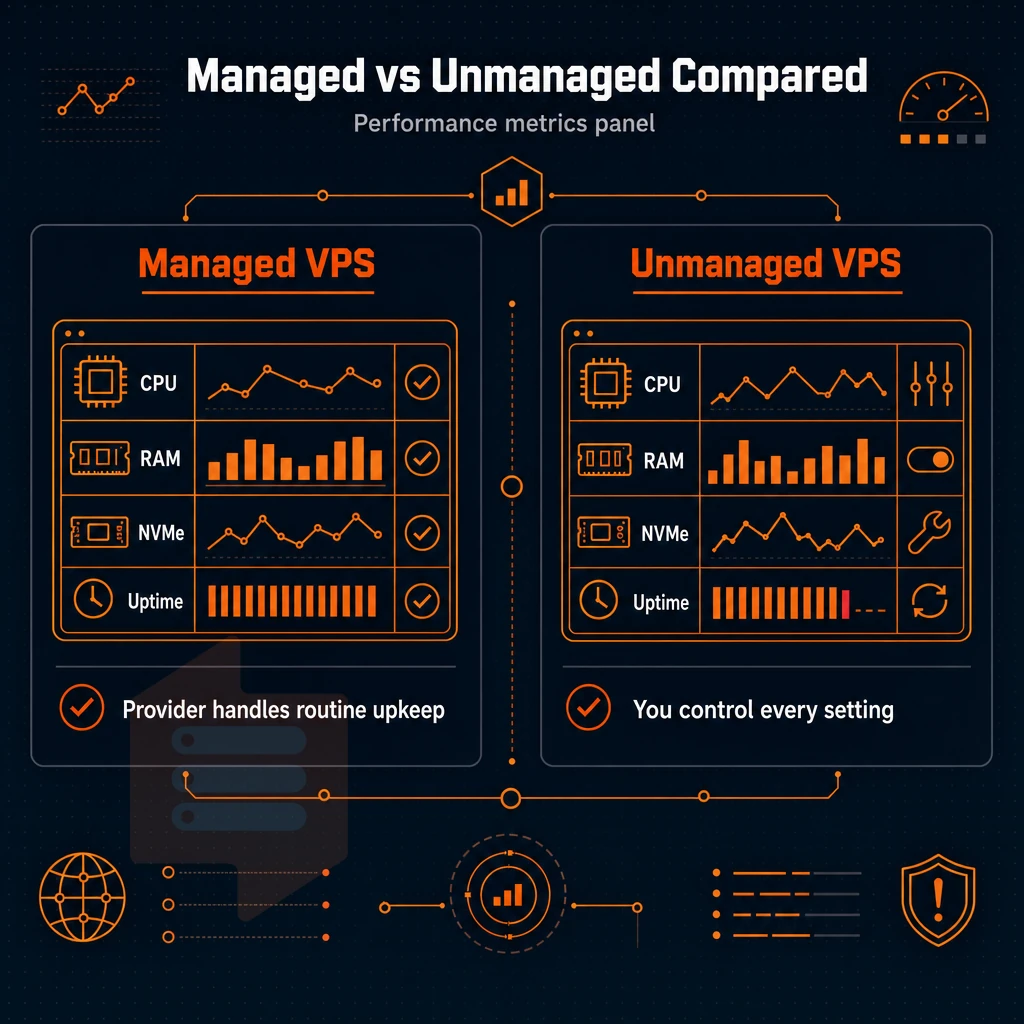
Your choice of managed versus unmanaged server hosting will dictate almost every subsequent operational decision that you make. Get it wrong and you'll either end up over paying for unnecessary services or be sucked into a morass of server administration tasks that you weren't prepared to take on. Evaluate whether your team has the expertise to handle security patches, backups, and monitoring, or if you need additional services bundled into your hosting plan.
When you choose VPS hosting, assess your internal capabilities honestly to determine the right management level for your infrastructure needs. A proactive response to potential issues requires either in-house expertise or a managed service that includes real-time monitoring and incident escalation. Managed services often include preconfigured control panels that simplify routine tasks such as domain management, SSL certificate installation, and user account provisioning.
Managed VPS hosting: what the hosting provider handles
For managed VPS hosting your provider takes care of OS-patches, software-updates, security-hardening and the hardware. Many managed providers also include preconfigured control panels that simplify server administration tasks such as domain management, database creation, and user account provisioning.
Windows Server hosting line of business apps where in-house personnel have no Linux expertise).
Unmanaged VPS hosting: full control, your responsibility
Unmanaged VPS hosting offers developers and sysadmins full control of their VPS server ‘stack’. In other words, you are responsible for setting up and running your VPS Server (running OS. Setting up Firewall Rules, keeping up-to-date with latest software updates etc.) as you would with your own server, fully accountable.
The Model is intended for use by technical teams, i.e. developers deploying containerized applications or engineers who need root access across users and environments.
Where BuyVPS fits your operating system needs
All of our plans come with full root access, a self-service control panel, and API access. So when something goes wrong with the underlying web hosting infrastructure and threatens consistent performance, we're able to respond immediately, usually within the hour, as opposed to a chatbot delivering a scripted response.
- KVM isolation with a separate kernel per VPS.
- Ubuntu, Debian, AlmaLinux, Rocky Linux, CentOS Stream, Fedora, or custom ISO.
- In-browser VNC console for out-of-band access.
Knowing where you are on the managed-to-unmanaged spectrum makes it easier to apply the evaluation criteria in the next section.
What to look for in VPS servers and hosting providers

Not all cloud server hosting is equal. These eight criteria separate reliable VPS hosting providers from those that cut corners on hardware, network, or support.
Performance: CPU, RAM, and storage
When running on Shared vCPUs, your resources can be throttled by other users when the host is under load. Additionally, NVMe RAID10 storage (BuyVPS measures 122,959 4K read IOPS) for the absolute best stack for production workloads.
E commerce network and control panels
Clearly published data transfer allowances are important to ensure there are no hidden caps. I am also looking for a shared hosting solution with a control panel that allows API access, in-browser VNC, and full control of OS reinstalls and reboots without having to open a ticket.
Virtualization, OS choice, and support
Each VPS runs with a separate kernel in KVM virtualization. OpenVZ virtualization uses one kernel for all virtual servers, which leads to restrictions on the OS selection and the required level of technical expertise for custom workloads.
An engineer-led team can proactively handle incidents, unlike a chatbot-first approach.
| Criterion | Minimum bar | BuyVPS |
|---|---|---|
| CPU | AMD EPYC or equivalent | EPYC Milan / Genoa, shared or pinned |
| Storage | NVMe | NVMe RAID10, PCIe direct |
| Uptime SLA | 99.8% | 99.8% |
| Virtualization | KVM | KVM, separate kernel per VPS |
| Renewal pricing | Transparent | No hidden fees |
Here’s one of them.
Why choose BuyVPS for cloud VPS server hosting
BuyVPS has been running virtual private server hosting since 2002. Every VPS plan is built on verified hardware with published benchmarks, no guesswork, no inflated specs.
- No-oversell, hard memory caps: Unlike shared hosting, your virtual server resources are never diluted by other users on the same physical server. Low node density means consistent performance under real load.
- Dedicated CPU option (AMD EPYC Genoa, pinned cores): Choose VPS with pinned cores for predictable latency on resource-intensive applications and e-commerce sites.
- NVMe RAID10, PCIe-direct storage: Measured at 122,959 4K read IOPS, fast enough for demanding web applications and email server workloads.
- KVM isolation, full root access: A separate kernel per virtual machine gives complete control over the server environment, including custom ISO uploads and operating system choice.
- In-place upgrades, no IP rotation: Scale resources as your business grows, no migration, no disruption to IP addresses or running services.
- Data centers in Amsterdam and New York: Identical hardware and pricing in both locations. Choose the region closest to your users for low latency.
Ready to compare VPS solutions? Explore our cloud VPS server hosting plans or reach out to our engineering team to find the right hosting plan for your workload.
VPS hosting faqs: your top questions answered
Common VPS hosting questions from people of all levels and uses of VPS hosting. Whether you are looking for your first Virtual Private Server as a developer or large VPS solutions for your large engineering organization.
Which VPS hosting providers or cloud hosting is better?
Cloud VPS and VPS are terms that are often used interchangeably, although they can have slightly different meanings. While a VPS is typically a virtual server that is hosted on a single physical server, a Cloud VPS is a virtual server that is hosted on a distributed system.
The advantage of a Cloud VPS is that it provides greater redundancy and can be scaled up or down more quickly. However, for many users and workloads, well-configured KVM virtual servers with NVMe storage and solid server management are all that is required to deliver reliable, high-performing services such as websites, APIs, and email.
Which VPS cloud server provider offers the best server management?
Top-class web hosting providers share three basic principles: published benchmarks (as opposed to a heap of empty words), engineer support, and transparent info about their infrastructure, including the operating system environment they run on.
Such a provider is BuyVPS, which uses AMD EPYC hardware, NVMe RAID10 storage, your choice of operating system, and a no-oversell policy for all nodes across two data centers: Amsterdam and New York.
What is the cheapest cloud VPS hosting service, and how much does cloud VPS cost?
Costs vary by supplier and by plan within a tier. So, a basic VPS hosting offer that can host a few sites will cost a few dollars a month. Then there are dedicated-core offers, and high-memory multi-CPU-core offers that cost more. However, a cheap VPS offer can actually cost more if it limits your sites in such a way as to generate less traffic than they would with a proper VPS.
Rather than just comparing host prices, evaluate host specs per dollar. In particular, pay attention to the type of vCPU provided, the method by which RAM is allocated, and the host’s storage IOPS rating.
VPS cloud hosting is in a sweet spot of being practical and offering more control and better performance than shared hosting, without the costs of a dedicated server and the complexities of managing one. Of course, there’s the question of whether you want to own the stack and manage the servers or just use a VPS to run your workloads.
Most developers and growing teams are of the latter mindset and look for unmanaged KVM VPS that offer root-level access, full control panels customization, and a solid hypervisor layer. The management of the underlying server is not as important to them.
Storage I/O, CPU predictability, and network reliability separate good VPS providers from average ones. BuyVPS is a hosting provider offering virtual private server VPS plans on AMD EPYC hardware with NVMe RAID10 storage across Amsterdam and New York, with hard memory caps and low node density to keep performance consistent under real load. If you're ready to move past shared hosting or trim the overhead of a bare-metal server, explore BuyVPS plans and find the tier that fits your workload.