


Every workload running on your shared servers carries unknown risk. By running your KVM VPS servers at the hypervisor level, each virtual server runs its own isolated kernel.
Memory and CPU allocation for each virtual server is guaranteed by the hardware virtualization of the server’s CPU rather than being based on unguaranteed software settings. For this reason, KVM VPS servers are becoming the default for production workloads that developers and systems administrators deploy rather than simply moving up from shared hosting . This guaranteed resource allocation ensures that performance remains predictable even when neighboring virtual machines experience load spikes.
Architectural decisions for virtualization matter more than most people care to admit. Virtualization with a full hardware virtualization (HVM) enabled KVM hypervisor allows for a complete kernel to run, uses the physical block devices (no emulated layers), and allows for the loading of custom kernel modules. This is fundamentally different than virtualization via containers or paravirtualized environments that share a physical host.
Full virtualization through KVM means the guest operating system runs unmodified, with no awareness that it is virtualized, unlike paravirtualization which requires kernel modifications. The choice of virtualization technology directly impacts whether you can load custom modules, run unmodified kernels, or must accept the constraints of a shared-kernel environment.
Choosing a proper KVM virtual machine depends on understanding what any given KVM hypervisor is promised to deliver, and what the underlying hardware is capable of.
What is a KVM VPS server and how does it work?
KVM (Kernel-Based Virtual Machine) is a hardware virtualization module built as a part of the regular Linux kernel. With KVM multiple virtual servers can run simultaneously on a single physical server. Each virtual server gets its own full OS, and even its own memory and storage space.
First month $1
Then the normal monthly price. One per customer. No setup fee, and a 30-day performance guarantee on your first order.
See the plans“Great experience with BuyVPN! The service is easy to use, the connection has been smooth and reliable, and the overall experience has been really good. The pricing is also reasonable…”
Kernel based virtual machines: how they work
KVM virtualization uses Intel VT-x and AMD-V CPU extensions to run guest OSes in separate hardware contexts, so a KVM-based server never routes CPU instructions through software emulation.
Independent kernel design for true operating system isolation
KVM VPS hosting is different than a reseller account or a virtual server hosted in a container. With KVM VPS hosting, each VPS has its own independent kernel, and not a shared host kernel as found in other types of virtual servers. This allows one VPS to run with a custom kernel patch, without affecting other VPSes. True isolated virtual machines running a linux guest, as opposed to isolated processes in namespaced virtual environments.
KVM full virtualization vs. Container virtualization
Containers share the host OS kernel to reduce overhead but sacrifice isolation.
Yes, it consumes a bit more of your resources, but then again you have full control over security and can even run custom kernel extensions if you need to. Most importantly, you can understand the isolation provided by KVM only at the architecture level, which is one of the reasons this virtualization technology is so widely used in production these days. The ability to install and configure your own monitoring and debugging tools further enhances the operational flexibility that full kernel access provides.
KVM virtual machines: isolation, kernels, and virtual hardware
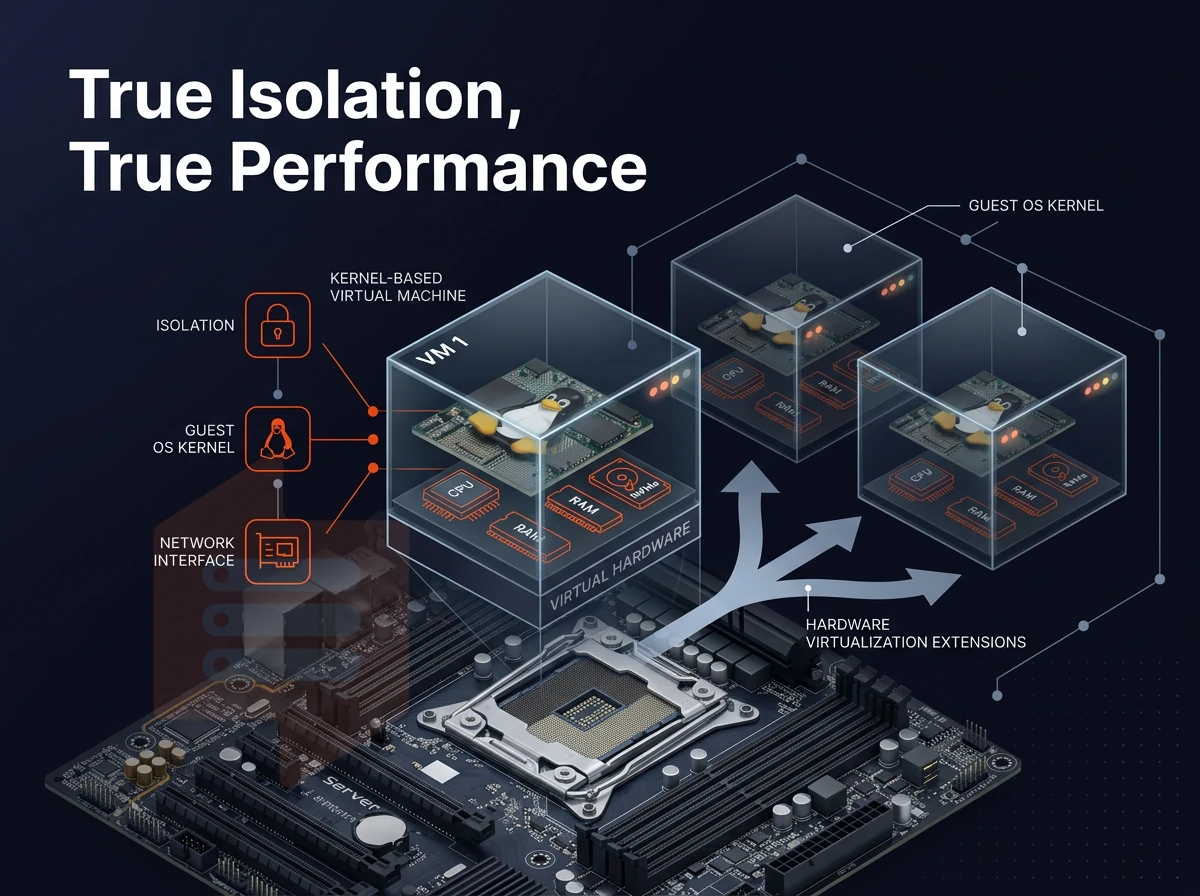
KVM (Kernel-based Virtual Machine) is a full virtualization/hypervisor solution. It uses the CPU’s hardware virtualization extensions to create fully isolated guest OS environments. This is in contrast to paravirtualization which requires a modified guest OS kernel. KVM stands out as a full virtualization solution that leverages hardware extensions to deliver complete isolation without requiring guest OS modifications.
KVM VPS: kernel based virtual machine with strong isolation
Each KVM VPS boots its own dedicated kernel, isolated from the host and other guests, so a crash or kernel panic won't affect anyone else. That's why KVM VPSes are the standard for production Linux VPSes.
KVM Linux VPS: how virtual machines access guest hardware
Hardware virtualization is exposed to the guest OS via virtio drivers for virtual hardware.
Best KVM VPS: isolation, stability, and the Linux VPS advantage
We take strong isolation measures to ensure both security and stability. A single rogue process, a flood of traffic, or a kernel exploit attempt will not affect other tenants. Our VPS hosting is powered by KVM with separate kernels for each instance and is protected by NVMe RAID10 storage. We offer a 99.8% uptime SLA in Amsterdam and New York.
| Dimension | Full virtualization (KVM) | Paravirtualization (Xen PV / OpenVZ) |
|---|---|---|
| Guest kernel | Unmodified, independent | Modified or shared host kernel |
| Isolation | Strong, hardware-enforced | Weaker, shared kernel namespace |
| Custom kernel modules | Fully supported | Restricted or blocked |
| Uptime SLA | 99.8% (BuyVPS) | Varies by provider |
KVM virtualization is chosen for workloads requiring isolation, complete control of the host kernel, and consistent performance. For lightweight, cost-sensitive workloads where shared-kernel risk is acceptable, paravirtualization, common in VPS hosting environments, can be sufficient. This article compares KVM with all other virtualization approaches.
Common use cases for a KVM virtual private server
KVM’s hardware-level isolation and dedicated resources are ideal for noisy neighbor sensitive workloads. Each VPS runs its private kernel and has virtio drivers to get near-native performance for I/O intensive workloads. The Intel VT-x extensions for the CPU also allow for full isolation of the guest.
It’s as if you had rented a whole server instead of sharing with others. This level of isolation bridges the gap between shared hosting and a dedicated server, giving you predictable performance without the cost of renting an entire physical machine.
KVM virtual private server for web and application hosting
Production web applications like blogs, dynamic websites, Node.js applications and Python web applications can run on a VPS hosting on KVM.
Our database-driven apps will perform well under load with lots of disk space on fast NVMe RAID10 storage.
Game servers and media workloads by operating system
Server software such as Minecraft, Palworld, FiveM/RedM (listed on the cfx server list) benefit from locked CPU and stable RAM.
A Jellyfin media server requires sustained read throughput. Our NVMe storage on the physical host handles concurrent transcoding streams without inducing queuing delay.
Development, staging, and proxy environments
KVM guests with isolation are ideal for VPS hosting test environments that mimic production as closely as possible. Proxy servers, FTP servers etc. can be ran as isolated KVM guests without the risk of any cross-tenant traffic mixing. Reproducible, throwaway test environments for developers is what isolated KVM guests are all about, and this virtualization technology is exactly what we have built BuyVPS to be able to run. What this looks like in more detail is covered in the following section.
Frequently asked questions about virtual machines
What is a VPS running its own kernel and operating system?
A KVM hypervisor instance is a virtual private server built on Kernel-based Virtual Machine technology, a Linux hypervisor that carves dedicated resources, CPU, RAM, and storage, out of physical hardware. Each VPS runs its independent kernel, fully isolated from every other tenant on the same node. The dedicated allocation of ram ensures that memory-intensive applications receive consistent performance without contention from neighboring virtual machines.
That isolation is the core promise of VPS hosting: your workload behaves like a standalone machine, not a container sharing an OS with neighbors. BuyVPS uses KVM with a separate kernel per VPS across all plans in Amsterdam and New York.
How does KVM differ from xen or hyper-v as an operating system virtualization solution?
All three are Type-1 or near-Type-1 hypervisors, but they differ in architecture, network configuration, and kernel control. KVM is built directly into the Linux kernel, so it benefits from every upstream Linux performance and security patch without a separate hypervisor layer to maintain.
Xen uses a privileged domain (Dom0) as a control plane, which adds an extra software tier between your VPS and the hardware. Hyper-V is Microsoft's hypervisor and works best with Windows guests; Linux guests require additional drivers and carry more overhead. KVM's tight kernel integration makes it the standard choice for Linux-first VPS infrastructure. Modern distributions such as rocky linux run efficiently on KVM without requiring special drivers or modifications to the guest kernel.
Organizations running Windows Server workloads often choose Hyper-V for native integration, while Linux-centric environments favor KVM for its kernel-level efficiency. Distributions like centos also run natively on KVM, benefiting from the same kernel integration and performance characteristics. While hyper v excels in Windows-centric data centers, KVM remains the preferred hypervisor for Linux workloads due to its native kernel integration. Popular distributions such as Ubuntu and debian run natively on KVM, leveraging the same kernel integration that makes this hypervisor efficient for Linux workloads.
Can i use Windows as my operating system on a KVM VPS?
KVM supports Windows guests technically, because it provides full hardware emulation including VirtIO drivers that Windows can use. BuyVPS supports custom ISO uploads, so you can install a Windows image you supply. However, unlike a linux VPS, BuyVPS does not include a Windows license or a pre-built Windows template, so you are responsible for your own licensing. If your workload is Windows-only, verify licensing compliance before deploying. Many administrators prefer CentOS or similar distributions on KVM because the full virtualization model allows them to run unmodified kernels and custom modules without licensing overhead.
What can i do with full root access to the operating system on a KVM VPS?
Full root-level access means you have unrestricted superuser control over your VPS environment. You can install any software, compile custom kernels, configure firewall rules, modify system libraries, and run privileged daemons without restriction from the host.
Is a KVM virtual private server good for game server hosting?
Yes, a KVM VPS is a strong fit for game server hosting , provided you choose the right tier. Game servers are sensitive to CPU consistency, a shared vCPU plan works for lighter titles, but latency-sensitive games benefit from a Dedicated CPU VPS where cores are pinned and not shared with other tenants.
BuyVPS Dedicated CPU VPS plans run on AMD EPYC Genoa with pinned cores, which delivers the predictable per-tick performance that multiplayer game engines require. NVMe RAID10 storage also keeps world-save and map-load operations fast.
What is the difference between a shared vcpu and a dedicated-core KVM VPS?
On a shared vCPU plan, your virtual cores are scheduled across physical CPU threads that other VPS instances also use, you get your allocated share during normal load, but burst headroom depends on neighbor activity. On a dedicated-core plan, physical CPU cores are pinned exclusively to your VPS and are never scheduled for another tenant.
BuyVPS Standard CPU VPS plans use shared vCPUs on AMD EPYC Milan, while Dedicated CPU VPS plans use pinned cores on AMD EPYC Genoa. If your workload has sustained high CPU demand or strict latency requirements, especially on intel vt x enabled hosts, the dedicated tier eliminates the "noisy neighbor" variable entirely.
Do i need a control panel to manage a KVM VPS?
No, a web interface is optional, not required. Full root SSH access on your kvm server lets you manage everything from the command line without any additional software. That said, panels like cPanel, Plesk, or open-source alternatives such as Webmin can simplify VPS hosting management tasks like DNS configuration and user account creation if you prefer a GUI over the command line.
BuyVPS provides a self-service panel with API access and an in-browser VNC console for out-of-band access, so you can recover or reconfigure your VPS, whether running Linux or Windows Server, even if SSH is unreachable, no third-party panel needed for infrastructure-level control.
KVM virtualization offers unique true kernel-level isolation of virtual servers, i.e. each VPS runs its separate kernel and has no shared memory with other VPSes. The isolation of KVM virtual servers provides stable performance, enhanced security and the possibility to run any OS, even with custom kernel.
Every KVM VPS comes with full root access and is managed via a powerful hosting dashboard. A KVM VPS makes an excellent alternative to traditional dedicated servers while requiring much less resources to maintain.
The use cases for virtualization are quite diverse: from high load web servers and databases to personal development environments and home-based systems. The common requirement for VPS hosting is a good quality hypervisor that does not let other "noisy" guests degrade performance.
BuyVPS runs KVM with a separate kernel per VPS, NVMe RAID10 storage, and no-oversell hardware across Amsterdam and New York. If that matches your requirements, explore the plans at BuyVPS.com or reach out to the engineering team directly.