
Deciding between VPS vs cloud hosting is rarely a clear cut decision as both types of hosting are often marketed with similar claims and there are only subtle differences between the two models when it comes to pricing at first.
Both types of hosting are used in production environments all over the world and serve a purpose.
VPS servers are slices of physical servers that, unlike cloud hosting, provide fixed amounts of resources (such as memory) to deliver guaranteed levels of performance and cost. Cloud platforms deliver elastic compute resources on demand, typically charging by the second, and introduce a level of complexity to managing servers that a VPS does not.

The choice of VPS or cloud will depend on a number of factors including the nature of your workloads, the nature and experience of your staff.
In this guide we outline the fundamental architectural differences between cloud, VPS and shared hosting. Understanding the key differences between these hosting models enables organizations to select infrastructure that aligns with their technical requirements and operational constraints.
Here we outline the details of a no-oversell KVM VPS from BuyVPS and prove why in many instances it will cost less to run and provide more consistency than an ‘elastic’ cloud server. We begin by explaining what a VPS is and how they work. For community perspectives, see Difference between cloud computing and VPS .
What are virtual servers and how does VPS hosting work?
VPS hosting is positioned somewhere between shared hosting and a full dedicated server offer in terms of cost and performance. A VPS, or Virtual Private Server, is virtualized to run on top of the server’s operating system as independent servers in their own right. Typically, a Virtual Private Server is a division of the physical server, with each Virtual Private Server having its own Kernel, disk space, RAM and processing power.
First month $1
Then the normal monthly price. One per customer. No setup fee, and a 30-day performance guarantee on your first order.
See the plans“Great experience with BuyVPN! The service is easy to use, the connection has been smooth and reliable, and the overall experience has been really good. The pricing is also reasonable…”
How KVM isolation works
KVM allows you to partition a host server into Virtual Private Servers (VPS), each running their own completely independent Operating System(s) without the need of a shared kernel or potential noisy-neighbor problems. Each server has hard-allocated resources, as defined by the KVM Hypervisor.
Every VPS at BuyVPS has its own kernel.
Dedicated hosting resources vs. Shared hosting provider
In shared hosting, the RAM and CPU are shared and contested by all sites on the server. With VPS hosting, your allocation of RAM and CPU is capped by the hypervisor but that is all, it’s then entirely yours and won’t be affected by other sites on other instances on the server.
- RAM: hard-capped per node, never overcommitted.
- CPU: guaranteed vCPU allocation (pinned cores on our Dedicated tier).
- Storage: NVMe RAID10 with PCIe-direct throughput.
Root access and OS control
As VPS hosting includes the option for full root access and your choice of Linux distribution, this type of hosting is not suited for shared hosting accounts. As a result, VPS hosting is perfect for users that require a robust base to create custom stacks, run containerized applications, or even have specific kernel configurations. Cloud hosting, on the other hand, is based around a completely different architecture.
What is cloud hosting and how does a cloud server environment work?
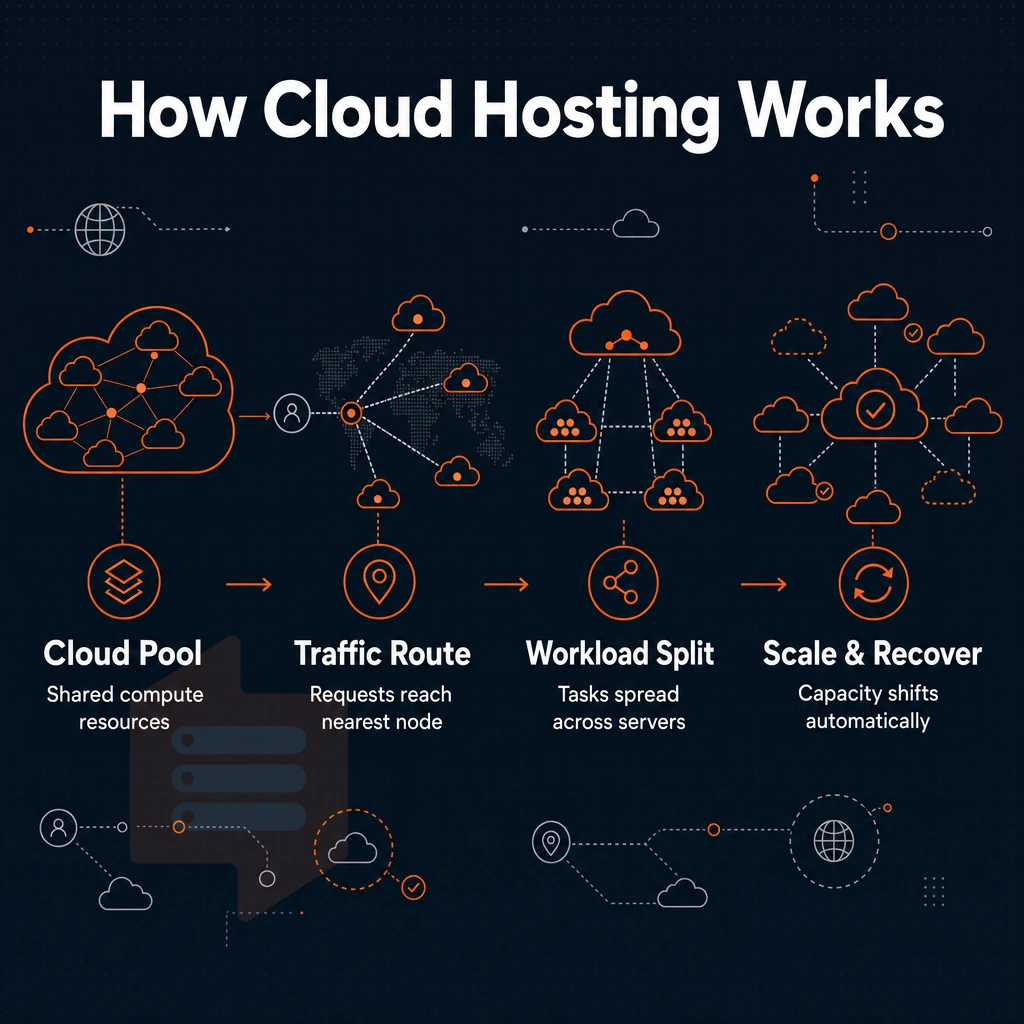
Cloud hosting is utilizing computing resources on a distributed architecture that consists of multiple servers and physical networks. As opposed to traditional VPS hosting this is spread across more than one physical machine. This distributed model relies on interconnected servers working together to pool computational capacity and provide redundancy across the infrastructure. Organizations deploying applications across multiple servers benefit from the inherent redundancy and load distribution that this architecture provides, reducing single points of failure.
Cloud servers and how the abstraction works
In cloud hosting, the hypervisor layer decouples your workload from the hardware in front of it. Therefore, if a server fails or is congested, the platform can move your instance automatically. The instance is not tied to a single physical server, which is a core tenet of cloud architecture portability. This architectural flexibility makes a cloud hosting environment particularly resilient to hardware failures and performance bottlenecks that would otherwise impact availability.
Cloud providers and the elasticity model
Elasticity is often embedded into the billing model of cloud providers. As vCPUs, RAM, and operating system resources are scaled up or down as required, customers only pay for what they consume, pay as you go. However, the costs can vary from month to month as teams scale resources up or down, which can be problematic for those with fixed infrastructure budgets or limited technical expertise, as it makes budgeting even more complex.
Cloud computing trade-offs vs. Predictable VPS costs
Flexibility is a core goal for cloud hosting, while VPS hosting has a more important goal: predictability.
| Dimension | Cloud hosting | VPS (e.g., BuyVPS) |
|---|---|---|
| Resource allocation | Dynamic, drawn from multiple servers | Fixed vCPU and RAM per plan |
| Cost model | Variable, consumption-based | Flat monthly rate, transparent |
| Storage | Network-attached, latency varies | NVMe RAID10, PCIe direct |
To help compare a fixed price, shared cloud environment with a dedicated VPS environment, we’ll first look at a scenario with stable resource requirements for your workload. VPS users with a fixed amount of RAM and hard memory limits, pinned to a set of dedicated cores (like the BuyVPS Dedicated CPU plans), will always experience better performance than a shared cloud environment.
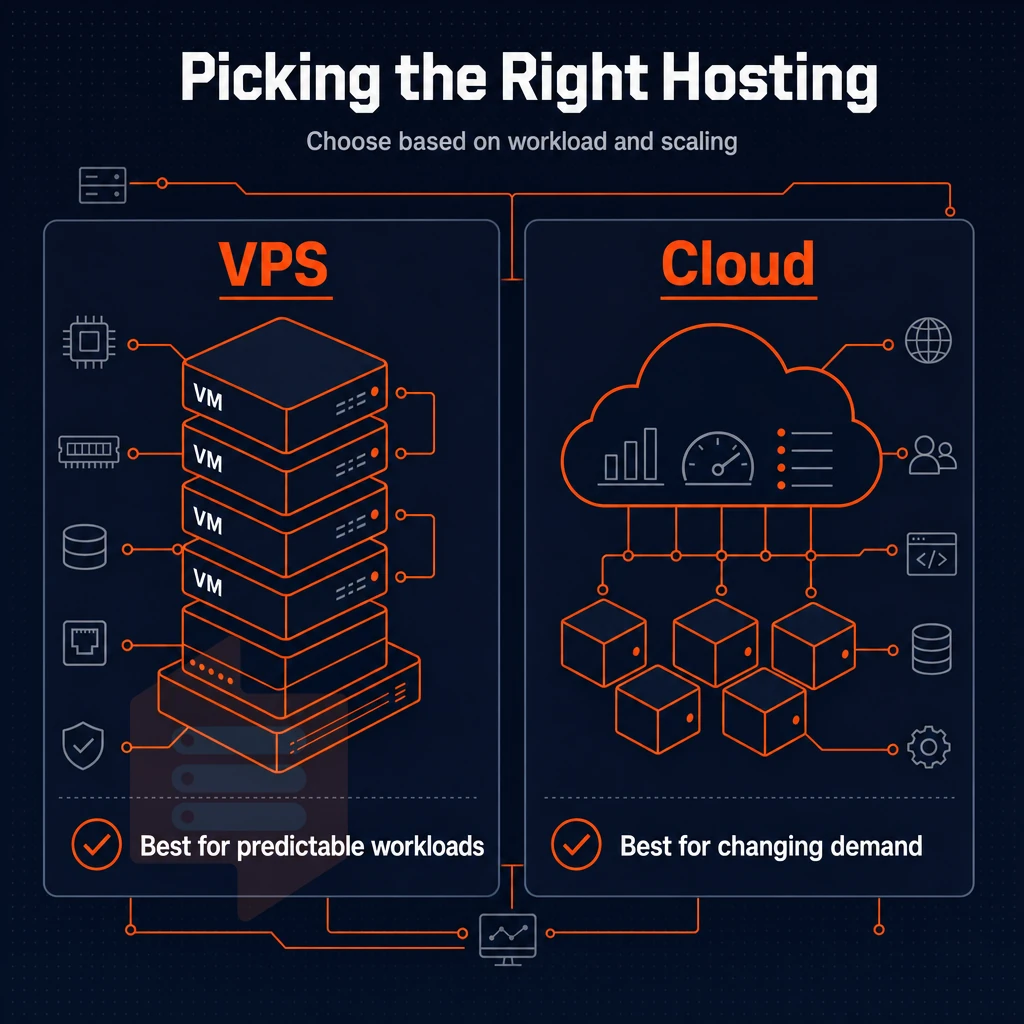
This performance consistency and cost predictability represent distinct advantages for businesses running stable workloads that don't require dynamic scaling capabilities. Organizations with growing workloads can allocate more resources by upgrading to a higher-tier plan, maintaining the same predictable pricing structure without the complexity of elastic billing models.
Common use cases: when to choose VPS hosting vs cloud hosting
Knowing when to use fixed IP addresses and when to use DHCP on your network, whether on dedicated hosting, multiple virtual servers, or a shared setup, will save you from over-engineering a simple website and under-provisioning a high-traffic web application. Administrators managing multiple websites can apply these networking principles consistently across their entire portfolio, ensuring each site receives appropriate IP configuration based on its specific traffic patterns and security requirements.
When VPS hosting is the right fit
VPS servers are typically best for projects that require a fixed and stable environment. A VPS provides full superuser access to the server (as if it were physical) while maintaining a fixed allocation of resources.
- Business of web site owners who run several web sites from one server.
- Applications with predictable, steady-state traffic.
- Teams requiring a custom ISO or specific OS build.
- Workloads for which knowledge of a data center location is required for data sovereignty reasons.
BuyVPS is perfect for High Resource VPS requirements, offering reliable cloud hosting with Full administrative access, Upload of own Custom ISO, and KVM Virtualization where each VPS has its own separate Kernel.
When cloud hosting makes more sense
Workloads that are unpredictable and spike in the cloud infrastructure. An e-commerce site on a dedicated server that triples traffic during a seasonal shopping special, or a SaaS application that needs to scale compute by spinning up additional virtual machine instances across multiple physical networks spanning different infrastructure zones.
A fixed VPS does not offer the same elastic provisioning. Organizations running mission-critical applications may find that a dedicated server offers the isolation and performance guarantees needed when elastic scaling is not a primary requirement. Sites experiencing fluctuating traffic patterns may benefit from the ability to adjust resources in real time without manual intervention or downtime.
Both VPS and cloud infrastructure cover the basics
VPS hosting and cloud hosting for web sites both support encryption in transit, a service level agreement for up time, and the ability to run your own server configuration. The key distinction between the two types of hosting services is that a VPS hosts your site on fixed resources carved from a single physical server that you have complete control over, as opposed to cloud hosting that uses elastic resources which can dynamically scale.
Both hosting models also support data encryption at rest to protect stored files and databases from unauthorized access. Organizations handling sensitive information should evaluate how each hosting model implements data transfer protocols, particularly when moving files between servers or synchronizing backups across geographic regions. Compliance frameworks such as PCI-DSS or HIPAA may impose additional requirements on how highly sensitive data is stored and transmitted, influencing the choice between these hosting models.
Once you know your use case for hosting your website, including whether virtualization technology or data center infrastructure plays a role, you can develop a decision-making framework that helps you navigate the hosting industry and choose the right services. Teams evaluating cloud hosting should also consider whether their internal workflows require the ability to programmatically provision resources through APIs or prefer the simplicity of managing a single server instance. Many cloud providers offer extensive API ecosystems and automation tooling that can streamline deployment pipelines, though this added capability often comes with a steeper learning curve for smaller teams.
Selecting the right cloud solution involves evaluating not only technical requirements but also organizational readiness to adopt new paradigms in infrastructure management and cost allocation. Evaluating a hosting company's support structure and documentation quality can significantly impact how quickly teams resolve technical issues and adapt to new infrastructure paradigms. Comparing hosting services side by side requires understanding not only the technical specifications but also how vendor support models align with your team's operational capabilities and response time expectations.
How to choose between VPS hosting and cloud hosting solutions
When deciding between VPS hosting and cloud hosting the three key questions to ask yourself are: How much traffic is your site likely to receive and how stable is it likely to be? How much control do you need over the configuration of your server?
Workload stability and control
So whilst VPS & cloud hosting are fundamentally different from Shared hosting in that you have dedicated resources & isolated execution, there’s then the additional factor of flexibility vs consistency. A VPS server gives you a defined set of vCPUs, RAM & NVMe storage that will perform the same 24/7.
A cloud server will scale out additional servers as required to handle unexpected traffic spikes, but performance can fluctuate at the operating system level as all servers compete for shared underlying resources.
If you have a relatively stable load and need root to fine tune the hosting environment to exactly match your application stack, then a VPS is likely a better choice.
Compliance and location
Data residency is important. As many EU laws require data to be stored within the EU, it is essential to verify the location of VPS and cloud hosting providers. BuyVPS has nodes in Amsterdam (EU) and New York (US East Coast), both setups have identical hardware and network setup. You can choose a location as you like without sacrificing performance.
Choosing the right cloud hosting provider
Use this table to match your circumstances to the appropriate tier.
| Situation | Better fit | Why |
|---|---|---|
| Steady traffic, web hosting or app server | VPS | Predictable cost, consistent performance |
| Highly variable or burst traffic | Cloud | Elastic scaling on demand |
| Strict EU/US data residency | VPS (BuyVPS) | Fixed nodes in Amsterdam or New York |
| Full OS control, custom stack | VPS | Root-level access, custom ISO support |
This framework to choose a VPS hosting solution is based on the assumption that VPS hosting is suitable for your application. The next section outlines scenarios in which a traditional VPS falls short.
When a traditional VPS is not the right choice
A VPS is the right solution for most of the tasks out there. But there are three scenarios in which VPS and cloud hosting options may not be enough: sudden and unpredictable traffic peaks. Multi-region failover scenarios, and, last but not least, the simple lack of resources to manage a VPS server.
Assess your traffic and redundancy needs
- Plan your traffic patterns before you lock yourself into a VPS. A VPS is allocated a fixed amount of resources from a single server, so when a flash sale or viral event hits, your traffic will hit a ceiling. In contrast, cloud services scale horizontally to meet your needs as they occur.
- You must evaluate your failover architecture. A VPS lives on one physical server, and thus when that server fails, your recovery is completely in the hands of the provider’s SLA and their subsequent recovery from the failed server. In the cloud, your servers are spread across many virtual servers in different availability zones, so a single server failure will typically cause no downtime at all.
- Check if cross-region replication is needed. Workloads with synchronized data across connected nodes such as active-active databases or global CDN origins are designed for cloud infrastructure not for the physical server that a VPS is.
Evaluate your team's operational capacity
- Be honest about your in-house Linux skills. A VPS provides full privileged full administrative access and a bare OS which is a real strength for experienced system engineers. For less experienced teams however, a managed hosting service can remove all the operational overhead.
- Another consideration is the management overhead. With a VPS you are expected to patch, monitor and perform hardening on the server. If your team are not able to handle this then a managed server or serverless option would be a better starting point for you.
Make the call
- Tools match workloads. Simple, stable applications like web servers, databases, and CI runners are perfect for virtual servers with fixed amounts of resources. However, cloud infrastructure is better for highly elastic, distributed or fully managed workloads.
Note: If your workload is stable and your team is technically capable, the cloud's flexibility often comes at a higher cost with no real benefit. Choose based on actual requirements, not trend.
Who is your VPS provider? Your choice of web hosting services and VPS provider is essentially the determinant of real-world performance for your model, which is why we at BuyVPS have been building our VPS's specifically for this sort of workload.
Why choose BuyVPS for VPS hosting in amsterdam and new york
When the virtual private server vs cloud decision lands on VPS hosting, the next question is which hosting provider actually delivers on the promise of dedicated resources and true isolation.
- KVM with a separate kernel per VPS, every virtual private server runs its own kernel. Unlike shared hosting, there is no bleed between tenants on the same physical server.
- No-oversell policy, hard memory caps and low node density mean the resources you provision are always available, not borrowed from idle neighbors.
- NVMe RAID10, PCIe-direct storage, 122,959 4K read IOPS measured under real load. Published benchmarks, not marketing claims.
- Dedicated-core D-tier, pinned vCPUs on AMD EPYC Genoa for workloads that cannot tolerate shared-CPU variance.
- Full root privileges and custom ISO on every plan, with in-place upgrades and no IP rotation.
- Two identical data centers, Amsterdam (EU) and New York (US East Coast), same hardware, same network, same pricing.
If you have decided a virtual private server is the right hosting solution, reach out to our team to compare configurations or get a quote tailored to your workload. Before you do, here is a quick recap of everything covered in this guide.
Frequently asked questions
Does VPS hosting beat cloud or dedicated server hosting?
For predictable workloads, a VPS is often the better choice. You get dedicated resources, a fixed monthly cost, and no surprise bills from traffic spikes or API calls. Cloud servers and platforms charge per-resource and per-request, which suits unpredictable burst workloads but adds billing complexity. If your application runs at a steady baseline, a VPS server delivers more performance per dollar with far less overhead to manage.
How do VPS and cloud hosting each make use of a physical server?
A VPS runs on a single physical server using KVM or similar hypervisor isolation, your resources are fixed and local to that machine. A cloud server is abstracted across a distributed infrastructure, so compute, storage, and networking are provisioned dynamically from a shared pool. VPS environments offer lower latency and more consistent I/O because there is no storage network hop. Cloud servers offer elastic scaling and redundancy across availability zones, at the cost of higher complexity and variable performance.
Is cloud hosting cheaper than VPS?
At low, steady utilization a VPS is almost always cheaper than an equivalent cloud instance. Major cloud servers and platforms charge separately for compute, storage, egress bandwidth, and support tiers, costs that compound quickly. A VPS bundles those into one predictable monthly figure with no egress fees. Cloud can become cost-effective when you need to scale to zero or burst heavily for short periods, but for always-on workloads the VPS wins on total cost of ownership.
VPS vs cloud hosting: where does Google cloud fit?
Google Cloud is a hyperscale public cloud platform where a dedicated server or virtual machine is just one small part of a much larger ecosystem of managed databases, serverless functions, object storage, and AI services. A VPS provider gives you a single virtual machine with superuser privileges, fixed resources, and a straightforward monthly cost.
Google Cloud VMs are billed per second, share infrastructure across a global fleet, and require navigating IAM, networking, and billing systems that have no equivalent in a standard VPS setup. If you want a Linux server with full system access and a predictable bill, a VPS is the simpler and more cost-effective path.
VPS and cloud hosting solve different problems. VPS is ideal for stable workloads that need dedicated resources and root control without the shared resource noise of a server with many other users. Cloud hosting trades off the predictability of VPS for the ability to scale on demand for projects with unpredictable traffic spikes or which require horizontal scaling of infrastructure quickly.
When you are a developer or team running production applications, databases or services of your own on VPS’s (Virtual Private Servers) a well specced VPS usually outperforms a cloud server of equal specifications. BuyVPS provide this cloud hosting with KVM isolation, NVMe RAID10 storage and fixed memory to prevent other users on the server from using up all of the memory. We offer VPS’s in two locations, Amsterdam and New York.
If your workload fits the VPS model, explore BuyVPS plans and see which tier matches your requirements.