
Most teams outgrow shared hosting fast, whether it's a traffic spike timing out your site or a noisy neighbor hogging your CPU.
And it will all be caused by the fact that you’re using shared resources with no isolation guarantees.
Shared hosting places dozens, sometimes hundreds, of sites on a single server with pooled CPU, RAM, and I/O. A VPS carves out dedicated resources using hypervisor-level isolation, giving each instance its own kernel, memory allocation, and storage throughput. See also: managed VPS hosting.
This breakdown details the major differences that matter for production work, resource isolation, performance under load, root access, scalability, and use cases, since most shared hosting plans fall short in at least one of these areas. I explain how shared hosting actually works, in order to make the VPS comparison more clear. For community perspectives, see VPS vs Shared Hosting : r/webhosting.
What is shared hosting and how does it work
Shared hosting has several websites hosted on the same server. The websites share the CPU, RAM and storage space allocated to each account on the server. Related: Amsterdam and New York.
First month $1
Then the normal monthly price. One per customer. No setup fee, and a 30-day performance guarantee on your first order.
See the plans“Sjoerd helped me with the setup of my VPS, super helpful team, smooth onboarding, and overall a great experience, thanks again”
If WordPress or WooCommerce is what outgrew shared hosting, our WordPress VPS guide covers the migration and the plan sizes step by step.
How shared hosting plans work
On a shared server, every tenant draws from the same server resources, so a traffic spike on one site can impact others on the same server. Compare our VPS plans.
A typical setup looks like this:
- A single physical server runs a control panel. cPanel is a common control panel.
- Dozens to hundreds of accounts per node.
- Each account is capped by soft limits, not hard memory boundaries.
What your hosting provider restricts in your environment
In shared plans, full server access is blocked by design.
While a simple brochure site will run fine on a shared server.
Cloud hosting and shared hosting provider compared
Cloud hosting allows for load distribution between several nodes, thus adding redundancy to shared hosting plans. Even though both types of hosting abstract from the physical server, the difference in them lies in server isolation and scalability. A VPS however takes a completely different approach and therefore it is worth looking at its architecture in more detail.
VPS vs shared hosting: managed VPS side-by-side comparison
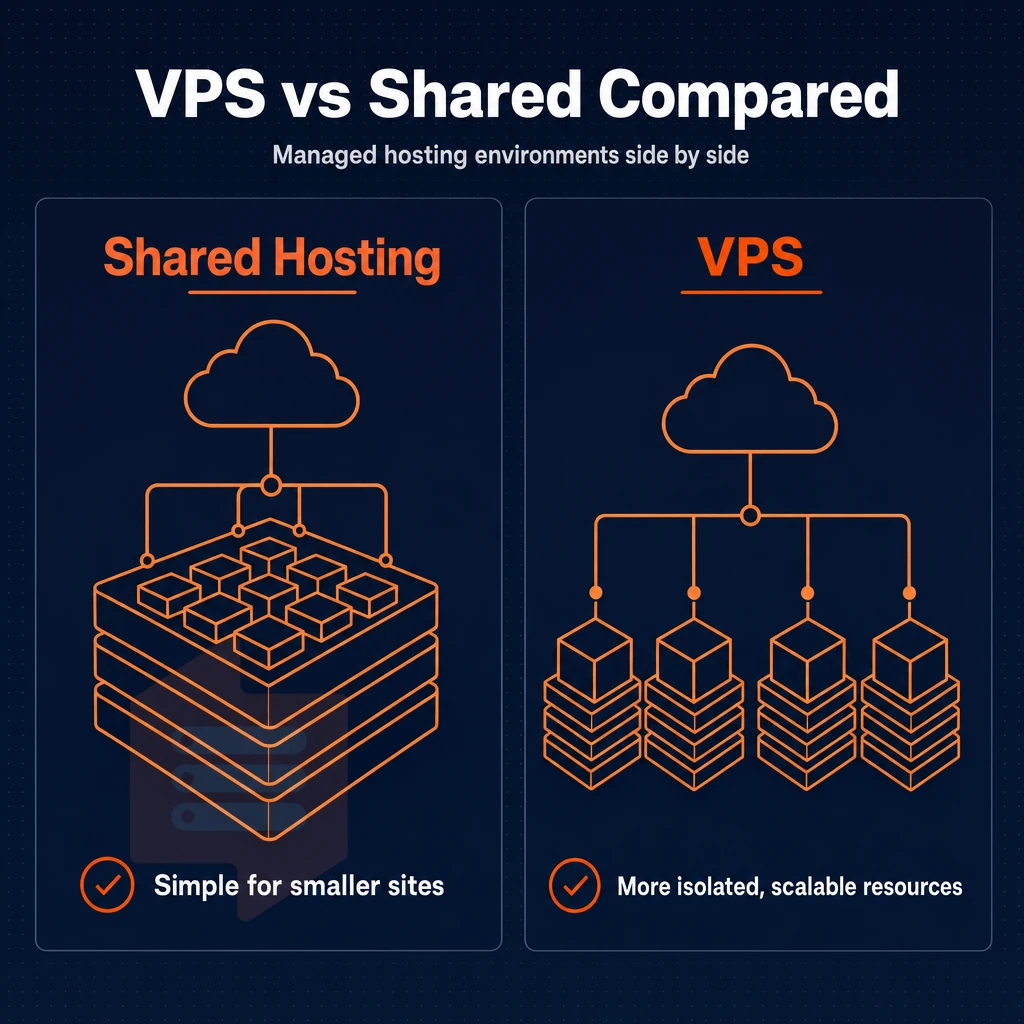
While looking for web hosting solutions, it is very important to understand the core differences between shared hosting and VPS hosting, in order to choose the right solution for your needs. Understanding these distinctions is the foundation for choosing VPS hosting that aligns with your application's performance requirements and growth trajectory. Selecting the right hosting platform requires evaluating not only current traffic patterns but also anticipated scaling needs over the next 12-24 months. Each hosting solution carries distinct trade-offs in resource allocation, administrative overhead, and scalability that directly impact long-term operational costs and technical debt.
Organizations with limited in-house technical skills may find managed VPS solutions particularly advantageous, as they provide enterprise-grade isolation without requiring deep systems administration expertise. When evaluating VPS hosting offers, prioritize providers that transparently disclose resource allocation policies, uptime SLAs, and hypervisor technology to ensure alignment with your infrastructure requirements. Choosing the right web hosting solution requires balancing technical requirements with budget constraints and internal team capabilities. For website owners with growing traffic demands, understanding these architectural differences becomes critical when performance degradation begins to impact user experience and conversion rates.
Choosing the right hosting provider for your needs
The table below is the fastest way to compare both options across the dimensions that matter most to developers and growing teams.
| Dimension | Shared hosting | VPS hosting |
|---|---|---|
| Resource allocation | Pooled, you share the server's resources with dozens of other accounts | Dedicated, RAM and CPU are reserved for your instance |
| Root access | No | Yes, full root on every plan |
| Performance consistency | Variable, noisy neighbours cause spikes | Stable, hard memory caps prevent contention |
| Security isolation | Weak, one compromised account can affect others | Strong, KVM gives each VPS a separate kernel |
| Scalability | Limited by shared plan tiers | In-place upgrades, no IP rotation |
| Management overhead | Low, provider handles everything | Medium, you control the OS; managed VPS hosting reduces this |
| Typical use cases | Brochure sites, personal blogs, low-traffic projects | Production apps, APIs, e-commerce, dev environments |
When to choose a VPS hosting solution
Shared hosting accounts are generally limited to a percentage of the CPU power in a shared server. As traffic to your site increases, this limit can soon become a constraint. A VPS hosting account removes these limits by providing a fixed set of dedicated resources, together with full control of the OS. This architecture makes VPS particularly valuable for agencies or developers managing multiple websites that require consistent performance baselines across different client projects.
The security of your VPS hosting also plays a role here. Shared hosting environments cannot guarantee this.
Note: If server administration feels daunting, managed VPS hosting lets engineers handle OS patching and updates while you retain admin access. BuyVPS engineer-led support covers exactly this gap.
The control gap is easily determined on paper.
Performance and reliability: dedicated resources vs shared server resources
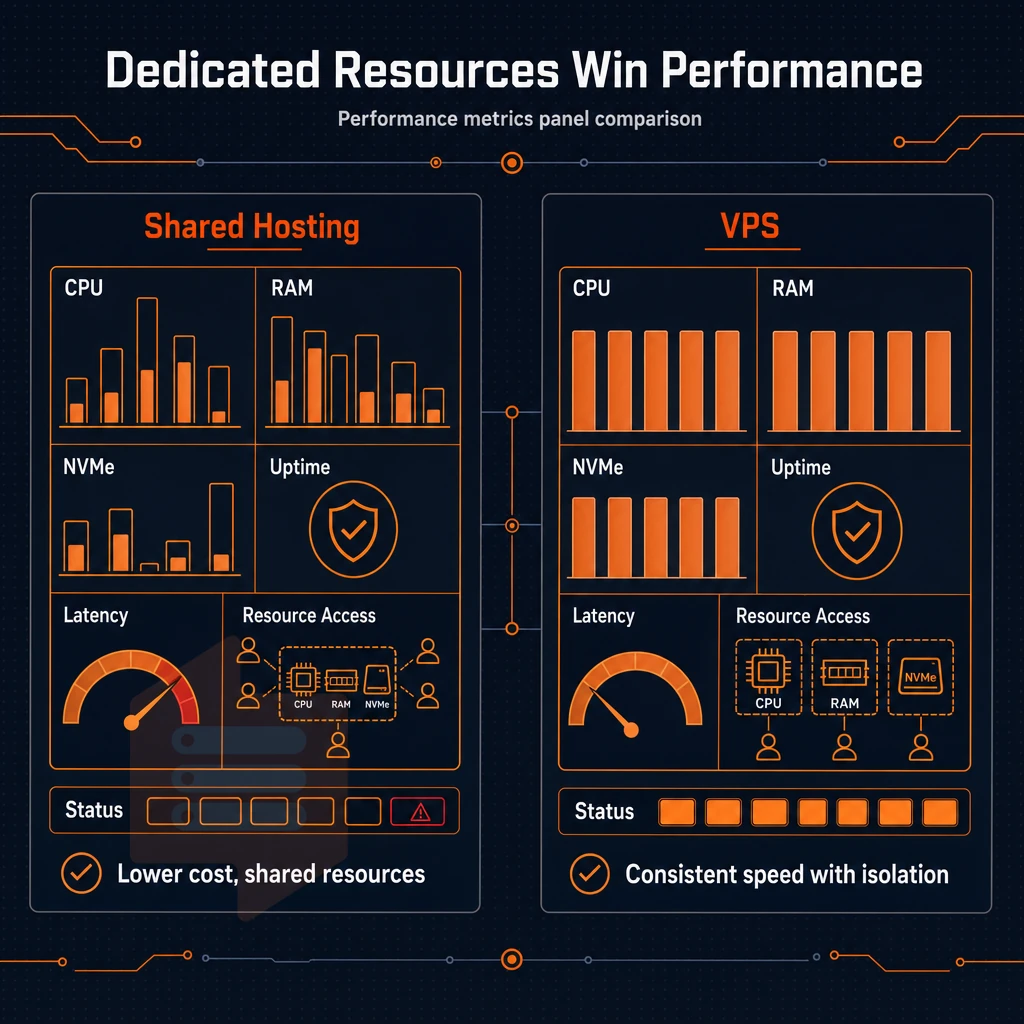
There are fundamental architectural differences between how performance is delivered on a shared hosting environment versus a VPS environment. To better understand these differences, a review of server resources and their allocation as well as how they respond under increased demand is provided.
The noisy neighbour problem
The “noisy neighbor” problem: Traffic on one shared server account can affect the resources available to all other accounts on the same server.
Shared hosting versus dedicated hosting. As outlined earlier, with shared hosting your OS image, server management and server maintenance are all running in a shared pool. Therefore, a single script can cause problems for the entire server environment. When a resource-intensive process runs unchecked, it can monopolize the entire physical server, degrading performance for every account sharing that infrastructure. In contrast, VPS environments isolate server maintenance tasks to individual instances, preventing system-wide disruptions when updates or patches are applied to one tenant's environment.
How VPS isolation changes the equation
Unlike a shared hosting plan, a VPS dedicates a portion of server space using hypervisor boundaries, with a hard memory cap to prevent a single tenant from exceeding their allocated memory. This is the main technical differentiator between VPS hosting and other forms of hosting in the vs VPS hosting debate. The hypervisor enforces these boundaries at the hardware abstraction layer, ensuring that allocated resources remain exclusively available to each tenant regardless of system load.
BuyVPS KVM VMs run on separate kernels (one per VPS) with strict per-node memory limits, and very low node density.
Verifiable performance benchmarks
Benchmarking Shared hosting is difficult as the resources allocated to a shared hosting account fluctuate based on the load of neighboring accounts. VPS hosting, on the other hand, offers repeatable performance. Most shared hosting providers do not publish real-time resource availability metrics, making it nearly impossible to establish consistent performance baselines for capacity planning.
BuyVPS’s NVMe RAID10 storage measured 122,959 4K read IOPS (fio median), a figure that only holds when storage bandwidth isn’t shared with uncontrolled tenants.
In managed VPS hosting, isolation goes beyond predictable performance and becomes a security argument too, especially when a neighboring account is compromised. Many providers offer managed VPS plans that include proactive security monitoring, automated patching, and incident response to further strengthen tenant isolation.
Security VPS hosting offers by isolating your environment
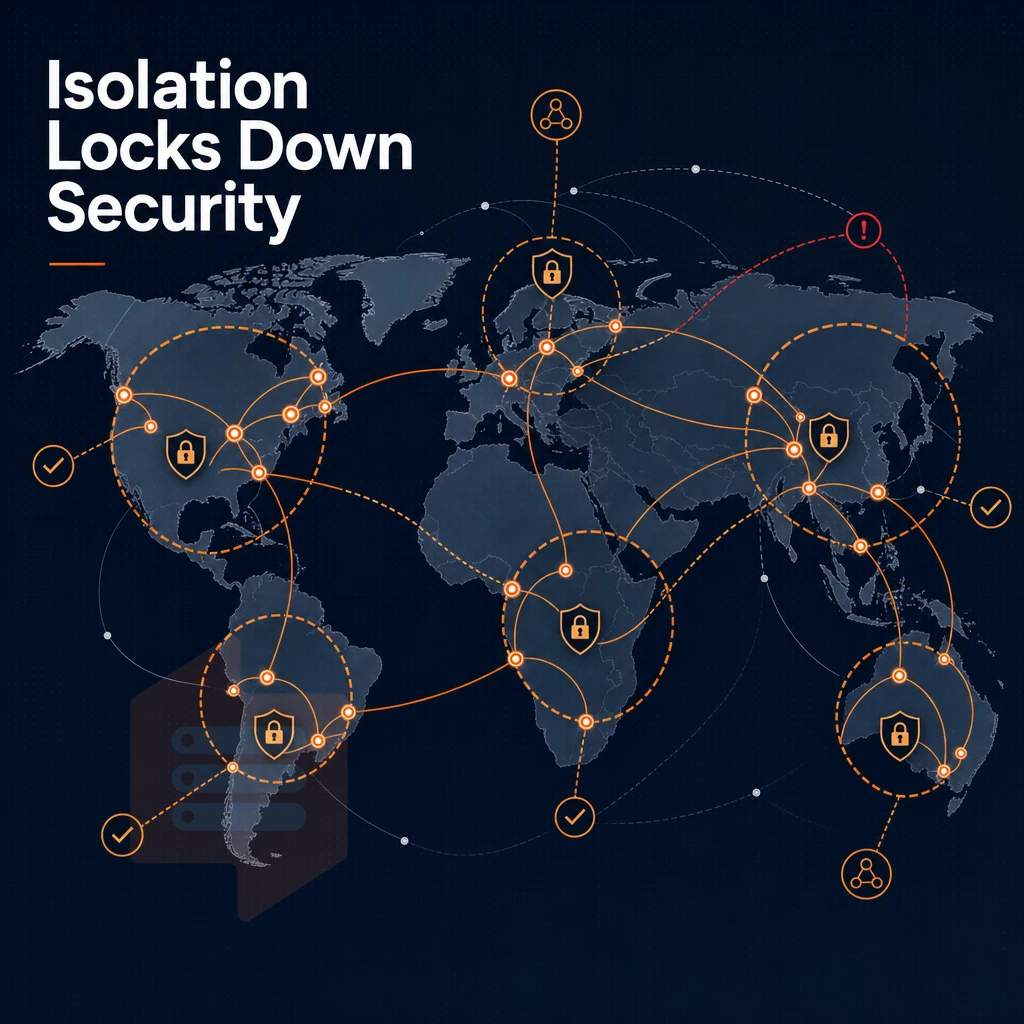
The biggest risk with shared hosting is that all accounts on the server are running the same Operating System. With that comes the risk of compromise of one account potentially affecting others on the server, including risk to your files, database, traffic, etc. VPS hosting does not have this risk as it is limited at the kernel level. See Virtual private server on Wikipedia for background.
Kernel-level isolation vs shared hosting
There's a real security gap between VPS hosting and shared hosting, starting with OS structure.
Your hosting environment is fully isolated.
Custom firewall rules and root access
Full root access means you control the security stack. You can:
- Apply OS patches on your own schedule, no waiting on hosting companies to push updates.
- Configure
iptables,nftables, orufwrules specific to your application. - Install custom server software, for example WAFs, intrusion detection, hardened kernels.
- Disable unused services to shrink your attack surface.
This level of control is not unavailable on managed hosting or shared accounts.
Edge filtering on our VPS plans
All our hosting plans come with edge filtering at the network perimeter, so malicious traffic is dropped before it reaches your VPS server. In addition to the isolated server environment, you also get root-level access on your VPS server, something you won’t get with shared VPS hosting plans.
Security and performance are strong across VPS plans, but understanding shared vs VPS hosting helps place VPS within the full range of options from basic shared servers to top-end bare-metal machines.
Hosting services and dedicated servers: understanding the full spectrum
Web hosting services come in many different varieties, and can range from a very basic shared hosting environment for small amounts of data to a fully stand alone machine for very large workloads. Knowing whether a hosting service hosts multiple websites on shared resources or dedicates them solely to you will help ensure you have chosen the correct tier for your particular application.
VPS vs shared hosting: where the line is drawn
Instead of putting many sites on a server with no resource isolation, as in shared hosting. Sites on a VPS get a guaranteed amount of RAM, CPU and storage, regardless of other tenants on the same server. Each site is on its own virtual server, or instance, managed by a hypervisor.
VPS and shared hosting differ mainly in terms of control. Shared hosting allows you to manage your account via a control panel but without full administrative access. A VPS on the other hand allows you to fully manage a server, running a full OS, custom kernel and any software stack you desire.
Shared hosting vs VPS vs dedicated server: the full spectrum
| Tier | Isolation | Root access | Uptime SLA | Best for |
|---|---|---|---|---|
| Shared hosting | None | No | Varies | Static or low-traffic sites |
| VPS hosting | Hypervisor (KVM) | Yes | 99.8%+ | Growing apps, dev environments |
| Dedicated hosting | Full hardware | Yes | 99.9%+ | High-throughput, compliance workloads |
| Cloud hosting | Virtualised, elastic | Yes | Varies | Burst-heavy, unpredictable traffic |
Choosing the right tier
BuyVPS offers VPS hosting, which is an alternative to shared hosting if you have outgrown it and don’t need a full dedicated server. VPS hosting runs on KVM with hard memory caps, and is powered by NVMe RAID10 storage for dedicated-server-grade isolation without the hassle of managing your own bare metal machines.
These signals should be clearly described.
When to choose shared hosting and when to upgrade to VPS
Where you are in your development as a web app, shared hosting or VPS will be the right tier for you.
When a shared hosting plan fits your needs
- Traffic and complexity can be used to determine what kind of hosting is needed. Since a site hosted on a multi-tenant server is located on the same physical server as other hosted sites. It is often best for a low-traffic site that is simple and where the owner has limited technical ability. A brand new personal blog or portfolio is an example of a site that rarely needs to be moved from a shared hosting environment.
- First, verify that the budget constraint really applies. If cost is the main concern and downtime has no financial impact, then a shared plan would be the rational choice. (Of course, the trade-off is that you’re competing with other websites on the same node for CPU and RAM time.).
Upgrade triggers: choosing a VPS hosting plan
- Performance degradation is another sign that shared resources have been exhausted. Slow page loads under normal traffic or site crashes during traffic spikes are a sure sign. Your workload will have dedicated allocation on a VPS.
- Isolate and determine server configuration needs (e.g. custom software stacks, full system access, security hardening). These requirements are currently blocked by the shared environments but would be possible with a VPS.
- Isolation requirements. Sites that require strict separation (e.g. running different code, different firewall rules, different SSL configs) will require a VPS (running multiple sites on one account. However, Isolated at the OS level) rather than a shared account (where all sites on the account are hosted as one account, and cannot be isolated at the OS level).
Note: Security incidents on shared plans are a hard upgrade trigger.
Choosing a reliable hosting provider
Once you decide to upgrade, consider a managed VPS offer if you don’t have enough experience of Linux administration on your team.
Note: Avoid choosing a managed VPS plan based on price alone. Verify that the provider enforces hard memory caps per node. Oversold nodes recreate the same contention problem you are leaving behind.
Once you've decided to move to a VPS, your choice of provider will determine whether that upgrade is actually worth it.
Why choose BuyVPS for your VPS hosting plan
When you move from shared hosting to a virtual private server, the hosting provider you choose determines whether that upgrade delivers.
- No-oversell policy. Hard memory caps per node and low node density mean your VPS hosting plan never competes for the same server resources that other websites consume.
- KVM isolation with a separate kernel per VPS. Unlike shared hosting, your virtual server runs its own operating system, full root privileges and custom ISO included on every plan.
- NVMe RAID10 PCIe direct storage. Measured at 122,959 4K read IOPS, our storage environment leaves shared hosting server performance far behind.
- In-place upgrades, no IP rotation. Scale your VPS server without migration or reconfiguration, your server configuration stays intact.
- Amsterdam and New York data centers. Identical hardware, network, and dedicated CPU options in both regions.
Engineer-staffed support handles server management questions directly, no bots. Ready to choose VPS hosting that fits your workload? Compare our VPS plans or contact us to find the right hosting solution.
Frequently asked questions
How does VPS fall short compared to shared and dedicated hosting options?
VPS hosting costs more than shared hosting and requires more technical confidence, you manage your own OS, security patches, and software stack.
When should i upgrade from shared hosting to VPS hosting?
Upgrade when shared hosting's resource limits are causing slow load times, frequent 503 errors, or failed cron jobs. If you need to install custom software, run background processes, or isolate a production database, shared hosting simply cannot support those requirements.
What is the difference between VPS and shared hosting?
Shared hosting places dozens or hundreds of sites on one server, splitting CPU, RAM, and disk among all tenants with no hard guarantees. When weighing shared hosting vs VPS, a VPS gives you a virtualized server with dedicated RAM, guaranteed CPU allocation, and full server control, so other tenants on the same physical host cannot consume your resources.
What are the four main types of web hosting setup?
The four main types are shared hosting, VPS hosting, dedicated server hosting, and cloud-based hosting. Shared hosting is the entry-level option where resources are pooled across many accounts.
VPS hosting isolates your environment on a hypervisor like KVM, giving you dedicated resources at a fraction of dedicated machine cost, BuyVPS, for example, runs KVM with hard memory caps and no oversell across its Amsterdam and New York nodes. Dedicated servers hand you an entire physical machine, while cloud infrastructure distributes workloads across a fleet of nodes for on-demand scaling.
The resources of a shared hosting account are shared with the other dozens of accounts on the shared machine. If you need a low traffic website with minimal security needs, then shared hosting is fine. But as soon as you need something like predictable CPU, isolated memory, and a hardened hosting environment, then shared hosting becomes a bottleneck.
A VPS can provide you with a set of dedicated resources while being kernel-level isolated from the other users on the single server. This also means that you have full complete server control to the server (just like a physical server) and that performance remains consistent under load.
If your site or application has outgrown shared hosting. Alternatively, if you want to get ahead of the problem before it hits, BuyVPS is a hosting company offering VPS and shared hosting solutions, with KVM-isolated VPS instances running AMD EPYC hardware with NVMe RAID10 storage across Amsterdam and New York. Browse the plans at BuyVPS.com and find the tier that fits your workload.