

Typically, running production workloads on a self managed VPS means that all unpatched kernel versions, all misconfigured firewall rules, all gaps in ddos protection, all control panel misconfigurations, and all failed backups are your problem and cost you sleep. However, with our fully managed VPS hosting, all of the OS updates, security hardening, monitoring and even disaster recovery is handled by us so you can focus on your application and not the underlying infrastructure.
What does “managed” mean to you? Typically in the IT world, managed means to be keeping up to date with the latest patches for the operating system, which for many systems is done on a monthly basis. However, to us managed means proactively monitoring your systems and responding to incidents in a timely manner, as well as locking down your servers, workstations, and control panel access to a hardened configuration.
This hardened approach ensures that every layer of your infrastructure remains secure against emerging threats without requiring constant manual intervention. Many hosting companies offer cpanel as the default interface for managing domains, email accounts, and databases through an intuitive web-based dashboard.
We deliver all of this as standard and it’s what we consider to be true “managed services”.
This article outlines what a managed VPS should actually look like, where people are typically going wrong. Additionally, how to actually compare hosting companies on the things that really matter: the depth of support you can get, whether setup takes just a few clicks, the security of your servers, the SLA, and the hardware that your applications run on. For community perspectives, see Looking for Good Managed VPS (as someone new to ....
What are fully managed hosting plans for VPS?
A fully managed VPS is a Virtual Private Server where the hosting provider takes care of the server for you, i.e. they update the Operating System for you. They fix any security issues for you, they monitor the uptime for you and generally they configure any software for you. This includes ensuring that databases remain optimized and backed up regularly, preventing performance degradation as your data grows.
First month $1
Then the normal monthly price. One per customer. No setup fee, and a 30-day performance guarantee on your first order.
See the plans“BuyVPS offers simple and reliable VPS hosting solutions for different online needs.”
Real time monitoring ensures that performance issues or security threats are detected immediately, allowing the hosting team to respond before problems impact your application availability. Many providers also offer cpanel or similar control panels to simplify common administrative tasks through a graphical interface.
The advantage of a fully managed VPS is that you have reserved resources to run your application(s) upon, without having to hire a full time sysadmin to look after a single server for you. This approach proves cost efficient for businesses that need reliable performance but lack the budget to maintain in-house infrastructure expertise. Businesses gain predictable monthly expenses at a lower cost than employing a full-time system administrator while still receiving expert-level server maintenance.
What are fully managed VPS servers?
An unmanaged VPS means you are responsible for all administrative tasks. A Fully managed VPS flips this model on its head, the provider is responsible for the operating system layer for tasks such as patching, hardening, monitoring and recovery, you are responsible for the application layer. This division of responsibility ensures that the infrastructure remains secure while giving you autonomy over your application deployment and configuration choices.
Typical tasks handled by the provider include:
- Automated security patches and software updates.
- Firewall configuration and intrusion monitoring.
- Free SSL certificate provisioning and renewal.
- Git integration for deployment pipelines.
- Performance tuning during traffic spikes.
Who benefits most
Fully managed hosting is suitable for teams that need server-grade hosting without the hassle of server management. If you are deploying your first VPS and you don’t have a dedicated ops team to support you, managed hosting support removes the steepest part of the learning curve.
A managed provider is particularly suitable for growing teams. If traffic peaks suddenly, the managed provider will deal with it, and not you at 2 a.m. in the morning.
Managed vs. Unmanaged: the real tradeoff
Unmanaged VPS is fully under your control and comes with less overhead than a Managed VPS. The Managed VPS comes with a support layer on top of that. It depends on how deep your team is.
At BuyVPS we have an engineer-led support team that physically test every configuration change (not automated scripts, not first level support chat). Where does that leave the responsibility for issues caused in production by a configuration change between our self-managed and fully managed plans? This commitment to hands on testing by experienced engineers ensures that changes are validated in realistic scenarios before reaching your production environment.
Self-managed vs. Fully managed VPS: key differences
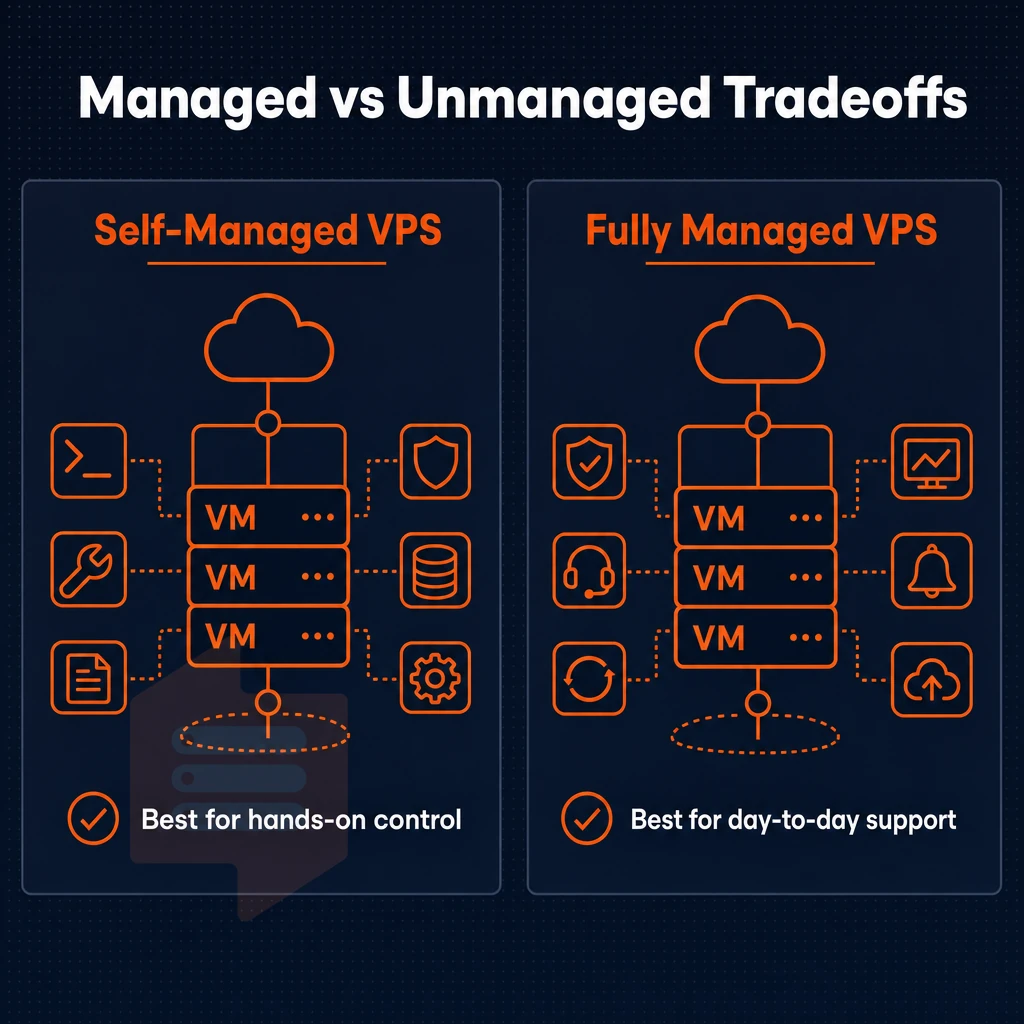
The management model you choose to go with will define who is best placed to handle the on going day to day work of keeping a server secure, up to date and running. Self-managed and fully managed VPS’s are at opposite ends of the spectrum when it comes to who is responsible for the on going work of a server and will depend on the technical ability of your team.
What is the difference between self-managed and fully managed VPS?
For self-managed VPSes, you own every operational step: updating the OS, locking down security, configuring applications, and monitoring for uptime. For fully managed VPSes, the provider handles all of these steps for you. The amount of control you give up in exchange for having them manage for you varies greatly from provider to provider. This division of responsibility directly impacts how quickly you can respond to vulnerabilities and keep your infrastructure secure against emerging threats.
| Responsibility | Self-managed | Fully managed |
|---|---|---|
| OS updates | You apply them | Provider applies them |
| Security hardening | You configure firewalls, fail2ban, etc. | Provider enforces baseline policies |
| Control panel updates | You manage the upgrade cycle | Provider patches on schedule |
| Uptime monitoring | You set up and own alerting | Provider monitors and responds |
| Custom configuration | Unrestricted | Within provider's supported stack |
Full root access and who needs it
Our self-managed VPS servers are designed for the suits (developers and sysadmins) who require full root access to tweak the kernel parameters, install custom runtimes, or run web applications that require unusual dependencies. BuyVPS provides root access on all of our servers so you can manage your server as you see fit. Many developers prefer working with cpanel or similar control panels to streamline routine tasks like email account creation and DNS management without sacrificing command-line access.
Dedicated resources and the managed trade-off
Fully managed hosting is a good option for small businesses and people without dedicated server staff. It means your web designer can design and build your website without having to patch your OpenSSL at midnight. The isolated resources on a VPS are managed by someone for you. Many users prefer a control panel like cPanel to simplify website and database management without requiring command-line expertise.
Decision guide
If your team owns the OS lifecycle then self-managed is more flexible for less money. If server administration is taking away from your core work then fully managed is the way to go, but you’ll give up some degree of configuration.
Once you have settled on a model for server administration then the next thing to consider is what a managed provider will actually do for you on a daily basis. Teams choosing a self managed approach gain maximum flexibility to customize their infrastructure stack, install experimental software versions, and implement non-standard configurations that would be restricted under managed plans.
What does a managed VPS provider actually do for you?
When we refer to a managed VPS provider we mean that they will take the operation of your server off your hands. As mentioned, there are various services that are included but knowing what to expect before you commit is key to finding the right package for you.
Managed services: what the provider handles
- Initial server setup, Your hosting provider sets up the OS. Networking and basic security hardening for you before you even log in for the first time, removing the most error prone part of the deployment process.
- Security patches. As a team we make sure to apply the relevant OS and software security updates on a scheduled basis. As the most common point of entry for attackers for malicious activity, making sure we are up to date on security patches is one of the most important things we do.
- Automated backups, instead of having to manually run a backup or snapshot on a regular basis, they are run on a schedule-based basis. Confirm the frequency of backups and the retention period for old backups as well as whether restore operations are a self-serve operation or require assistance from support.
- DDoS protection. By filtering traffic on the edge of network it can absorb volumetric attacks before they even get near your VPS. Also check if it’s always on or if it needs to be manually triggered.
- Brute-force protection. Failed login attempts get automatically blocked. This is typically done by the firewall or with the help of a tool like Fail2Ban on your provider’s stack.
Keeping things running smoothly
- Real-time monitoring of CPU, memory and disk usage. We have alerts in place that fire before resources reach a spike that can cause an outage.
- Uptime monitoring. External probes from outside of the data center can test for your server’s upness. These probes can find failures at the network level that you’d never even know about from the inside monitoring that you do normally.
- Support escalation. Include in alert processing triage and remediation not just notification. Is that service included or is it separate and billed.
Note: Some providers bundle control-panel management or managed WordPress into their offering. BuyVPS does not offer those services, our focus is infrastructure-layer management on KVM VPS with full root access.
What's the most reliable VPS hosting company?
Their support is engineer-led (no first-tier chatbots) and problems are diagnosed not just acknowledged.
That makes for a very reliable service that doesn’t have the lock-in of managed services for stack. However, knowing what a provider can do to support you is only half the battle, you also need to know whether your workload needs managed hosting in the first place.
Who needs fully managed VPS web hosting?

Fully managed VPS hosting isn’t for every body, but there are several audiences for who it can take a major operational task off their plate. Understanding where that line is can help you make a determination for which service model is best for you and your team’s actual capabilities.
Profiles that benefit most from fully managed VPS
Small business owners do not typically have a sysadmin on staff full time. They want reliable web hosting. They don’t need the full power of a managed server (i.e. they don’t need to deal with kernel updates, security hardening, etc).
They just need a managed layer to deal with logs, etc so they can focus on making money instead of dealing with uptime issues. Many small businesses prefer solutions that include cPanel or similar control panels to simplify website and email management without requiring command-line expertise.
For web designers managing multiple sites for different clients, the problem scales up. Juggling multiple client sites means coordinating updates, backups, and troubleshooting across different hosting accounts, which quickly becomes unmanageable without centralized support.
Web application developers want to write code, deploy new features, etc. They don’t want to spend time and money managing servers. Managed VPS servers let you keep engineers focused on code, not on updating the OS, adding firewall rules, etc. and scheduling of backups.
Many online shops which are in heavy traffic will outgrow the shared hosting environment in a very short time. Many high resource consuming programs or scripts require a fixed amount of CPU power and RAM. With a Managed VPS the online shop is able to grow without the online shop owner or web developer having to deal with server administration.
How much does VPS web hosting cost?
VPS prices vary depending on a Tier, a Management Level and a Contract Length. So, instead of me posting prices that are subject to change due to promotions, you can always check a current plan page on BuyVPS’s website. The prices for Standard CPU, Dedicated CPU and High Memory VPS servers are published there in a clear and simple way. What you see there today is the full price. No setup fees.
Transparent pricing makes budgeting simple: the advertised price is the full price. This predictability is very important for a small team that is operating on tight margins.
When unmanaged VPS is the better choice
The unmanaged plans on BuyVPS are aimed at the sysadmin, DevOps engineer, and platform team who wants to run VPS’s as a VPS, i.e. with full control over the VPS and its related resources. The user has root access to the server and is able to manage the VPS without any management layer in between. Users can install cpanel or any other control panel of their choice, giving them complete freedom to configure the server environment according to their specific workflow requirements.
The fully managed abstraction layer on top of the managed plans is very convenient, but takes away a lot of the direct control that power users typically want.
Core features to look for in a managed VPS plan
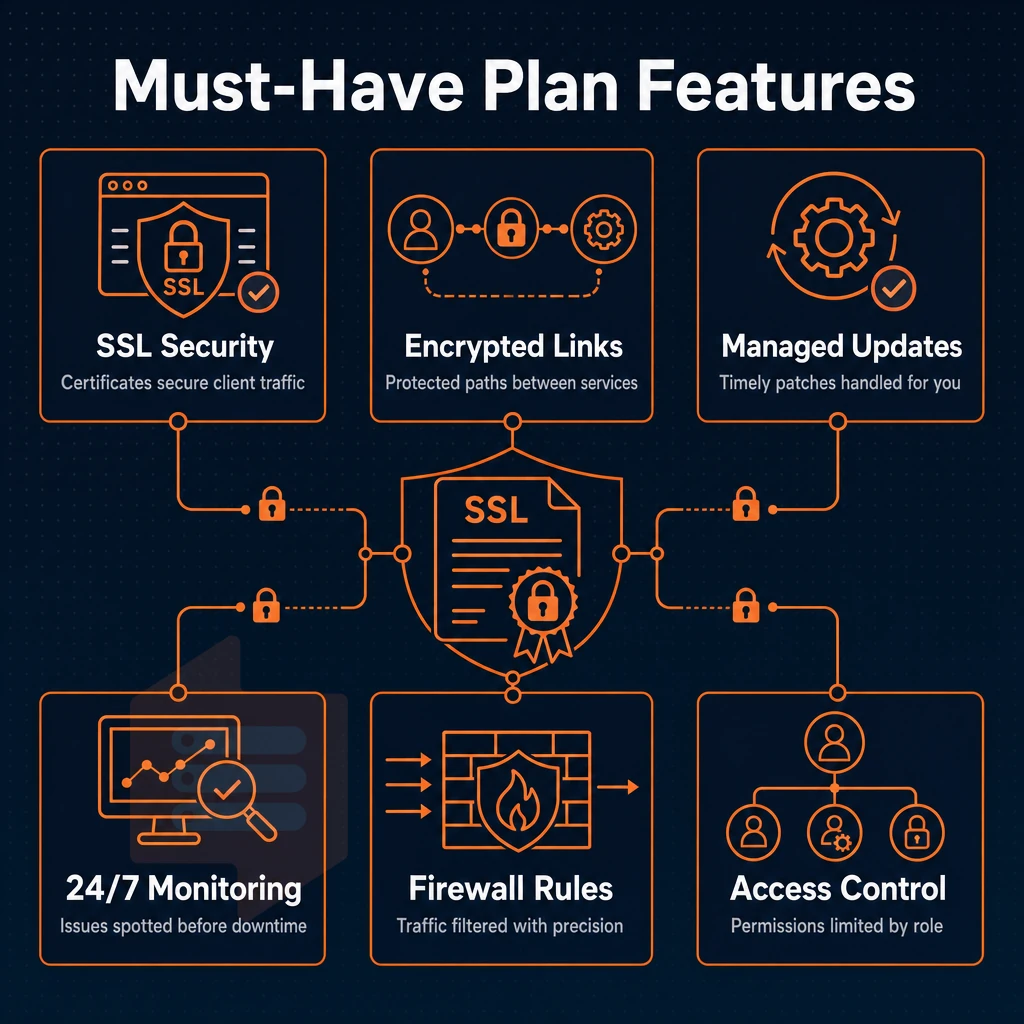
Fully managed VPS hosting is not equal across providers. The set of features provided under the banner of ‘fully managed’ hosting can lead to a tremendous amount of variance with how a hosting environment can function. Below we outline some of the fundamental features which allow for a host to operate on the enterprise level and keep everything running smoothly, versus providing a subpar hosting environment that fails to deliver on promised functionality.
Storage, virtualization, and enterprise grade hardware
For I/O intensive workloads NVMe storage is a must. Disks and even SATA SSDs will not keep up with the load that databases, caches and high traffic sites place on a server. You want to look for NVMe storage that is set up in RAID10 for maximum performance and redundancy.
KVM virtualization for your VPS is provisioned with its own kernel, and thus is completely isolated from any noisy neighbor. This, combined with a no-oversell policy and strict hard memory caps per node, means that your dedicated account manager can ensure efficient resource utilization across the available resources, without them being degraded by over allocation to other users.
VPS hosting plans: dedicated vs. Shared vCPU
Dedicated (pinned) cores are designed for low latency applications (payment gateways, real-time APIs, high volume of queries, etc).
- IPv4 + IPv6 dual-stack on every plan.
- Dedicated firewalls with edge filtering.
- ECC memory on every node.
- In-place upgrades, no IP rotation.
Do i still get full control panel access with a fully managed VPS?
Yes. Full root access is included on all managed plans. Management covers OS patching, security hardening, monitoring etc. This does not mean you will be locked out of your server. You will have full shell access, custom ISO support, API access etc. We charge a flat fee for this type of access. With the feature checklist in hand it is now easier to compare managed VPS hosting with other types of hosting that you may be considering.
Managed VPS vs. Shared hosting vs. Dedicated server
When it comes to deciding upon web hosting, there are three main tiers that are utilized: shared hosting, managed VPS hosting and dedicated servers. Each tier exists upon a control-vs-cost spectrum and helps inform where best to reside, especially for resource intensive applications requiring timely software updates, in order to ensure reliable email delivery without over-provisioning your server or running an under-powered stack.
How the tiers compare
| Dimension | Shared hosting | Managed VPS hosting | Dedicated server |
|---|---|---|---|
| Resource isolation | None, shared pool | Dedicated resources per VPS | Full hardware ownership |
| Management overhead | Minimal, provider handles all | Low, server management handled by provider | High, full admin responsibility |
| Scalability | Limited by shared limits | In-place upgrades, no IP rotation | Constrained by physical hardware |
| Cost efficiency | Lowest outlay, least control | Cost-effective for dedicated resources | High TCO, justified at scale |
When managed web hosting makes sense
Shared hosting is generally recommended for static websites and small to medium-sized development projects with minimal traffic. As traffic grows, the performance of the site will become increasingly inconsistent. As development teams mature, noisy neighbors on shared hosting servers can become a serious problem. With Managed VPS Hosting, you get isolated RAM and CPU without the financial burden of owning a physical server.
This level includes managed cloud servers, abstracted infrastructure, predictable performance and no need to physically manage a server and its associated hardware. VPS plans in this tier are cost-effective for development teams that require root access but do not require a full-time operations team.
What security features should a managed VPS include?
Managed VPS security should cover four areas. First, edge filtering to prevent volumetric attacks from reaching your instance. Second, KVM isolation which means a separate kernel is running for your VPS to prevent cross-tenant exploits. Third, an abuse-policy firewall (e.g. UFW) to filter traffic on a per-port basis. Finally, complete root access to harden the OS as needed.
Root Access is given on all of the Plans.
Decision guide
Start with Shared Hosting for low traffic low risk sites. Then move to Managed VPS Hosting when traffic increases, when performance becomes important or if you need to comply with rules that require isolation. Bare Metal Hosting is reserved for the few cases in which a site actually exceeds the virtual resources provided by a VPS.
Then the issue becomes how to choose between plans for the chosen tier and how to choose the best plan for your specific needs.
How to choose the right managed VPS hosting plan
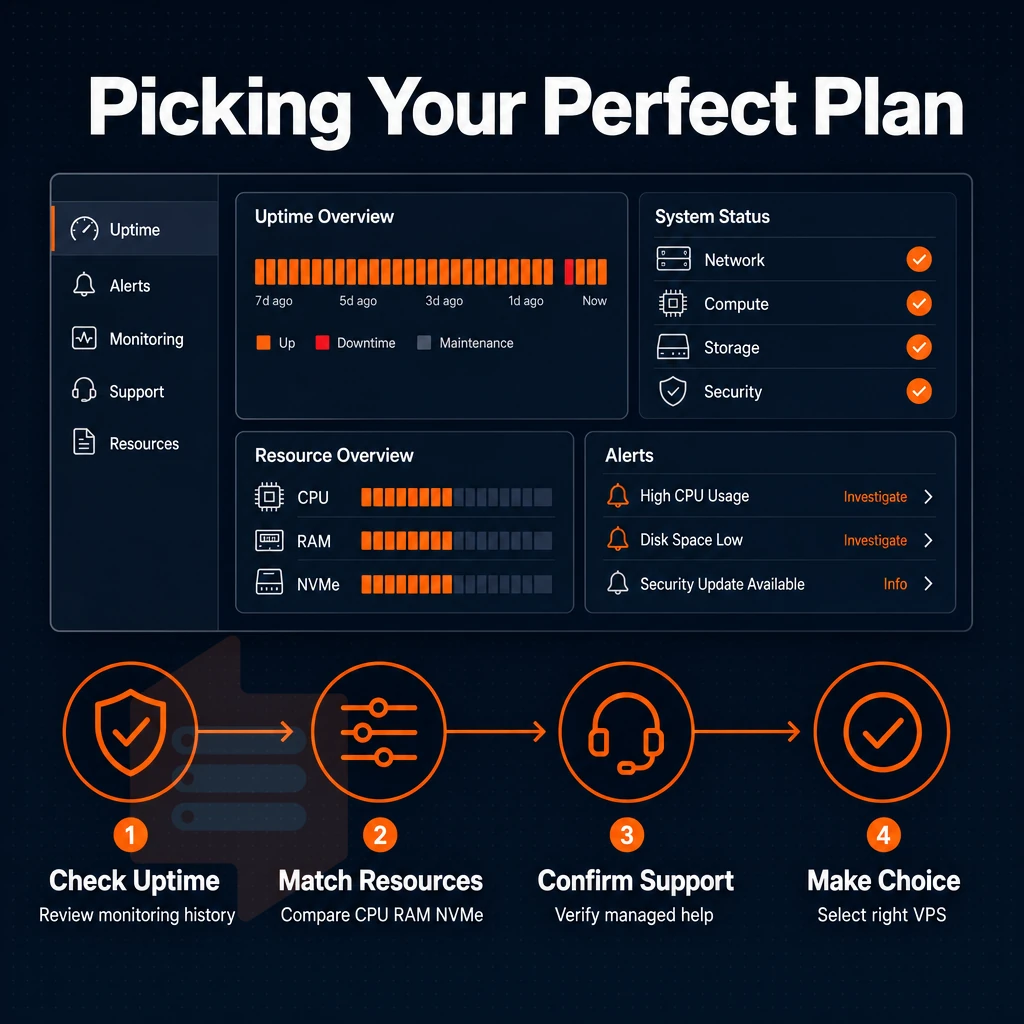
Choosing the right fully managed VPS hosting plan can be a very simple process if you go through 5 basic checks in order to avoid most common mistakes.
Preparation: understand your workload
- Estimate the required RAM and CPU headroom, and calculate your peak concurrent load (not your average load). A web site that has more traffic during campaigns than at other times needs headroom above and beyond the requirements of idle time. A underpowered plan will need to be upgraded on short notice.
- Prioritize NVMe over SATA for new storage. NVMe significantly reduces I/O wait compared to storage that uses SATA interfaces. For database intensive applications and other real time applications that support monitoring and dashboards, storage I/O throughput directly affects response time. SATA is now a slow interface that most workloads have outgrown.
Evaluation: what to check in a provider
- Confirm in-place upgrades with no IP rotation. Managed cloud server plans should let you scale in just a few clicks, without migrating data or losing your IP. Note: providers that rotate IPs on upgrade force DNS changes that break live services.
- Check what the provider commits to in writing before you sign up for a service with a vague high-availability promise.
- Quality of support. This should be handled by REAL humans, i.e. engineers. BuyVPS doesn’t route tickets to first-tier scripts, ALL tickets are handled by engineers 24/7, including late night fixes for you. So at 2 a.m. when something inevitably breaks, a REAL human will fix it for you.
Can i upload a custom OS or ISO on a managed VPS?
BuyVPS allows you to upload your own custom ISO on every plan. You manage the OS part and we take care of the underlying infrastructure, which we fully support. This is especially useful for VPS users on development teams running their own niche distributions or for people running their own internal appliances, whether for an online business or otherwise, for which there are no decent templates for standard distributions.
Dedicated account manager and location
- Match the data center to your target audience. We have two data centers: Amsterdam (EU) and New York (US East Coast). Lower latency to your users when the server is geographically closer to them. Serve users in one region or serve them from two locations for redundancy.
- Clarify who will run the operations on an ongoing basis. Some customers like to have a single account manager to deal with escalations while others prefer to deal with issues on a self-serve basis. It’s worth establishing what model is best for your team before committing. BuyVPS gives you a panel to manage your servers on a self-serve basis with API access to automate as much as you like and engineer-backed support for when things go wrong.
Picking a plan is partly about hardware decisions and partly about security decisions. In the next section we outline what a managed environment should protect you against and how.
Security in a fully managed VPS environment

Security is the main reason businesses choose to host on a fully managed VPS over other types of unmanaged hosting. The main reason is that by the hosting provider managing the patching, free ssl provisioning, threat monitoring, and incidents, your engineers can remain focused on delivering your application rather than managing the operating system.
Patch management and OS hardening
Unmanaged VPS means full patching burden on you. A managed environment flips this model on its head. Security updates (including kernel patches, OpenSSL fixes, and package-based CVE fixes) are applied on a fixed schedule as opposed to when you get around to it.
We test OS updates against a running config before we deploy it to ensure it doesn’t break our production stack. We also harden our servers and control panel for wordpress sites as part of our provisioning, by disabling services that are not required, configuring SSH key authentication, enabling ddos protection, and locking down paths for privilege escalation. We maintain these hardening steps over time.
Network-layer threat mitigation
This prevents malicious bots, volumetric DDoS traffic and port-scanning attempts from consuming your VPS resources.
Brute force protection is implemented at network level, so that repeated failed login attempts are blocked before they even reach the SSH daemon.
Edge filtering is configured to block any traffic that could be considered an attack from entering or leaving the network perimeter. Host-based rules are to act as a second layer of defense as opposed to the first line of defense.
KVM isolation as a hardware-level boundary
Most cloud providers run lots of tenants on shared kernels. KVM running separate kernels for VPS servers in these hosting plans (as opposed to running in user space and relying on software to enforce the isolation boundary) means that a compromised neighbor can't mount a shared kernel vulnerability attack to escalate into your instance.
This architecture is particularly important when you are running sensitive data processing workloads. The separation between your VPS instances is structural, not some setting in a policy that can be misconfigured. This security foundation is what BuyVPS’s managed VPS offering is built upon.
Why choose BuyVPS for your managed VPS needs
Fully managed VPS hosting is only as reliable as the infrastructure underneath it. BuyVPS gives you the performance foundation that managed services run on top of, so your team handles the application layer while our hardware does the heavy lifting.
- KVM isolation, separate kernel per VPS. Every virtual private server runs its own kernel. No noisy-neighbor risk, no shared kernel vulnerabilities bleeding across tenants.
- NVMe RAID10 storage with published benchmarks. Our NVMe storage delivers 122,959 4K read IOPS measured via fio, not estimated. Managed VPS workloads and resource-intensive applications get consistent, reliable performance under real load.
- No-oversell policy, hard memory caps. Low node density and hard memory caps mean dedicated resources stay dedicated. Traffic spikes on one VPS do not degrade yours.
- Dedicated-core D-tier on AMD EPYC Genoa. Pinned cores deliver predictable latency, critical for databases, web applications, and anything latency-sensitive.
- In-place upgrades, no IP rotation. Scale your managed VPS plan without migration headaches or DNS changes. complete root access and custom ISO upload are standard on every plan.
- Identical infrastructure in Amsterdam and New York. Both data centers run the same hardware, control plane, and network. Deploy where your users are without compromise.
We have operated founder-run infrastructure since 2002. Engineer-staffed support, real humans, not first-tier chatbots, backs every managed VPS hosting plan. Explore our fully managed VPS options or reach out to discuss which plan fits your workload.
The core value of fully managed VPS hosting
Our Fully Managed VPS Hosting solutions are designed to offer you the best of guaranteed resources and a VPS (Virtual Private Server) with the benefit of us handling the server management for you. We update the OS, apply security patches, take automated backups and monitor the server for uptime.
You can then get on with running your application, without worrying about the server management. This is different from our Self-Managed VPS Hosting solutions where you have root access to the server, but that also means you have full administrative responsibility for the server.
Small business owners and teams of people who run very large web applications and need the application to perform well all the time but can’t afford to hire a full time sysadmin.
Choose a managed hosting company with transparent hardware, honest SLAs and engineer level support (not bots). BuyVPS delivers fully managed VPS on AMD EPYC servers with NVMe storage, real time monitoring, DDoS protection from Amsterdam and New York data centers. Our engineers respond directly to your issues and questions.
Fully managed VPS hosting means we will be doing all the server administration for you and you can rely on us to keep your server up 24/7 and fix any problems quickly and efficiently. This is perfect for projects where the people who manage the server also manage the product and they don’t want to spend their time on things like updating the kernel instead of on improving the application.
So, the main question is: how much do you want to pay for running your own server as opposed to the operational overhead of a self-managed server.
Weight the support model heavily when evaluating providers for support of your application. An engineer-led response, proactive monitoring and in-place upgrade paths are far more important than the number of processors, threads or RAM in the node. A managed plan is of no value whatsoever if the underlying hardware is substandard or the nodes are massively oversold.
BuyVPS runs KVM VPS infrastructure on AMD EPYC hardware across Amsterdam and New York, offering both managed and self managed plans with hard memory caps, no-oversell node density, and engineers, not bots, handling support. Browse the plans at BuyVPS.com and see which tier fits your workload.