

When comparing VPS prices from different providers, the number can be deceiving. What looks like a low-cost VPS can actually end up costing more when all the overages, and added features, such as premium support, are factored in.
I take a look at the current VPS prices from DigitalOcean, which follows the typical industry pricing model. First, there's a low introductory price, followed by a slew of increasing overages, as well as support, and other features that are typically included by default with other virtual private server hosting companies.
Read on to learn more about VPS pricing structures and what to look out for.
We take a close look at the fixed pricing model offered by BuyVPS, memory optimized KVM VPS on AMD EPYC hardware with NVMe RAID10 storage in Amsterdam and New York data centers, which involves no renewal price hikes and no overselling. We start by outlining what a VPS is, then describe the core resources typically charged for in a VPS pricing plan.
What is a VPS and how does VPS pricing work?
A Virtual Private Server (VPS) is a portion of a physical server allocated to a Hypervisor to create Virtual Machines (VMs). These VMs are provisioned with dedicated RAM, disk space and IP addresses. Knowing how to evaluate resources that hosting providers charge for allows you to ensure you are not overpaying for features you need not.
First month $1
Then the normal monthly price. One per customer. No setup fee, and a 30-day performance guarantee on your first order.
See the plans“Great service! Everything was delivered quickly and worked exactly as expected. the process was smooth, reliable, and professional. Highly recommended!”
If the numbers push you to move, our guide on switching VPS provider covers the inventory, the data copy and the DNS cut-over. Read the guide.
Core pricing variables for developer tools
Each VPS plan is defined by 4 parameters: vCPUs, RAM, NVMe or SSD storage, and included bandwidth. Plans are billed monthly, with the monthly rate dropping significantly on annual or multi-annual commitments.
- vCPU count, more cores handle higher concurrency.
- RAM, the most common bottleneck for web apps and databases.
- Storage, NVMe outperforms SATA SSD significantly on IOPS.
- Bandwidth, measured as a monthly transfer cap or port speed.
Shared vs. Dedicated cores for developer tools
The largest cost factor in the market for virtual servers is the number of cores provided in a virtual server. The cost of a shared vCPU virtual machine (a virtual server that provides a number of virtual CPU cores) is much lower than for a cpu optimized dedicated-core server (a virtual server that provides a number of physical CPU cores).
The shared vCPU servers have virtual CPU cores that are time-sliced between the virtual servers of neighboring servers. To prevent CPU contention, a dedicated-core server assigns all physical CPU cores of a physical server to a single virtual server, such as a VPS ( Virtual Private Server). The latency for such servers is very low.
How BuyVPS structures its high performance tiers
Both the Standard CPU plans (using shared AMD EPYC vCPUs on NVMe RAID10 storage) and the Dedicated CPU plans (pinning cores on EPYC Genoa hardware with DDR5 ECC RAM) are offered. These plans are offered in Amsterdam as well as in New York, on identical hardware, and with the guarantee of no price increases upon renewal. A look at how a major cloud provider organizes corresponding tiers of service is provided by a concrete example.
Shared vCPU vs. Dedicated CPU: the pricing difference that matters
The biggest cost/performance trade-off when buying Virtual Private Servers (VPS) is between shared vCPU and dedicated core VPSes. Get it wrong and you'll overpay, or worse, run your application on hardware that can't sustain consistent latency in production.
Assess your workload type for general purpose use
- Classify CPU sensitivity. Burst-tolerant workloads (e.g., staging envs., developer tools, low-traffic sites) can run on shared vCPU plans, whereas Latency-sensitive workloads (e.g., production APIs, real-time apps, high-performance databases) need to run on pinned cores.
- You should probably check your concurrency pattern. If you’re on a shared vCPU plan, then the CPU time of all users on that server is being pooled and hence can be consumed by another user under load, thus becoming noisy. Only if p99 latency matters to you, then you have to be worried. Otherwise, shared is perfectly fine.
Note: Shared vCPU plans are not "low quality", they are the right tool for variable or low-intensity workloads. The mistake is running a cpu optimized database on shared hardware to save cost per month.
Match the memory optimized plan tier to the use case
- For developer and test workloads, BuyVPS’s Standard CPU VPS (S-tier) is powered by an AMD EPYC Milan CPU, with NVMe storage. It is well-suited for running developer work and CI pipelines, without the premium for pinned cores.
- Dedicated CPU VPS for production and database workloads. The BuyVPS Dedicated CPU VPS (D-tier) comes with EPYC Genoa processors and DDR5 ECC memory. Note that while these plans cost more per month than the shared-vCPU plans, the dedicated-core VPSes deliver the most predictable high performance for production apps and database query times.
Verify general purpose fit before you commit
- You can run your own benchmark, we publish results of fio and pgbench benchmarks on BuyVPS for different plans and you can compare them with your own workload requirements.
What else will get charged to your bill, once you have established which tier matches your workload, as the base plan most likely won’t be enough.
What drives VPS costs beyond the base plan?
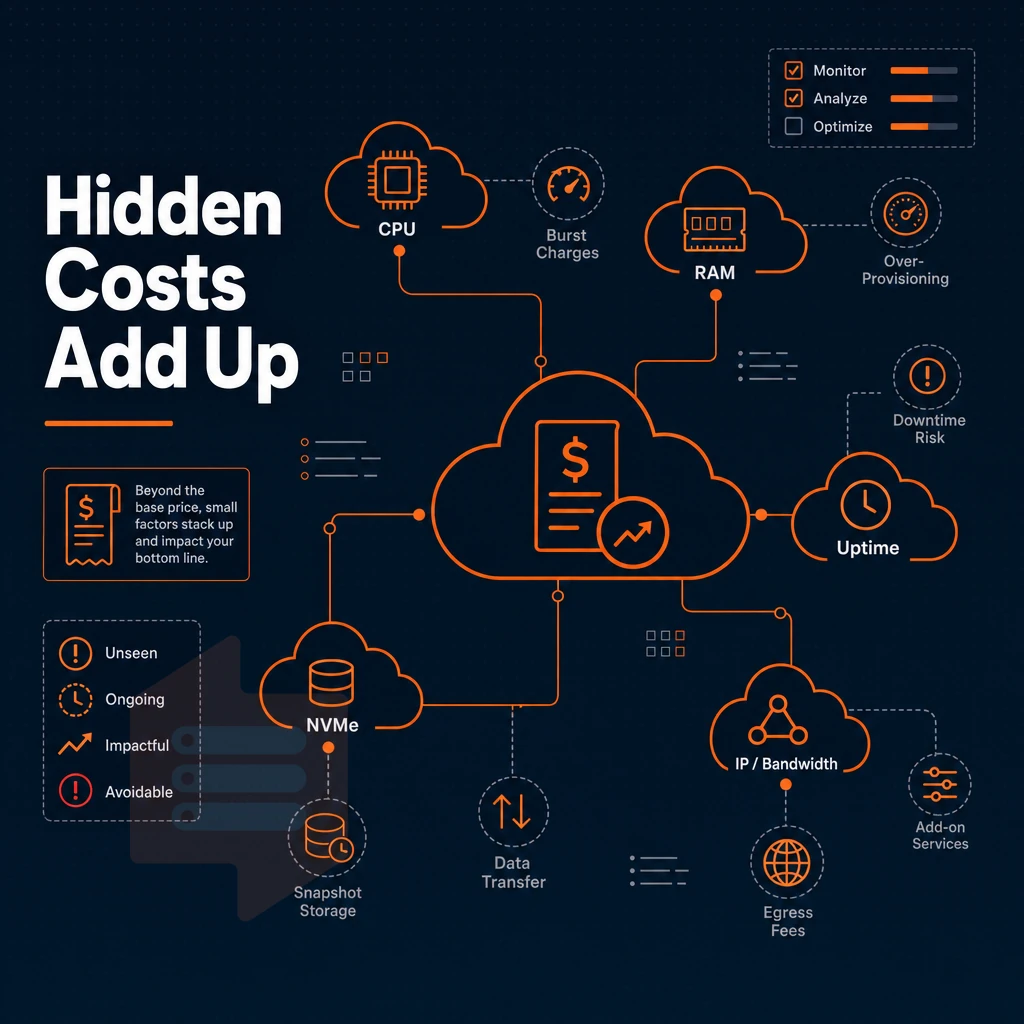
The base plan price is only part of the costs to consider for your monthly mobile spend. A variety of add-on costs will greatly exceed the base plan price for your monthly spend, with huge variations between different providers.
General purpose bandwidth and storage add-ons
Storage transfer is sometimes included in the allowance for a provider’s base plan.
General purpose managed services and support tiers
In addition to the cost of the underlying nodes in a Managed Kubernetes cluster, there is an orchestration fee. Upgrading the support tier from using community forums and getting answers from other users, to answers provided by engineers working for the platform, also costs on a recurring per-month basis. Things like DDoS protection, advanced firewalling and other security features as well as features for complying with certain laws, are typically only available in the platform’s premium tiers.
The best plans bundle bandwidth, backups and engineer support into a flat monthly rate. Our BuyVPS plans include IPv4 + IPv6 dual-stack, edge filtering and engineer-led support on every plan, all included in the price without any additional lines for these features.
What to audit before you commit
Before signing up for a VPS for development, check egress prices, snapshot prices, and service level agreement terms. The real cost difference between a bundled and unbundled provider usually exceeds the gap between the two base plans.
We do not charge regional premium.
Why BuyVPS is a strong alternative for developers and teams
BuyVPS (buyvps.com) is a founder-run virtual private server provider operating since 2002, with data centers in Amsterdam and New York. Every virtual machine runs on KVM with a separate kernel, no shared kernel risk. Our no-oversell policy enforces hard memory caps per node, so high performance stays consistent under real load.
- Three tiers for every workload: Standard CPU (shared vCPU, general purpose), Dedicated CPU (pinned cores, cpu optimized), and High Memory VPS (memory optimized, 1:8 RAM ratio).
- NVMe RAID10 storage: PCIe direct, 122,959 4K read IOPS measured, storage optimized throughput without the premium label.
- Full root access + custom ISO on every plan. We offer IPv4 + IPv6 dual-stack on all plans.
- In-place upgrades: scale up without IP rotation or migration downtime.
- Predictable cost per month: no setup fees and no hidden add-on charges.
Developers evaluating developer tools and teams comparing managed Kubernetes overhead against self-managed virtual private servers will find BuyVPS a practical fit. Contact our engineers at info@buyvps.com or call +31 85 369 6285 to compare configurations. One remaining decision is which of our two locations best fits your audience and compliance requirements.
BuyVPS server locations: amsterdam and new york
BuyVPS operates 2 data centers: Amsterdam and New York. Both facilities utilize identical hardware, the exact same control plane and same pricing. Therefore, there is no premium for a regional location.
Amsterdam: EU coverage and data residency
Amsterdam is the right location for European audiences. Low latency to Western Europe and hosting your data in the EU to fulfill any GDPR data-residency requirements without having to configure anything extra. A high performance location, powered by AMD EPYC Milan processors, with NVMe RAID10 storage, and a 99.8% uptime SLA. Both locations include enterprise-grade security features such as DDoS mitigation and isolated network environments to protect your infrastructure.
New york: US east coast and transatlantic reach
New York allows us to cover users from US East Coast with minimal round-trip times.
Which location fits your high performance workload?
| Factor | Amsterdam | New York |
|---|---|---|
| Primary audience | Europe | US East Coast |
| Compliance | EU / GDPR | US jurisdiction |
| Uptime SLA | 99.8% | 99.8% |
| Cost | No regional premium | No regional premium |
We support Amsterdam for EU compliance and New York for US-first traffic. Either way you choose, the hardware and cost will be the same.
Frequently asked questions about general purpose use
Does DigitalOcean offer managed Kubernetes and vm hosting across their data centers?
DigitalOcean markets its virtual machines as \"Droplets,\" but they are functionally VPS instances, KVM-based, root-accessible, and billed by the month.
For general purpose use, which is cheaper: Aws or DigitalOcean?
For straightforward VPS workloads, DigitalOcean is generally cheaper than AWS on a like-for-like RAM and vCPU basis. AWS pricing is complex, on-demand rates are high, and meaningful savings require reserved instance commitments or spot bidding.
DigitalOcean uses flat monthly rates with no egress surprise fees up to a generous bandwidth allowance, making total cost easier to predict. Neither platform publishes a simple flat rate card, though, unlike independent VPS providers that list one monthly price per plan.
What is the monthly cost of a general purpose VPS?
VPS pricing varies widely depending on the tier, hardware, and provider. Entry-level shared-CPU plans from most providers start in the low tens of dollars per month. Dedicated-CPU or high-memory configurations cost more, often several times the entry rate.
The most reliable approach when choosing a virtual private server is to match your workload requirements (RAM, CPU type, storage IOPS, bandwidth) to a specific plan and compare providers on those specs rather than headline price alone. For BuyVPS pricing across Standard, Dedicated CPU, and High Memory tiers, visit buyvps.com .
How much does a VPS server cost?
A VPS server cost depends on three main factors: CPU type (shared vCPU vs. pinned dedicated core), RAM allocation, and storage class (NVMe vs. SATA SSD). Shared-CPU plans are the most cost-effective entry point for low-to-medium traffic workloads. Shared-CPU plans work well for general purpose workloads such as small web applications, development environments, and content management systems that do not require guaranteed CPU cycles. For workloads requiring fast disk throughput and large capacity, such as database replicas or log aggregation systems, storage optimized configurations prioritize NVMe capacity over CPU or RAM allocation.
Check buyvps.com for current plan details across all three tiers in Amsterdam and New York.
The price for a VPS is usually more than just the price for the base plan.
The difference between cheap plans and cost-effective plans is what you actually get to use: reliable compute, high storage throughput, and a production-grade network. Not a bunch of oversold nodes with a competitive headline price.
BuyVPS offers dedicated and shared CPU VPS plans on AMD EPYC hardware with NVMe RAID10 storage, hard memory caps, and no setup fee, deployed from Amsterdam and New York. Browse the plans at BuyVPS.com and see which tier fits your workload.