
Deciding between a VPS server, cloud hosting and the mix of both is one of the biggest decisions for a development team in terms of the underlying infrastructure.
The market has made this harder than it needs to be by referring to “cloud VPS” to everything from renting bare metal servers to multi-tenant instances on hyperscalers such as Amazon.
Isolation guarantees vary across VPS offerings. Related: cloud hosting.
This guide offers a practical breakdown of how each virtual server package differs at the infrastructure level and where VPS or cloud architectures perform better. See also: Amsterdam and New York.
First we will explain the basics of VPS hosting. For more context, see Virtual private server . Related: BuyVPS.com/VPS-server.
What is a VPS cloud virtual server?
A cloud virtual server is a combination of a VPS (Virtual Private Server) and a cloud server. A VPS cloud instance provides isolated servers with dedicated resources similar to a dedicated server. However, unlike a dedicated server you do not have to purchase your own servers. compare plans.
First month $1
Then the normal monthly price. One per customer. No setup fee, and a 30-day performance guarantee on your first order.
See the plans“Excellent service! Thank you for providing the server so quickly. The service was fast, reliable, and exactly what I needed. Highly recommended!”
Your VPS is created on shared servers using virtualization software known as a hypervisor. Within a virtual cloud server you have root access to control the server as you wish, a fixed allocation of RAM to guarantee performance, and a private operating system. The hypervisor software isolates each instance at the kernel level, ensuring that one tenant's workload cannot interfere with another's resource allocation or security boundaries. Related: game servers.
How KVM splits one machine into virtual servers
KVM (Kernel-based Virtual Machine) is a way to partition a single physical server to create many isolated servers or virtual private servers. Each virtual private server has its own kernel, its own memory and its own storage.
We at BuyVPS run KVM with a separate kernel for each VPS.
VPS vs. Traditional cloud vm: the isolation difference
Unlike traditional cloud VMs that pool the resources of noisy-neighbor nodes to provide computing power, VPS servers are confined to a fixed amount of memory on a single server node. This allocated memory is guaranteed and will not be taken away from you even under real load.
Web applications that require consistent performance benefit from the dedicated computing power of a VPS backed by physical servers, rather than the burst-oriented resources of a cloud server.
But everything above the hypervisor (the packages, the configs for services, etc.) will be under your complete control.
When a load balancer fits into this model
To scale past a single node, you can pair a VPS with a load balancer to distribute traffic to multiple VPS instances (each with its own hardware allocation on physical servers). This model is easy enough to understand on paper, but it's completely different when you actually get to see how it's set up behind the scenes to ensure access works the way it's supposed to.
Key benefits of running a VPS with a cloud service provider
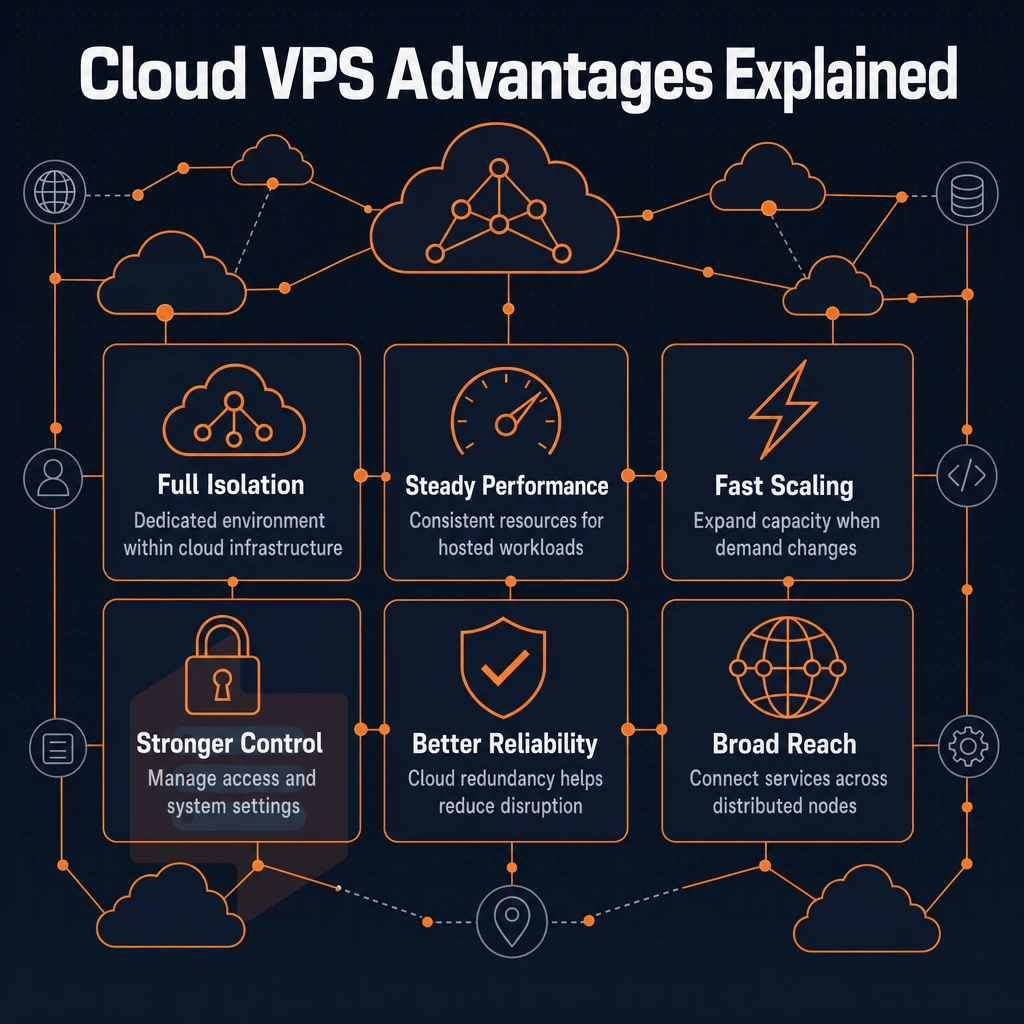
When it comes to server cloud environments, a VPS server environment allows you to have the isolation of a dedicated server environment without the additional overhead of managing out physical servers. Below are the 6 key benefits for teams running production workloads that choose VPS server environments over shared hosting and bare-metal servers.
Complete data center control panels and customizable firewall
With full superuser access to your VPS you can install any package, tune any kernel parameter, and set up custom firewall rules at the OS level.
Dedicated resources that scale with consistent performance
Upgradable resources: upgrade RAM and vCPUs without migration or IP change.
Hard memory caps plus very low node density = neighboring workloads cannot “steal” your allocation.
High performance, OS choice, and cost effectiveness
Redundant infrastructure for your business critical applications. Choose from Ubuntu, Debian, Rocky Linux, AlmaLinux and many more. Upload your own ISO as well. For community perspectives, see Virtual Private Server (VPS) Discussions.
A VPS provides a number of benefits over bare-metal including: a predictable monthly cost with unlimited traffic (no additional charges for visitors) and full control of the server (no one else can log in to your server).
Common use cases for a VPS server cloud vs dedicated server
A VPS is very versatile and can be used for all sorts of tasks. Hosting websites is probably the most common use for a VPS, but many users also use them to host their own private infrastructure. To give you full control over your individual use case, we have put together a list of the most common workloads and their corresponding resource requirements. These are the workloads that our customers use most. Whether you're running a personal blog or a complex application stack, one user can manage multiple services on a single VPS instance through proper resource allocation and containerization. Unlike shared hosting solutions that limit administrative access and software choices, a VPS grants you complete control to configure the environment precisely for your workload.
Understanding the distinction between a virtual private server VPS and shared hosting is essential when evaluating infrastructure options for production deployments. Modern control panels like cPanel, Plesk, or DirectAdmin can be installed on most VPS configurations to simplify server management through a graphical interface. Many customers start with a single VPS for testing and later expand to multi-server architectures as their projects mature and traffic requirements increase. The ability to install any software stack, from web servers and databases to custom development tools, makes a VPS ideal for developers who need flexibility beyond what traditional shared hosting permits.
General and demanding workloads for operating systems
Standard CPU VPS plans cover most web hosting needs, WordPress sites, shops, and Node.js applications.
Memory-intensive workloads like large in-memory databases and high-scale analytics engines serving multiple users are a perfect fit for High Memory machines.
Networking, DDoS protection, and private network endpoints
VPN gateways and load balancer nodes benefit from low-latency, static IPs.
Data center location and VPS solutions
Our servers are located in Amsterdam and New York .
Why choose BuyVPS for your VPS server cloud
BuyVPS delivers virtual private server infrastructure built for reliable performance, no oversell, hard memory caps, and low node density on every cloud server node.
- No-oversell guarantee: hard memory caps mean your dedicated resources stay yours under load.
- Pinned cores (D-tier): AMD EPYC Genoa with locked vCPUs for predictable, low-latency VPS hosting.
- NVMe RAID10 storage: PCIe-direct, measured at 122,959 4K read IOPS, fast NVMe storage you can benchmark yourself.
- Full administrative access + custom ISO: total control over your operating system, including Rocky Linux and other Linux distributions.
- In-place upgrades: scale resources without migration or IP rotation.
- Dual data centers: Amsterdam and New York, identical hardware, same pricing, high availability across regions.
No hidden fees.
Frequently asked questions about web hosting
How does a VPS with unlimited traffic differ from a cloud server in physical hardware use?
A VPS runs on a single physical host with a fixed allocation of CPU, RAM, and storage carved out by a hypervisor like KVM.
Is a virtual private server VPS considered a form of cloud hosting?
A VPS provisioned on a single hypervisor node is not cloud hosting in the strict sense, there is no live migration, no auto-scaling across nodes, and no distributed storage layer.
Some providers market multi-node VPS clusters as "cloud VPS," but a traditional KVM VPS, like those offered by BuyVPS, is a virtualized private server, not a cloud instance.
What can i run on a VPS server cloud?
VPS hosting supports almost any Linux-based workload: web servers (NGINX, Apache), application stacks (Node.js, Python, PHP, Ruby), databases (PostgreSQL, MySQL, MongoDB), containerized services via Docker or Podman, and self-hosted tools like GitLab, Nextcloud, or Grafana.
Do i need root access on a VPS?
Installing system packages, configuring firewalls, tuning kernel parameters for high performance, mounting filesystems, and running Docker all require root or sudo privileges. BuyVPS grants full superuser privileges on every plan, so you retain absolute control over your server from day one.
How does VPS hosting protect my data compared to shared hosting?
On shared hosting without a customizable firewall, every tenant runs inside the same OS instance, so a misconfigured or compromised neighbor can expose your files, processes, and environment variables. A VPS uses hypervisor-level isolation: each instance has its own kernel, memory space, and storage volume.
KVM virtualization, as used by BuyVPS, enforces hard memory caps per node so one tenant cannot consume another's resources or access their data. You also control your own firewall rules, SSH configuration, and user permissions, none of which are possible on shared server hosting.
Which operating system can you install on a VPS?
BuyVPS supports Ubuntu, Debian, AlmaLinux, Rocky Linux, CentOS Stream, and Fedora as one-click installs. Unlike multi-tenant hosting, if you need something outside that list, a custom Linux build, a BSD variant, or a specialized appliance with its own hardware management, you can upload your own ISO and boot from it directly.
How do i choose between a shared vCPU and a dedicated-core VPS?
Choose a shared vCPU plan if your workload is bursty or intermittent, web apps with variable traffic, development environments, or lightweight services that do not peg the CPU continuously. Choose a dedicated-core plan with a tuned operating system if you need consistent, low-latency CPU performance: real-time compute-heavy workloads, latency-sensitive APIs, game servers, or database workloads where noisy neighbors would cause jitter.
BuyVPS Dedicated CPU VPS plans use AMD EPYC Genoa with pinned cores, meaning your vCPUs are never time-shared with another tenant, what you benchmark is what you get under sustained load.
A cloud-based VPS, on the other hand, is a great compromise between a shared server cloud and a bare-metal server cloud. It gives you dedicated resources, full admin access, and a separate environment as if you had a private server.
And it is far less expensive and less complicated to manage than a bare-metal server cloud. For most applications, web apps, databases, development, testing, and even high-traffic sites, a VPS carved from a single physical machine is the perfect middle ground and will grow with you.
KVM virtualization with separate kernel for each VPS, separate storage (NVMe) for each VPS on a RAID10 on a bunch of SSDs. Additionally, Fixed amount of RAM for each node, so performance is predictable under load.
If you're ready to move beyond shared web hosting or consolidate workloads onto reliable infrastructure, explore BuyVPS's Standard, Dedicated CPU, and High Memory VPS plans, available in Amsterdam and New York, at buyvps.com.