

Buying a VPS server is a simple decision until it comes time to choose a plan, compare benchmarks that reflect your website's performance needs, and read the fine print about renewal costs.
This guide will try to dispel some of the myths and help explain the differences between a well engineered VPS and a commodity, oversold server.
Most applications that have outgrown a shared hosting solution can run well on a VPS, whether it be a high traffic website, a database back end, or a development environment that mirrors production. The most important thing is to choose a VPS or dedicated server that is the right size for your application, and is properly isolated from the start. Proper resource allocation ensures that application performance remains stable even during traffic spikes or intensive database queries. For e commerce platforms handling payment processing and customer data, a properly sized VPS provides the isolation and dedicated resources necessary to maintain PCI compliance and fast checkout experiences.
Ecommerce sites in particular benefit from VPS environments where resource contention won't cause slowdowns during high-volume sales periods or seasonal traffic surges. When hosting websites that serve dynamic content or run custom applications, a VPS eliminates the unpredictability of shared environments and provides the stability required for consistent uptime. A single VPS can efficiently host multiple websites through virtual host configurations, making it cost-effective for agencies or developers managing client portfolios. Related: custom ISO.
BuyVPS runs their server s as KVM based VMs on top of their AMD EPYC powered infrastructure in Amsterdam and New York. Each node has fixed amounts of RAM and they are running the web hosting servers off of NVMe RAID10 storage. It's a good baseline for what a no-compromise virtual server would look like when evaluating hosts.
What is VPS hosting and why buy a VPS server
A Virtual Private Server (VPS) is something between shared hosting and a physical server. On a VPS you have full control over dedicated resources and get root access to your virtual server. You get a fully isolated environment as if it were a physical server, but you don’t have to pay for or manage a physical server. See Virtual private server on Wikipedia for background.
First month $1
Then the normal monthly price. One per customer. No setup fee, and a 30-day performance guarantee on your first order.
See the plans“Perfect and fast VPS with good support.”
How VPS hosting works with Plesk web hosting
A hypervisor is a software that enables one physical server to function as multiple virtual servers. Each virtual server is allocated a portion of the physical server’s CPU, RAM and storage, and is completely independent of the other virtual servers on the physical machine. This is unlike shared hosting where neighboring sites can consume resources and even access files that belong to other sites.
The hypervisor abstracts the physical hardware layer, creating isolated virtual environments that operate as if each were running on its own dedicated machine. The hypervisor software layer also enforces resource limits and prevents any single virtual machine from monopolizing CPU cycles or memory that belong to other tenants.
VPS hosting typically comes with a separate kernel per instance.
When to buy VPS hosting or a dedicated server
VPS servers are for the type of projects that have outgrown the shared hosting that you are on, but don’t need a full dedicated server. These are some common scenarios in which a VPS is used.
- Traffic spikes that slow down shared environments.
- Applications requiring custom software or specific OS configurations.
- Databases or APIs that require fixed amounts of RAM and CPU.
All our VPS hosting plans are powered by the latest AMD EPYC processors and are provisioned with NVMe RAID10 storage. Unlike many other plesk web hosting providers, all allocated resources are available under real load.
Managed virtual private server hosting vs. Unmanaged
Unmanaged VPS hosting is provided on a fully root accessible basis, allowing full control. You will be responsible for all updates to the Operating System, for applying security patches as required and for the configuration of the server. This is a major advantage to those with in-house Linux skills. For teams without Linux expertise or those who prefer to focus on application development rather than server maintenance, managed VPS hosting offers the same root-level environment with vendor-handled updates and security hardening.
After you have determined that a VPS is required for your workload.
Managed VPS hosting vs unmanaged: choosing the right level of control
Before you purchase a VPS server, you must decide how much you want to be responsible for the day to day tasks of your server.
VPS hosting provider and server management spectrum
- How much server management experience do you have? If you are a developer or power user who is very familiar with Linux and can handle tasks such as patching, securing, and configuring a VPS then an unmanaged VPS would be a suitable option. However, if you have little to no experience with servers then a managed VPS would be more suitable as the provider would handle tasks such as updating the OS. Monitoring your server and setting up your control panel.
- Determine whether your workload is best suited for a specific tier of hosting. For example, a high-traffic ecommerce site would likely benefit from a managed hosting environment, because the uptime-intensive work for the site is handled by the hosting provider. On the flip side, a developer’s project or company’s internal tools are typically best suited for unmanaged hosting where the developer has total control over every layer of the application.
Choosing and verifying your high performance VPS hosting setup
- Review what you will get from a “managed” service and confirm that the service includes OS patching, firewall rules and additional IP addresses. The scope of managed services varies greatly between service providers so make sure you read the full service definition.
- Make sure root access is preserved. Some managed VPS plans are restricted on what you are able to modify. Make sure you have the correct access to run your stack.
Note: Managed hosting adds cost and may limit configuration flexibility. If your team has solid Linux skills, unmanaged VPS hosting typically delivers more value.
Once a management model is chosen, the next step is identifying which technical specifications actually matter to VPS performance under load.
Key features to look for when you buy VPS hosting
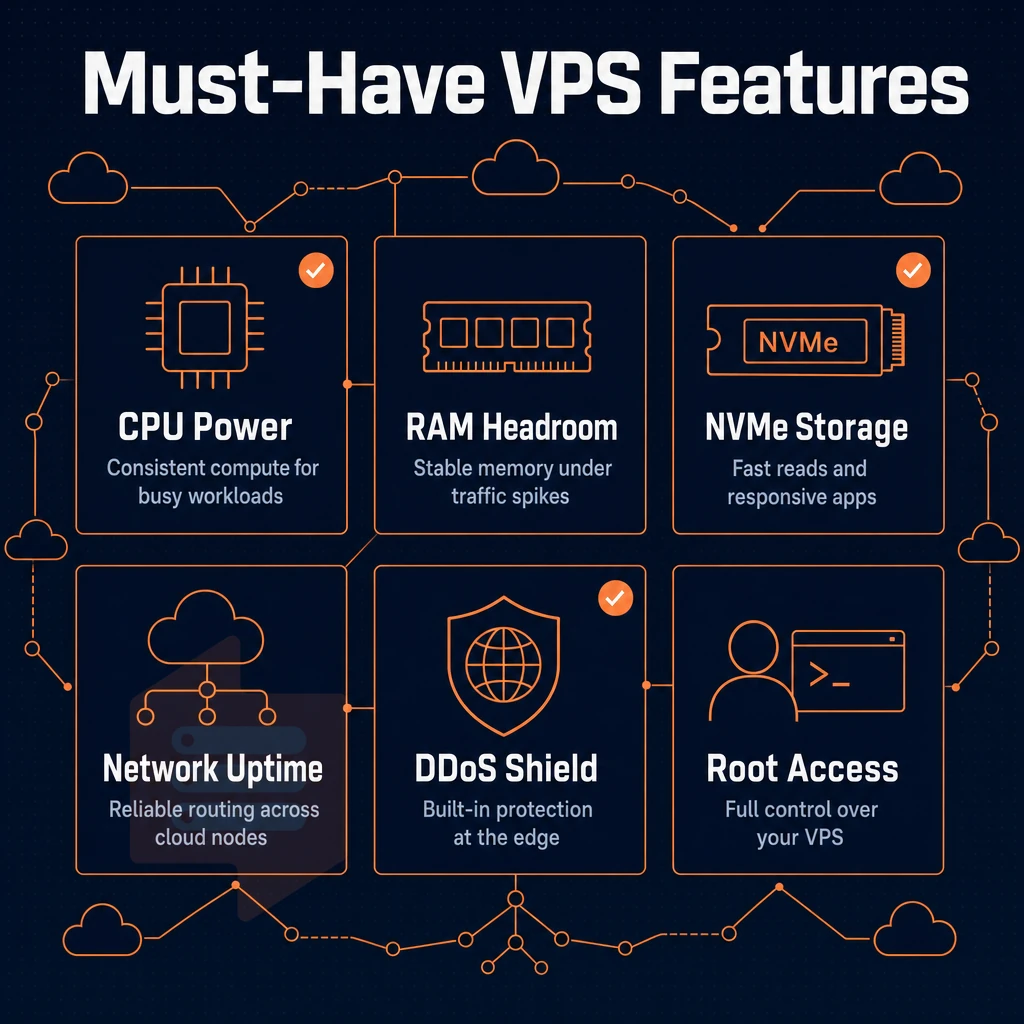
Not all VPS plans are equal, here's what to look for in a VPS web hosting plan built for production that won't fail at the worst moment.
More power with storage, virtualization, and full root access
NVMe RAID10 storage contains IOPS of far greater value than that found in typical spinning disk or low-end SSD storage. The PCIe-direct connected NVMe arrays powering each virtual private server at BuyVPS have been measured at over 122,000 4K read IOPS using fio for a real benchmark, rather than a fanciful estimate created by a salesperson, and every plan includes ddos protection as standard.
KVM virtualization is very important, because each VPS has its own kernel. This means that each VPS has its own dedicated resources on the hypervisor level, and none of these can be used by other VPSes. Therefore, with VPS servers there is no shared pool of resources that a noisy neighbor could fill up.
Full root access combined with custom ISO support means you can run any Linux distribution or specialized appliance image without limitations.
Choosing the right VPS hosting plan and operating system
A good VPS hosting plan will come with a number of Operating System (OS) options (such as Ubuntu, Debian. AlmaLinux, Rocky Linux, CentOS Stream & Fedora) and the ability to swap between them without loosing your IP address. As your stack develops this flexibility is key.
Control panel, DDoS protection, and data center network
The self-service control panel together with API access to all functions (e.g. Virtual private server management tasks (virtual machine provisioning, reboots, snapshots) makes administrating a lot easier as most functions can be automated without the need to create a ticket.
DDoS protection at the network edge is critical for public workloads. BuyVPS does edge filtering for workloads hosted in Amsterdam and New York, so your VPS resources remain available under attack traffic.
Having IPv4 + IPv6 dual-stack and a very scalable VPS upgrade path (all in-place, without having to rotate IPs for clients) completes the list of requirements. Scaling out should never mean switching to a new web hosting server and having to relearn how to administer it.
After defining the required core parameters, you then need to compare VPS hosting providers and decide on server administration, including whether you need a control panel. When evaluating a hosting provider, confirm that scaling operations preserve your existing configuration and do not require manual intervention or service interruptions.
Why choose BuyVPS for your next VPS server
Not all VPS hosting providers are equal. BuyVPS delivers dedicated resources, high performance, and fair pricing, with no surprises at renewal. Here's what sets us apart: We also provide transparent pricing with no hidden fees for bandwidth overages or additional services that should be standard.
Bandwidth is included in every plan tier without metering or throttling, and scaling your VPS never incurs an extra cost for IP retention or migration assistance. Renewal pricing remains locked at your initial rate, and invoices are issued on a monthly basis with no long-term contract requirements. Our monitoring infrastructure enables a proactive response to potential hardware issues, ensuring minimal downtime and consistent service availability.
- No-oversell policy: Hard memory caps and low node density mean your virtual server gets the resources it was sold with, other users never eat into your allocation.
- AMD EPYC hardware + NVMe RAID10 storage: PCIe-direct NVMe measured at 122,959 4K read IOPS. Dedicated-tier VPS runs on EPYC Genoa with pinned cores for consistent, predictable performance.
- Full root access on every plan: Install any operating system, configure custom software, and manage your environment without restrictions.
- In-place upgrades, no IP rotation: Scale up as your business grows, no migration, no new IP addresses, no downtime disruption.
- Dual data centers, Amsterdam and New York: Identical hardware, control plane, and pricing in both locations. Choose the data center closest to your users for low latency.
- Founder-run since 2002, engineer-level support: Real engineers reply, not chatbots.
Ready to compare VPS plans? Browse our VPS hosting options or reach out to our team to find the right fit.
Buying a VPS or dedicated server comes down to three decisions: the right resource tier for your workload, the level of control you're comfortable managing, and a provider whose hardware and network hold up under real load. Shared hosting has a ceiling, once you hit it, a VPS is the only move that doesn't compromise performance or root access. A VPS delivers more power than shared hosting while remaining cost-effective compared to bare metal, making it the logical step for growing applications.
Across reputable VPS hosting providers, the features that matter most are consistent: dedicated RAM with hard memory caps, NVMe storage, KVM isolation, and a network backed by a real SLA. Control panel choice, whether that's Plesk, a custom panel, or direct CLI, should follow your team's workflow, not the other way around.
Providers that guarantee CPU pinning or reserved cores deliver high performance that remains predictable even when neighboring tenants spike their workloads. As workloads scale, upgrading to a plan with more memory prevents application bottlenecks and ensures database caching remains effective under load.
BuyVPS offers web hosting and KVM VPS on AMD EPYC hardware across Amsterdam and New York, with no-oversell architecture and in-place upgrades that never rotate your IP, backed by a team with deep technical expertise. Browse the plans at BuyVPS.com and find the tier that fits your stack.