
When choosing between cloud hosting and VPS, you are deciding whether you need elastic infrastructure to scale as needed, or fixed dedicated resources that actually work for you. Both host types solve different problems, and choosing the wrong one will result in either poor performance or excess costs.
In contrast, a VPS gives you a fixed slice of physical hardware with known CPU, RAM and storage. This allocation model ensures consistent computing power because your virtual machine never competes with other tenants for processor cycles or memory bandwidth. Because the hypervisor enforces strict boundaries on system resources, performance remains stable regardless of activity on neighboring virtual machines.
In this in-depth guide, we outline the fundamental architectural differences between the two models, their respective performance metrics and the corresponding workloads. This will reveal whether managed cloud elasticity is worth paying for over a long period of time, or not. Above all, for a long time now, a growing number of developers and IT departments have been transferring latency-sensitive and cost-predictable workloads back to VPS hosting solutions, where dedicated server resources offer greater consistency. Related: VPS Alternative.
On BuyVPS, for example, whose VPS hosting offers are powered by AMD EPYC processors and rely on KVM virtualization technology, there are strict hard memory limits in place, and a guarantee of no overselling. We explain in detail how cloud hosting actually works under the hood.
What is cloud hosting and how does it work?
Cloud hosting runs your workload on multiple interconnected servers, rather than a single server. This architecture change affects how resources are allocated and failures are handled, and has big implications for scaling your application under load. For community perspectives, see Cloud Hosting vs VPS Hosting -Which is better for an ....
First month $1
Then the normal monthly price. One per customer. No setup fee, and a 30-day performance guarantee on your first order.
See the plans“Very satisfied with the service. The server was provided quickly, and everything worked perfectly. Fast response, reliable service, and great overal experience!”
How cloud hosting works
In cloud hosting, resources such as compute, memory and storage are pooled and supplied by multiple servers. Resources from additional servers are used as required to provide your application with the necessary capacity. This pooling architecture relies on multiple physical networks to interconnect the distributed servers and allocate resources across the cluster.
The infrastructure takes care of placing the server, distributing the load and failovering as needed. Automated orchestration within a cloud hosting environment ensures workloads remain available even when individual nodes experience hardware degradation or unexpected outages.
Traffic spikes and failover across multiple websites
The distributed model handles sudden traffic peaks very well.
Here’s a real-world example.
Cloud servers vs. Traditional setups
Unlike traditional hosting which is limited to one physical server, Cloud servers draw from a distributed pool of servers within a cluster. As such, ceiling limits are defined by the cluster of servers rather than a single physical server.
- ,.
- Capacity scales horizontally across the pool.
- Physical infrastructure is completely abstracted from end users.
That distributed model is probably the biggest feature of cloud hosting.
What is a virtual server and how does VPS hosting work?
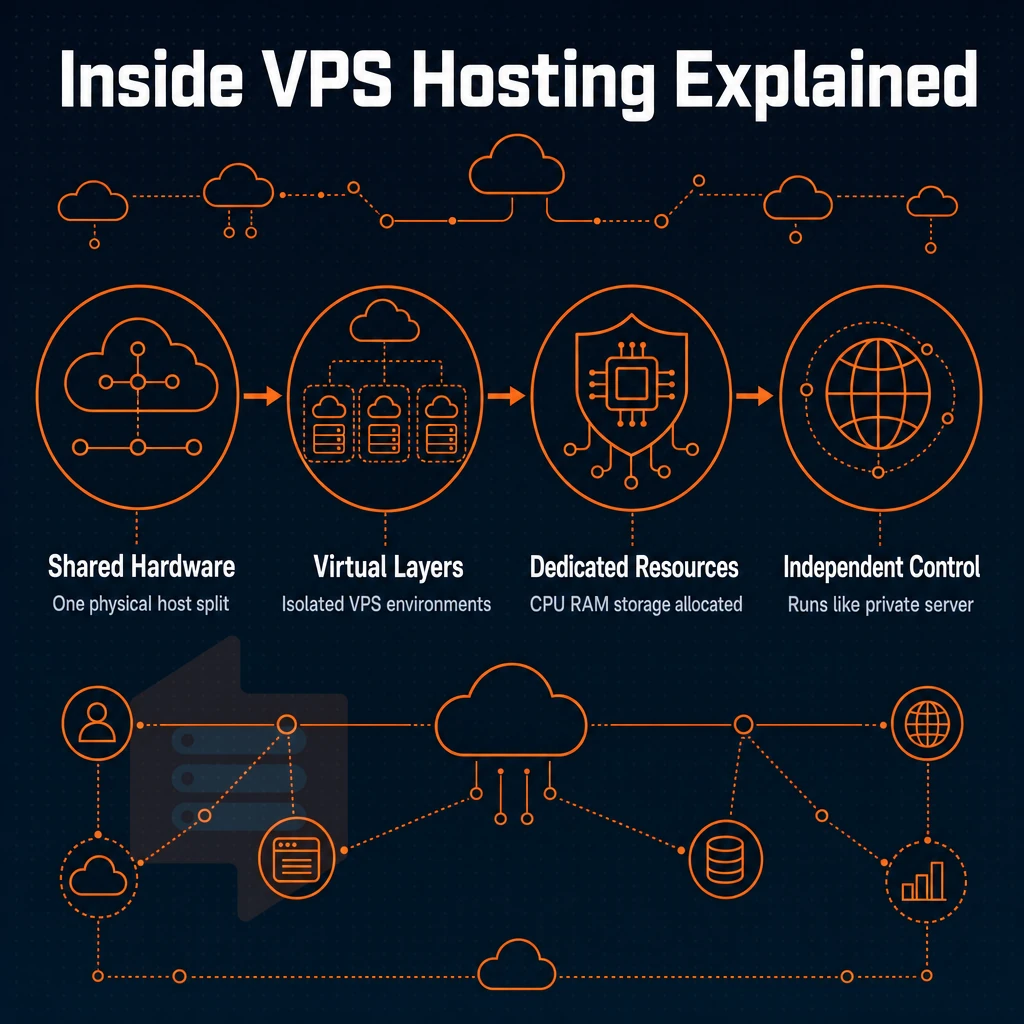
Virtual Private Servers (VPS) are somewhere between shared hosting and a full physical machine. There is one physical server which is divided up using virtualization technology to create a number of tenants, or virtual machines. Each virtual machine runs its own operating system and is allocated a set of resources.
That VPS runs independently of all the other tenants on the same server. Each tenant effectively operates their own server environment with guaranteed resource allocation and administrative control. Understanding how VPS functions at the hypervisor level helps clarify why resource isolation remains so consistent across different tenant workloads.
How VPS hosting works
KVM hard isolates each virtual server within a physical server, for example: RAM, CPU core count and NVMe storage are allocated in full, rather than being a pooled resource. This hard partitioning ensures predictable performance because server resources are never oversubscribed or subject to contention from neighboring tenants.
Because allocated resources remain fixed and isolated at the hypervisor level, performance benchmarks stay consistent even during peak usage periods across the physical host. Administrators can monitor system resources in real time through hypervisor-level metrics, ensuring capacity planning remains accurate and performance thresholds are never exceeded.
This way a noisy neighbor cannot consume your server resources, for example: RAM, CPU, IOPs etc, because the hypervisor kernel sets these limits for each virtual server. BuyVPS takes this and adds other limits, for example: hard memory caps on each node, and low node densities, to ensure headroom is always real. Many VPS users appreciate this strict isolation model because it eliminates performance variability caused by resource contention.
All of our VPS’s come with root access to the OS, allowing you to alter kernel parameters, install software packages and change firewall settings. This level of control extends to network configuration, allowing administrators to customize server settings for security hardening, performance tuning, and application-specific requirements.
Dedicated server vs both VPS and cloud options
A dedicated server is a physical server. A VPS is a virtual server created from a physical server. Most workloads (such as web apps, databases and APIs) require a well powered VPS. A dedicated server is only cost effective if a single tenant is going to use 100% of the server’s cores and all of its RAM. When a workload genuinely needs all the resources a physical machine can provide, a dedicated server becomes the most economical choice.
Organizations that require full hardware control, regulatory compliance, or maximum single-tenant performance often find dedicated hosting to be the only viable solution despite its higher upfront cost. For most development teams and small to medium enterprises, a virtual private server delivers the performance isolation and administrative flexibility needed without the complexity of managing bare metal infrastructure. The decision often hinges on whether your application requires elastic computing power that scales on demand or fixed resource allocations that deliver predictable performance.
Comparing hosting tiers
| Tier | Resource isolation | OS control | Uptime SLA | Best for |
|---|---|---|---|---|
| Shared hosting | None, CPU and RAM pooled | None | Varies | Static brochure sites |
| VPS (BuyVPS) | Hard caps, KVM kernel isolation | Full, custom ISO supported | 99.8% | Apps, APIs, databases, dev environments |
| Dedicated server | Complete, single tenant | Full | Varies by provider | High-throughput workloads needing every core |
BuyVPS's In-Place VPS Upgrades will allow you to Grow without worrying about IP Rotation.
VPS and cloud hosting key differences explained
Choosing between VPS and cloud hosting is a matter of 7 differences. They help you to pick the right host for your projects. Understanding the architectural trade-offs inherent in both VPS and cloud platforms enables teams to align infrastructure decisions with operational priorities and budget constraints.
Key differences at a glance
| Factor | Traditional VPS | Cloud hosting |
|---|---|---|
| Infrastructure model | Runs on a single server (one physical host) | Spread across a network of physical machines |
| Scalability | Fixed plan; upgrade requires a manual resize | Resources scale on demand, often instantly |
| Billing model | Predictable flat monthly cost | Variable, metered per hour or per resource unit |
| Redundancy | If the physical server fails, downtime is possible | Traffic reroutes automatically to surviving nodes |
| Dedicated resources | Guaranteed CPU and RAM per plan | Shared pool; noisy-neighbor risk on lower tiers |
| Root access | Full root on every plan | Varies; some managed tiers restrict OS-level access |
| Data sovereignty | Server location is fixed and known | Data may move across regions unless pinned explicitly |
Cloud VPS: where the models converge
Some of the providers that blur the lines of VPS hosting run their VPS accounts off of distributed systems. A fixed amount of resources are given to each VPS, to be in line with typical VPS hosting. However, It is given on a distributed system, which allows for live-migration in case of a failure that takes the entire physical server down for maintenance. This hybrid approach demonstrates how VPS and cloud hosting architectures can converge, offering the predictability of fixed allocations with the resilience benefits of distributed infrastructure.
The key advantage is that allocated resources remain constant and predictable, even though the underlying infrastructure provides redundancy through distribution. When evaluating both VPS and cloud models, understanding how resource allocation differs between fixed partitioning and dynamic pooling helps clarify which architecture best suits your operational requirements.
BuyVPS takes this approach, with KVM isolation, NVMe RAID10 storage, and in-place upgrades. This means you can upgrade your VPS without losing your IP address or having to re-install your OS. No migration and no surprise bills.
Which model needs more technical expertise?
VPS and cloud hosting usually mean you get to manage your own OS, but in terms of billing complexity, there is a world of difference: cloud metering means cost monitoring overhead. VPS charges a flat monthly fee, which makes it much easier to budget and to audit.
Note: Data sovereignty is often overlooked. With a VPS, your data stays in the region you chose, Amsterdam or New York at BuyVPS. Cloud platforms may replicate data across borders unless you configure explicit region locks.
While knowing the differences between all hosting services, including what VPS hosting offers, is already very valuable, the true value lies in understanding the strengths and trade-offs of each approach to make the best decision for your case. Each hosting company implements these models differently, so evaluating specific provider architectures and support offerings is essential before committing to a platform.
The hosting industry has evolved to offer hybrid solutions that combine elements of both models, giving organizations more flexibility in their infrastructure decisions. Selecting the right hosting solution requires careful analysis of your application's resource patterns, budget constraints, and long-term scalability requirements.
Common use cases: when to choose cloud hosting or a VPS
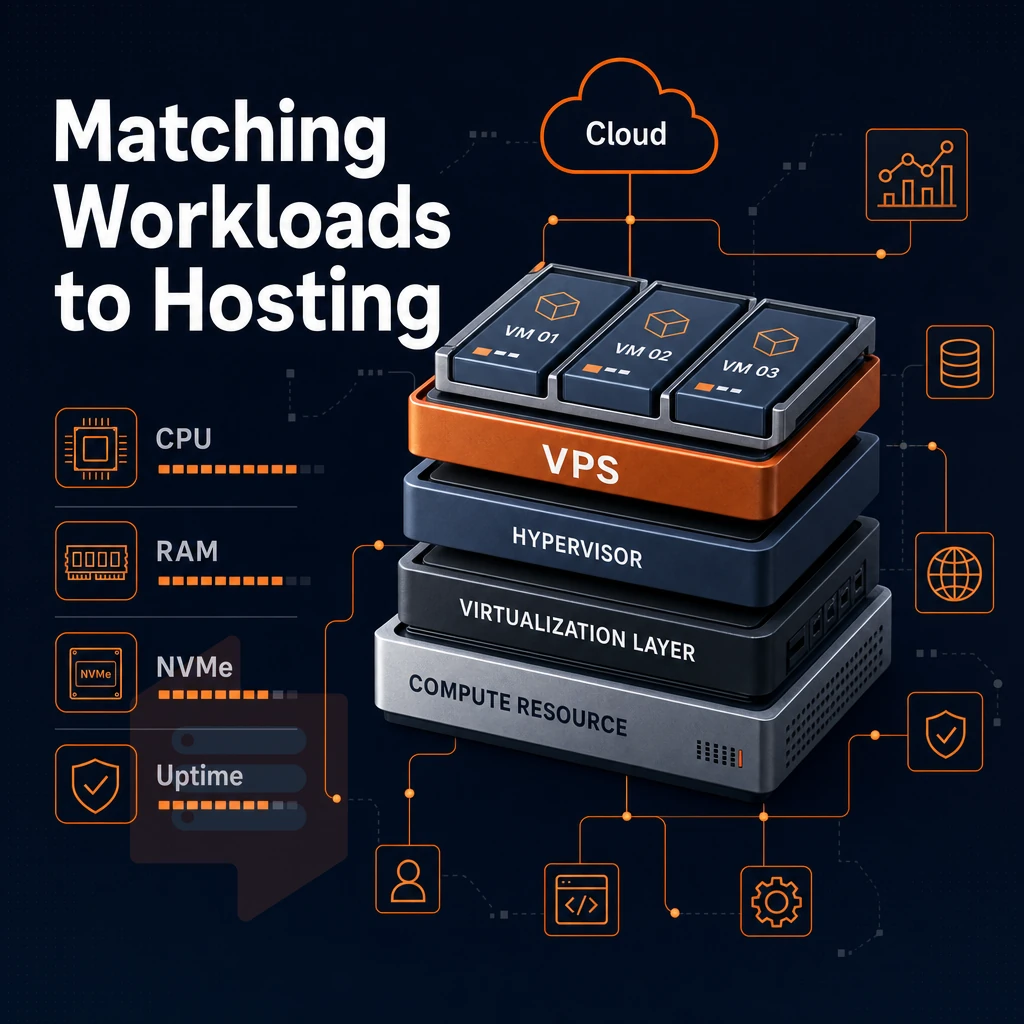
Choosing between cloud hosting and a VPS depends on the behavior of your workload. If demand is elastic and irregular then cloud hosting is probably the best option. Many small and medium businesses find VPS hosting more cost-effective when their traffic patterns are predictable and their resource needs remain relatively stable throughout the month.
When cloud hosting fits best
Cloud hosting accounts are designed for workloads that can increase quickly. High traffic e-commerce sites during sales, SaaS applications with users in different time zones, or fast growing start-ups with increasing numbers of users are examples of applications that can benefit from on-demand resource scaling across multiple servers through reliable hosting solutions.
- Unpredictable traffic spikes that outpace fixed capacity.
- Multiple websites with variable, asynchronous load patterns.
- Applications needing geographic redundancy across a distributed infrastructure.
- Teams that want a private cloud environment without managing physical hardware.
When VPS hosting fits best
VPS hosting provides a fixed root-level VPS environment with consistent performance and flexibility. For small to medium sized businesses with established web applications (e.g. CRM, staging, production API) VPS provides consistent levels of throughput without the expense of idle elastic servers.
On a VPS you always know which resources you have at your disposal each month.
Matching hosting services to your workload
BuyVPS provides VPS hosting for both steady-state and growth scenarios. BuyVPS’s KVM VPS server hosting in Amsterdam and New York come with pinned or shared AMD EPYC processors, NVMe RAID10 storage, and in-place upgrades. Upgrades happen without migration or IP rotation.
Use cases tell you which model fits your traffic pattern. Understanding the infrastructure behind each model explains why those patterns matter at the hardware level.
Cloud computing vs VPS: understanding the infrastructure behind each
Cloud and VPS hosting services are often used to describe similar products, but there are some very important differences in how they are delivered that will impact the performance, the reliability, and the control of your server. Here’s a brief primer that describes how to pick between them.
Cloud computing: distributed by design
Cloud computing uses the resources of a pool of virtualized servers spread across physical networks and data centers. Each workload runs on a virtual machine created from the pool of servers. If a node fails, the virtual machine is automatically moved to another node by the orchestration layer. Public cloud is scalable on demand while private cloud uses the same abstraction within a single organization’s boundary.
Virtual private server: one physical server, isolated slices
A VPS server runs off of a single physical server. A hypervisor manages the physical server to provision and manage multiple virtual servers, such as VPS servers, on the same physical server.
In the case of a VPS server, there is no automatic failover to another server or node for example. Redundancy is a function of the architecture of the provider’s nodes. VPS servers provide a fixed amount of RAM and CPU power to deliver consistent performance and scale of dedicated resources.
Cloud providers and the "cloud VPS" blur
In addition to Cloud Servers, some cloud providers now are offering Cloud VPS products, hosted on distributed cloud platform, not on a single server. Such Cloud VPS products offer VPS-like resources with added layer of cloud resiliency. BuyVPS offers KVM-based Cloud VPS on AMD EPYC hardware, running on high-performance NVMe RAID10 storage, in two locations: Amsterdam and New York. The resources are being capped with hard memory limits per each server to avoid typical for oversold cloud servers noisy neighbors.
| Dimension | Public cloud | VPS |
|---|---|---|
| Resource allocation | Dynamic pool, shared nodes | Fixed slice, one host |
| Failover | Automatic across nodes | Provider-dependent |
| Performance consistency | Variable under shared load | Predictable with hard caps |
| Root access | Varies by service tier | Full root on every plan |
Workloads that require elastic horizontal scaling will find public cloud an adequate solution. For workloads that require a consistent amount of CPU and RAM, with full root privileges and without the risk of resource contention, VPS cloud hosting solutions are far superior to shared alternatives, especially if they are offered on "no-oversell" hardware. The following sections will translate this infrastructure knowledge into a decision making framework.
How to choose between VPS and cloud hosting
Five questions to ask will enable you to find the best web hosting solution for your needs and ensure that you don’t end up with an expensive mistake.
Assess your virtual private server constraints
- Budget predictability. Cloud billing is usage sensitive which means very variable and typically unpredictable for ‘spiky’ workloads. VPS on the other hand can provide a fixed monthly line item which finance can easily budget for.
- Technical expertise. A VPS runs on one server and behaves like a Linux box you already know. cloud-based infrastructure adds orchestration layers. If your team lacks that depth, start with VPS and grow into cloud tools gradually.
- Workload type. As workloads such as databases, APIs and internal tools remain steady, VPS is the most suitable choice. However, highly variable traffic such as for example for flash sales or seasonal campaigns is better served by a cloud hosting solution that can scale up or down on demand.
Evaluate compliance and scale
- Data sovereignty: Data needs to stay within a country’s borders. Check with your web hosting provider to see if they can guarantee that your data is stored in a specific physical region. Note that with a VPS you know the location of the node(s) that host your VPS. With a cloud hosting provider, the data might be stored in different physical regions unless you lock it down.
- The scalability ceiling: Fast VPS cloud upgrades are still limited by the power of individual nodes. So, if you’re expecting 10 times as much traffic within the next 12 months, you need to factor this into the plan you choose now. I asked all the main hosting companies if they do in-place upgrades (i.e. without moving your server to a different node) and therefore without having to reassign your IP address, and BuyVPS does.
Make the call on your virtual private server
Use this checklist. If you answer yes to three or more items in a column, that's your tier.
- Choose VPS: fixed budget, steady traffic, root-level control, known Linux admin skills, specific data-center location required.
- Choose cloud: unpredictable spikes, multi-region redundancy, managed web hosting preferred, minimal ops staff.
Note: Both options have an upper limit. Teams that outgrow VPS and find cloud costs unmanageable should evaluate dedicated server hosting as a third path, a hosting provider running bare-metal gives maximum performance at a predictable cost.
Along the way, we also point out scenarios where cloud hosting can work against you.
Why choose BuyVPS for cloud hosting vs VPS workloads
Once you've worked through the cloud hosting vs VPS comparison, the next question is which virtual private server actually delivers on its specs. BuyVPS is built for buyers who won't accept shared-vCPU noise, oversold nodes, or surprise renewal fees.
- True KVM isolation. Every VPS runs a separate kernel. No shared-memory side-channel risk, no noisy-neighbor CPU contention across the same physical server.
- Dedicated-core D-tier. Pinned AMD EPYC Genoa cores give predictable latency, critical for databases and latency-sensitive web applications.
- NVMe RAID10 storage. PCIe-direct drives with published benchmark results: 122,959 4K read IOPS measured under real fio load.
- No-oversell policy. Hard memory caps per node, low node density by design. Allocated resources stay allocated.
- In-place upgrades, no IP rotation. Scale resources without migrating or losing your dedicated IP.
- Amsterdam and New York data centers. Identical hardware, dual-stack IPv4 + IPv6, full root privileges, and custom ISO on every plan.
We've operated founder-run infrastructure since 2002, no bait-and-switch tiers. If you're ready to compare plans, visit our comparison page or reach out to our engineering team directly.
Frequently asked questions
Does a cloud or VPS operating system outperform a dedicated server setup?
Neither is universally better, the right choice depends on your workload. Cloud hosting wins when you need instant horizontal scaling or pay-per-second billing across unpredictable traffic spikes. A VPS wins when you need predictable performance, fixed costs, and full root control over a stable environment. For most production workloads with known resource requirements, a well-specified VPS ranks among the better hosting solutions at a comparable price point, outperforming cloud instances that spread workloads across multiple servers because there is no noisy-neighbor overhead from shared, dynamically allocated hardware.
Is cloud cheaper than a virtual private server or dedicated server?
Teams that run baseline workloads 24/7 consistently find that VPS server infrastructure delivers a lower total cost of ownership than equivalent cloud instances once data transfer fees are factored in.
How does a VPS differ from a cloud platform compared to a dedicated server?
A VPS is a single virtualized server with dedicated, guaranteed resources, fixed vCPUs, RAM, and storage on a specific physical host.
VPS environments offer simpler, more predictable performance; cloud platforms offer elasticity and managed services at the cost of pricing complexity.
What are the 4 types of hosting, including dedicated hosting?
The four main types are shared server hosting, VPS hosting, cloud hosting, and dedicated server hosting. shared web hosting places many sites on one server with no resource isolation. VPS hosting carves a physical server into isolated virtual machines with guaranteed resources. Cloud hosting distributes workloads across a networked pool of servers for on-demand scalability. Dedicated hosting gives you an entire physical machine to yourself, maximum performance, maximum cost.
Can a VPS run in a cloud environment?
Yes. Many cloud platforms provision their compute instances as KVM or similar virtual machines, effectively VPS instances running on cloud hosting platform. The distinction is architectural: a traditional VPS is tied to a specific physical host with a guaranteed local server environment, while a cloud-hosted VM may live-migrate between hosts. Providers like BuyVPS specializing in hosting websites run KVM with a separate kernel per VPS on dedicated physical nodes, making it easier to scale resources consistently while eliminating the live-migration jitter common in large cloud pools.
Which is better for an e-commerce store, cloud hosting or VPS?
A VPS is the stronger default for most e-commerce stores. Checkout flows and database queries demand consistent low latency, exactly what a VPS with pinned resources delivers. Cloud hosting makes sense if your store sees extreme, unpredictable traffic spikes that a fixed-size VPS cannot absorb. For stores with seasonal peaks but otherwise stable traffic, a right-sized VPS from a reliable hosting provider on NVMe storage handles the load reliably and, unlike shared hosting, keeps monthly costs predictable with no surprise egress bills after a flash sale.
What happens to a virtual private server if the physical server fails?
This is the key resilience trade-off versus cloud platforms, which can reschedule workloads across surviving hardware automatically.
For mission-critical uptime beyond that threshold, running identical VPS instances in the same hosting environment and operating system across two locations, Amsterdam and New York, provides geographic failover without the complexity of a full cloud architecture.
Cloud hosting and VPS hosting are solutions to different problems. Cloud hosting scales horizontally on demand. VPS hosting gives you dedicated resources, the performance of a dedicated server, and root-level access to a virtual server, all ideal for workloads of consistent volume where you can run your own stack.
The deciding factor between Resource predictability and Elastic scaling for most developers, SaaS applications and business workloads.
If a VPS fits your workload, BuyVPS runs KVM-isolated servers on AMD EPYC hardware with NVMe RAID10 storage across Amsterdam and New York. No overselling, no hidden fees, and in-place upgrades that keep your IP address intact. Browse the plans at BuyVPS.com and find the tier that matches your requirements.