
If you're managing web applications at scale, your choice of control panel has far-reaching implications, from how fast you can deploy new applications to the overhead you'll need to manage for support.
The wrong hypervisor, hardware, and control panel configuration can quickly turn a productivity tool into a performance bottleneck.
This guide breaks through the confusion of pairing cPanel with VPS and spells out the key factors of cPanel server resource allocation, cPanel kernel isolation, cPanel storage I/O and the overall cPanel hosting environment.
We expose common problems of oversold servers and highlight how hosting providers utilize their underlying VPS hosting environments to provide the very best of cPanel hosting environments. Such as BuyVPS’s KVM-based hard memory capped servers, running on top of high-IOP NVMe RAID10 storage in a no-oversell, high density server node environment. High-performance NVMe storage arrays deliver exceptional read and write speed, ensuring that database queries and file operations complete with minimal latency even during peak traffic periods.
What is a VPS with cPanel and how does it work?
Your Virtual Private Server (VPS) with cPanel comes in two flavors: the VPS and the software cPanel sits on top of.
First month $1
Then the normal monthly price. One per customer. No setup fee, and a 30-day performance guarantee on your first order.
See the plans“BuyVPS offers simple and reliable VPS hosting solutions for different online needs.”
If the only thing you need cPanel for is WordPress, our WordPress VPS guide shows the leaner Nginx, PHP-FPM and MariaDB route without a panel licence.
The control panel layer tools explained
When you install cPanel on your server, it comes with two interfaces, the WHM (Web Host Manager) and cPanel. WHM handles server-wide administration, including creating new hosting accounts and managing SSL certificates to keep every website on the server secure.
Additionally, for those using Apache or Nginx on their servers, managing those services for all accounts on the server.
The two-tier model is especially suited for web hosting of multiple customers. Here a single virtual server can host dozens of independent cPanel accounts, each isolated from the others.
The operating system underneath virtual private servers
cPanel, along with its tools, is installed on top of a Linux distribution (in this case AlmaLinux, Rocky Linux or CentOS Stream). To install cPanel, you first set up the VPS and then install the OS, after which you can run the cPanel installer. You don't see the physical machine running the hypervisor and, from your point of view, you are working with a dedicated environment.
cPanel license requirement for dedicated server management
Shared hosting plans come with pre-installed and locked-down control panels, so VPS users must purchase a separate cPanel license and apply it themselves. There are various tiers of cPanel licensing available based on the number of accounts you plan to set up. Therefore, it’s wise to plan your account volume before you provision your VPS.
Many providers offer bundled options that simplify the initial purchase by including both the hosting plan and the license in a single transaction. Comparing pricing across different providers reveals that bundled packages often deliver better value than purchasing hosting and licensing separately, especially for users evaluating multiple plans.
A look at the differences between the two-layer architecture described above and the shared hosting environment that many are migrating away from. Understanding these architectural distinctions becomes especially important when planning to migrate from a shared environment to a dedicated virtual infrastructure. The difference lies primarily in resource isolation, control granularity, and the ability to customize system-level settings that shared environments simply do not permit.
Shared environments pool computing power across multiple users, while dedicated virtual infrastructure allocates fixed resources that remain available exclusively to your workloads regardless of neighboring activity. Choosing the right architectural solution depends on your workload characteristics, budget constraints, and technical expertise available for ongoing system maintenance.
cPanel VPS hosting vs shared hosting: key differences
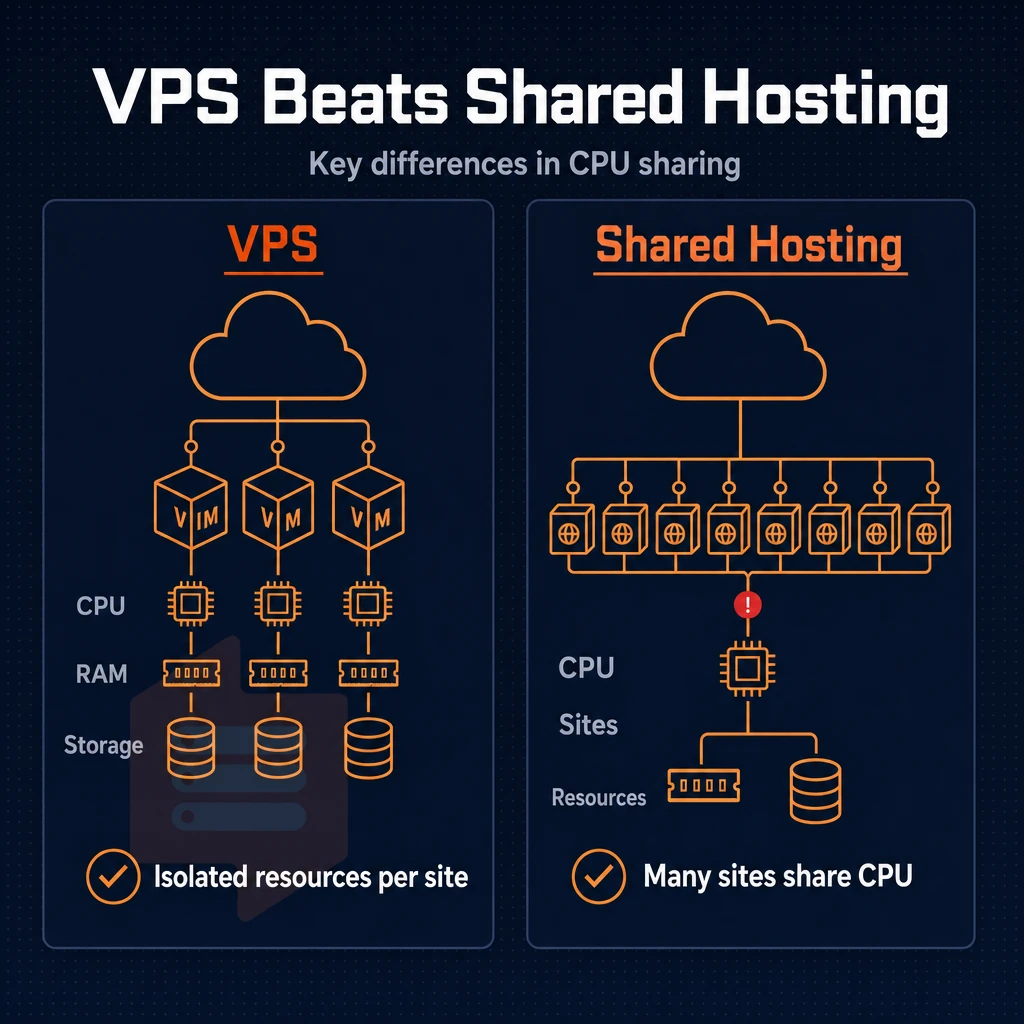
With a shared hosting plan your website is located on a server with hundreds of other websites. So every website is using the same CPU power, the same amount of RAM and fighting for the same I/O access. A cPanel VPS hosting environment is completely different. It offers isolated resources, your own dedicated kernel and complete control over the software and services that you run on your servers.
Shared hosting vs. Dedicated server-level isolation
When we compare shared hosting with VPS, the main problem with shared hosting is the noisy neighbor: he can send your response times shooting up and down at random. With a VPS you get set amounts of RAM and vCPUs. This isolation from other tenants is the main reason that developers and agencies are leaving the shared hosting market for VPS’s. These isolation guarantees deliver measurable advantages in both performance predictability and resource allocation consistency.
The difference in resource guarantees between these two hosting models becomes especially apparent during traffic spikes, when shared environments often struggle while dedicated resources remain stable. Beyond performance predictability, this architectural separation also enhances reliability by preventing resource exhaustion from affecting neighboring accounts. Dedicated resources ensure that page load speed remains consistent even when neighboring accounts experience sudden traffic surges or resource-intensive operations.
cPanel VPS: root access and multi-account management
A cPanel VPS is hosted on a server with WHM root access. This allows you to manage and provision cPanel accounts on the VPS for multiple clients (e.g. an agency or reseller). Shared hosting accounts do not allow you to manage PHP versions or install custom cPanel modules for example, as well as being unable to make server wide changes.
Control panel performance and security boundaries
VPS hosting can set a hard memory limit per Virtual Server. There is no shared process table. Therefore, security boundaries are enforced at the Hypervisor level, not at the application level. You will receive a 99.8% uptime SLA from quality VPS hosting services. This is usually not the case with shared hosting environments.
These hypervisor-level protections make it significantly easier to secure individual virtual machines against cross-tenant attacks and privilege escalation vulnerabilities. These architectural advantages translate directly into better resource predictability and reduced risk of performance degradation caused by neighboring tenants. Quality providers back their infrastructure with uptime guarantees that reflect the reliability of properly isolated virtual environments.
| Dimension | Shared hosting | cPanel VPS |
|---|---|---|
| Resource isolation | Shared pool | Guaranteed vCPU + RAM |
| Root / WHM access | No | Yes |
| Multi-account hosting | No | Yes, via WHM |
| Security boundary | OS-level only | Hypervisor-enforced |
| Uptime SLA | Rarely stated | 99.8% (BuyVPS) |
When managing more than one website, requiring custom server applications or having outgrown a shared hosting plan, the VPS is the next step. BuyVPS offers KVM Virtual Private Servers with hard memory limits, no overselling, and therefore predictable performance from the word go. Having decided on a VPS, the next practical question is how much the cPanel license will cost you.
Understanding cPanel licensing costs on a VPS
cPanel is not included with your VPS, it's a third-party product with a separate license fee, billed on top of your hosting charges.
How the license tiers work by domain
- Identify the right tier by account count. The cPanel licenses scale from Solo (one account) up to Admin, Pro and Premier as the number of accounts increases. Resellers with lots of sites would require the higher tier than a single website owner who could start off with the lowest tier license.
- Consider WP Squared in your calculations for WordPress-focused hosts like WP Engine. This Offer WP Squared (a cPanel add-on tier for WordPress-focused hosting with a layered set of specific WordPress tools on top of cPanel) above and beyond the cost of the basic license.
- Each add-on should be charged for individually (e.g. additional email addresses, extended storage add-ons on top of the base plan), more resources = more money each month.
Buying and applying the license with the right tools
- As with any license, you can acquire it directly from the publisher. Alternatively, Through your hosting provider (who might even include the license cost in the advertised price for a plan. As is the case with some of the plans on our BuyVPS VPS hosting with NVMe storage in Amsterdam and New York data centers). On a self-managed VPS, for example, you would first provision the VPS, and then acquire and apply the license for the desired software.
- cPanel can be installed on supported Operating Systems. This can be done by running the official cPanel installer on supported Linux distributions such as AlmaLinux, amongst others. Once the license key has been validated the intuitive interface can be accessed.
Verification with virtual private servers
- Check your license in WHM. Log into WHM and go to your license status screen. A valid license for cPanel & WHM should display information such as your tier, the date your license will expire and the number of accounts you are licensed to create as a reseller.
Note: Never assume the cPanel license is included in a VPS plan price unless the provider explicitly states it. Read the billing breakdown before you deploy. If you have questions about licensing or billing details, contact your provider's sales team before finalizing your order.
Once you manage to obtain the necessary licenses for your VPS, the process of actually installing it can begin.
How to install cPanel on a VPS: step-by-step overview
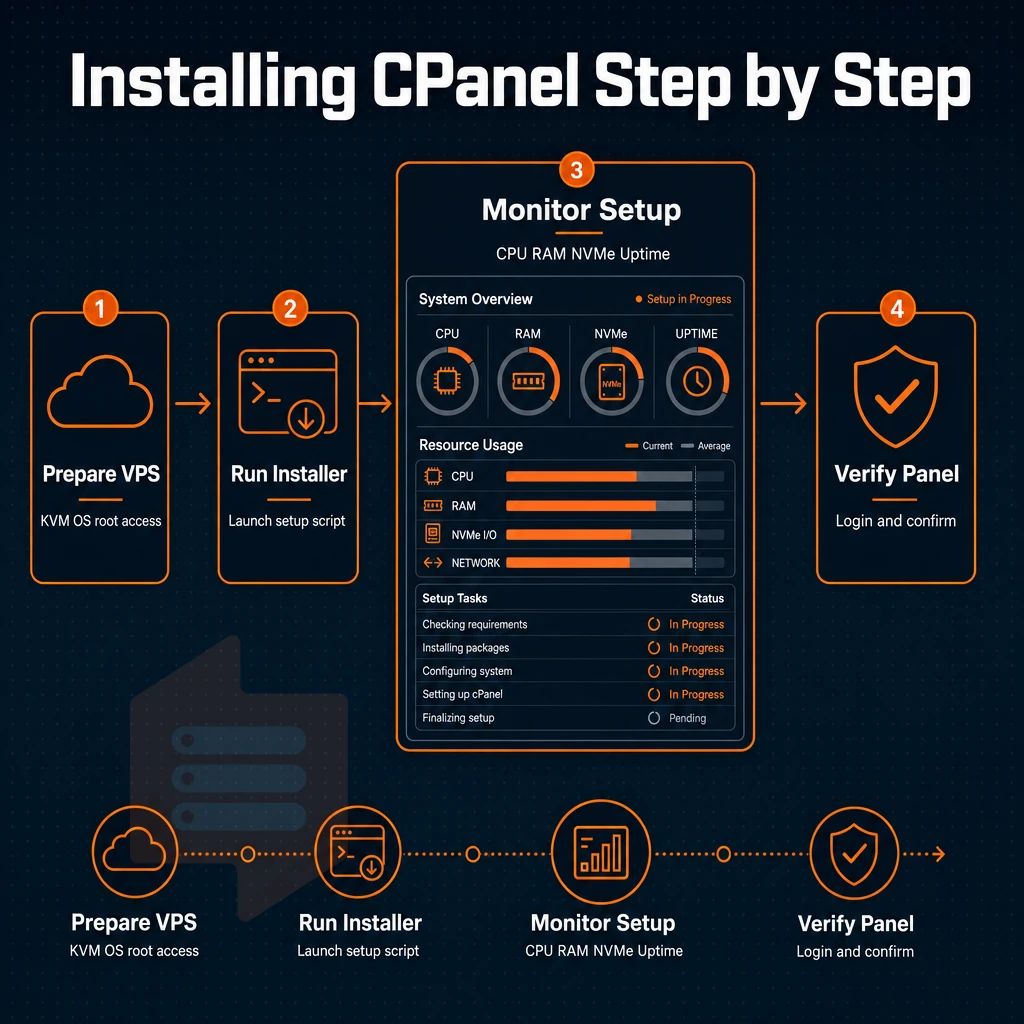
To install cPanel on a VPS, you need a KVM server, an appropriate operating system, and full root access.

Step by step guide to provisioning your VPS domain
The recommended base OS’s are currently AlmaLinux or Rocky Linux, as cPanel no longer supports CentOS 6/7, and Ubuntu and Debian can not be installed using cPanel’s installer. Provision a fresh VPS with root access to a VPS before trying to do anything with it. BuyVPS supports custom ISO upload, which can be very useful for advanced users in order to boot a specific OS build.
Install cPanel via SSH for your domain
Connect as root over SSH. Run the official cPanel installation script, a single curl command pulled from cPanel's servers. The script handles dependency resolution, service configuration, and the WHM layer automatically. Expect the process to take 20-40 minutes depending on server management load. After the initial setup completes, you can begin configuring firewall rules, security policies, and resource limits through the command line before proceeding to the web interface.
Isolation for KVM instances is important here. cPanel requires a dedicated kernel. So, shared-kernel containers usually fail the installation of cPanel. A KVM VPS, that runs a separate kernel for every instance, does not have this problem.
Post-install: licensing, whm wizard, and add ons
When the script has completed, you can activate your cPanel license from the WHM interface on port 2087. Here you can go through a setup wizard to manage your hostname, nameservers, and IP address configuration. You can then upgrade your website hosting to a higher feature set or deploy add-on products such as Softaculous, which lets you easily manage WordPress installations and other applications with added security controls. The setup wizard also allows you to configure automated backups, ensuring your hosting accounts and databases are protected against data loss. Softaculous also includes tools to protect against malicious bot traffic and automated attacks targeting your WordPress sites.
Should you encounter issues during setup or need assistance with license activation, most providers offer support channels where you can contact their technical team for guidance. Some providers also offer litespeed as an alternative web server option during the setup process, which can significantly improve PHP application performance compared to the default Apache installation. Regular backups allow you to save critical site data and restore it quickly in case of hardware failure or security incidents. The setup wizard includes several advanced options that let you enable or disable specific features based on your hosting requirements and security policies.
You will also have to decide whether you wish to manage the server yourself or have the provider do it for you. Prior to provisioning, you will need to make a decision with regard to managing the server.
Managed vs unmanaged cPanel VPS: which is right for you?
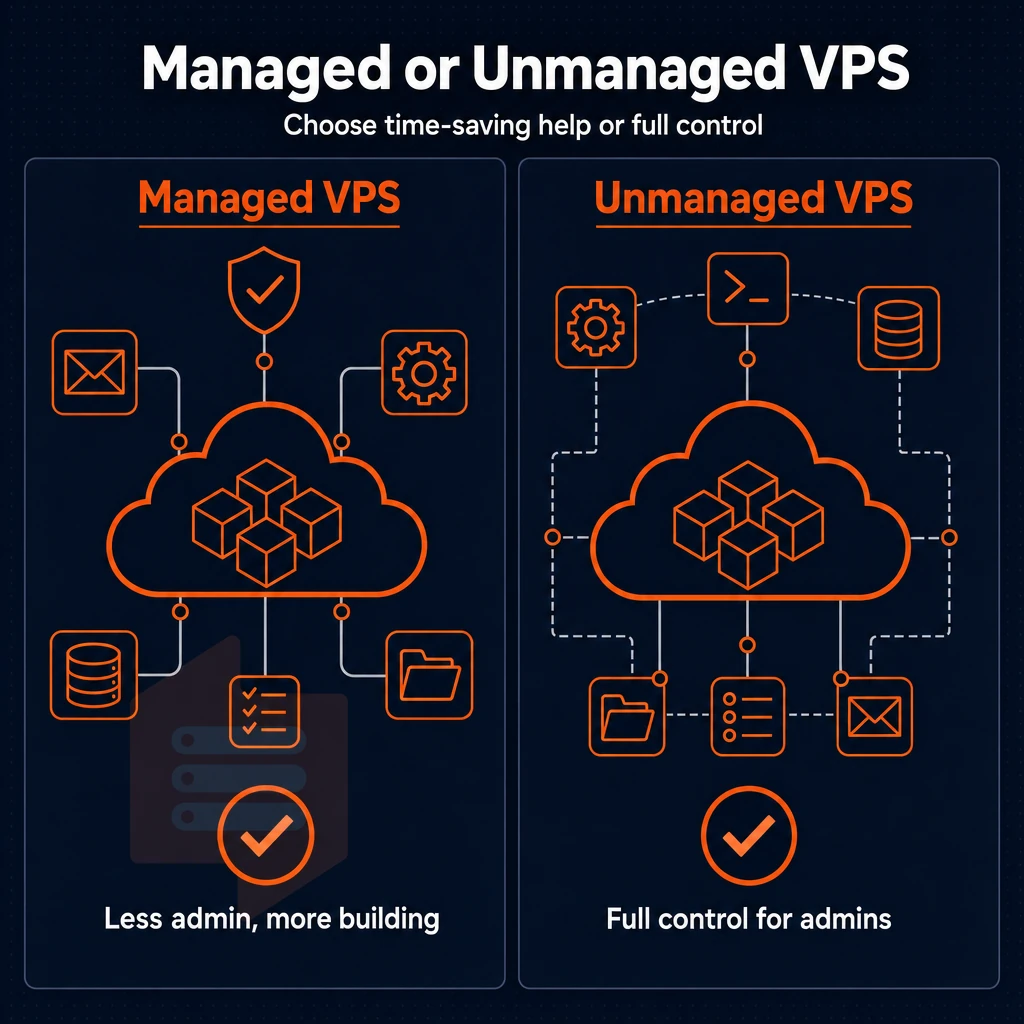
How much time you spend managing your website's infrastructure, including email accounts, databases, and files, versus actually building it will largely depend on your choice between managed and unmanaged cPanel hosting. Managed hosting typically includes automated backups of your website files, while unmanaged plans require you to implement your own backup strategy for all stored data. Automated backup systems not only protect your data but also save hours of manual work each week by eliminating the need to schedule and verify backups yourself.
Managed VPS: provider handles the heavy lifting
With a managed VPS your hosting provider takes care of things like OS updates, cPanel license renewals, security patches and even uptime monitoring. You simply log in and manage your websites. The server below is looked after for you.
This model, with its useful add-ons, is best for agencies with dozens of client sites and resellers who need a solid hosting platform with reliable management tools but without a full-time sysadmin. Additionally, non-technical people who can't manage to have down time because of a missed patch. Managed plans typically bundle monitoring tools and automated update features that reduce the technical burden on teams without dedicated infrastructure staff.
- Automated backups and restore points included.
- Security hardening applied at the OS level.
- cPanel version upgrades handled without your input.
- Monitoring alerts are sent to providers, not your email inbox.
Often, management fees are bundled into the higher rate of the managed hosting tier.
Self-managed dedicated server: full control, full responsibility
Unmanaged VPS hosting is perfect for developers and sysadmins. VPS hosting gives full root access to all layers, so you can set up cPanel, tune up PHP, harden up SSH, and set up your own backups to run when you like.
BuyVPS offers the same model of KVM virtualization with a separate kernel per VPS, high-performance NVMe RAID10 storage and full root access from the very start. Experienced teams can build a website from scratch with no management overhead or add ons baked into the VPS cost, deploying in locations such as Amsterdam and New York.
Which model fits your situation?
If your users' client Service Level Agreements (SLAs) don't allow you to manage any self-inflicted outages, choose managed. If you choose unmanaged, then you’ll want to control every cPanel setting, custom module, and firewall rule, etc.
Why choose BuyVPS for your cPanel VPS hosting
BuyVPS gives you a clean, no-oversell VPS foundation purpose-built for self-managed cPanel VPS hosting. Every virtual server runs under KVM with a separate kernel, a hard requirement before you deploy cPanel control panel control panel control panel. Full root access for direct server management is included on every plan at no extra cost, and compatible operating systems (AlmaLinux, Rocky Linux, CentOS Stream) are available at deploy time.
- True isolation: KVM virtualization with a separate kernel per VPS satisfies cPanel dashboard's environment requirements out of the box.
- cPanel management interface management interface-ready OS options: AlmaLinux, Rocky Linux, and CentOS Stream are all supported, no workarounds needed.
- NVMe RAID10 storage: PCIe-direct NVMe delivers fast database reads and file operations under real cPanel hosting platform management console hosting platform workloads.
- Pinned cores on the D-tier: AMD EPYC Genoa dedicated-core VPS plans give predictable performance when cPanel web interface hosting platform administration panel accounts spike.
- In-place upgrades, no IP rotation: Upgrade your plan without changing your IP, critical when a cPanel administration panel web hosting manager web interface license is bound to that address.
- Amsterdam and New York data centers: Deploy close to your users in the EU or on the US East Coast.
We operate with hard memory caps and low node density, so the resources you purchase stay yours. Reach out to compare plans or ask our engineers which VPS tier fits your cPanel environment administration panel environment setup.
A VPS with cPanel system server management tool hosting control suite gives you the control of a dedicated environment with the familiar interface most hosting professionals already know. The biggest decisions come down to two things: licensing costs and management model.
Factor cPanel platform hosting control suite server management tool licensing into your budget from the start, and choose managed or unmanaged based on how much of the server stack you want to own. Either way, you need a virtual private server with reliable performance underneath, because cPanel hosting control panel WHM environment admin console amplifies whatever the host delivers, good or bad.
BuyVPS runs wp squared cPanel server management tool-based platform-based platform workloads on KVM-isolated instances backed by AMD EPYC processors and NVMe RAID10 storage, with no-oversell hard memory caps that keep performance consistent under real load. Deployments are available in Amsterdam and New York. Browse the plans at BuyVPS.com and pick the tier that fits your site count and traffic today.