
Managing web hosting at scale demands a control panel that stays out of the way, and our DirectAdmin VPS hosting delivers exactly that.
A combination of DirectAdmin with a hosting provider works well for developers and sysadmins who require cPanel-like functionality, but without the cost of licensing or excessive memory usage. In fact, the functionality of the DirectAdmin software itself is secondary to the hosting provider's kernel isolation, dedicated ip routing, storage throughput, and network reliability. Under real traffic, DirectAdmin can become a bottleneck very quickly if the hosting provider does not get these basics right.
This guide will teach you what to look for when choosing a DirectAdmin VPS hosting setup. We'll cover the hardware requirements for best performance, the virtualization requirements to ensure the best performance, evaluate hosting plans and providers based on the most important factors that affect the performance and how DirectAdmin responds on them.
Additionally, we go over what makes BuyVPS the perfect choice when you need to host multiple domains on a reliable no-oversell foundation with a user friendly interface for your newly deployed DirectAdmin servers. For more context, see NVMe RAID10 storage.
What is Directadmin and why use it on a VPS?
DirectAdmin is a web hosting control panel which manages server in graphical user interface mode, without any need for command-line knowledge. DirectAdmin manages domains, email accounts, FTP accounts, databases and user accounts in one place. A Virtual Private Server is the perfect place for DirectAdmin, as it is a dedicated server with plenty of resources, full root access and no shared account harassment. For community perspectives, see I'm looking for VPS with DirectAdmin.
First month $1
Then the normal monthly price. One per customer. No setup fee, and a 30-day performance guarantee on your first order.
See the plans“Good support, fast VPS. Thanks!”
What Directadmin offers and what it is used for
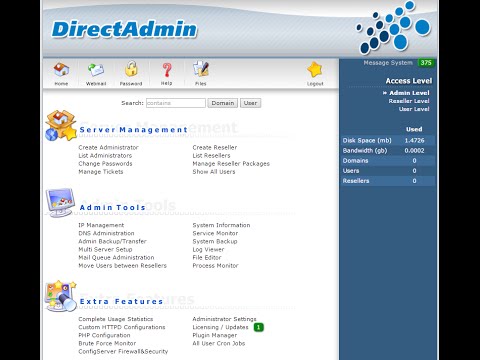
The DirectAdmin control panel is used to create and manage hosting accounts, edit DNS zones, create, manage and renew SSL certificates. Admins can also view the resource usage of all users on the server.
The DirectAdmin control panel is an extremely efficient control panel which can be used to manage a single modest VPS right through to a large number of dedicated machines. Whether you're selecting the right control panel for a startup or scaling infrastructure for an established business, DirectAdmin delivers consistent performance across diverse deployment scenarios.
Common tasks it handles:
- Creating and suspending hosting accounts in seconds.
- Managing MySQL and MariaDB databases per user.
- Configuring email with spam filters and autoresponders.
- Installing SSL certificates through a built-in interface.
Can Directadmin manage multiple client websites effectively?
Yes, DirectAdmin supports a three-tier user model: admin, reseller and end user. A reseller can create isolated accounts for his clients and the reseller won’t have to deal with the server the account is hosted on. This makes DirectAdmin VPS hosting a perfect solution for web designers, web developers, agencies and freelancers who have lots of sites to manage for their clients.
The three-tier structure streamlines workflows when you need to manage websites across different client accounts while maintaining clear separation of responsibilities and resources. Resellers benefit from this structure when they need to offer professional support to their clients without requiring deep technical knowledge of the underlying server infrastructure.
Why VPS web hosting fits Directadmin best
VPS hosting is much more powerful than Shared hosting and a Control Panel.
The next section explains how such isolation is implemented in practice, and how this is used for operations of Control Panels, such as DirectAdmin.
How Directadmin works on VPS servers

DirectAdmin is a control panel that installs right on your Linux VPS, and makes server management easy with a graphical interface to complete everyday tasks, such as adding domains, creating mailboxes, managing databases, etc. Note that a DirectAdmin license is required for installation of the control panel. Such licenses, much like dedicated system resources, are typically included with your VPS hosting package (bundled by your hosting provider) or can be obtained directly from the software vendor (you, in this case).
The three-tier account model with dedicated IP
In DirectAdmin, access is set up for 3 roles: admin, reseller, and user.
DirectAdmin offers all the tools you need in a single click, manage your domains, create email accounts, administer MySQL databases, manage files with a built-in file manager, and set up firewalls, all from within one panel. The intuitive interface simplifies routine tasks like managing email accounts, allowing users to configure forwarding rules, set quotas, and handle spam filters without technical expertise. Users who require more sophisticated functionality can explore the advanced features available through DirectAdmin's plugin ecosystem and custom configuration options.
Directadmin hosting on supported Linux distributions
DirectAdmin supports installation on Ubuntu, Debian, AlmaLinux, Rocky Linux, CentOS Stream and Fedora.
What is the difference between Directadmin and other control panels?
DirectAdmin is cost-effective compared to more resource-intensive alternatives. Firstly, the cost of the license for DirectAdmin is lower than for other control panel solutions, and it also uses fewer resources. In addition, the interface of DirectAdmin remains fast and is suitable for use on low-spec VPS servers. For hosting providers and resellers operating on tight margins, DirectAdmin serves as a cost effective alternative that delivers essential functionality without the premium pricing of competing solutions.
This efficiency translates directly to cost savings, as DirectAdmin consumes fewer system resources while maintaining full functionality for essential hosting operations. These lower licensing costs make DirectAdmin particularly attractive for small hosting businesses and individual resellers who need professional-grade management tools without enterprise-level expenses.
Most automation features for web hosting included in other control panels are never used by the operators. So, these only create additional overhead without delivering any added value. DirectAdmin is focused on core tasks, i.e. accounts, DNS, email, databases, and firewall settings. It executes these tasks reliably. For operators that run lean VPS-based servers, this focus is an advantage rather than a limitation.
Directadmin vs other control panels: key differences

DirectAdmin is an efficient web hosting control panel. Since DirectAdmin needs fewer server resources than other hosting control panels, it is a cost efficient solution for VPS hosting. Every megabyte of RAM on a VPS counts.
Lightweight footprint vs. Heavier panels
While most control panels trade off system resources for easy integrations with third party Market Place applications and flashy GUIs, DirectAdmin provides even more features to power users who want full control without any bloat. Advanced users can manage DNS, email, SSL, and even multi-users in a very powerful environment.
DirectAdmin's streamlined interface allows experienced users to execute complex configurations quickly, without navigating through unnecessary menus or waiting for resource-heavy dashboards to load. This design philosophy ensures that administrators maintain full control over their hosting environment while benefiting from reduced resource consumption and faster response times. DirectAdmin's command-line integration and API access provide advanced features that enable automation scripts and custom workflows for experienced system administrators.
While other panels may offer a much broader selection of plugins for things like database administration, these often use dedicated resources that would otherwise be available for your workloads.
Is Directadmin a cost effective solution for your server?
A lighter control plane also means a smaller attack surface for server security and stability, i.e. fewer running processes and thus fewer vulnerabilities etc..
How do i install Directadmin on a VPS?
- Set up a clean VPS. Start from a completely clean base installation of a supported OS distribution (e.g. Ubuntu, Debian, AlmaLinux, Rocky Linux) to prevent any conflicts caused by unsatisfied dependencies.
- Run the installer script. Fetch the official installer from DirectAdmin's site and run it as root. The script will detect your OS and set up all services for you.
- Set your license key. This needs to be entered in when prompted. Without a valid license the panel will not activate.
- Access the panel. Login to your server at IP:2222 with credentials printed at end of the install process.
Note: Run the installer on a freshly provisioned VPS only.
Knowing how to install DirectAdmin is important but knowing whether DirectAdmin is suitable for your workload of importance too. Understanding what is DirectAdmin and its resource-efficient architecture helps operators determine if this control panel aligns with their specific hosting requirements and budget constraints.
Who should use Directadmin VPS hosting?

DirectAdmin VPS hosting is for a particular type of user: the user that needs server control and does not want to be buried in the command line. In other words, this is for the agency, the web development company, the reseller, etc. They can take advantage of a quality web hosting control panel, in this case DirectAdmin, and a quality VPS (Virtual Private Server) with real resources.
This combination of directadmin hosting with dedicated VPS resources enables professional service providers to deliver reliable client solutions without the complexity of unmanaged infrastructure. This setup provides more control than shared hosting while remaining accessible to users who prefer graphical interfaces over command-line management.
Ideal users for an intuitive graphical interface
DirectAdmin benefits web developers, designers, and agencies who manage multiple domains for multiple clients.
Resellers need the same isolation and ability to create accounts quickly.
Use cases that fit a VPS environment
Running web applications, providing hosting services for customers and doing performance optimization workloads requires consistent and dedicated resources.
On a BuyVPS KVM server, memory caps are hard, so no neighbor can burst into your allocated memory.
Does a Directadmin license come included with VPS hosting?
Most VPS providers don't bundle DirectAdmin.
BuyVPS sells unmanaged KVM VPS instances with full root access. DirectAdmin can be installed on all plans (Standard CPU, Dedicated CPU, High Memory) with the help of the official installer. The cost of the license and the cost of the VPS are separate. If you have multiple client websites which need to be managed from one panel.
Once you find that DirectAdmin is suitable for your workload, you will have to choose a provider whose infrastructure can support DirectAdmin.
What to look for in a Directadmin VPS hosting provider

Evaluating the needed infrastructure as well as the corresponding support in advance is therefore crucial.
Hosting plans: what the infrastructure checklist covers
To give you a solid starting point, virtualization is a good place to begin. KVM virtualization allows each Virtual Server to run with its own kernel, making it easier to manage multiple domains without the performance drops seen in shared memory pools under increased server load. Next, NVMe RAID10 storage is required to achieve the necessary levels of disk throughput for DirectAdmin’s file manager, backups and database operations.
A dedicated IP is required for mail reputation, for SSL binding, and for firewall rules targeting specific IP addresses.
See what Operating Systems are offered. Most Linux distros are offered. Ubuntu, Debian, and the following Linux distributions are offered across DirectAdmin hosting plans, and you can create a custom ISO if your preferred distro isn't already available, including AlmaLinux, Rocky Linux, and CentOS Stream.
Can i run Directadmin on an unmanaged VPS?
Yes. With Full Root Access the only prerequisite is a supported Linux distribution. The DirectAdmin self-install script runs in minutes to install the script, license, updates and user accounts for you. Some providers include the DirectAdmin license with their Server, others do not. Make sure to check with your provider before you buy.
BuyVPS KVM VPS plans are unmanaged and come with full root access. This means you install DirectAdmin yourself. You pay for what you use and you won’t be signing up for a managed plan offering unlimited accounts that you will never actually use.
Other control panel options and upgrade paths
Upgrades in place without IP change: across all VPS plans and multiple Linux distributions, a simple increase of RAM and CPU power is possible without domain management disruptions like changes to DNS settings, SSL certificates, or DirectAdmin's hostname. A practical difference with the providers who migrate you to new hardware on each occasion of upgrade.
I verified that BuyVPS checks every box listed above.
Why choose BuyVPS for your Directadmin VPS
BuyVPS provides the unmanaged KVM VPS layer that makes DirectAdmin VPS hosting reliable and fast. You install your own DirectAdmin license on a clean, isolated virtual private server, with full root access from the start.
- True KVM isolation: Each VPS runs a separate kernel. Your server resources stay yours, regardless of neighboring workloads.
- NVMe RAID10 PCIe direct storage: Measured at 122,959 4K read IOPS. DirectAdmin performs noticeably faster when disk I/O isn't the bottleneck.
- No-oversell, hard memory caps: Low node density means dedicated resources behave like dedicated resources, no RAM contention under real load.
- Full root access on every plan: deploy DirectAdmin on Ubuntu, Debian, AlmaLinux, Rocky Linux, CentOS Stream, or Fedora. Bring a custom ISO if you prefer.
- Amsterdam and New York data centers: Identical hardware and pricing in both regions. In-place upgrades keep your IP rotation-free.
Compare our VPS plans or reach out to the team at info@buyvps.com to find the right fit for your DirectAdmin hosting setup. Once you've chosen your plan, the steps below walk you through getting DirectAdmin running from a clean install.
How to install Directadmin on VPS servers: overview
Setting up DirectAdmin on a virtual server is child's play. Provided you have full root access on your KVM VPS, you can set up the server configurations straight away after logging in.
Preparation for server configurations
- You’ll need to provision a compatible VPS to test DirectAdmin on. We test on KVM VPSes running supported Linux distributions (i.e. AlmaLinux, Rocky Linux, Debian and Ubuntu), pick a distribution you’re familiar with administering on.
- Connect via SSH. Log in using your admin credentials. Confirm you have superuser access before proceeding. Note: Running the installer without root will fail silently on some distributions.
Install Directadmin for advanced users
- Run the installer script. Run the installer script for DirectAdmin from http://www.directadmin.com/installer.php. This script automatically recognizes the server environment and builds up all necessary dependencies.
- This activates your DirectAdmin license. You will be prompted to enter your license key. The DirectAdmin control panel will be running in restricted mode until a valid license key is entered. Be sure to keep a close eye on your license keys to ensure that they are not compromised.
Which Linux distributions does Directadmin support?
DirectAdmin can run on AlmaLinux, Rocky Linux, CloudLinux, Debian and Ubuntu platforms.
First access through a user friendly interface
- Create the first admin account. Use a good username and password during the post-install setup.
- Open the DirectAdmin interface by accessing your server's IP address on port 2222 (e.g. xxx.xxx.xxx.xxx:2222) in your browser. Once opened, test adding multiple websites in the interface and verify they are added without errors.
Lightweight control panel which does not cost any licensing and does not use too much resources compared to more powerful hosting control panels.
NVMe storage and KVM isolation (as opposed to soft caps, slow HDDs and emulation-based 'virtualization').
BuyVPS runs KVM VPS instances on AMD EPYC hardware with NVMe RAID10 storage across Amsterdam and New York, and what is DirectAdmin if not the user friendly, cost effective control panel that ties it all together with no-oversell guarantees and in-place upgrades that preserve your IP addresses. Browse the available plans at BuyVPS.com and pick the configuration that fits your workload.