

For developers, VPS hosting often means the opportunity to access the server with root access and install custom kernels. On the other hand, for sysadmins, VPS hosting is all about isolation of resources and consistent, predictable performance.
And to answer the question first posed by the title of this article, a VPS or Virtual Private Server is a unit of hosting that sits in the middle of shared hosting and dedicated servers.
A VPS is a slice of a physical server that functions as its own complete, separate server.
Beyond the technical definition of VPS hosting, there are many more important questions to ask about what you can expect from your VPS in production.
In this article, we’ll examine the virtualization of VPS hosting in some detail, discuss what makes a well-designed VPS different from an oversold server.
VPS hosting meaning: what does VPS stand for?
The abbreviation VPS stands for Virtual Private Server. VPS hosting is one of the most common tiers of web hosting services. It is positioned between shared hosting and dedicated servers and helps users choose the right server to host their websites or applications.
First month $1
Then the normal monthly price. One per customer. No setup fee, and a 30-day performance guarantee on your first order.
See the plans“Sjoerd helped me with the setup of my VPS, super helpful team, smooth onboarding, and overall a great experience, thanks again”
How virtualization technology splits one machine into virtual servers
Virtualization allows a single physical server to run multiple virtual servers. Each virtual server runs its own Operating System and has its own set of resources. Virtual servers are completely isolated from each other. For more context, see Virtual private server.
Thus, "private" is a very accurate label for this hosting solution, as each tenant runs in his or her own fully contained environment with isolated server management tasks, regardless of the fact that the underlying hardware is shared. When you deploy your own VPS, you gain complete autonomy over the server configuration, software stack, and security policies without interference from other users.
What virtual server hosting actually gives you
For a small price you get root access, a dedicated IP, and guaranteed RAM and CPU. You are not sharing your virtual server with hundreds of other accounts on the same server as with shared hosting.
For example: A web developer running a single Node.js web API with a PostgreSQL database uses one VPS hosting plan. He gets consistent performance because he’s using a fixed set of resources that are capped and not pooled from the entire physical server. Similarly, businesses running e commerce sites benefit from the predictable resource allocation, ensuring their online stores maintain fast page loads and reliable checkout processes during traffic spikes.
Where BuyVPS fits your contents virtual private server needs
Every server environment in Amsterdam and New York runs under KVM with separate kernels, delivering maximum isolation well beyond what the hypervisor provides by default. This architecture provides enhanced security by preventing kernel-level exploits from affecting neighboring virtual machines on the host. Each tenant operates within a fully isolated virtualized environment, ensuring that security boundaries remain intact even under heavy computational load.
After establishing this definition, it is important to take a more in-depth look at how a VPS allocates resources among multiple users and how those allocations are enforced. Understanding how the hypervisor enforces resource boundaries when multiple users share physical hardware is essential to evaluating VPS performance guarantees. A single physical machine can host several virtual servers, each with strictly enforced resource limits that prevent any tenant from consuming more than their allocated share of CPU, memory, or disk I/O.
The hypervisor creates each virtual machine with its own isolated memory space and CPU scheduling queue, ensuring that resource contention between tenants is eliminated at the hardware abstraction layer. Each virtual server operates with its own dedicated kernel space, file system hierarchy, and network stack, making it functionally indistinguishable from a standalone physical machine.
Contents of a virtual server: what's inside a VPS?
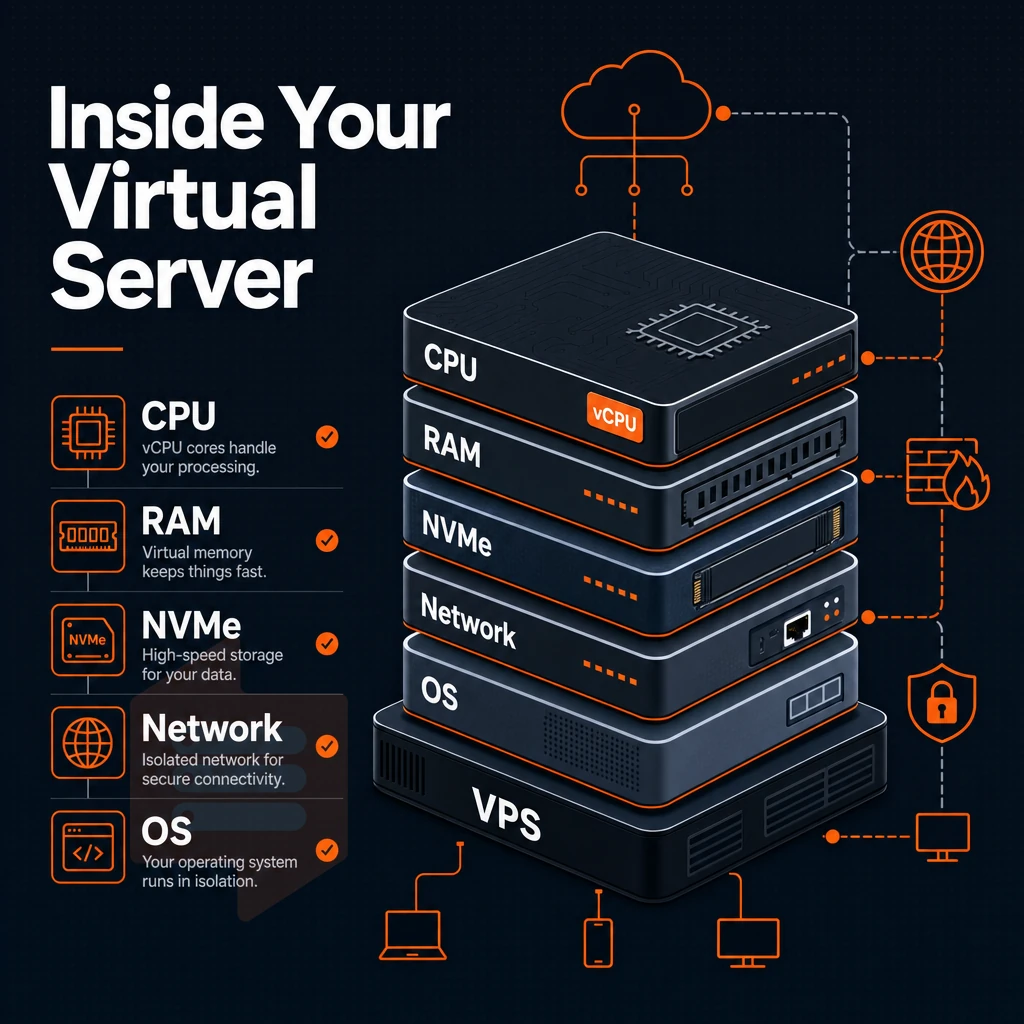
When we talk about the technology behind VPS hosting, it’s helpful to first consider what we’re actually being given. VPS stands for Virtual Private Server. Alternatively, more accurately a slice of physical hardware in a server repository that has been configured to act as a fully independent and standalone server, bridging the gap between shared and dedicated hosting in much the same way that a dedicated server would.
Understanding the virtual private server VPS model helps clarify why this hosting tier delivers both the isolation of dedicated infrastructure and the cost efficiency of shared resources.
Each VPS account is a completely independent virtual environment, unaware of fellow tenants on the same single physical server.
Own operating system and root access
Each VPS comes with a completely fresh operating system , installed and fully controlled by yourself.
We support Ubuntu, Debian, AlmaLinux, Rocky Linux, CentOS Stream, and Fedora.
Dedicated VPS server resources
A VPS is allocated fixed server resources that are hard capped and not provided as soft limits that will collapse under load. Below is a table showing resources provided to each tier of the BuyVPS service. This allocation model ensures that your VPS receives dedicated computing resources without contention from other tenants on the physical machine.
Each tier includes a specific allocation of disk space, ensuring you have predictable storage capacity for your applications and data. Unlike shared hosting where resources fluctuate based on neighbor activity, each VPS tier guarantees you own dedicated resources that remain consistently available regardless of load on other virtual machines.
| Tier | CPU type | RAM | Storage | Bandwidth |
|---|---|---|---|---|
| Standard (S-tier) | Shared vCPU, AMD EPYC Milan | From 4 GB DDR4 ECC | NVMe RAID10 from 60 GB | From 2 TB/mo |
| Dedicated (D-tier) | Pinned cores, AMD EPYC Genoa | From 4 GB DDR5 ECC | NVMe RAID10 from 45 GB | From 2 TB/mo |
| High Memory (H-tier) | Shared vCPU, AMD EPYC Milan | From 64 GB DDR4 ECC | NVMe RAID10 from 480 GB | From 6 TB/mo |
Isolation and independence at the operating system level
BuyVPS delivers exactly what it promises.
Scale up or down within a tier as required without having to go through IP rotation or migration.
The guarantees given by a virtualization system are entirely dependent on the virtualization layer (the hypervisor) that enforces them. take a close look at the virtualization technology, how it sets up and manages the isolation of virtual systems on the hardware.
Proper hypervisor configuration ensures each server environment maintains strict resource boundaries, preventing one tenant from monopolizing CPU cycles or memory that belong to another. Modern hypervisors rely on mature virtualization software that has been hardened over years of production use to enforce these guarantees at the hardware abstraction layer.
Managed VPS hosting vs shared hosting vs dedicated hosting
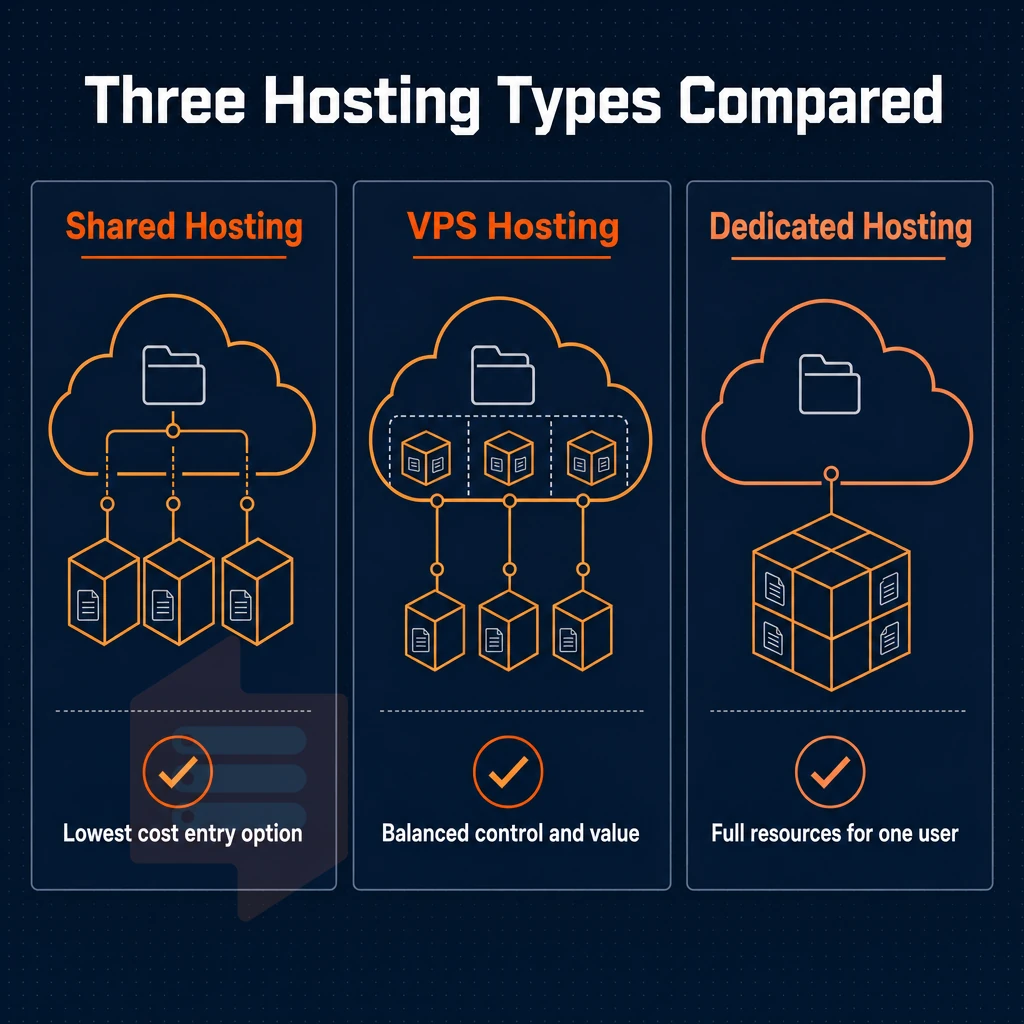
There are three main options: shared hosting, VPS hosting and dedicated servers.
Shared hosting operating system options
In shared hosting, multiple customers share the same server, CPU, RAM, and I/O.
Dedicated resources on a VPS
VPS hosting is in the middle. With VPS hosting, your VPS server is set up by a hypervisor (like KVM) on a physical server. Each VPS server gets its own kernel, and it has a guaranteed amount of RAM and CPU allocation. As for CPU pins/schedulling, that can vary. Your VPS won’t perform badly because of a noisy neighbor. The hypervisor ensures that each VPS operates independently with strict resource enforcement, preventing cross-tenant interference at the kernel level.
VPS hosting delivers isolation. The core of VPS hosting is the promise of steady, consistent performance, without the huge up-front costs of buying hardware. At BuyVPS each VPS runs on its own KVM kernel. Memory is capped hard on each node to ensure no resource contention.
KVM isolation. When you order a VPS, it gets its own kernel, which it boots. So if another VPS on the same server crashes or suffers a kernel panic, you won’t even know.
Dedicated server vs virtual server
A dedicated server is a physical server, not virtualized, and you are the only tenant on the server. You have maximum raw power, and full control of the server hardware. The price for this is higher than a VPS, and provisioning time for a dedicated server is typically longer than for a VPS. For most applications, however, VPS hosting can provide similar performance at a fraction of the operational cost.
For teams that need full administrative access, consistent I/O and the ability to scale without moving to a completely different hosting environment. VPS hosting is the best of both worlds between the constraints of shared hosting and the full weight of dedicated hosting. Once you’ve chosen VPS hosting, the next decision is how much of the server you want to manage yourself.
Managed VPS hosting vs unmanaged VPS hosting
There are essentially two models: managed and unmanaged, and in the middle is self-managed hosting.
Managed VPS: your hosting provider handles all operations
A managed VPS account has your hosting provider handling day-to-day server management, OS patching, security hardening, application updates, and basic monitoring.
A small e-commerce team running a busy storefront would likely benefit from a managed virtual private server VPS, since they need reliable uptime rather than having to learn how to administer Linux.
Unmanaged VPS hosting: full control, full responsibility
Unmanaged VPS hosting is ideal for developers and engineers. They are able to configure all settings to their hearts’ content, including firewall settings, kernel parameters and package management. No one is there to hold their hand in managing a hosting environment for production websites.
You will never find yourself locked into a shared hosting environment or managed service that you did not specifically ask for.
Which model fits your workload?
- Managed: limited ops staff, compliance-sensitive workloads, or rapid deployment needs.
- Self-managed / unmanaged: developers, DevOps teams, and anyone who wants a clean VPS with administrator access and no management overhead.
If you have the technical expertise to manage a server, then unmanaged is the most cost effective solution.
The answer is more than most people expect.
Common use cases: what is VPS hosting used for?
You have control of the full server stack from the kernel up, just like you would with a dedicated server, but at a fraction of the cost and with much more flexibility than shared hosting.
Web and application hosting plan options
This way, a sudden traffic spike on one application won't starve another applications for resources.
Dev, test, and remote access environments
A VPS environment is typically set up by developers to mirror the exact production environment. Unlike shared hosting, here you can install special software, pin specific runtime versions, and change server-wide settings without opening a support ticket.
VPS vs. Cloud hosting for specialized workloads
While cloud hosting spreads the load of your applications across multiple virtual servers that can be added and removed as needed.
A VPS (Virtual Private Server) assigns a fixed server to you for consistent I/O performance.
| Use case | Key requirement | Why a VPS fits |
|---|---|---|
| Web application | Isolated RAM, root access | No noisy-neighbor RAM contention |
| Dev / test | Custom runtimes, snapshots | Full OS control, custom ISO support |
| Game server | Low latency, stable CPU | Pinned cores available on Dedicated tier |
| Proxy / DNS | Reliable uptime, IPv6 | Dual-stack, 99.8% SLA |
The term “ cloud hosting ” keeps popping up in these use cases, often used as a synonym for VPS.
VPS hosting vs cloud hosting: key differences
The term VPS hosting meaning shifts with the underlying infrastructure.
Understanding traditional VPS
- A single-server model, This is how a traditional VPS runs. One physical server, with several virtual machines or VPS’s, each running their own applications in their own virtual environments. Each VPS has dedicated resources, including RAM, CPU’s and storage, which are completely isolated from other VPS’s on the same server.
- This is a trade-off. A single physical host runs all of your VPSes, and if that host fails, all of your VPSes fail. There is no failover between hosts. This is a fundamental architecture issue with VPSes compared to shared hosting and dedicated hosting that are built as distributed systems.
Note: Web hosting providers sometimes label traditional VPS as "cloud VPS" without distributing workloads across nodes. Verify the architecture before assuming failover is included.
Cloud hosting and the hybrid model
- Distributed infrastructure, Understanding how cloud hosting uses many physical servers set up in a cluster. A failed server can have its workloads immediately handled by other servers.
- We evaluate cloud VPS hosting. Cloud VPS hosting is a form of hybrid hosting. This type of hosting combines the positive features of a VPS hosting account (isolation of resources + full system access) with the benefits of a cloud hosting platform (redundancy + constant and smooth performance from multiple servers).
Dedicated hosting: a separate category
- Dedicated hosting in context. Dedicated hosting gives one tenant an entire physical server (no virtualization layer, no shared neighbors from other tenants). As a result, dedicated hosting is much more expensive than VPS hosting and offers less flexibility than both VPS models.
Having mapped the architecture landscape, the only remaining question is which web hosting solution, and the server management and virtual private server options it encompasses, can deliver on the core fundamentals of isolation, performance, and operational stability without compromise.
Why choose BuyVPS for virtual private server hosting
BuyVPS has operated as a founder-run VPS hosting provider since 2002.
Every VPS hosting plan runs on KVM virtualization with a separate kernel per VPS, genuine isolation, not a virtual environment competing with other users on the same physical server.
- No-oversell policy: Hard memory caps per node and low node density protect your dedicated resources under real load.
- Full unrestricted server access + custom ISO: Install any OS or custom software on every plan, no restrictions.
- NVMe RAID10 storage: PCIe-direct drives with 122,959 4K read IOPS measured, not estimated.
- Pinned cores on Dedicated CPU tier: Predictable latency for databases, e-commerce sites, and compute-heavy workloads.
- In-place upgrades: Scale your virtual server without migration or IP rotation.
- No renewal hike: Same price in year five as day one.
We offer Standard CPU, Dedicated CPU, and High Memory tiers to match a range of workloads. Reach out to our engineering team at support@buyvps.com to discuss which hosting solution fits your requirements.
Frequently asked questions
How does VPS give dedicated resources for hosting databases in your own virtual environment?
VPS hosting means running your workload on a virtual private server, a dedicated slice of a physical machine, isolated from other users via a hypervisor such as KVM. You get full server control, your own operating system, and guaranteed resources (CPU, RAM, storage) that no neighbor can consume.
It sits between shared hosting, where resources are pooled and unguaranteed, and a bare-metal dedicated server, where you lease the entire physical machine.
Is a virtual machine VPS better than a VPN?
They solve completely different problems, so "better" is the wrong frame. A VPN (Virtual Private Network) encrypts your internet traffic and masks your IP address, it is a privacy and security tool for your connection. A VPS is a remote server you control, used to host applications, websites, databases, or APIs. You can run a VPN service on a VPS, but the two are not interchangeable.
Is unmanaged VPS hosting safe?
Yes, a properly configured VPS is a secure hosting environment. Providers like BuyVPS add edge filtering and an abuse-policy-based firewall at the network layer to protect your server resources and virtual environment, and every plan ships with IPv4 and IPv6 dual-stack with no shared IP pools.
Do i need VPS hosting?
You need a VPS the moment shared hosting can no longer guarantee the resources your application requires. Concrete triggers include traffic spikes that cause timeouts, applications that need a custom runtime or kernel module, databases that require dedicated RAM, or compliance requirements that prohibit a shared server environment.
BuyVPS offers Standard, Dedicated CPU, and High Memory plans from its Amsterdam and New York data centers to match the workload precisely.
We see VPS hosting as a sweet spot of cost vs. control. Even with dedicated resources such as a dedicated CPU, ample RAM and high-performance NVMe storage, a VPS doesn’t share a kernel with neighbors.
Whether or not to choose a managed or unmanaged VPS is just as important as choosing the right hardware. Unmanaged VPS offers full superuser privileges to the server and allows for complete control over the server stack. A managed VPS, on the other hand, takes care of all of the operational work for you.
The choice between managed and unmanaged VPS when it comes to server settings and administration is not black and white and really depends on the amount of in-house expertise that a company has and how much time it wants to devote to server administration.
If you have outgrown shared hosting, we recommend taking a look at our Standard, Dedicated CPU and High Memory VPS plans.