
Picking the right VPS web host with solid server management can be the difference between your application scaling well with increasing amounts of real traffic and it starting to fail. Shared hosting has a number of limitations. Bare metal dedicated servers can lock you into a lot of unused hardware. Unlike shared hosting, a VPS gives you root access, isolated resources, and the flexibility to run any stack, all without having to manage physical servers.
Many VPS hosts promise much but fail to deliver. Over time, things like an oversold node, noisy neighbor, or unexpected price hike can surface after you have moved your sites to the new shared hosting solution. But what really distinguishes a VPS web host from a commodity host are a few key measures: CPU, RAM, storage, network, and support. Specifically, can the support team reproduce and fix a kernel panic at 2am?
For an in-depth look at what you should be looking for, what to avoid. See also: managed vs. unmanaged.
What is VPS hosting and how does it work?
A Virtual Private Server (VPS) is a part of a physical server which is partitioned off to run its own operating environment. A VPS sits between shared hosting and a fully dedicated server (i.e. you own the hardware). Like a dedicated server, a VPS provides a virtual server with guaranteed resources (i.e. Related: NVMe RAID10 storage.
First month $1
Then the normal monthly price. One per customer. No setup fee, and a 30-day performance guarantee on your first order.
See the plans“Excellent experience from start to finish! The server was delivered promptly, and the service was reliable and efficient. I m very happy with the results and would definitely recommend them.”
CPU power, memory, storage space) as opposed to shared hosting where resources are shared and can fluctuate wildly. The main difference between a VPS and a dedicated server is that you don’t own the physical hardware of a VPS. Providers typically allocate disk space using NVMe or SSD arrays to ensure fast read/write operations for database queries and application files. High-performance VPS plans increasingly rely on NVMe SSD storage to minimize latency during concurrent user sessions and intensive I/O workloads. See also: custom ISOs.
How virtualization splits one machine into virtual servers
Hypervisors allow you to make better use of servers by running multiple virtual servers from a single physical machine. Each virtual server runs exactly like a physical server, and can contain its own operating system.
So each windows server virtual machine boots up, and runs, as if it were a standalone server, completely isolated from other virtual servers running on the same physical machine. The hypervisor layer implements virtualization technology that abstracts physical hardware into logical resources, enabling efficient multi-tenancy while preserving strict boundaries between guest environments.
We run KVM (Kernel-based Virtual Machine) on our servers, each VPS has its own kernel.
Own operating system and dedicated resources
Every VPS now comes with dedicated resources.
The lack of pooling of resources is what allows your work load to run as consistently as it would in a web hosting on a VPS as opposed to on a shared hosting environment. Monitoring your website's performance becomes more straightforward when resource allocation remains stable, eliminating the unpredictability that shared environments introduce to response times and throughput metrics.
Shared, VPS web host, and dedicated hosting compared
The three tiers break down clearly:
- Shared hosting: There’s a shared server for your shared hosting account. The CPU, RAM and I/O are shared amongst all the tenants of that server. So if one of the sites on that server is busy, that’s going to impact the others.
- VPS: Isolated virtual machines with guaranteed resources. Full root access, no shared resources.
- Dedicated hosting, an entire physical server for one tenant. Maximum performance, highest cost.
For VPS hosting providers, the middle tier of Shared, VPS, and Bare Metal hosting is often the sweet spot. APIs, e-commerce sites, and other SaaS applications typically graduate from Shared hosting well before they can justify the cost of a dedicated server, but are too complex for a bare metal server.
In the next section, we’ll examine the key differences of each of these tiers of hosting. Running a dedicated email server on a VPS provides the isolation needed to manage mail queues and SMTP configurations without interference from neighboring accounts.
VPS hosting provider vs shared and dedicated hosting: key differences
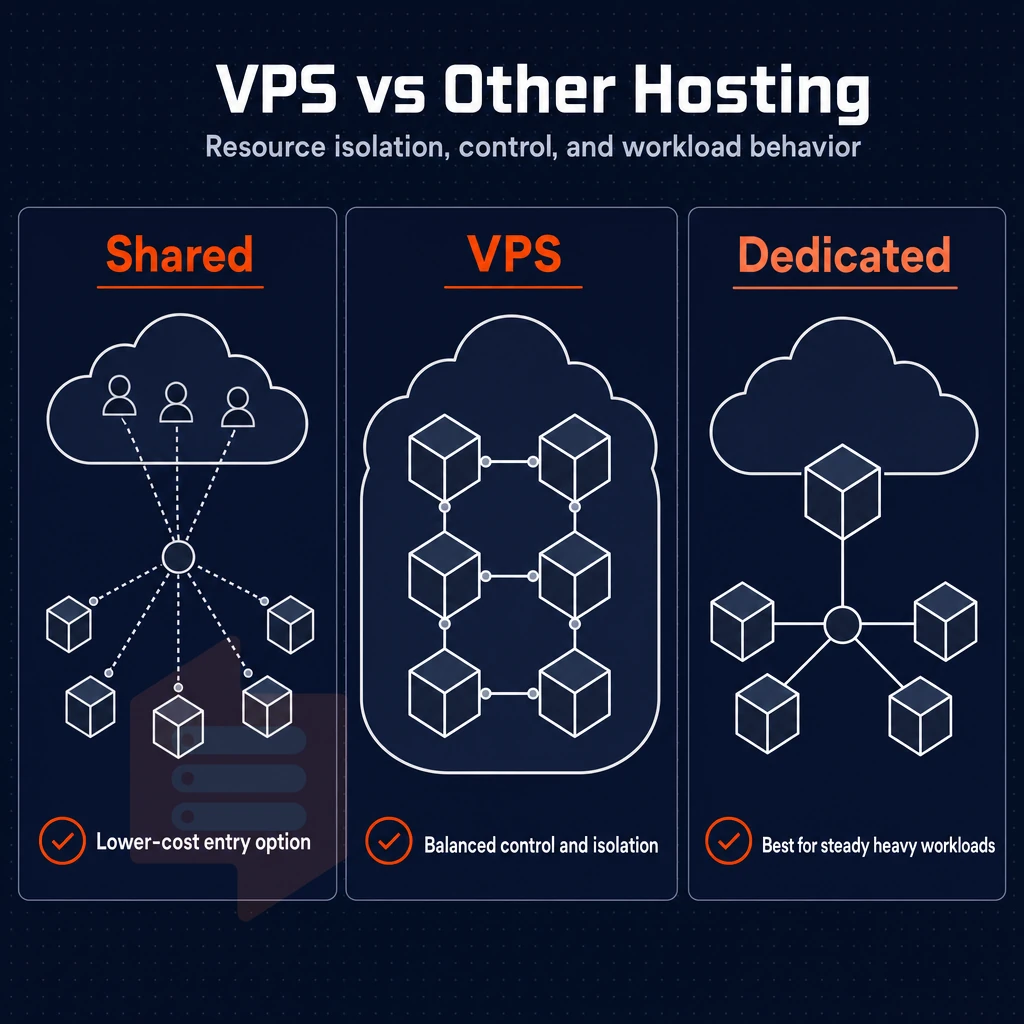
Selecting the right web hosting service tier depends on resource isolation, degree of control, and predictable workload behavior under load.
Resource isolation and performance
Instead of shared hosting where dozens of sites are running on the same server and operating system competing for CPU, RAM and I/O (where a single noisy neighbor can cause latency issues for you).
A VPS will enforce hard caps on resources by instance, whereas a dedicated server will give you the entire physical server to do with as you will, with no neighbors to contend with for resources. Additionally, Thus maximum throughput for your use of the server.
Control and OS access
As opposed to shared hosting. There, You are locked into your host’s environment, a VPS (Virtual Private Server) allows for root access and therefore complete control of the Operating System and any associated kernel parameters.
As well as the ability to install whatever software you require. Dedicated servers offer the same level of control, but at a much greater cost, and with longer provision times. Most VPS providers include a web-based control panel or offer optional installations of cPanel, Plesk, or Webmin to simplify server administration tasks.
Comparison at a glance
| Feature | Shared | VPS | Dedicated |
|---|---|---|---|
| Resource isolation | None | Guaranteed per instance | Full hardware |
| Root access | No | Yes | Yes |
| OS control | Provider-defined | Full (custom ISO supported) | Full |
| Typical use case | Small static sites | Apps, APIs, growing sites | High-traffic, compliance workloads |
Many teams outgrow shared hosting quickly as their sites begin to get traffic and they start to demand uptime. Thus, VPS (Virtual Private Server) typically becomes the next step of server infrastructure before a team is ready to pay for a dedicated server.
VPS plans provide the isolated environment and resource guarantees necessary for hosting websites that require reliable uptime and predictable scaling as visitor numbers grow. Modern VPS infrastructure typically uses NVMe SSD storage arrays to deliver the low-latency disk performance that growing applications depend on for database operations and content delivery.
Every VPS plan on BuyVPS covers KVM instances in Amsterdam and New York, each backed by a 30-day money-back guarantee, with hard memory caps, no-oversell policies, and full operating system flexibility.
Managed vs unmanaged VPS hosting: choosing the right provider
When deciding between managed and unmanaged VPS hosting, one question drives everything: how much of the stack do you want to own?
Understanding your responsibilities
- You should find out how proficient you are with Linux. With unmanaged hosting you are responsible for updating the OS, for releasing security patches and for managing the server. As long as you are confident using the command line then this is actually an advantage for you.
- Outlining the management of servers on a VPS plan. Unmanaged VPS plans have users configuring firewalls, securing SSh, installing software and monitoring for uptime. Managed VPS plans have hosting companies manage these tasks.
- Comparison: Control vs. Convenience. You can run your projects with managed VPS hosting if you are not a dedicated sysadmin and have a team. Unmanaged hosting provides full control of all layers (kernel, runtime, configuration).
Choosing the right fit
- Select a plan that suits your workload. Unmanaged VPS hosting is ideal for developers, agencies and SaaS companies, as it offers the same flexibility as cloud hosting, without the constraints of shared resources.
- For unmanaged hosting, BuyVPS is a good option. Every BuyVPS VPS server comes with full root access and KVM virtualization. All servers are located in Amsterdam or New York and can be set up immediately.
Note: Switching from managed to unmanaged mid-project is disruptive.
Private servers, cloud infrastructure, and VPS hosting: understanding the landscape
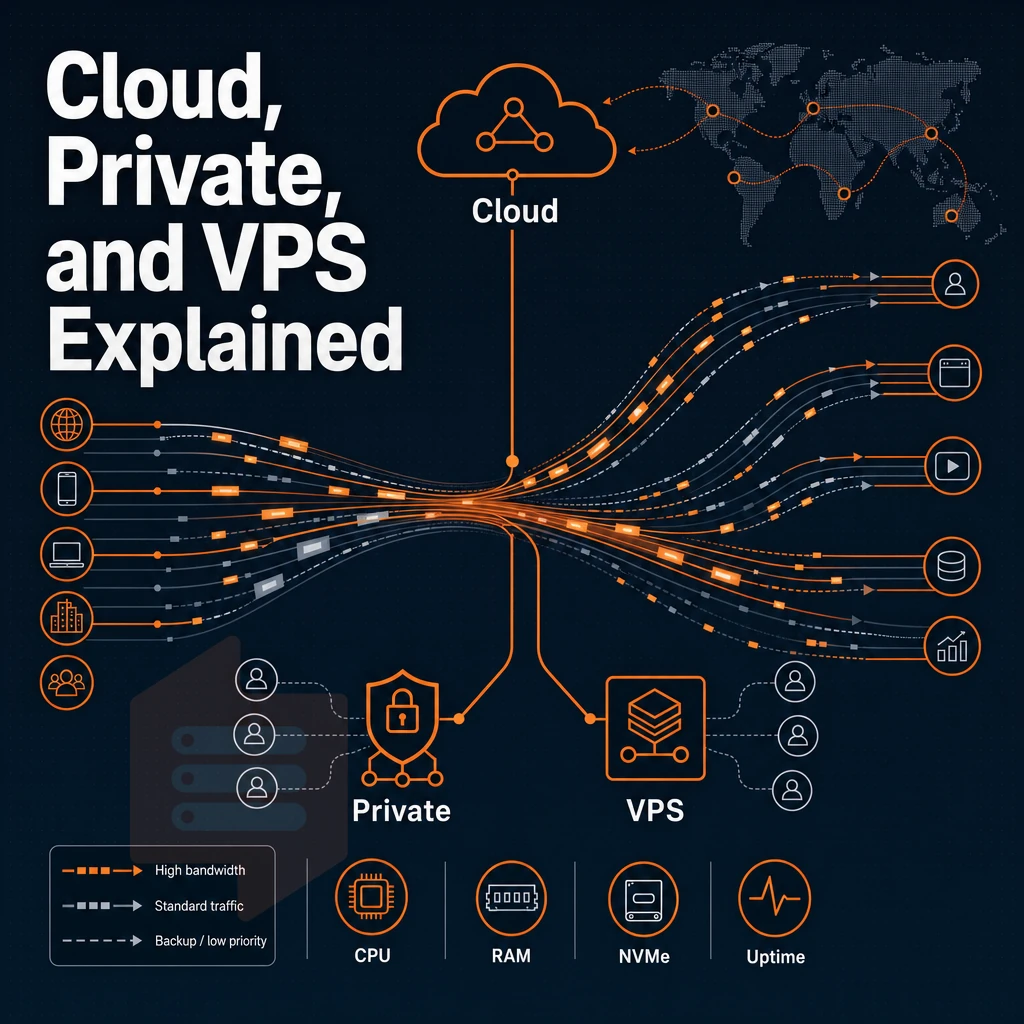
When evaluating infrastructure options, private servers, cloud infrastructure, and VPS solutions, a money back guarantee is one of the key factors people look for. Here is a simple breakdown to help match the right environment to your workload. BuyVPS offers a 30 day money back guarantee on all VPS plans, allowing teams to test infrastructure performance risk-free before committing long-term. Selecting the appropriate hosting plan requires evaluating not only the refund policy but also the resource allocation model, uptime commitments, and scalability options that align with your application's growth trajectory.
Comparing hosting services across providers requires examining not only pricing and guarantees but also the underlying virtualization technology, network uptime SLAs, and support response times that differentiate premium offerings from budget alternatives. Organizations migrating from shared hosting to private servers often prioritize trial periods to validate that isolated resource allocation meets their application's latency and throughput requirements.
What a virtual private server VPS email server actually is
Each virtual private server (VPS) is powered by KVM hypervisor technology, which divides the physical server into isolated virtual machines, each allocated its own dedicated CPU power. RAM and storage (e.g. on an NVMe disk) completely separately from other virtual servers running on the same physical server. On a VPS, you have a completely isolated environment, comparable to a standalone server and hence with full root access and a dedicated kernel. Beyond block storage on NVMe disks, some providers also offer object storage as a complementary service for backups and static assets.
Monitoring disk space usage on your VPS is essential to prevent application failures, as NVMe storage allocations are fixed per instance and cannot be dynamically expanded without provisioning adjustments. The performance advantage of NVMe SSD technology becomes particularly evident during high-concurrency database operations, where low-latency access to indexed data structures directly impacts query response times. The KVM hypervisor represents a mature implementation of virtualization technology that enables full hardware emulation without the performance penalties associated with older paravirtualization approaches.
Virtual Private Server hosting (VPS hosting) sits between shared hosting and a full cloud platform.
This Can be very expensive and complex. VPS hosting is a way to get isolated environments (i.e. virtual private servers) without all of the extra overhead. Organizations seeking predictable monthly costs and straightforward resource allocation often find VPS hosting delivers the right balance between infrastructure simplicity and workload isolation.
Many businesses transition to VPS platforms after outgrowing the resource constraints of shared hosting services, which cannot guarantee the isolation or performance required for production workloads. Private servers in a VPS environment deliver the dedicated resource allocation and kernel-level isolation that production applications require without the capital expenditure of owning physical hardware.
How to choose VPS hosting vs dedicated server and cloud
Dedicated servers provide a single physical machine and the most isolated form of hosting.
A cloud hosting provider can offer elastic scalability, but the noisy-neighbor risk and variable costs typically mean that it's not for everyone. VPS hosting plans typically sit in the middle ground of these two extremes of hosting, with a fixed monthly cost, hard limits on the resources that can be used and no sharing of content.
Businesses evaluating hosting services often prioritize cost predictability and resource isolation when comparing VPS plans to elastic cloud platforms. Organizations migrating from shared environments to private servers gain predictable billing and dedicated resource pools that eliminate performance variability caused by neighboring tenants.
VPS hosting gives you the dedicated isolation of a VPS but at a fraction of the usual size. Perfect for serious production work that has outgrown shared hosting but doesn’t need the full management of a cloud server.
Choosing the right virtual environment
For web applications, databases and other applications such as staging environments, Virtual Private Servers (VPS) are good to use.
For peak single node performance with no resource contention on the VPS servers, we pin the cores directly to the VPS instance (in the case of our BuyVPS Dedicated CPU VPS plans). The first step is to identify the correct environment for your workloads. The second step is to determine what to look for in a VPS plan.
What to look for in VPS servers and hosting plans
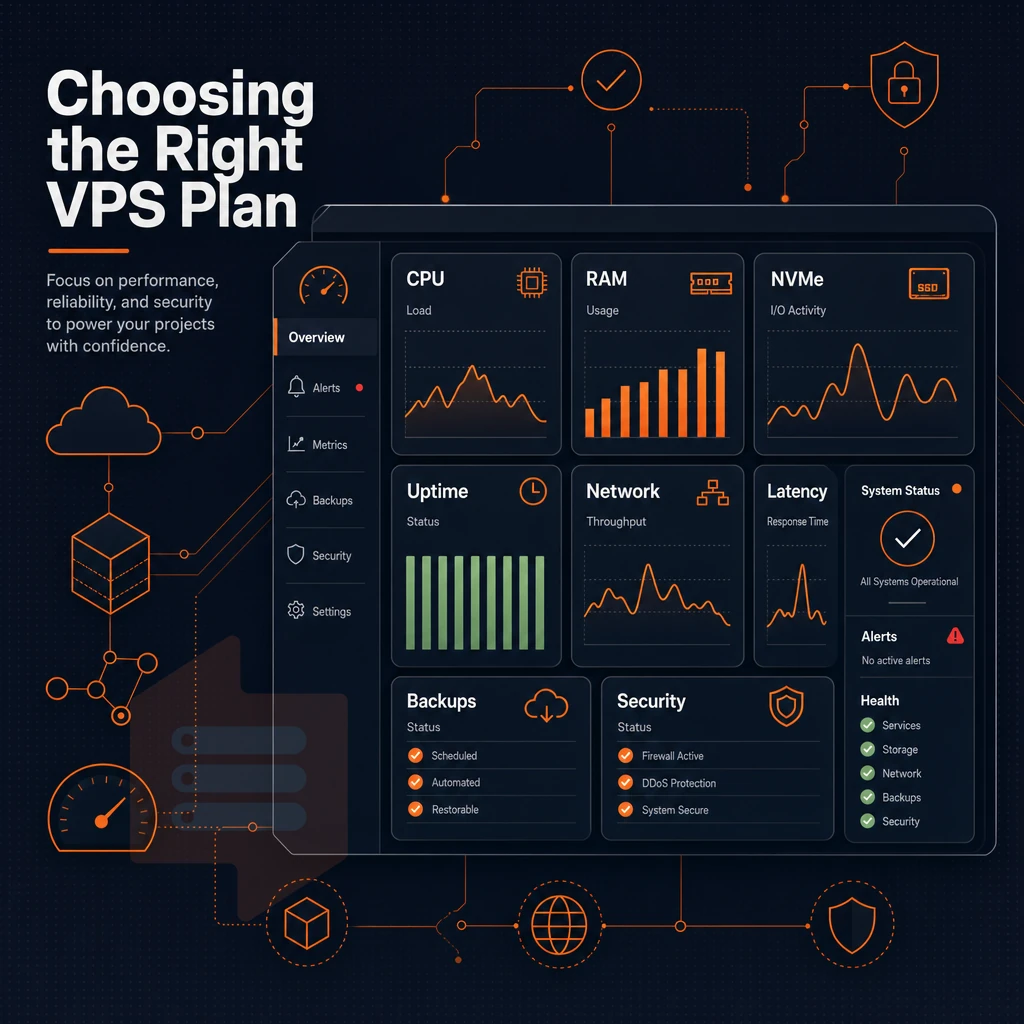
When you’ve outgrown shared hosting, choosing a VPS web host is not as straightforward as most guides make it out to be. The right web hosting service plan depends on many factors, including the CPU architecture, storage, network, and degree to which you can manage your virtual hosting environment.
VPS solutions: CPU, RAM, and storage fundamentals
Load up and see for yourself.
Storage is critical, and like dedicated hosting, our NVMe SSD storage runs in a RAID10 configuration, eliminating the I/O bottlenecks of older SATA-based plans.
- RAM: Hard memory caps per node prevent noisy-neighbor degradation.
- Disk space: NVMe RAID10 over raw SSD for both speed and redundancy.
- Network: Dual-stack IPv4 + IPv6 should be standard, not an add-on.
Install custom software: OS flexibility and root access
The unmanaged VPS allows full admin access and lets you run your own operating system.
We implement KVM isolation by giving each VPS a separate kernel, so your VPS acts like a dedicated server rather than a glorified shared hosting account.
Pricing transparency and upgrade paths
Note that renewal price hikes are common. When evaluating managed VPS hosting, check whether the control panel offers an API to automate OS updates and whether in-place upgrades will retain your server's IP address. At BuyVPS, server administration is made easy since upgrades are done without migration and without change of IP address, so the whole server stack will be left intact. In the following section the above criteria will be translated into concrete workloads.
Common use cases for VPS hosting
Workloads that have outgrown the shared hosting environment but don’t require the full power of a dedicated server are well-suited for a VPS. We outline how a virtual server maps to the most common types of web hosting plans and how to choose the right one for your workload.
Choose VPS servers for these workloads
| Use case | Why VPS fits | Key requirement |
|---|---|---|
| Web apps & ecommerce sites | Guaranteed server resources prevent traffic spikes from crashing the site | Low latency, NVMe storage |
| Email server | Dedicated IP protects sender reputation; custom configs require root access | Stable IP, full control |
| Game server | Pinned CPU cores keep tick rates consistent under player load | Low-latency network, dedicated CPU |
| Dev & staging environments | Isolated server environment mirrors production exactly | Snapshots, custom OS |
| Multiple websites | One VPS hosts dozens of domains without per-site fees | Sufficient RAM, NVMe I/O |
| Custom software stacks | Install custom software, runtimes, and kernel modules freely | Full root access, custom ISO |
Where BuyVPS fits each workload
KVM is used at BuyVPS with a separate kernel for each VPS to keep workloads separated. The Dedicated CPU tier from any serious hosting company now assigns fixed numbers of cores, suitable for gaming servers, windows server deployments, and high performance websites which require low latency. Amsterdam and New York nodes have 99.8% uptime SLAs with NVMe RAID10 storage for ecommerce sites and email servers which require high levels of reliability.
Windows Server environments can be created by uploading a custom ISO and deploying it straight away.
Alternatively, Run custom software written to use a lot of RAM, the RAM allocated to you would be yours to use at all times.
Why choose BuyVPS for your VPS web hosting needs
When you need a virtual private server that delivers consistent performance without surprises, BuyVPS is built for exactly that. We've operated founder-run VPS hosting infrastructure since 2002, and every plan ships with full superuser access, KVM isolation with a separate kernel per VPS, and your choice of operating system, including custom ISO uploads.
- AMD EPYC processors + NVMe RAID10 storage, PCIe-direct NVMe delivers a measured 122,959 4K read IOPS, so your web hosting workloads never wait on disk.
- No-oversell policy, hard memory caps and low node density mean dedicated resources stay yours under real load.
- Dedicated-core D-tier, pinned vCPUs give predictable latency for databases, email servers, and web apps.
- In-place upgrades, scale your VPS plan without migration or IP rotation.
- Amsterdam and New York data centers, identical hardware, identical pricing, IPv4 + IPv6 dual-stack on every VPS hosting plan.
Compare our VPS hosting plans at buyvps.com/VPS-hosting or reach our engineering team at info@buyvps.com to find the right fit. Those two data center locations, Amsterdam and New York, deserve a closer look, because which single physical server environment your VPS runs on has a direct impact on latency for your users.
Amsterdam and new york BuyVPS server management for EU and US audiences
Where your VPS is located affects page load times for real users. We operate two data centers, Amsterdam (EU) and New York (US East Coast), so we can provision your server resources in the location that best serves you and your users. We deliver consistent performance in both locations with no compromise between them.
Identical infrastructure across both regions
Each web hosting service detail is mirrored between Amsterdam and New York sites. Therefore hosting providers that cut corners in certain regions make their customers have to cut corners as well.
A complete mirroring of details of service for hosting VPS’s for example consists of mirroring of VPS resources and mirroring of OS options as well as mirroring of server settings and more.
As a result, Your configuration will not change and you can scale as needed.
Network reliability and uptime
Both our Data Centers are setup to use multi-homed uplinks to all upstream carriers.
Whether you’re running a web hosting provider stack, a game server or a backend database server, the network path to your audience is the biggest latency variable. So Amsterdam will serve all your EU visitors and New York all your US East Coast users, all running on the same hardware underneath.
Compliance and audience targeting
As data residency within the EU is typically required, and as essential as a money back guarantee, to give organizations complete control over personal data remaining within European borders, Amsterdam fulfills this requirement. For teams administering virtual private server VPS hosting across regions, this means no relearning of administration as the identical control plane is used for administration via an API via the same panel for hosting services.
Both locations will run identical hardware, control plane, and pricing. Choose the location best for your audience, not just because it’s available.
VPS hosting is a sweet spot: more control and more consistent performance than shared hosting, without the massive overhead of a dedicated server. Which brings us to managed vs. unmanaged: do you want to own the stack, or just the app?
Most developers and growing teams will find that an unmanaged KVM VPS web hosting plan with full administrative superuser access is the way to go, because the underlying hardware is so solid that server management is something you only have to worry about rarely.
Key characteristics for a plan under load are CPU architecture, memory limits, storage IOPS, and network redundancy.
BuyVPS runs AMD EPYC hardware across Amsterdam and New York, with NVMe RAID10 storage, no-oversell guarantees, and engineer-led support. Browse the plans at BuyVPS.com and find the tier that fits your workload.