


When selecting the top-tier VPS hosting for your needs, the real test of a host is whether it can meet the demands of your particular work load. We’re not talking about some hypothetical test case in a lab, we’re talking about your site under real traffic. With a large number of concurrent connections and, perhaps most telling, high I/O spikes that can reveal an oversold web hosting server with too many accounts on underpowered shared-core machines.
Once you strip away the hype from the specs of most data centers, the real differences between hosts are typically revealed at 3 AM when your query queue is failing. You’ve experienced a kernel panic due to a ‘problem’ neighbor and their recovered server is now bogging down your box. Alternatively, Your support ticket has gone unanswered for 6+ hours.
Below is a realistic buying guide to the services of virtual private servers offered by hosting providers to developers and other users that need to set up and manage remote server infrastructure. The guide is focused on the key aspects of VPS hosting such as CPU isolation, storage performance, network stability and quality of support.
Each of the top VPS hosting providers is reviewed against these criteria, not against their brand recognition and special promotions. We put BuyVPS on the list above due to their cloud servers' published fio benchmarks, hard memory limits per VPS on each node, KVM-based isolation with a separate kernel for each VPS, etc. The rest of the field is rated by the same yardsticks.
What is VPS hosting and how does it work?
A VPS (Virtual Private Server) is often offered as an alternative between shared hosting services and full dedicated servers. With a VPS you have full control over your isolated resources while you don’t have to purchase the physical servers themselves. To choose the correct offer for your needs, first you have to understand how the isolation of a VPS works.
First month $1
Then the normal monthly price. One per customer. No setup fee, and a 30-day performance guarantee on your first order.
See the plans“Great experience with BuyVPN! The service is easy to use, the connection has been smooth and reliable, and the overall experience has been really good. The pricing is also reasonable…”
How a single physical server becomes many virtual servers
Hypervisors can partition one physical server into multiple environments, each running its own Operating System. Each Virtual Machine gets a fixed amount of CPU Cores, RAM and NVMe Storage and cannot touch the resources of its neighbors. For community perspectives, see Best VPS providers and hosting recommendations?.
The big thing that VPS hosting promises is isolation. And what it means is that you're not sharing a pool of servers. Instead, you're renting a slice of a server and that's it. The another tenant can run a CPU intensive task, but it won't affect you. Multiple VPS instances can coexist on the same hardware without performance degradation when proper isolation mechanisms are enforced at the hypervisor level.
Proper resource allocation prevents scenarios where unused resources sit idle on one instance while another struggles under load, maximizing the efficiency of the underlying hardware. Isolation also protects your instance from hardware failures on neighboring VMs, as hypervisor-level separation ensures that component degradation in one tenant's allocated resources doesn't cascade across the node.
KVM, for example, is the “gold standard” for virtualization. Since every virtual machine in modern data centers runs on its own kernel, there is no shared kernel path and thus no way for resource bleed to occur even in policy failure scenarios.
This kernel-level separation means each virtual machine operates as an independent entity with its own memory space, process scheduler, and system libraries, eliminating cross-contamination risks. Each virtual server maintains its own isolated execution environment, ensuring that security patches, kernel updates, and system configurations can be applied independently without affecting neighboring instances on the same host.
Cloud VPS hosting vs shared and dedicated hosting
Shared hosting has dozens of websites on one OS instance. No root access. No guarantee of resources. One noisy neighbor can affect everyone. Good for static websites like brochure sites for small companies, no more.
Dedicated hosting uses a whole physical server for a single customer. They are generally very expensive and take a long time to provision. Most workloads don’t need that kind of power.
A Virtual Private Server (VPS) is 'in the middle' of the spectrum of options: it provides dedicated resources, root access, fast setup and a fixed monthly charge for them. As such it is the most common platform to run production workloads on. For most developers and growing businesses, VPS hosting represents the ideal solution that balances performance, control, and cost-effectiveness without the overhead of managing entire machines.
The level of control extends to full root access, allowing you to configure server management tools, install custom software, and optimize system parameters according to your application's specific requirements. Modern VPS solutions have evolved to support containerized workloads, CI/CD pipelines, and microservices architectures that demand both flexibility and predictable resource allocation.
Which cloud VPS server is best?
The best fit depends on your specific needs and how much work you have. Understanding the key factors that drive your application's resource consumption, such as concurrent user load, database query patterns, and peak traffic windows, will guide you toward the right tier and configuration. Profiling your application under realistic load conditions helps you identify which resources become bottlenecks first, whether CPU, memory, or disk I/O.
Comparing VPS options across multiple providers helps you match specific resource guarantees to your workload profile rather than relying on generic tier names. Evaluating VPS solutions from different providers side-by-side reveals how resource allocation policies and isolation guarantees vary significantly across the market, even at similar price points.
- Shared vCPU, The cost efficient option for dev environments, staging and low traffic production apps.
- Pinned/dedicated vCPU, needed for latency sensitive databases, real-time APIs and CI pipelines.
- High-memory configs, used for in-memory cache, analytics, large data sets.
- Windows VPS options for when your stack requires a Windows OS. Make sure the provider allows custom ISO uploads for your VPS.
We run KVM with hard memory caps per node and low node density at BuyVPS. We have three tiers of cloud servers (Standard, Dedicated CPU, and High Memory) which cover all three types of workloads and are hosted in two datacenters (Amsterdam and New York).
Key factors to evaluate when choosing a cloud VPS provider

When choosing a cloud VPS provider, there are several important factors that set up reliable hosting providers from providers that may secretly destroy your uptime and cost. Review these criteria before committing to a cloud VPS provider. Transparent pricing structures matter because hidden fees for bandwidth overages, backup storage, or control panel access can double your actual monthly costs.
A reputable hosting provider will publish their resource allocation policies and virtualization technology stack openly, allowing you to verify isolation guarantees before signing up. Some providers also offer hourly billing models that let you spin up test environments or handle traffic spikes without committing to full monthly charges for temporary capacity.
Performance with root access: CPU, RAM, and storage
While shared vCPUs might work for very low usage sites, noxious neighbors will find ways to steal cycles and kill consistent performance under sustained load. Pinned (dedicated) cores guarantee no such interference, look for hosts that guarantee core isolation.
RAM overselling poses similar risks. The hard memory cap per node ensures that the RAM allocated to you is your own and not borrowed from your neighbor’s idle RAM. Make sure to check with the provider for their policy on this first.
Storage tier is just as important as total capacity. A NVMe RAID10 over PCIe storage system provides significantly lower latency than a storage system made of SATA SSDs. Our NVMe RAID10 over PCIe storage system runs with direct connection to the PCIe controller and reaches 122,959 4K read IOPS in our fio testing. This makes it perfect for very database-intensive work as well as for any work that generates a lot of throughput.
Network, uptime guarantees, and small business support
As a minimum, a growing company with production traffic would want multi-homed uplinks and dual-stack IPv4/IPv6 support. Also make sure to agree on the SLA percentage in writing. BuyVPS offers a 99.8% uptime SLA which is backed by edge filtering and an abuse-policy firewall. High-availability architectures often require load balancing across multiple VPS instances to distribute traffic and prevent single points of failure during peak demand periods.
When evaluating providers, compare their published uptime guarantees against actual incident history and compensation policies for downtime events that exceed the stated threshold. Redundant network paths and power systems help mitigate the impact of hardware failures that could otherwise cause extended outages for mission-critical applications.
The support model is often ignored. Chatbot first queues critical incidents in hours. Engineer-led support, with the human being the first to reply and having root-level knowledge, is far more valuable. BuyVPS sends all tickets straight to the engineers, bypassing first-tier scripts.
Backup options, control, and billing transparency
Evaluate early key features of cloud servers backup options such as frequency of snapshots, retention period, and whether restores are done as a self-service or require a support ticket. This information is rarely featured in marketing material.
Our self-service control panel with API access enables you to automate all tasks related to server provisioning and monitoring and even to immediately rebuild failed servers. The BuyVPS control panel is provided with API access as well as with an in-browser VNC console.
For teams working with specific software stacks, flexibility with OS choices is key. Ubuntu, Debian, AlmaLinux, Rocky Linux, CentOS Stream, Fedora and upload of your own ISOs are all possible with your BuyVPS server. This range of operating system options ensures compatibility with virtually any development framework or enterprise application stack you need to deploy. Each operating system image comes preconfigured with essential security updates and can be customized post-deployment to match your infrastructure requirements.
Read the billing terms carefully. Most hosts add hidden fees to the bill on renewal, or raise the price in year 2 or 3. BuyVPS fixed the price at the same rate for year 5, with no renewal surcharge, and in-place upgrades of servers that retain your IP addresses. Some providers also offer hourly billing for short-term projects or testing environments, though monthly commitments typically provide better value for production workloads.
What are the top 10 best cloud VPS hosting services?
Instead of a list of brand names ranked from best to worst, use this table to compare providers against your criteria. Use it as a shortlist filter to see which workload types a provider can handle best and with which key capabilities.
| Workload | CPU priority | RAM priority | Storage priority | BuyVPS fit |
|---|---|---|---|---|
| High-traffic web app | Pinned cores | Hard caps, no oversell | NVMe RAID10 | D-tier (dedicated CPU) |
| Database server | Pinned cores | High ratio (1:8+) | NVMe RAID10 | H-tier (high memory) |
| Dev / staging | Shared vCPU acceptable | Standard allocation | NVMe SSD | S-tier (standard CPU) |
| EU-latency sensitive | Any | Any | Any | Amsterdam node |
| US East Coast | Any | Any | Any | New York node |
All of these points need to be a yes for any provider you’re even thinking of picking. BuyVPS do against a published set of benchmarks for both Amsterdam and New York locations.
Shared vcpu vs. Dedicated CPU vs. High-memory VPS: which tier fits your workload?
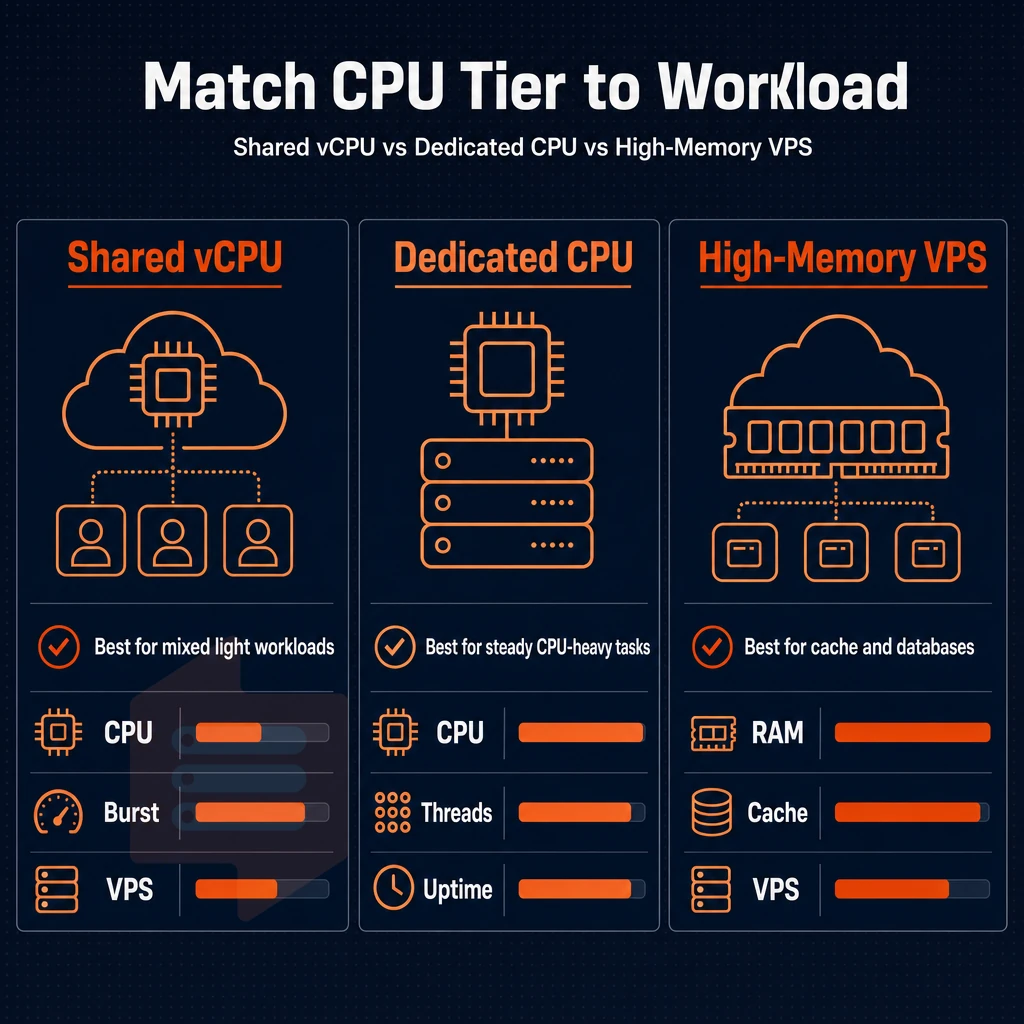
Not every workload should be running on the same VPS tier. Instead, match your workload’s compute profile (e.g. CPU-intensive, memory-hungry, high volume of traffic, etc.) to the underlying hardware. We describe three compute profiles here that map to our three VPS solutions that we offer for purchase.
Assess your workload type first
-
Profile your CPU usage. Run
toporvmstatfor 24 hours under real traffic. If CPU stays below 60% and spikes are short-lived, you are a Standard-tier candidate. If CPU is consistently high or latency-sensitive, read on. - You measure your memory-to-CPU ratio by dividing your working-set memory by the number of required CPU cores. A ratio above 4 GB per core indicates a High-Memory workload. A ratio below 2 GB per core with bursty compute in between the spikes indicates Dedicated CPU.
- Determine your latency requirements. While batch jobs and development servers can tolerate occasional CPU contention, real-time APIs, financial applications and CI/CD tools cannot. Record your maximum p99 latency before selecting a tier.
Note: Skipping this profiling step is the most common mistake. Teams that skip it often over-provision on RAM while under-provisioning on pinned cores, and pay for the wrong tier for months.
Match the tier to the use case
- Our Standard CPU VPS (S-tier) serves general purpose and constant workloads. This tier is ideal for the development environment, the staging server as well as growing companies with medium-sized websites and light APIs (e.g. Content Management Systems). It is based on AMD EPYC processors (generation Milan) and makes use of NVMe RAID10 storage. Even though it’s a shared vCPU, it’s very cost-efficient while at the same time offering strong single-thread performance due to the EPYC architecture. Thus, a highly reliable hosting service is provided without over-engineering.
- Dedicated CPU VPS (D-tier), Raw performance and predictable latency. The EPYC Genoa CPU cores of your VPS are physically pinned to it. Thus there is no CPU steal by noisy neighbors. Therefore D-tier VPS servers are suitable for production databases, for CPU bound programs like compilers as well as for CI/CD servers. Here p99 latency has to stay constant. Such a VPS is like a dedicated server, isolated without the overhead of bare metal.
- High-Memory VPS (H-tier), in-memory and analytics workloads. The 1:8 RAM ratio (up to 192 GB) makes for an ideal host for Redis clusters and in-memory analytics and application data caches. High availability systems which replicate all data in RAM to ensure sufficient performance are also well suited to run on this type of server.
Is a cloud VPS hosting provider good for your site?
Yes. Most production workloads are better off running on a VPS than on a shared hosting account. For any number of reasons, VPSes generally outperform their shared hosting counterparts in just about every measurable respect: isolated resources, root access, I/O. To this end, the best VPS hosting is KVM based with NVMe storage and a no-oversell policy. We deliver exactly this at BuyVPS on every node.
For small business operators, the Standard tier provides a powerful hosting solution at a fraction of the cost to larger enterprises. Dedicated style isolation, AMD EPYC processors, and scalable virtual server options in one hosting plan that doesn't require a migration or change of IP addresses when you need to upgrade from the entry point config.
A well-configured VPS is typically the best solution for a workload that needs more than shared hosting but is not ready yet to manage a bare-metal dedicated server.
Storage, network, and virtualization: the infrastructure details that actually matter
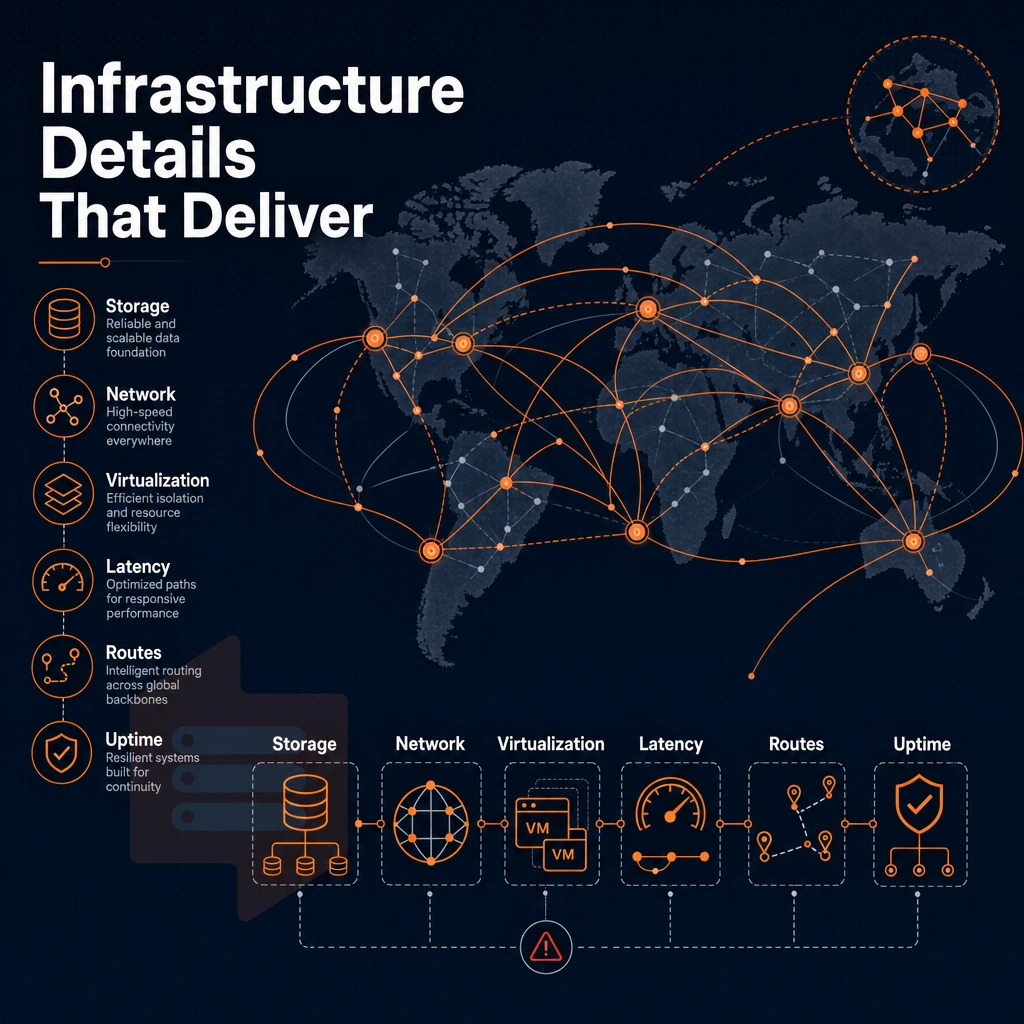
What looks like a 'budget VPS' plan to you actually lets providers cut multiple corners in their data centers, and they fail to account for how these will compound under real loads. Latency on storage, CPU noisy-neighbor-ism, and the network’s ability to handle surprise all reveal themselves long before you get to list out all the features you want in a production host.
Storage: NVMe raid10 with pcie direct attachment
Storage is typically attached to most providers via shared SAS backplane. However, with PCIe direct attachment to storage, this entire bottleneck is eliminated. The fio benchmark for our random read 4K IOPS records real world queue depth numbers versus synthetic throughput numbers for storage in data centers performing only sequential I/O.
Using RAID10 on multiple NVMe SSDs provides a high availability environment that can sustain the failure of single drives without incurring any loss of data or sacrificing performance to run in a degraded state and rebuild. That is the environment of production cloud computing vs. cheap shared storage. Using PCIe direct connect RAID10 on multiple NVMe SSDs provides that environment.
Cloud VPS virtualization: KVM with a separate kernel per VPS
The shared host kernel used in container-based web hosting virtualization means that one misconfigured or compromised container can affect all other virtual machines running on that node. In contrast, with KVM each VPS runs a fully isolated kernel and therefore a kernel panic in one instance will not affect other instances.
This matters for workloads that load kernel modules, tune sysctl parameters, or run custom kernel builds. Full root access and custom ISO support are only meaningful when the hypervisor actually enforces that isolation boundary.
Network: multi-homed uplinks, DDoS protection, and private networking
Having a single upstream provider is a single point of failure. Our multi-homed uplinks automatically reroute traffic around a degraded carrier. Every plan is IPv4 + IPv6 dual-stack. We can provision VLAN-based private networking for you on request to run isolated back-end traffic between your nodes.
The Edge filtering feature enables DDoS protection at the network edge, before any traffic reaches your VPS. We stand by our 99.8% uptime SLA thanks to the multi-homed setup of our VPSes.
Can i find a $5 cloud VPS server?
Ultra-low-cost plans are offered by many cloud providers. The trade-offs are well known: shared-kernel containers, low-end storage (e.g. on spinning disks or low-end NVMe), single-homed connections, and no SLA. Such plans are typically fine for personal projects or throwaway test environments. But for anything that handles real user data, sees significant production traffic, or requires compliance with regulations, the performance deficit will prove to be more expensive than the cost savings.
In-place upgrades and operational continuity
Most platforms require you to migrate to a new server (i.e. a new node) on a new IP address. Then you wait for the change to propagate through your DNS. With our in-place upgrade path, we keep your IP addresses and your data intact.
No re-provisioning of servers, no rotating of IP addresses, and no need for adown time for what is otherwise a straightforward addition of resources to your server. The operational continuity provided by this approach is considerable and a real advantage for a large number of virtual server production scenarios where IP address changes can have negative consequences for things like certificates. Allowlists, and partner integrations.
Managed vs. Unmanaged VPS: what level of control do you need?
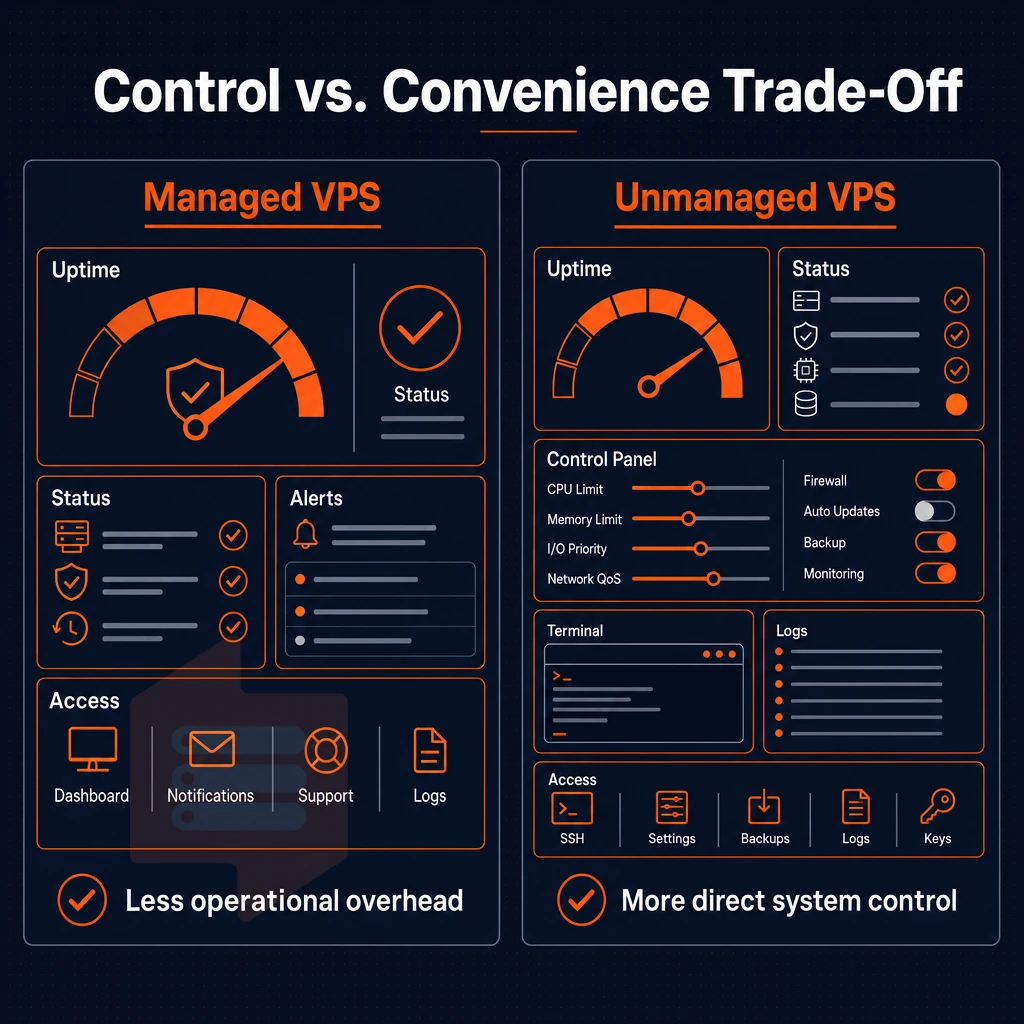
Deciding between managed and unmanaged VPS hosting is a matter of determining who is better suited to handle the operational overheads of VPS hosting, you, or your potential hosting provider. Getting this wrong can result in you paying over the odds for services you don’t need. Alternatively, Being woken up in the middle of the night to patch a kernel with no assistance from your hosting provider.
What unmanaged cloud VPS actually means
Unmanaged hosting refers to servers which have full root access from the boot up of the server. This means you have full control over the server environment. This can include everything from installing a server’s Operating System up to full security hardening and the software stack and all updates in between.
Typical OS options are Ubuntu, Debian, AlmaLinux, Rocky Linux, CentOS Stream and Fedora. You can upload a custom ISO if required by your workload and not listed in the typical options.
This model is well suited to developers, sysadmins and agencies looking to run their web apps exactly as they were developed. No provider constraints, no shared control panels and no performance-sucking abstractions.
- Full control over every package, daemon and firewall rule.
- No cPanel dependency, bring your own stack.
- Custom ISO support for non-standard distributions.
- In-place upgrades with no IP rotation.
When managed services make sense
A managed tier is managed by your provider, so you don’t have to manage things like patching, monitoring, and backups. This is useful if your team doesn’t have the necessary knowledge to manage things like Linux servers, or if they simply don’t have time to manage the OS layer.
A managed plan costs more to run than an unmanaged one and restricts changes that you want to make. For example, a non-standard kernel or a very specific version of a runtime might be blocked or delayed by a support team of a managed provider.
Managed hosting is best for sites running standard web applications and valuing uptime above control. Managed hosting is not suitable for people building their own data centers or infrastructure, or high volume sites that need low-level OS tuning to reach their full potential.

What is the difference between shared hosting and VPS hosting?
Typically hundreds of accounts are hosted on a single server with shared CPU, RAM and I/O. One noisy neighbor can affect the entire shared hosting environment. With a cloud VPS you get isolated resources guaranteed by a hypervisor.
A cloud VPS provides your workload with isolation from other workloads that do not belong to you, so it does not compete with them for memory and for disk throughput. To achieve performance, any serious cloud VPS provider imposes hard memory limits and keeps low node density. We do at BuyVPS on our Amsterdam and New York data centers.
Common use cases: what workloads run best on a VPS?
Different workloads require different types of VPS’s to ensure that you’re not spending too much money on a VPS and also not under-provisioning it. Below is a table that outlines the typical use cases and the appropriate type of VPS for each. I’ll explain my reasoning for each below.
| Use case | Recommended tier | Key requirement | Why it fits |
|---|---|---|---|
| Web apps / high traffic sites | Standard CPU VPS (S-tier) | Burst headroom, IPv4+IPv6 | Shared vCPU handles variable load; scalability via in-place upgrade |
| E-commerce storefronts | Dedicated CPU VPS (D-tier) | Consistent checkout latency | Pinned cores eliminate CPU steal during peak traffic |
| Game servers (Minecraft, Palworld, FiveM) | Dedicated CPU VPS (D-tier) | Low tick-rate jitter, RAM | Pinned EPYC Genoa cores keep latency predictable under player load |
| CI/CD and dev/staging environments | Standard CPU VPS (S-tier) | Root access, fast NVMe | 122,959 4K read IOPS cuts build and test cycle times |
| Database servers | High Memory VPS (H-tier) | Large working set in RAM | Up to 192 GB DDR4 ECC; NVMe RAID10 for durable writes |
| VPN and proxy servers | Standard CPU VPS (S-tier) | Dual-stack IP, low latency | Amsterdam and New York locations cover EU and US East Coast |
| Self-hosted tools (Git, monitoring, chat) | Standard CPU VPS (S-tier) | Always-on, full root control | KVM isolation keeps tools independent from other cloud workloads |
Latency-sensitive and game server hosting
A lot of Minecraft server hosting services, as well as Palworld servers, punish CPU steal hard. A single 20 ms missed tick is immediately visible to players. Dedicated CPU VPS hosting on pinned EPYC Genoa cores is not affected by any amount of steal. FiveM servers hosting 64 player servers also benefit from this isolation.
For game servers it’s best to place them near your player base. So Amsterdam for Europe and New York for US East Coast. Both locations run identical hardware, so latency is a geography decision and not a specs decision.
Data-heavy and high traffic workloads
For database servers and high traffic web applications, memory is the single bottleneck: once the working set size exceeds physical RAM, every cold read will end up on disk. The H-tier VPS is optimized for this type of usage, with large pools of DDR4 ECC memory holding hot data in RAM. Additionally, NVMe RAID10 handling the rest without the large latency hit of spinning disk.
A cloud VPS is also well suited to run behind a load balancer. Run your application on multiple VPS servers and use the load balancer to distribute traffic to them. Since you can scale individual servers in place without them changing IP address, your load balancer configuration remains unchanged.
Do i need managed or unmanaged VPS hosting?
Unmanaged VPS hosting provides you with full root access to a clean OS and you can patch, security harden and install software as required. Most developers and small business resellers prefer unmanaged VPS hosting as it is cheaper than managed and does not include a third party in your IT stack.
Managed hosting adds OS-level support from the provider. It suits teams without a dedicated sysadmin. BuyVPS is unmanaged by design: engineers answer support tickets, but the server is yours to configure. If your team can run apt upgrade and read logs, unmanaged cloud VPS servers are the right call.
VPS hosting comparison: what to look for across providers

Even VPS plans vary greatly between hosts. Issues such as CPU architecture, storage type, virtual server virtualization, and transparency in billing affect how some hosts will handle high load versus just looking good on paper. This review will serve as a guide for you to compare future web hosts to evaluate any web hosting option before you commit.
How to evaluate a cloud VPS provider
Use these criteria in order. Each one eliminates a category of providers before you can even look at their prices.
- Check the CPU allocation (e.g. shared vCPUs for low traffic websites are fine). For applications that require low latency, look for plans that offer pinned cores (e.g. the Dedicated CPU plans offered by BuyVPS).
- Verify storage technology. While many providers offer SSD storage, make sure they also use RAID10. While SSD storage alone provides high speed, it does not provide any redundancy. BuyVPS measures 122,959 4K read IOPS on fio, published and reproducible benchmark numbers.
- Check for the correct hypervisor (KVM in this case) and confirm that root snapshots are created separately for each VPS (as opposed to container-based virtualization where all VPSes run on the same host kernel. Restricting the OS choices even more and allowing for a greater blast radius from a neighboring compromised account).
- Check IPv6 inclusion. It should be a standard feature of the server and not an optional add-on. All of our BuyVPS plans include IPv4 and IPv6 (dual-stack) by default, with no additional charge.
- Does the provider support custom ISO’s for very hardened or non-standard OSes? Typically such support is outside the Budget conscious tiers.
- In-place upgrades are upgrades to your device(s) in their current location(s), without any IP rotation or migration. In-place upgrades avoid any DNS propagation delays and any reconfiguration work.
- Verify that there is no overselling and that there are hard memory caps for each node. This ensures that the RAM you allocated to a node will not degrade when the node is under heavy load and affects performance of all your VPS hosted on that node.
- Read the SLA. BuyVPS publishes a 99.8% uptime SLA. Anything below that is a warning sign, and anything above that without methodology to back it up is just marketing.
- Evaluate the support model. Engineer-led support is typically faster to resolve issues than a tiered chatbot support model. Find out who actually reads and responds to your tickets.
- Review the provider’s billing structure. Typically, a provider that bills on a monthly basis with no increases upon renewal is preferred. Look for the fine print as some providers advertise hourly rates but subsequently charge a higher monthly rate in order to lock the client at that hourly rate.
Note: Competitive pricing means nothing if the plan is oversold. A lower monthly rate on a crowded node will cost more in downtime and troubleshooting than a well-provisioned plan at a fair price.
What workloads are VPS servers best suited for?
A VPS server is suitable for servers that require dedicated resources but do not require a full bare-metal server. Web servers hosting medium-sized websites, application servers, CI/CD environments, game servers and databases requiring consistent IOPS are typical examples of such servers.
High-memory workloads like in-memory databases, large caches and analytics can be scaled on BuyVPS’s H-tier VPS offerings. They reach up to 192 GB RAM and are combined with fast NVMe storage. The RAM to CPU ratio is also very high on these offerings.
Provider comparison at a glance
| Feature | Budget providers | Mid-tier providers | Performance-focused providers (BuyVPS) |
|---|---|---|---|
| CPU type | Shared vCPU | Shared vCPU | Shared or pinned (dedicated tier) |
| Storage | SSD storage | NVMe storage | NVMe RAID10, PCIe direct |
| Virtualization | Container or KVM | KVM | KVM, separate kernel per VPS |
| IPv6 included | Sometimes | Usually | Yes, dual-stack on all plans |
| Custom ISO | Rarely | Sometimes | Yes |
| In-place upgrades | No | Sometimes | Yes, no IP rotation |
| No-oversell policy | Rarely stated | Varies | Hard memory caps, low node density |
| Uptime SLA | 99.0-99.5% | 99.5-99.9% | 99.8% |
| Support model | Chatbot / ticket queue | Mixed | Engineer-led |
| Billing transparency | Renewal hikes common | Varies | Same price in year 5, no renewal hike |
European and US server locations: latency strategy for amsterdam and new york
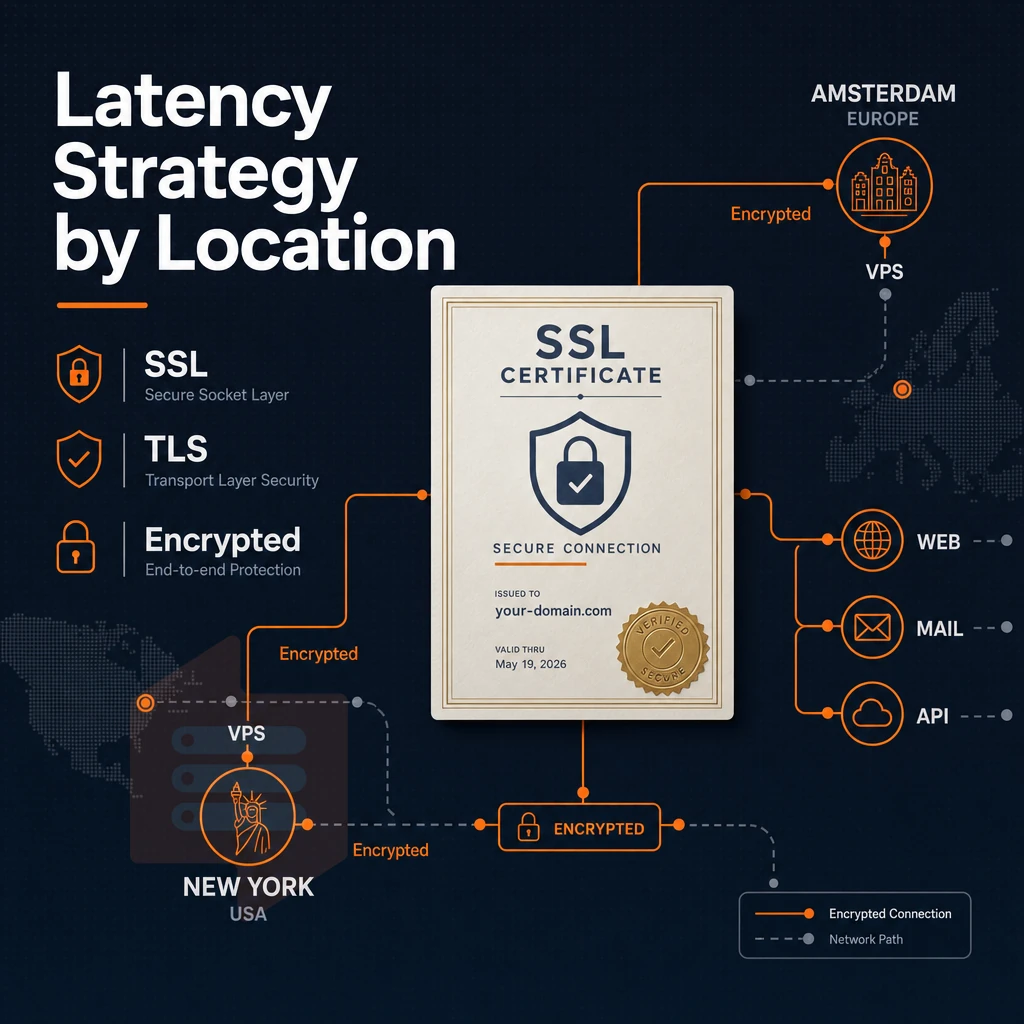
Latency for your cloud servers depends on the physical locations of the data centers where you buy your VPS. For optimal performance BuyVPS has set up two data centers: in Amsterdam and in New York. We achieved the best coverage of the Western world with these two locations.
Why geography drives latency
The speed of light through fiber is around 200,000 km/s, which means that a round trip from London to New York adds roughly 70 ms of natural latency before any packet even reaches a virtual server for processing. Selecting the wrong region for your cloud servers will only multiply this and then also apply to every subsequent database call, API request and TLS handshake that your application serves up.
Hosting on a physical server near your users is the most reliable way to mitigate these overheads. Caching and a good CDN go a long way, but choosing the wrong region defeats most of that effort.
Amsterdam: EU users and data residency
Amsterdam is at the heart of Europe’s internet exchange infrastructure. Routes to major EU cities like London, Paris, Frankfurt and Stockholm are typically close and have low latency.
Amsterdam supports data residency for EU user data for teams under GDPR. Allowing personal data to reside within EU-based data centers to simplify compliance without forming a separate legal entity or entering into data transfer agreements.
For workloads that require EU data residency and/or European end-user performance, Amsterdam is the natural anchor for those workloads.
New york: US east coast and transatlantic reach
New York is one of the most connected interconnection points on the East Coast of the US. We measure latencies to Boston, Washington DC and Toronto of less than 20 ms. When it comes to transatlantic connections to Europe. New York is also preferable to the West Coast of the US as it offers shorter paths for applications that need to serve both continents.
For teams who require full control over their stack (e.g. custom kernels, raw socket access, BGP-adjacent configurations). A US East location allows for traffic to remain local and not be sent through a geographically distant interconnect hub.
No penalty for choosing either region
Our hardware, control panel, and network setup is identical in both locations. We use KVM virtualization on NVMe RAID10 storage and offer IPv4 and IPv6 on dual stacks in both Amsterdam and New York. We support both Linux and custom ISO installs in both locations.
Spin up additional servers in regions close to your users. Spin up additional servers in regions far from your users. If your user base shifts to a new region, simply move your monitoring application to the new web hosting servers without having to re-learn a new monitoring console or re-size monitoring displays.
Why choose BuyVPS for best VPS server hosting
BuyVPS has been founder-run since 2002. That longevity shapes every decision, from hardware choices to how support works. When you need the premium virtual private server hosting for steady workloads, high traffic applications, or general purpose cloud servers, the fundamentals matter more than marketing copy.
Here is what separates our VPS hosting from the typical cloud VPS provider:
- No-oversell policy: Hard memory caps and low node density mean your virtual private server gets the dedicated resources it was sold. No noisy neighbors stealing your RAM at peak load.
- Pinned cores on the Dedicated tier: Shared cloud VPS plans run on AMD EPYC Milan. Dedicated-tier virtual server plans use EPYC Genoa with cores pinned to your instance, consistent performance under real load, not just on a benchmark slide.
- Provable performance: We publish Geekbench 6, fio, and pgbench results. Our NVMe RAID10 PCIe-direct storage hits 122,959 4K read IOPS (fio median). That is NVMe SSD storage with numbers you can verify.
- Full root access and custom ISO on every plan: Every operating system we support, Ubuntu, Debian, AlmaLinux, Rocky Linux, CentOS Stream, Fedora, ships with full root access. Bring your own ISO if none of those fit.
- KVM isolation: Each virtual machine runs its own kernel. That is real isolation, not a container dressed up as a dedicated hosting product.
- Identical hardware in Amsterdam and New York: Same specs, same data centers infrastructure quality, same network setup. Low latency to Europe or the US East Coast, your choice, no trade-off.
In-place upgrades mean no migration and no IP rotation when your workload grows. Price locks mean no renewal hike in year five. Our support team is engineers, not first-tier chatbots.
Ready to compare VPS solutions and find the right fit? Browse our full VPS lineup or reach out to the team at support@buyvps.com to talk through your requirements.
How to choose the right VPS plan: a decision framework

Selecting the right VPS configuration consists of 7 decisions. Read through them and you will have a configuration that matches your workloads and does not waste money on unnecessary servers or run out of resources under load.
Cloud VPS options: map your workload to a tier
Begin with RAM and CPU. For a content site or staging environment, 2-4 GB RAM + 2 shared vCPUs is typical. For a database server, CI/CD environment, or other real-time app, you need predictable CPU performance, which is why pinned cores exist.
We have three levels of service: Standard CPU (e.g. shared vCPU on AMD EPYC Milan processors), Dedicated CPU (e.g. pinned vCPUs on EPYC Genoa processors with DDR5 ECC memory). Additionally, High Memory (very high RAM to vCPU ratios, 1:8 for example, ideal for in-memory workloads). Choose the appropriate service level based on the workload, not based on cost per service.
Shared web hosting vs. Dedicated resources
For bursty but infrequent workloads, Shared vCPU plans are an efficient option as they deal well with occasional but temporary spikes in traffic. However, for applications with high traffic volumes and sustained loads (e.g. payment processing or live APIs) where low latency is critical, the use of dedicated resources with fixed cores is often more appropriate.
Workload mapping to the right tier is shown in the following table.
| Workload | Recommended tier | Key spec to verify |
|---|---|---|
| Dev/staging, low-traffic sites | Standard CPU (S-tier) | RAM ≥ 2 GB, NVMe disk space |
| APIs, databases, CI/CD | Dedicated CPU (D-tier) | Pinned cores, DDR5 ECC, 99.8% SLA |
| In-memory caches, analytics | High Memory (H-tier) | RAM up to 192 GB, 6 TB transfer |
Unlimited traffic, region, and billing model
Pick a region near your users. Our Amsterdam (EU) and New York (US East) datacenters run identical hardware. Opt for the closest region to lower round-trip latency for your users.
Monthly billing lets you have flexibility during the early growth phase of your company. With a 1 or 2 year commitment at a lower rate with no hike on renewal you are charged the same rate in year 5 as you were in year 1.
Make sure your plan comes with unlimited traffic or a transfer limit that's clearly stated before you sign up. Then confirm the following: no overselling and hard memory caps, 99.8% uptime SLA, root access, your preferred OS (we offer Ubuntu, Debian, AlmaLinux, Rocky Linux, CentOS Stream, Fedora and a custom ISO). Additionally, In-place upgrades with no IP address changes. Those seven checks will distinguish a quality hosting service from a potentially disastrous hosting service later on down the line.
The core differences between VPS tiers and hosting types
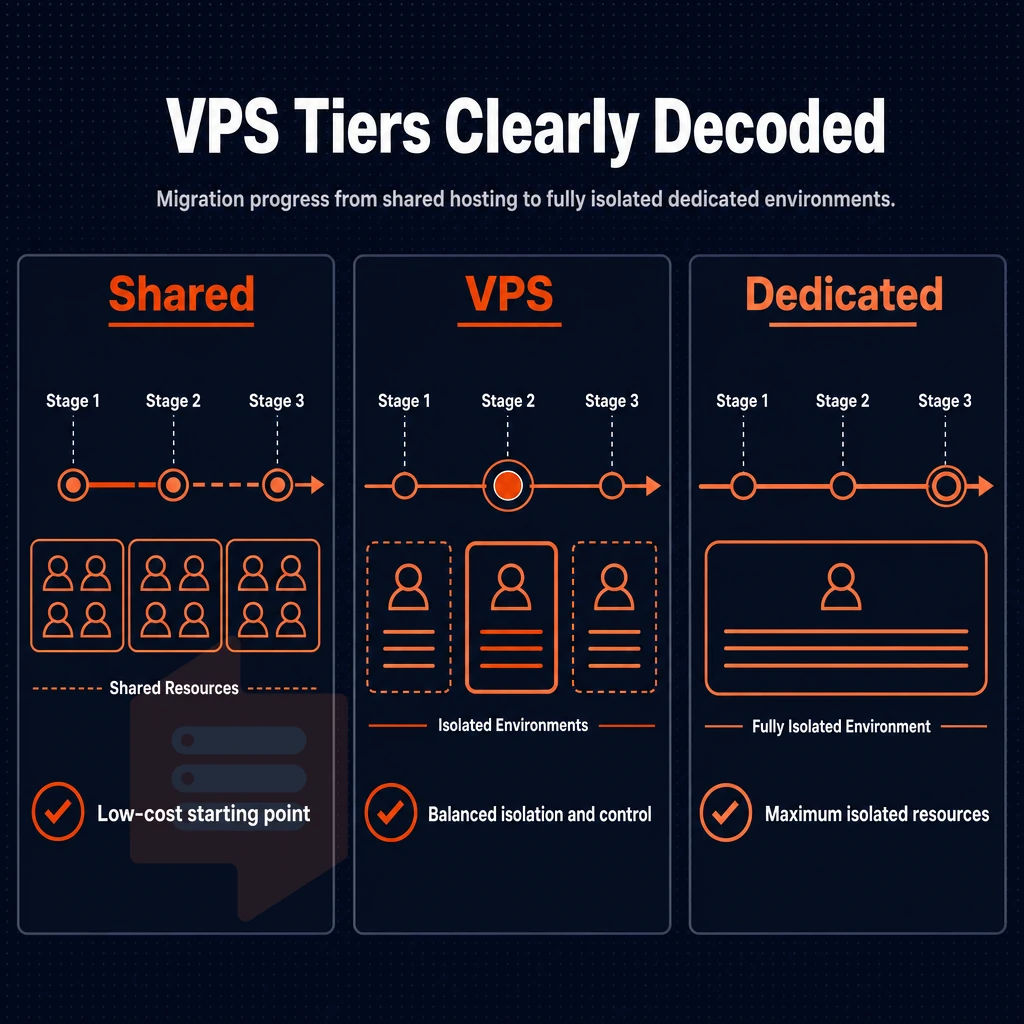
The primary difference between shared hosting, a VPS (Virtual Private Server) and a dedicated server is resource isolation. Shared hosting server resources such as CPU and RAM are shared with other hosted accounts on the same server. A VPS on the other hand is a section of the physical server which has been partitioned into virtual servers.
The VPS has guaranteed resources such as disk space, memory and root access. A dedicated server is a complete physical server with no other hosted accounts on the server. Cloud VPS adds live migration and automatic failover between data centers to the standard isolation provided by a VPS.
The main variables to consider within the VPS tier of cloud servers are the predictability of your workload, the amount of RAM available for your applications and your latency sensitivity. Shared vCPU plans are ideal for constant workloads running general purpose web applications. If you require guaranteed CPU power then a Dedicated CPU virtual server plan is the better option as it will protect your applications from noisy neighbors and guarantee low latency.
High memory plans are for data intensive applications that will run out of RAM before CPU power is required. We offer three different VPS plans (Standard, Dedicated and High Memory) that are hosted in two datacenters (Amsterdam and New York) to guarantee low latency and consistent performance.
Key advantages of choosing a performance-focused cloud VPS provider
The differences between cheap shared hosting and real cloud VPS hosting can be summarized with a few non-negotiables: hard memory limits to avoid impact from ‘noisy neighbors’. NVMe storage with IOPS numbers to back up claims, KVM virtualization to run multiple VPSes as separate kernels.
Additionally, Most importantly, real performance under load and not just on the day you sign up for a new host and they stop overselling to ensure you get to enjoy the performance of your Cloud VPS.
Transparent pricing with no renewal hikes, in-place upgrades without IP rotation, and an engineer-led support team compound those gains over time. Root access on every plan keeps your server environment fully under your control. If you're evaluating the best VPS server hosting options for steady workloads or growing businesses, start with providers that back their claims with data. Compare the best VPS plans and match specifications to your actual workload requirements.
Choosing the leading VPS hosting solution comes down to three decisions: matching the CPU tier to your workload, verifying the underlying infrastructure (hypervisor isolation, storage type, network redundancy). Additionally, Deciding how much control you want to manage yourself. Get those three right and everything else follows.
The reality of web hosting is that the marketing blurb about your server is far less important than the hardware itself. A shared vCPU hosting service is generally fine until you hit moderate levels of traffic. A fixed dedicated CPU core (a ‘pinned core’) means you’ll never get latency hits from noisy-neighbor processes.
If you run in-memory databases and analytics in your data centers, you'll need a high memory configuration to avoid total collapse under a typical service plan's limits. And no, a single hosting plan will never be sufficient for all web applications. But a provider that offers multiple tiers is useful: they give you scope to up-grade as required without having to move to a completely different hosting environment.
BuyVPS runs KVM-isolated VPS on AMD EPYC hardware with NVMe RAID10 storage across Amsterdam and New York. Full root access, in-place upgrades, and engineer-led support are standard on every plan. Browse the plans at BuyVPS.com and match your workload to the right tier today.