
Deciding between VPS vs VPN solutions can make technical teams scratch their heads since the two terms sound so similar.
It is very common for people managing website files, or even hosting companies themselves, to confuse these products and purchase a dedicated server or cloud resource that doesn't fit their needs, wasting money in the process.
Both virtual private server VPS and container technologies are forms of virtualization targeted at developers and IT professionals, and there are scenarios where you will want to run both to best facilitate your organization's workloads. See also: KVM virtualization.
But to make smart infrastructure decisions around enhanced security and avoid wasting money, you need a clear understanding of what each does, where it lives in your stack, and what problem it solves. Related: Ubuntu, Debian, AlmaLinux, Rocky Linux, CentOS Stream or Fedora.
Here is a breakdown of the key points. This should give you a good sense of what each service provides, whether it's a VPS vpn setup, where they overlap, and how you can tell which service and/or combination of services your application will require. First, let’s start with the VPS side of things. See Virtual private server on Wikipedia for background.
How a virtual private server VPS works on a physical server
VPS stands for Virtual Private Server, a virtual server realized on one physical server using hypervisor software. Related: VPS hosting provider.
First month $1
Then the normal monthly price. One per customer. No setup fee, and a 30-day performance guarantee on your first order.
See the plans“BuyVPS offers simple and reliable VPS hosting solutions for different online needs.”
Want the VPS side of that story in practice? Our guide to a WireGuard or Tailscale VPS shows how a small server becomes your own VPN or exit node in an evening. Read the guide.
How VPS isolation works on a physical server
We here at BuyVPS utilize KVM virtualization for all our VPS accounts.
Each of our VPS servers boot up their own individual operating system.
Storage and compute on a dedicated server via public wi fi
Our VPS hosting is powered by NVMe RAID10 storage attached directly to the server's PCIe slots. We measured 122,959 4K read IOPS (fio median) on these servers. That is not shared cloud storage shared across 100+ nodes, it is real dedicated throughput per server.
How it differs from shared web hosting
- Shared hosting, one OS, many tenants, no root access.
- VPS: a fully isolated kernel, dedicated RAM and CPU and full root access.
- Hard memory caps per node prevent noisy-neighbor saturation.
Above we described what VPS is for and how it can provide isolation.
What is a VPN and how does its virtual server work?
VPN stands for Virtual Private Network, not a server you rent and manage the way you would a VPS.
What a virtual server in a virtual private network VPN actually does
A VPN establishes an encrypted connection, or ‘tunnel’, between your device and a VPN server operated by the VPN provider. All traffic routed from your device will then pass through this tunnel, masking your real IP address, and making your internet connection appear to originate from the location of the VPN gateway. This encrypted tunnel protects your data from interception when browsing over the public internet, especially on untrusted networks.
Network administrators can configure route tables to control how traffic flows between the VPN client, the remote server, and other network segments. When properly configured, a vpn hides your actual location and browsing activity from websites, advertisers, and internet service providers monitoring network traffic. Understanding how a vpn protects your communications helps clarify why organizations deploy them for remote teams accessing sensitive business systems.
A VPN for public Wi-Fi and geo-restrictions. A VPN service, provided as hosted infrastructure. You never get root access, you never get to control a virtual network, and you can never install software. This limited control makes VPN services ideal for privacy but unsuitable for hosting applications or running custom server configurations.
VPN vs. Virtual private cloud on a physical server
A Virtual Private Server (VPS) is server infrastructure that you can lease and control. With a VPS, you gain more control over system configurations, software installations, and resource allocation compared to shared hosting environments.
When a virtual server changes the physical server equation
While a VPN can be very useful for privacy and security. A VPN is great for protecting data over secured connections but cannot substitute a VPS when you need to run applications, host a database, or control your own traffic routing. At BuyVPS you can order a fully managed VPS running on KVM with full root access in Amsterdam or New York.
One more term often thrown into the mix alongside these two services: virtual private cloud.
Common use cases: when to choose VPN vs VPS hosting
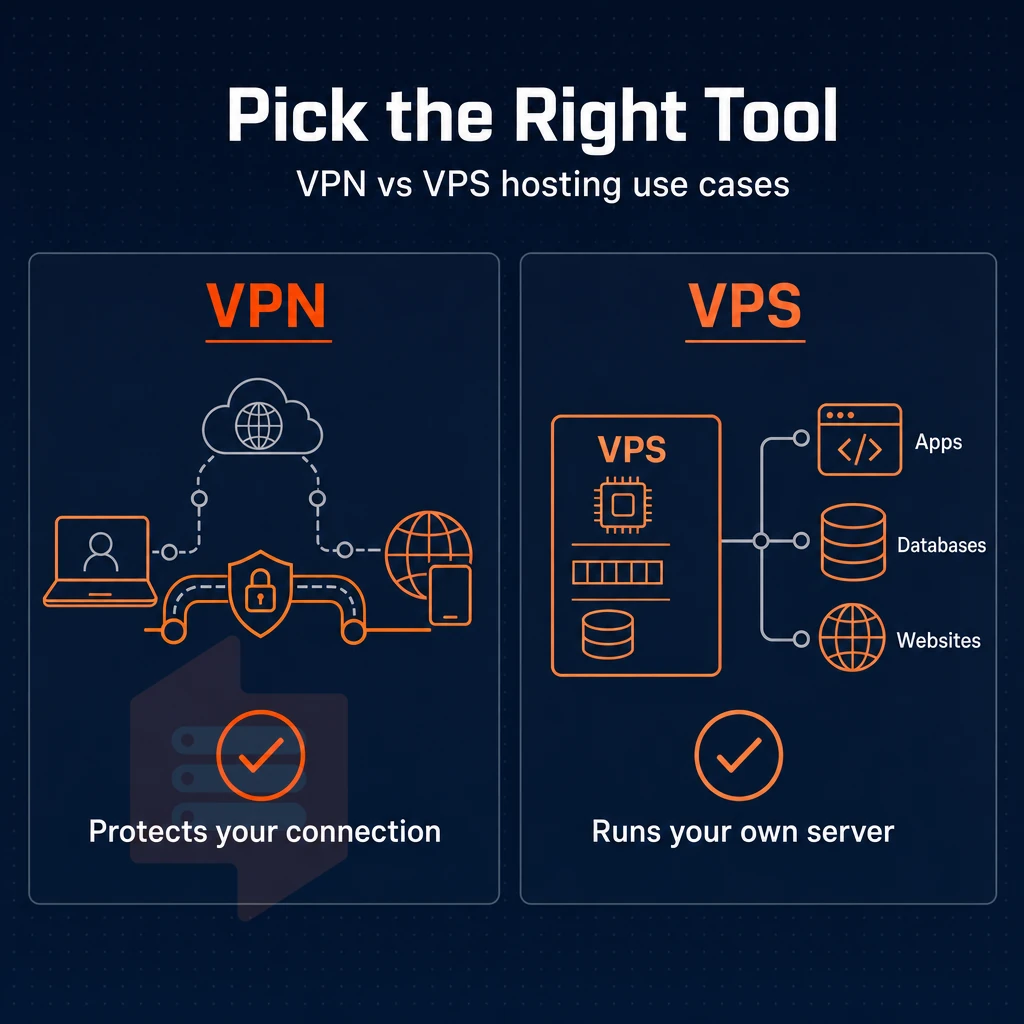
Choosing between VPN services and VPS hosting depends on your goals. One service protects your connection while the other provides a server to host your projects. Often you will need both a VPN and VPS hosting solution.
When to choose a VPN connection with a dedicated server
A VPN is the right tool for secure remote access to your corporate network, for protecting your traffic on public Wi-Fi hotspots, and for increasing your online privacy.
- encrypted remote access to office networks from home or anywhere in the world.
- Encrypting traffic on untrusted networks.
- Keeping browsing activity private from ISPs.
When to choose VPS web hosting
When you need to run something (e.g. web hosting, application servers, databases or other software packages), VPS’s are the correct tool. They allow you to run full Linux environments with root access.
- Hosting web applications or APIs.
- Running a game server or project backend.
- Self-hosting tools your team controls entirely.
The overlap between VPS vs VPN software
There is a degree of overlap between VPS and vpn, namely that a VPS can host vpn software directly. Deploying WireGuard or OpenVPN on a single physical server or VPS and then connecting clients to it creates a self-managed VPN to secure data in transit, without relying on a third-party service. This approach appeals to developers and privacy-conscious users who prefer self hosting their VPN infrastructure rather than subscribing to commercial providers.
Full root access and KVM isolated servers create secure environments where your VPN endpoint runs quietly, with no noisy neighbors affecting your bandwidth.
After you have decided that a Virtual Private Server is the right layer for your application, you have to decide which service provider you can trust with your server. Evaluate whether the provider offers transparent billing, reliable uptime guarantees, and the ability to scale cloud resources as your traffic and storage demands grow over time. Look for providers that deliver strong customization options, allowing you to tailor CPU allocation, memory configurations, and operating system choices to match your application's technical requirements.
A reputable hosting service will also provide comprehensive documentation, responsive technical support channels, and clear service-level agreements that outline maintenance windows and incident response procedures. Consider how the provider integrates with other resources such as backup solutions, monitoring tools, and content delivery networks to streamline your operational workflow. The provider's infrastructure should also support clean migration paths, so you can move your server environment between data centers or upgrade hardware specifications without extended downtime.
Why choose BuyVPS for your virtual server hosting needs
Once you've decided a virtual private server is the right fit, the next question is which VPS hosting provider to trust.
- True KVM isolation, each VPS server runs a separate kernel, so your server resources stay yours alone. No shared kernel risks, no noisy neighbors.
- NVMe RAID10 storage, PCIe-direct drives with published fio benchmarks (122,959 4K read IOPS measured). Performance is provable, not claimed.
- No-oversell policy, hard memory caps per node and low node density mean your server environment behaves consistently under real load.
- Dedicated-core tier, AMD EPYC Genoa with pinned cores for workloads that need guaranteed CPU, not shared vCPU.
- Full root access + in-place upgrades, custom ISO support, no IP rotation when you scale, and identical hardware in both Amsterdam and New York.
If you've weighed VPS vs VPN and a virtual private server is your answer, we'd welcome the chance to match you to the right plan.
Frequently asked questions about secure access
Does a VPS hosting service provide more dedicated resources than a VPN does?
A VPS is a remote server you control, you run applications, host websites, and manage infrastructure on it. A VPN encrypts your internet traffic and masks your IP address but gives you no server to deploy code on. If you need compute resources, a VPS wins. If you need private browsing or private remote connectivity to a corporate network, a VPN wins.
Can i use my VPS as a VPN?
BuyVPS provides full root access and KVM isolation on every plan, so installing and running a tunneling server is straightforward.
Is getting a VPS worth it?
A VPS is worth it the moment shared hosting or a local machine can no longer handle your workload.
For developers, businesses running production apps, or anyone self-hosting services behind a virtual private network VPN, the jump to a VPS pays off quickly in reliability and control.
Is VPS just a vm on public wi-fi networks?
Technically yes, a VPS is a isolated server instance running on shared physical hardware. Unlike a shared hosting plan, BuyVPS runs KVM with a separate kernel per VPS, which means your instance behaves like a standalone server, not a noisy-neighbor environment.
Do i need a VPN if i have a VPS?
If you want private browsing, a secure internet connection to your VPS's dedicated server resources and internal network, or encrypted tunnels between team members, adding a VPN layer on top of your VPS makes sense.
Can i use VPS and VPN together?
Absolutely, this is a common and practical setup. You host a WireGuard or OpenVPN server on your VPS, then connect all your devices to it. Your traffic exits through the VPS's IP, your self-hosted apps stay on the same private network alongside your cloud resources, and you control every aspect of the configuration. BuyVPS supports this out of the box: full root access, IPv4 and IPv6 dual-stack, and KVM isolation deliver enhanced security while ensuring the private network server runs cleanly without kernel restrictions getting in the way.
Vpc vs VPN: what is the role of a VPN gateway?
A VPC (Virtual Private Cloud) is a logically isolated network segment inside a cloud platform, distinct from a VPS VPN setup, designed to protect sensitive data by defining how your servers, subnets, and routing rules are organized. A VPN (Virtual Private Network) is an encrypted tunnel that connects two endpoints, such as your laptop and a remote server.
A VPC is infrastructure architecture; a VPN is a connectivity and privacy tool.
A VPN is used to secure a connection to the internet, and a VPS is a server that you can use to control and host your own server. For the majority of technical workloads (hosting applications, databases, APIs, etc.) a VPS is more than sufficient.
The distinction matters when you're scaling. A VPN adds a privacy layer on top of existing infrastructure. A VPS is the infrastructure. If your project needs root access, persistent compute, or a dedicated IP that belongs to you, you need a server, not a tunnel.
BuyVPS runs KVM-isolated servers on AMD EPYC hardware in Amsterdam and New York, with NVMe RAID10 storage, full root access, no-oversell guarantees, and the ideal foundation for any VPN creates secure tunnel scenario. If you're ready to move from a VPN workaround to real infrastructure, explore BuyVPS plans and find the tier that fits your workload.