

Shared hosting falls apart under load.
Not all VPS hosting is created equal. Unlike shared and dedicated hosting, a VPS should offer isolation, yet the actual server it runs on can still be heavily loaded with other accounts, and the memory limit may be soft.
Outdated hardware is another common problem, often buried in marketing materials. See also: managed VPS hosting.
In this guide we will take a look into how VPS hosting works, how to set up a VPS to run fast.
Additionally, come up with a set of criteria, including how server resources are allocated on a single physical server, to evaluate providers, as well as a list of questions to ask before you sign up for a hosting service. We will start from the beginning and explain what a VPS hosting service is.
What is VPS hosting and how does it work?
A VPS (Virtual Private Server) is a part of a physical server that is divided into many Virtual Machines (VMs) that are isolated from each other. Each VM runs its own Operating System (OS) and has its own fixed resources. Because of this isolation, VPS hosting is very different from shared hosting where many users are hosted on the same physical server and share the same resources such as CPU and RAM.
First month $1
Then the normal monthly price. One per customer. No setup fee, and a 30-day performance guarantee on your first order.
See the plans“Excellent experience from start to finish! The server was delivered promptly, and the service was reliable and efficient. I m very happy with the results and would definitely recommend them.”
This architecture ensures that each VPS functions as an independent private network environment, preventing resource contention and security vulnerabilities that plague multi-tenant shared hosting configurations. Modern VPS plans typically allocate between 1 gb ram and 32 gb ram per instance, with the exact amount determined by the chosen pricing tier and workload requirements.
What is VPS virtual private server hosting?
Yes. VPS is just an abbreviation for Virtual Private Server. Both terms are used to refer to the same thing: in documentation, in your control panel and on your provider’s website.
How virtualization splits one machine into virtual servers
KVM (Kernel-based Virtual Machine) is the hypervisor technology we use to enforce tenant isolation.
At BuyVPS we run KVM with separate kernel for each VPS.
Where VPS hosting sits between shared and dedicated
The three tiers break down clearly:
- Shared hosting: Many websites are hosted on one Operating System instance and there are no guarantees for any of the hosted websites for any of the resources.
- VPS, One isolated OS with guaranteed resources and full root access.
- Dedicated server, One Tenant/Server/Physical Server/Physical Machine/Physical Host/Server (Physical), Dedicated, i.e. one tenant/owner/renter/contractor (hereafter referred to as tenant) or organization owns and is completely responsible for the physical machine/server/box.
Virtual Private Servers (VPS) provide the control of a dedicated server for the price of shared hosting. A VPS is typically the most cost effective solution for production work loads. The next section details the behind the scenes infrastructure which makes your VPS possible.
How a virtual private server VPS works under the hood
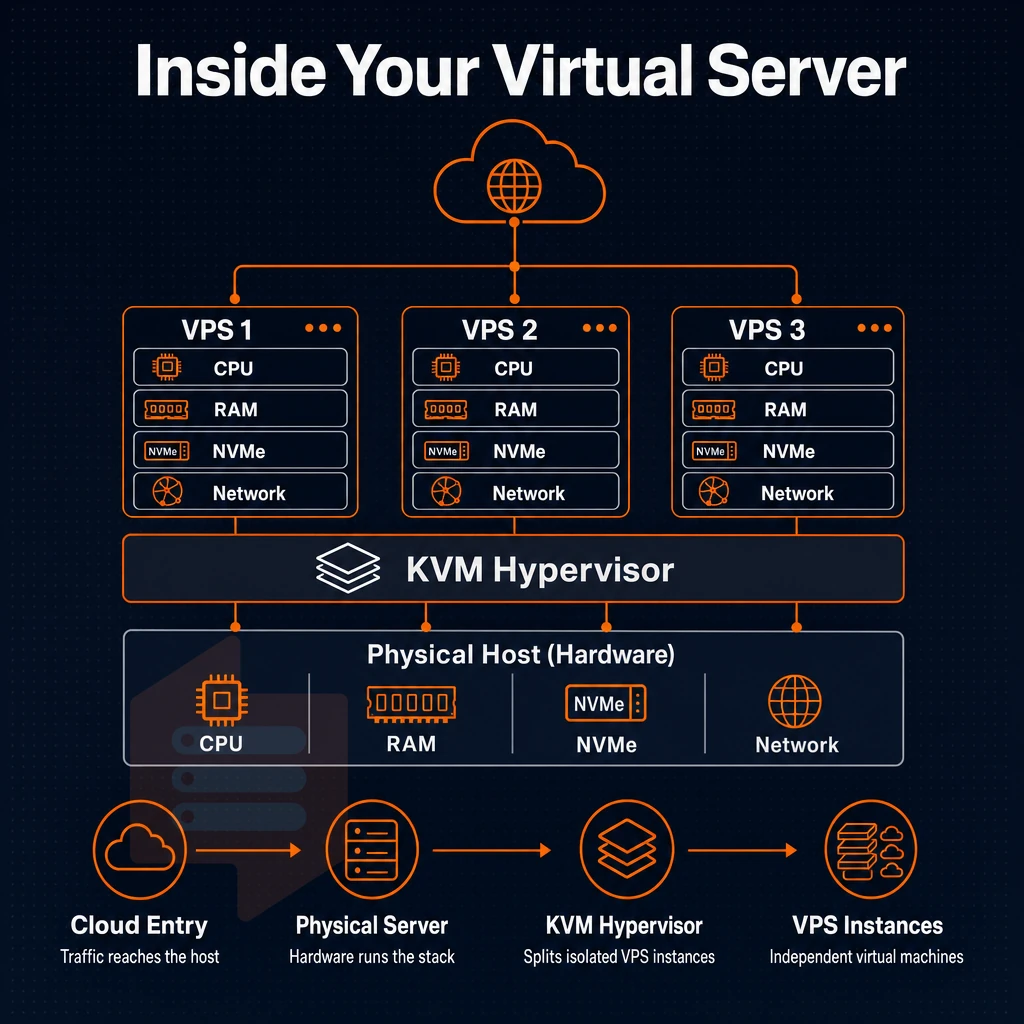
A VPS runs on a hypervisor, in our case KVM, on a physical server that is divided into individual VPS instances.
Full control panels without owning the physical server
Shared hosting is a setup where many users are hosted on the same server. In such environments, there is no isolation between accounts. A noisy neighbor can impact performance of other users on the same server. A VPS however, enforces hard limits on resources per instance on the same server of other users.
Dedicated hosting is one dedicated server with one tenant on the server for maximum isolation between tenant and tenant. However, with dedicated hosting there is higher cost per server and therefore slower provisioning. A VPS is a middle ground and offers the isolation of a dedicated server but is provisioned in minutes.
Organizations seeking maximum performance often find that dedicated hosting delivers the lowest latency and highest throughput, though VPS instances with dedicated vCPUs can approach similar benchmarks at a fraction of the cost. When evaluating VPS options, businesses should prioritize providers that guarantee reliable performance through dedicated resource allocation and transparent SLA commitments. The choice ultimately depends on whether your applications require the raw processing power of bare metal or can operate efficiently within virtualized resource boundaries.
NVMe raid10 and pcie-direct storage
As spinning disks from traditional servers queue I/O over SATA, NVMe RAID10 servers connect I/O directly over PCIe reducing latency to the order of microseconds. BuyVPS measures out 122,959 4K read IOPS (fio median) for example, a performance that spinning disks just can’t hope to match.
Is VPS hosting better than a VPN?
VPNs and VPSs solve different problems. A VPN encrypts your traffic. A VPS is a full virtual server that you can use to run applications, host databases, deploy code, etc. For workloads that require more than privacy routing, a VPS is the correct tool to use. If you need root access or consistent performance then shared hosting is not for you. You can install MySQL, PostgreSQL, or other database systems to manage databases for your applications with complete configuration freedom.
| Type | Isolation | Root access |
|---|---|---|
| Shared hosting | None | No |
| VPS (KVM) | Full kernel | Yes |
| Dedicated | Physical | Yes |
This unmanaged hosting and web hosting comparison will serve as the introduction to a closer look at how each of the three tiers stack up when it comes to the production team's key metrics.
VPS hosting vs shared hosting vs dedicated hosting
There are three main hosting tiers on the market, from shared environments up to semi managed VPS hosting and beyond, knowing where each fits helps you match workloads to the right environment without overpaying or under-provisioning.
Shared hosting vs VPS hosting
- All tenants on the server share resources. No account is isolated from others. Traffic spikes on other sites could impact your site negatively, the noisy-neighbor problem.
- There is minimal control, you get a control panel not a shell. You are limited to changes that your provider permits.
VPS hosting
- Unlike shared hosting, a VPS has its own dedicated resources. For a VPS, the RAM, CPU and storage are all reserved for your instance, so you won’t have any variation in performance caused by other tenants.
- All of our servers are set up with full root access. This means you can install any package, tweak the kernel to optimize for your site, or run custom daemons that would otherwise not be allowed. Really, the server is yours to do with as you please.
Note: superuser access means full responsibility. A misconfigured firewall or unpatched service is your problem to fix. Proper network security configuration, including firewall rules and intrusion detection, becomes essential when you hold superuser privileges on your VPS instance. Many providers also offer ddos protection as part of their security suite to mitigate volumetric attacks that could overwhelm your instance.
Dedicated hosting vs VPS hosting
- This Server is dedicated to 1 Tenant. There is no Hypervisor Overhead and no shared hardware. As the most performant option this is also the most expensive on a cost per Server basis.
- The operational overhead to manage physical hardware (such as failures, firmware updates, scaling for growth, etc.) will typically be left with the tenant or their managed-services provider.
| Factor | Shared | VPS | Dedicated |
|---|---|---|---|
| Isolation | None | Hypervisor-level | Full hardware |
| Root access | No | Yes | Yes |
| Scalability | Fixed plan | In-place resize | Hardware swap |
| Noisy-neighbor risk | High | Low | None |
| Management overhead | Low | Medium | High |
What is the best virtual private server VPS for your needs?
To start with, choosing between a VPS server and other options like shared and dedicated hosting depends on a number of factors including the nature of your work and the degree to which you require control over your server. Static websites with minimal traffic would likely benefit from a Shared plan. However, for most users, managed VPS hosting is the sensible middle ground, a fully isolated server, with administrator access, that can be scaled up as required without the overheads of managing your own physical hardware. For teams that prefer to focus entirely on their applications rather than infrastructure maintenance, fully managed hosting removes the burden of system updates and security patches.
A VPS is particularly well-suited for developers and agencies managing multiple websites, as each site can be isolated within its own environment while sharing the underlying server resources efficiently. Small business owners launching personal websites or portfolio sites will find VPS hosting offers room to grow beyond the constraints of shared plans without requiring dedicated infrastructure. Cloud-based VPS platforms excel at providing scalable resources that adjust to traffic spikes, ensuring consistent performance during periods of high demand without manual intervention.
As a hosting provider, BuyVPS takes a no-nonsense approach to server management and resources like memory, each node has a hard cap, and upgrades are implemented in-place to prevent IP rotation and associated migration downtime. After you’ve decided on VPS, the next question is how much of the server administration you wish to handle yourself. Monitoring disk space usage becomes critical as your applications grow, since running out of storage can halt services and corrupt databases without warning.
Transparent allocation policies ensure that resources allocated to your VPS remain fixed and cannot be borrowed by neighboring instances, even during peak load periods. Many providers also offer optional control panels like cPanel or Plesk to simplify routine tasks such as domain management and email configuration for those who prefer graphical interfaces.
Managed and unmanaged hosting: VPS types including semi-managed
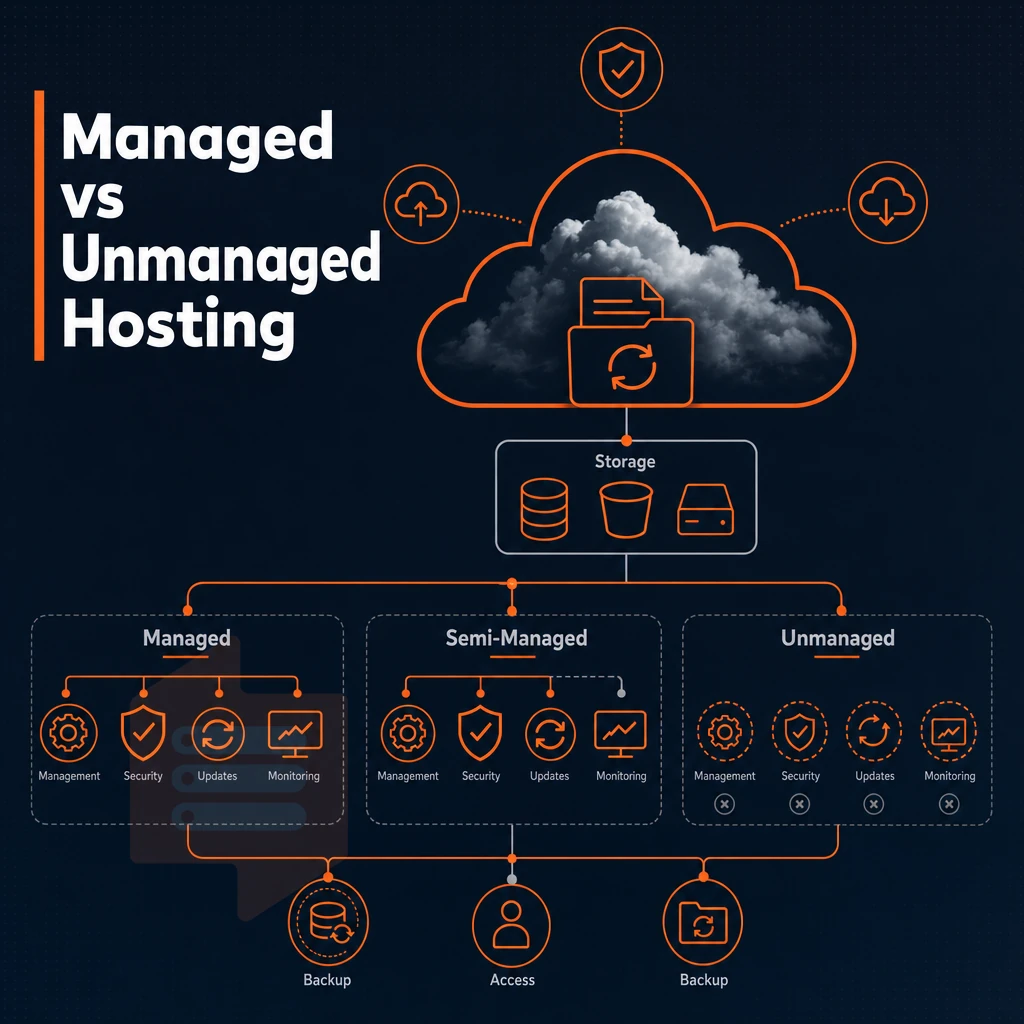
VPS hosting comes in three flavors of management. Additionally, It can be helpful to know the basics of each so that you can pick a VPS hosting plan that has the right level of server management for your team.
Managed vs semi managed VPS hosting: what the provider owns
Our managed VPS hosting is ideal for organizations without in-house sysadmin resources, the provider handles OS updates, security patches, and core server administration, freeing you to focus on the application layer.
Unmanaged VPS hosting: full tenant control
Unmanaged VPS hosting is when we hand you a bare server and give you full system access to the box. You then install the OS of your choice on the virtual machine, configure the hardening on the firewall, apply any necessary patches, and have full control from the data center's OS layer up. More work for us, but full control for you on all the configuration.
This level of independence is ideal for teams running custom applications or data processing workloads that demand specific kernel modules or non-standard software stacks. Some providers also offer optional control panels like cPanel or Plesk for users who want graphical interfaces alongside command-line access.
How do you choose a VPS hosting provider?
Determine your team’s skill level and choose the corresponding management tier. If your developers are comfortable with running commands in a terminal then unmanaged or semi managed VPS hosting provides the most flexibility. However if your team members are not comfortable with server administration then look for a hosting provider that has active server management support. Some providers also offer intuitive control panels that simplify routine tasks like domain management and email configuration, bridging the gap between fully managed and unmanaged tiers.
The VPS server hardware tier matters too.
BuyVPS offers KVM-isolated VPS hosting with full privileged access and a separate kernel for each VPS. This is the correct type of hosting for teams who require unmanaged or semi-managed hosting and want to have full control without compromise on performance or isolation. Both Amsterdam and New York nodes run identical hardware.
Once you have a handle on your Virtual Private Server's management model, you can explore the types of workloads it handles well, probably better than you initially thought.
Common use cases: what can you run on a VPS server?
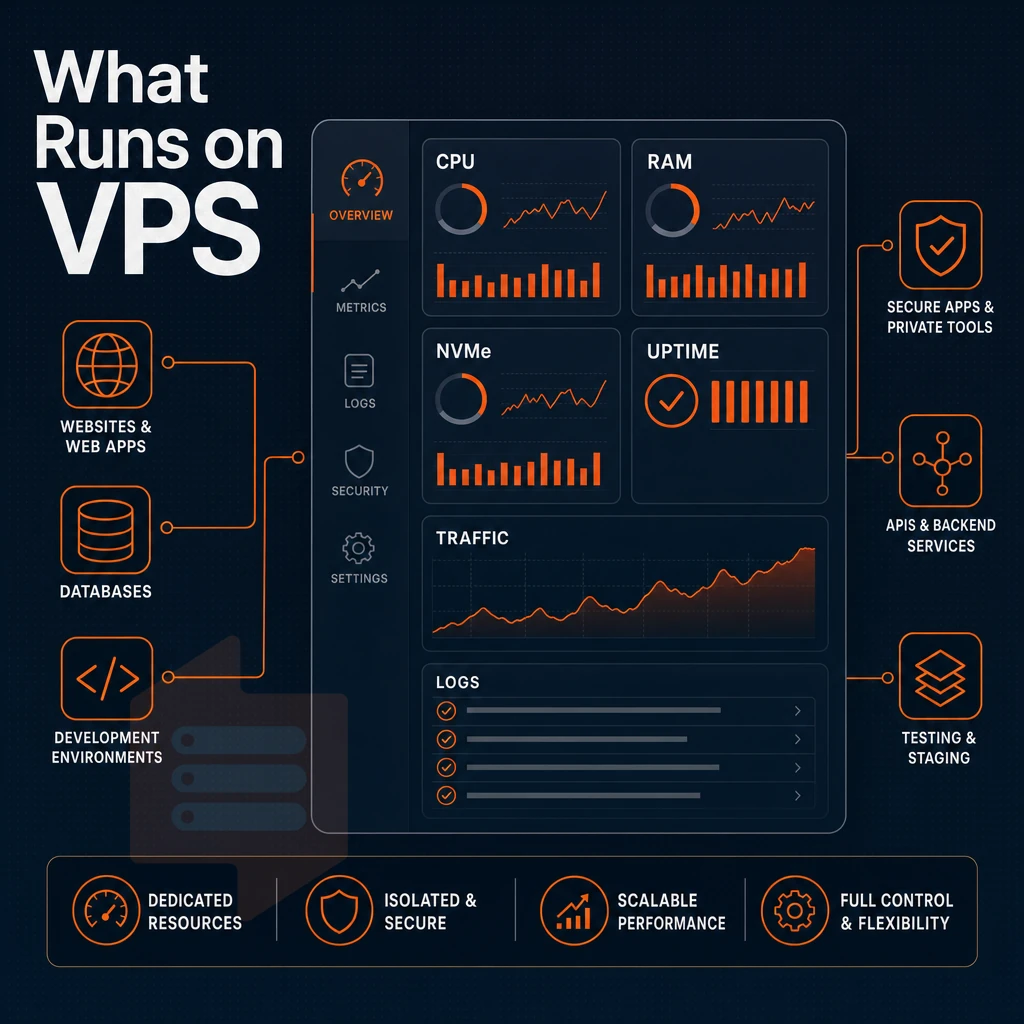
When people refer to a Virtual Private Server or VPS they typically think of it in terms of web hosting. Additionally, yes a VPS, even with unmanaged hosting, is more than capable of handling the usual production applications that a normal shared hosting account would manage.
However, that is not the full extent of what a VPS can do, as many people use a VPS server and its dedicated server resources to run test environments for applications in isolation from the rest of their production servers. The VPS is ideal for such test environments and the choice of the correct Operating System for your web hosting VPS is important for your server's performance.
Web applications, ecommerce sites, and hosting websites
Web applications and ecommerce sites are typical VPS applications. One server with many websites, all managed from one control panel, each website running isolated on its own operating system.
Our Database hosting store workloads such as PostgreSQL, MySQL and MongoDB.
Game servers, private networks, and remote access
We have data center locations in Amsterdam and New York.
Private networks and remote access solutions such as VPNs, jump hosts and internal tools run great on a VPS that gives you full root-level access and IPv4/IPv6 dual-stack connectivity without needing an entire physical server.
Development, staging, and physical server administration
VPS instances can be mirrored by developers to produce a exact replica of their production setup. Our virtual servers support Ubuntu, Debian, AlmaLinux, Rocky Linux, CentOS Stream, and Fedora, plus a custom ISO upload option so multiple users with unique stack requirements are fully accommodated.
- Spin up a staging clone without touching production.
- Test your deployments on the exact OS you run in production.
- Isolate system administration tasks from live traffic.
Knowing what software you will run on your VPS helps you figure out the required amount of resources.
Understanding VPS resources: CPU, RAM, storage, and bandwidth
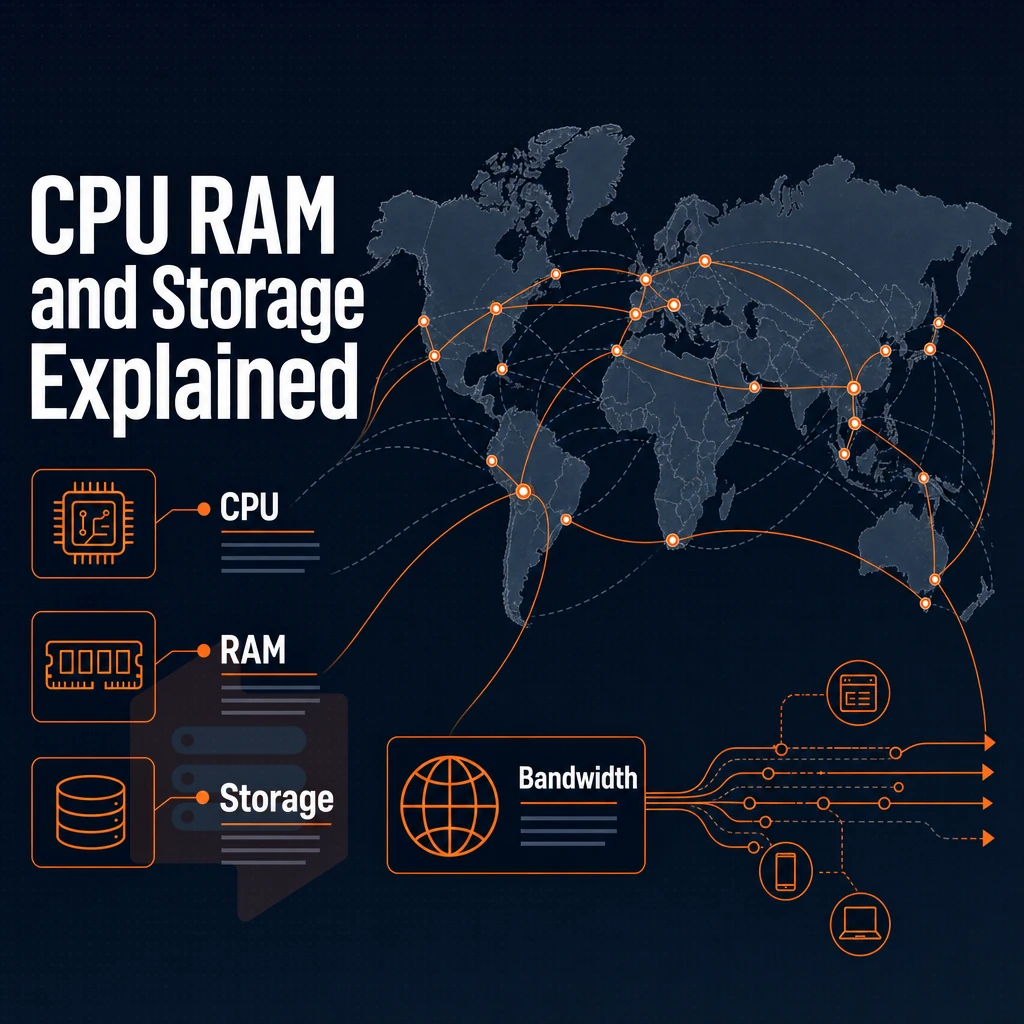
Knowing how each of these resources are provisioned, where cost cuts occur.
CPU: shared vCPU vs. Pinned cores
Virtual CPUs shared between environments compete with their neighbors on the same host. Pinned (dedicated) cores are 100% reserved for your virtual environment and eliminate the noisy neighbor problem. Pinned cores also give your server environment the consistent performance under sustained load that applications like databases, CI/CD pipelines, and latency-sensitive APIs require.
BuyVPS offers both tiers. As a VPS hosting provider, they offer a Standard CPU tier with virtual servers running shared vCPU on AMD EPYC Milan processors and a Dedicated CPU tier with servers that pin your cores on high performance AMD EPYC Genoa processors with DDR5 ECC RAM for the most predictable, low jitter compute.
RAM and NVMe SSD storage
For web hosting storage, NVMe SSD storage over PCIe direct in RAID10 was measured at 122,959 4K read IOPS by BuyVPS, a real benchmark not a marketing phrase.
Network, additional IP addresses, and semi managed VPS options
VLANs are also available on request.
Can i install a custom operating system on a VPS?
Yes.
Why choose BuyVPS for virtual private server hosting
BuyVPS is a founder-run virtual private server hosting provider operating since 2002, with data centers in Amsterdam and New York. Every VPS plan runs on KVM with a separate kernel, full isolation from other users on the same physical server.
- No-oversell guarantee: Hard memory caps and low node density mean your dedicated resources stay yours, unlike a shared hosting environment where other users compete for the same physical machine.
- Pinned cores on the Dedicated CPU tier: Consistent performance under real load, no noisy-neighbor contention.
- NVMe RAID10 PCIe-direct storage: 122,959 4K read IOPS measured via fio, faster than traditional hard disk drives by a wide margin.
- Full unrestricted server access + custom ISO: Complete control over your server environment, operating system, and software solutions on every VPS plan.
- In-place upgrades, no IP rotation: Scale your virtual private server without migration or losing your IP addresses.
- Transparent pricing: Predictable monthly cost across Standard CPU, Dedicated CPU, and High Memory tiers.
Engineers, not chatbots, handle support. Explore our VPS hosting plans or reach out to compare which virtual private server fits your workload.
A VPS gives you dedicated resources, full sudo access, and genuine isolation, without the cost of a bare-metal server. That combination makes it the practical default for developers, growing applications, and anyone who has hit the ceiling on their shared hosting solution.
The use cases are broad: web servers, databases, game server s, CI/CD pipelines, private VPNs, and more. What ties them together is the need for predictable performance and a stable environment you actually control.
If you're ready to move forward, explore BuyVPS's Standard, Dedicated CPU, and High Memory VPS plans, available in Amsterdam and New York, and find the configuration that fits your workload at buyvps.com.