

Most infrastructure decisions die because you’ve outgrown shared hosting but can’t quite bring yourself to commit to a full dedicated server. A VPS or Virtual Private Server is a virtual server running your own isolated set of virtual compute resources (such as memory, CPU power, etc).
It You control, as opposed to shared hosting, which you don’t. Additionally, That is provisioned on physical hosts that are managed by a hypervisor such as KVM.
When talking about hosting workloads on a hosting service, drafting SLAs, or explaining your infrastructure choices and server resources to colleagues and managers, it is very important to have a clear understanding of what VPS actually is. Many people use this term loosely, and most commercial offerings are not created equal.
Choosing the right provider means evaluating how each hosting company implements virtualization, enforces resource limits, and maintains transparency about their infrastructure architecture. Keep in mind that not every hosting company provides the same level of transparency regarding their virtualization stack or resource allocation policies.
Even 'oversold' servers running custom software can have very different performance characteristics under load, due to factors such as how server resources are distributed across shared memory pools and opaque virtualization layers.
For a complete overview, explore our VPS definition guide.
VPS definition: what is a virtual private server?
VPS stands for Virtual Private Server. It is a form of hosting where one server is split into many VPS servers. In each of these virtual servers there is installed an operating system and there are assigned certain resources. This The virtual server can use as it were a stand-alone machine, even though it is located on a shared server. Multiple virtual servers coexist on the same server hardware, yet each operates independently with its own isolated environment and resource allocation.
First month $1
Then the normal monthly price. One per customer. No setup fee, and a 30-day performance guarantee on your first order.
See the plans“Good support, fast VPS. Thanks!”
How virtualization splits one machine
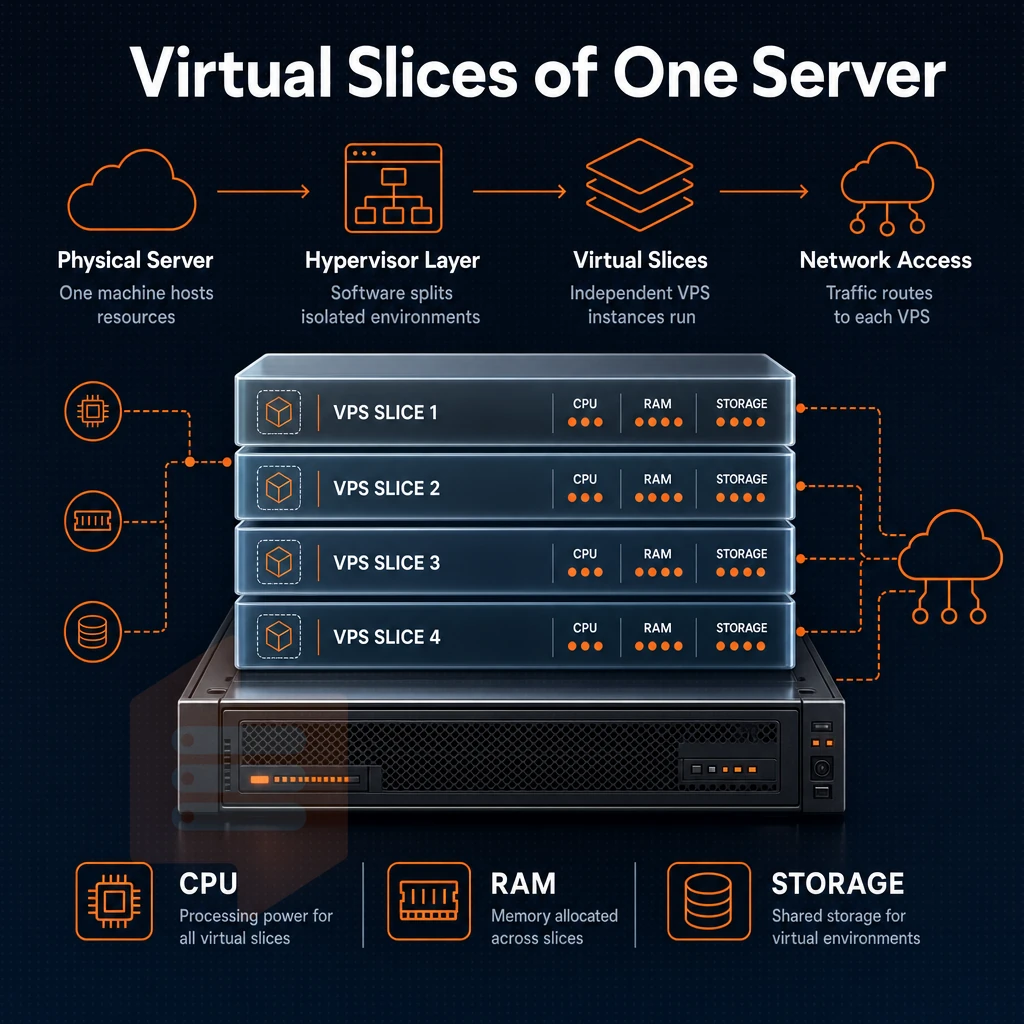
The physical host is divided by the hypervisor into virtual instances (VMs), each VM is allocated a fixed amount of CPU, memory and storage. Each virtual instance operates independently on the single physical server, with the hypervisor ensuring strict resource boundaries between tenants.
We run KVM with a separate kernel for each VPS at BuyVPS, giving you full OS-level isolation, not a container, but a true VPS.
What makes it "private"
Note that the term “private” is used to denote resource ownership.
- Ability to install any software or kernel module with root access.
- Isolated filesystem, other tenants can't read your data.
- Independent reboot cycles without affecting neighboring instances.
A concrete example of how to install custom software
A developer running a Node.js web API and PostgreSQL database needs guaranteed RAM and disk I/O.
How VPS hosting works: virtualization technology explained
VPS stands for Virtual Private Server. By using virtualization software on a physical server we can partition it into several virtual servers, each running completely isolated from the others and able to install custom software independently. Each virtual server can boot its own operating system independently, allowing administrators to run different Linux distributions or even Windows across separate instances on the same physical hardware. This flexibility allows development teams to test multiple configurations on the same hardware without provisioning additional physical machines.
How resources get divided
A hypervisor assigns virtual machines to the physical servers. The allocated VPSes get to use dedicated CPU cores, allocated amounts of RAM and allocated disk space. Your website is running in a solid environment that does not share resources with other websites. This isolation ensures that activity from other users on the same physical hardware cannot interfere with your allocated resources or compromise your server's performance.
Unlike shared hosting environments where resource spikes from other websites can degrade performance unpredictably, VPS isolation guarantees your allocated capacity remains unaffected by neighboring tenants' usage patterns. Each virtual machine operates with its own dedicated resources that cannot be borrowed or reallocated by the hypervisor to other tenants on the same physical host.
Isolation on the same physical server
All of our VPS servers run their own OS. Thus a ‘noisy neighbor’ on a physical server will not affect your workloads.
What this means in practice
| Layer | Shared hosting | VPS |
|---|---|---|
| OS | Shared | Own OS per instance |
| CPU/RAM | Pooled | Hard-capped allocation |
| Kernel | Shared | Separate kernel (KVM) |
| Root access | No | Full root access |
For those who require guaranteed resources and full control over their server, VPS hosting is the obvious step up from shared hosting.
VPS hosting vs shared hosting: key differences every website owner should know
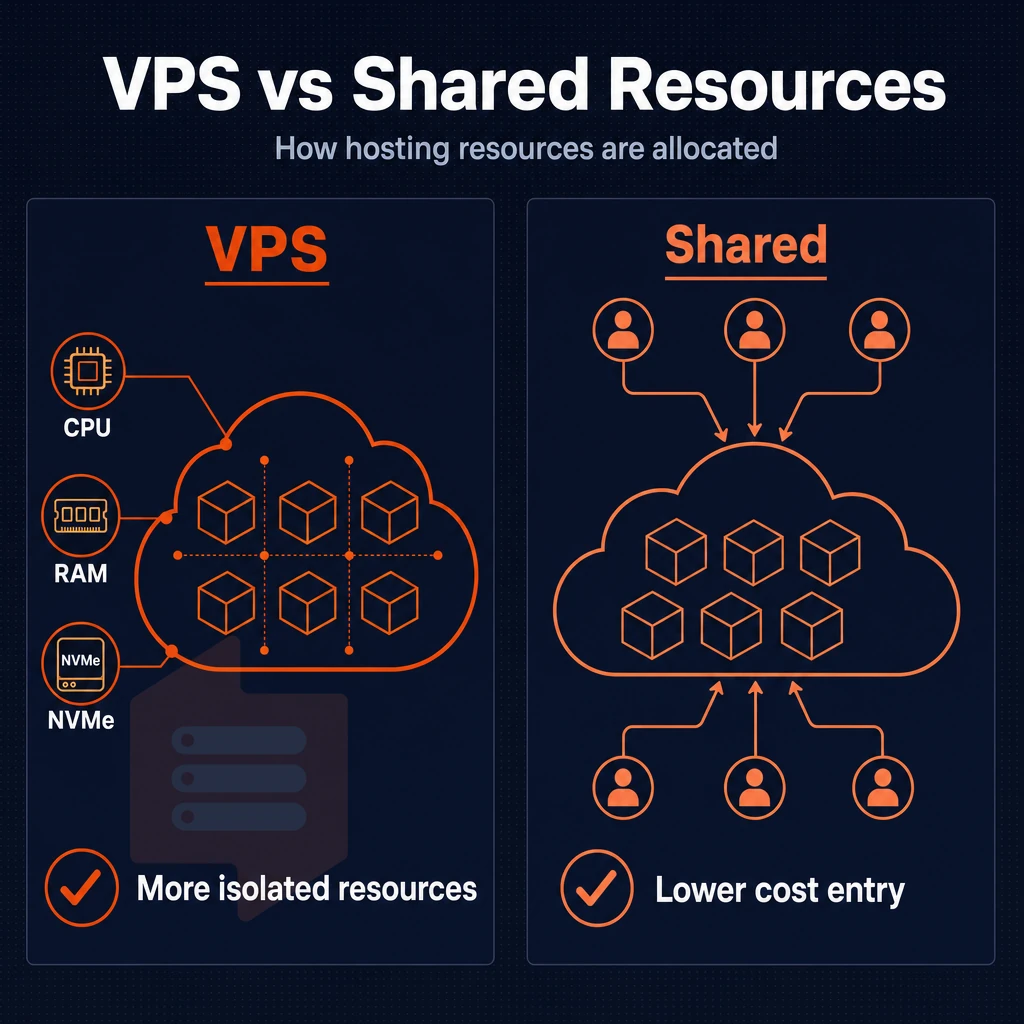
The main difference between VPS hosting and shared hosting is how resources are owned. Shared hosting accounts share resources like CPU power, RAM and I/O on a single server. In contrast, VPS hosting changes the paradigm for these shared resources entirely.
Understanding resource contention in your online store
- The shared-pool problem. With basic shared hosting, all accounts on a server share all available resources on an equal-by-default basis. A single neighbor’s increase in traffic to their web site can negatively impact performance of every other web site on the server before anyone even knows that a problem exists.
- You should also understand what a VPS server actually allocates. Unlike with shared hosting, a VPS server allocates fixed amounts of CPU power and RAM to you, which other users on the same node cannot use up. The amounts of your allocated resources do not change regardless of activity on other servers on the same node.
Note: Resource contention is the most common reason website owners discover they've outgrown shared hosting. If load times spike during peak hours, the shared pool is usually the cause. Sites experiencing high traffic volumes often see the most dramatic slowdowns when competing for resources in a shared pool during concurrent user sessions. Consulting with other website owners who have migrated from shared to VPS environments can provide valuable insight into whether resource contention is truly limiting your site's performance.
Isolation and performance in custom software
- We confirm kernel-level isolation. Each VPS instance runs under its own kernel. Thus a crash or misconfiguration on one account does not affect another account. This is in contrast to shared hosting accounts which do not have such isolation.
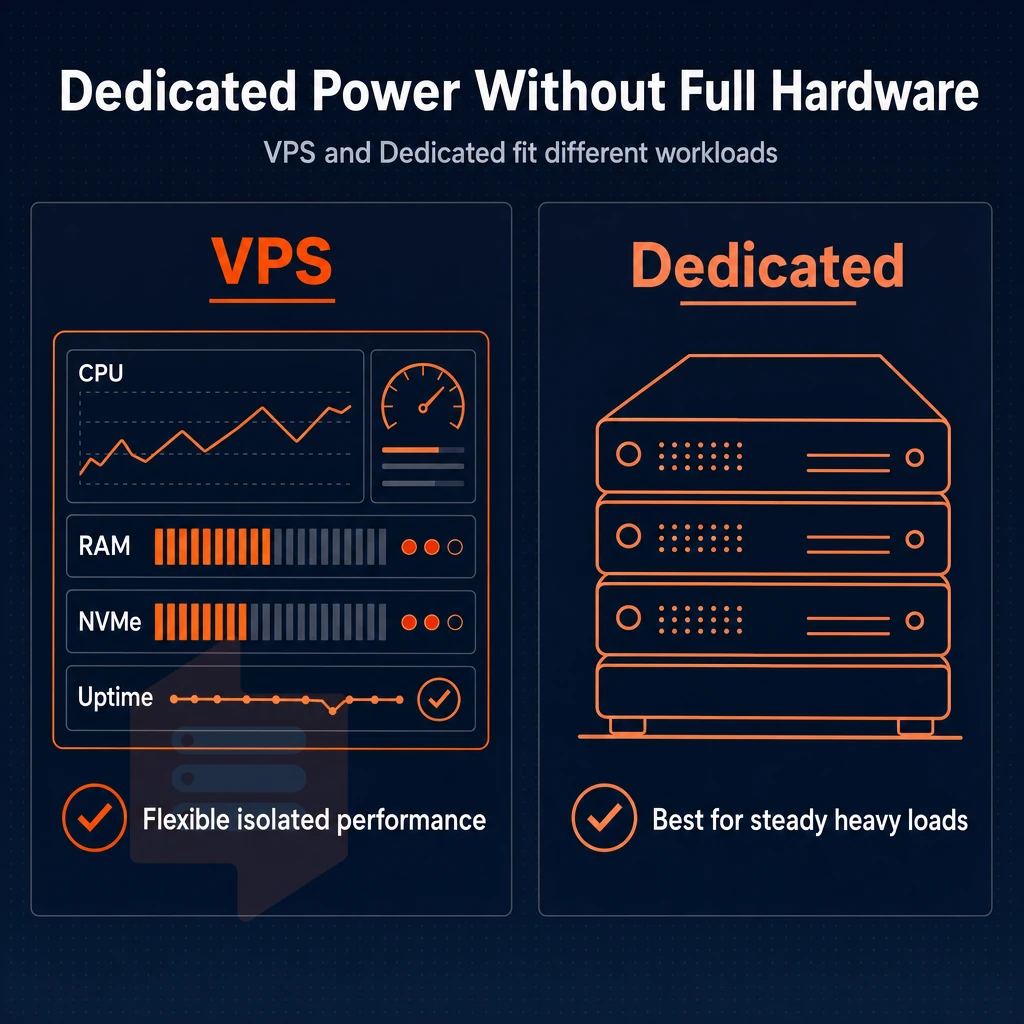
- VPS hosting compared to alternatives for hosting. Dedicated hosting would give a single tenant a full physical server. VPS hosting delivers similar isolation to dedicated hosting for a fraction of the space that would be required, sitting between shared hosting and a full dedicated server for practical use.
At BuyVPS we enforce hard memory caps per node and keep the density on any given node very low. Therefore the dedicated resources you pay for are always yours and we do not engage in silent overselling. However when a single shared physical host running a common operating system no longer is able to cater to your growing work load even with strict memory caps in place then a dedicated server is the way to go and it's really a very clear line.
VPS vs dedicated server: when you need your own personal server
VPSes and dedicated servers solve different problems.
Your own physical server vs. Shared physical hardware
A physical dedicated server is the whole machine and no other tenant uses the CPU, RAM or storage. It's totally isolated and not virtualized in contrast to a VPS (Virtual Private Server) web hosting solution that runs as fully virtualized servers on shared servers and are separated by a hypervisor and restricted by resource limits for each tenant. When you lease a dedicated machine, you effectively operate your own server without sharing any hardware components with other customers.
While many VPS vs shared hosting comparisons highlight how providers only loosely enforce these boundaries, at BuyVPS we use a variety of techniques, including hard memory caps and low node density. To ensure that your VPS acts as a Virtual Dedicated Server and not as a typical shared server account.
Where the trade-off actually lives
One area where a dedicated machine trumps raw single-tenant throughput is on direct compute tasks for very long running apps.
Is your workload sufficient to fill a physical host or are there many workloads that do not approach fully utilizing a host.
Control and server settings for high traffic
Both solutions offer full root access and the ability to modify kernel parameters, install any number of stacks, and change all server-level settings as needed. With dedicated server hosting, you have complete control of the server's BIOS, firmware, and physical network interface cards. This level of control enables administrators to implement custom server configurations tailored to specific application requirements or compliance mandates.
With a VPS, you abstract away these layers and use KVM to virtually represent the hardware.
Managed VPS vs unmanaged VPS hosting types explained
When choosing a VPS hosting plan, one of the first things to consider is the management of the server and the different levels of performance that are available. VPS hosting can be offered with two different styles of management and a number of different performance tiers.
Managed vs unmanaged VPS hosting: who handles the work?
By using managed VPS hosting, the host looks after the OS updates, security fixes and server config for you.
Un managed VPS hosting typically gives you superuser access to play with as you see fit.
VPS hosting vs shared hosting vs cloud hosting: a key distinction
Unlike shared hosting, a VPS gives you isolated resources rather than CPU and RAM pooled with other users on a basic shared hosting account.
There is a large gap between VPS hosting and shared hosting, especially under load. Unlike shared hosting where all accounts on a server are affected by high traffic on another account, a VPS has a fixed allocation of resources that are not affected by other accounts on the server.
Performance tiers worth knowing
- Shared-vCPU VPS, cost effective for average load sizes. CPU cycles are time sliced between tenants.
- Dedicated-core VPS, VPS configured to run on a specific, physical core, ideal for database and real-time applications that require consistent latency.
- High-memory VPS, High RAM-to-CPU ratio to run in-memory caches and very large datasets.
At BuyVPS we offer three service tiers: Standard CPU, Dedicated CPU, and High Memory.
Frequently asked questions
How does a VPS server with its own OS differ from a VPN?
A VPS (Virtual Private Server) is a virtualized server you rent to host websites, applications, or databases, with dedicated compute resources and full access to the operating system and environment.
They solve completely different problems: a VPS is a hosting service you deploy software on as infrastructure, while a VPN is a privacy layer for your network connection.
What types of VPS web hosting options are available?
The three main categories are shared-CPU (Standard), dedicated-CPU, and high-memory VPS.
High-memory plans flip the ratio toward RAM, making them the right fit for in-memory databases, large caches, or analytics workloads.
What is a VPS hosting account from a hosting provider?
A VPS account is your control relationship with a hosting provider: it covers billing, authentication, and access to the self-service panel where you provision, reboot, reinstall, or resize your VPS server instances. Through the account you also reach the API, VNC console, and support tickets. Think of it as the management layer sitting above the actual server instances you spin up.
Is VPS hosting good for beginners compared to dedicated hosting?
An unmanaged VPS requires Linux command-line comfort, you handle OS updates, security hardening, and software installation yourself. That makes it a poor fit for absolute beginners who have never administered a server. However, if you have basic SSH and Linux skills, a VPS is a powerful and cost-effective step up from shared hosting. Provider s like BuyVPS include an in-browser VNC console and engineer-led support, which lowers the barrier considerably for developers who are new to self-managed infrastructure.
Can i run multiple websites on a VPS hosting plan?
Yes, a VPS places no artificial limit on the number of sites you host. Full root access means you control every aspect of the stack across all your domains from a single instance.
What is the difference between managed and unmanaged VPS hosting?
With an unmanaged VPS, the hosting provider maintains the physical host and hypervisor; everything inside the VM, OS, security patches, software, backups, is your responsibility. With a managed VPS, the provider takes on some or all of those tasks, typically for a higher fee. Managed plans suit teams that want to offload administration but still need dedicated resources rather than shared hosting.
Who are the top VPS hosting providers?
The VPS server and broader hosting service market includes large cloud platforms, budget-focused providers, and performance-oriented specialist hosts, each with different trade-offs on hardware quality, support, and pricing transparency. BuyVPS stands out as a web hosting option for teams that need predictable performance: AMD EPYC processors across all tiers, NVMe RAID10 storage with measured 122,959 4K read IOPS, hard memory caps to prevent overselling, and in-place upgrades with no IP rotation.
Deployments are available in Amsterdam and New York, with identical hardware and pricing at both locations.
A VPS offers you reserved resources, full administrative access and complete isolation from other users for a price that is below that of a single dedicated server. We recommend VPS hosting for workloads that grow beyond shared hosting and require a constant level of performance.
The decision between managed/unmanaged, standard/dedicated CPU offerings for multiple virtual servers, each running its own operating system, will largely be based upon your team's level of Linux expertise as well as how predictable you believe their resource requirements will be. Choose correctly on day one.
BuyVPS runs KVM-isolated VPS instances on AMD EPYC hardware across Amsterdam and New York, with hard memory caps per node and no-oversell by design. If you're ready to move beyond shared hosting, or want a server that won't surprise you at renewal, explore the plans at BuyVPS.com and find the tier that fits your workload.