
Just as every infrastructure conversation eventually comes back to VPS (Virtual Private Servers). So, VPS stands for virtual private server. What that acronym refers to, though, is more than just a few letters.
In reality, the technology creates a VPS (Virtual Private Server) that exists somewhere between the realm of shared hosting and that of a full dedicated server. It provides isolated compute resources (in the form of a Virtual Private Server) with root access and a controlled environment (i.e. a VPS) and does so without forcing you to manage physical servers.
As you read on, you’ll find that the real value for developers and IT teams is found at the edges: the consistent performance under load, the ability to configure the OS stack as needed.
In this article, we explain how VPS virtualization works, what makes a well-engineered VPS and an oversold VPS, and for which workloads a VPS is particularly suitable.
For a complete overview, explore our what does VPS stand for guide.
What does VPS stand for in web hosting?
VPS is short for Virtual Private Server. Virtual Private Servers are created as virtualized server environments on single physical servers. In these environments, VPS tenants have isolated compute resources, storage and their own Operating System. Each tenant has its own Virtual Server environment that is independent from the environments of other users sharing the same physical server. See Virtual private server on Wikipedia for background.
First month $1
Then the normal monthly price. One per customer. No setup fee, and a 30-day performance guarantee on your first order.
See the plans“Very satisfied with the service. The server was provided quickly, and everything worked perfectly. Fast response, reliable service, and great overal experience!”
Dedicated resources on shared hardware
With a VPS, one physical server is partitioned into multiple isolated servers (VPSes) using a hypervisor. Each virtual server has a fixed set of resources (e.g. CPU, RAM, storage) which are dedicated to that server and cannot be contended with by other users on the same server. The storage allocation ensures each VPS receives guaranteed disk space that remains available regardless of usage patterns on neighboring instances.
Many providers also include unmetered bandwidth in their VPS plans, eliminating concerns about traffic overages during traffic spikes or high-volume periods. The hypervisor layer acts as virtualization software that creates and manages these isolated environments, ensuring strict resource boundaries between each instance.
At its core, VPS hosting is fundamentally different from shared hosting in that while shared hosting accounts are pooled together for use of server resources, VPS accounts are guaranteed for their respective users.
Operating system isolation
Each VPS runs its own OS kernel. With full root access to your VPS, you can set up your VPS however you need to in order to run your workloads. Installing packages and setting up the environment as required, without affecting other VPS instances running on the same server. This level of control allows administrators to implement custom security measures tailored to their application's specific requirements and compliance standards.
Administrators can modify kernel parameters, adjust firewall rules, and fine-tune server settings to optimize performance for specific application architectures. This flexibility extends to software installation, where administrators can deploy custom applications, libraries, and dependencies that match their exact technical specifications. This isolation ensures that each VPS can configure virtual hosts independently, allowing multiple domains or applications to coexist on a single instance without cross-contamination.
What this means in practice
A developer can run a Node.js API on a server and have a team run their PostgreSQL database on the same server without any interference.
VPS hosting vs. Shared hosting vs. Dedicated hosting
To decide on the right amount of isolation for your web site, look at shared hosting and dedicated hosting as the two end points. VPS hosting is in the middle, as it provides you with dedicated resources, without the high price for a full physical server.
Understanding the three tiers
- Shared hosting: Multiple sites run on the same server and draw from a common resource pool. One site's traffic spike degrades shared hosting performance for every other tenant, the classic noisy-neighbor problem. You get no root access and no control over the web server environment.
- VPS hosting: Virtualization carves a physical machine into isolated slices. Unlike shared hosting, each VPS gets its own dedicated resources, RAM, CPU, and storage are reserved, not pooled. You have full administrative access and can configure the environment exactly as needed.
- Dedicated hosting: One tenant gets the entire physical server. Maximum performance, full hardware control, but the highest cost tier. An entire dedicated server makes sense when workloads consistently saturate VPS-level resources.
Side-by-side comparison to host multiple websites
| Factor | Shared | VPS | Dedicated |
|---|---|---|---|
| Resource isolation | None, pooled | Hard caps per instance | Full hardware |
| Root access | No | Yes | Yes |
| Control level | Minimal | Full OS control | Full hardware + OS |
Choosing your tier
Note: Many teams outgrow shared hosting without realizing it. Intermittent slowdowns under normal load are a strong signal to move up.
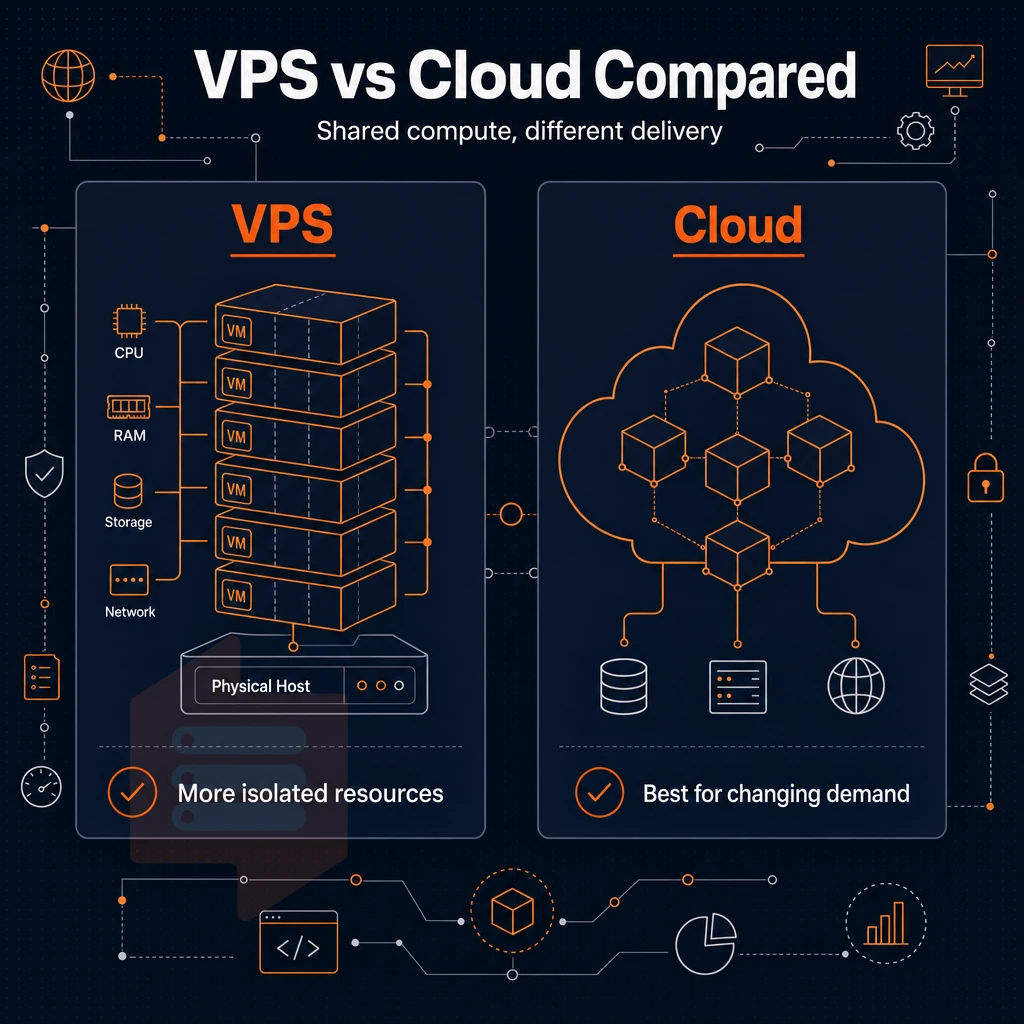
Is how a user would compare to purchase a VPS (a traditional VPS) to a ‘cloud hosting’ offering from the major cloud platforms.
VPS server vs. Cloud hosting
VPS and cloud hosting are both methods of allocating portions of compute resources that are supplied from shared physical servers. Importantly, the architecture, scaling, and performance guarantees of VPS and cloud infrastructure are very different. This page outlines the main differences and will help you decide on the appropriate method for your needs.
VPS hosting, cloud hosting, and elastic scaling
Cloud infrastructure such as servers, storage and networking distribute loads of work between a pool of physical servers.
Noisy neighbors: While performance is elastic, it’s not always consistent due to “noisy neighbors” (i.e. other users on shared cloud nodes) who can impact the I/O performance of your workload, especially under burst conditions.
Full root access and fixed resource allocation
Traditional VPS hosting is hosted on a single physical server. Your VPS slice is configured with fixed vCPU, RAM and high-performance NVMe storage. Each VPS slice runs its own independent kernel, completely separate from other slices hosted on the same server, and is not impacted by demands on the platform.
The main advantage of VPS hosting is predictability. With a reliable hosting provider, benchmarks can be repeated with identical results, the same latency is experienced, and capacity planning is based on known and fixed limits of the virtual environment. This predictability comes at a reasonable price point, making VPS hosting an economical choice for teams that need consistent performance without enterprise-level costs.
When each model fits
Running bursty or distributed workloads in the cloud makes sense.
Some providers advertise their VPS as “cloud VPS”. Find out whether your VPS has fixed resources or uses a shared pool of resources before you commit to a purchase.
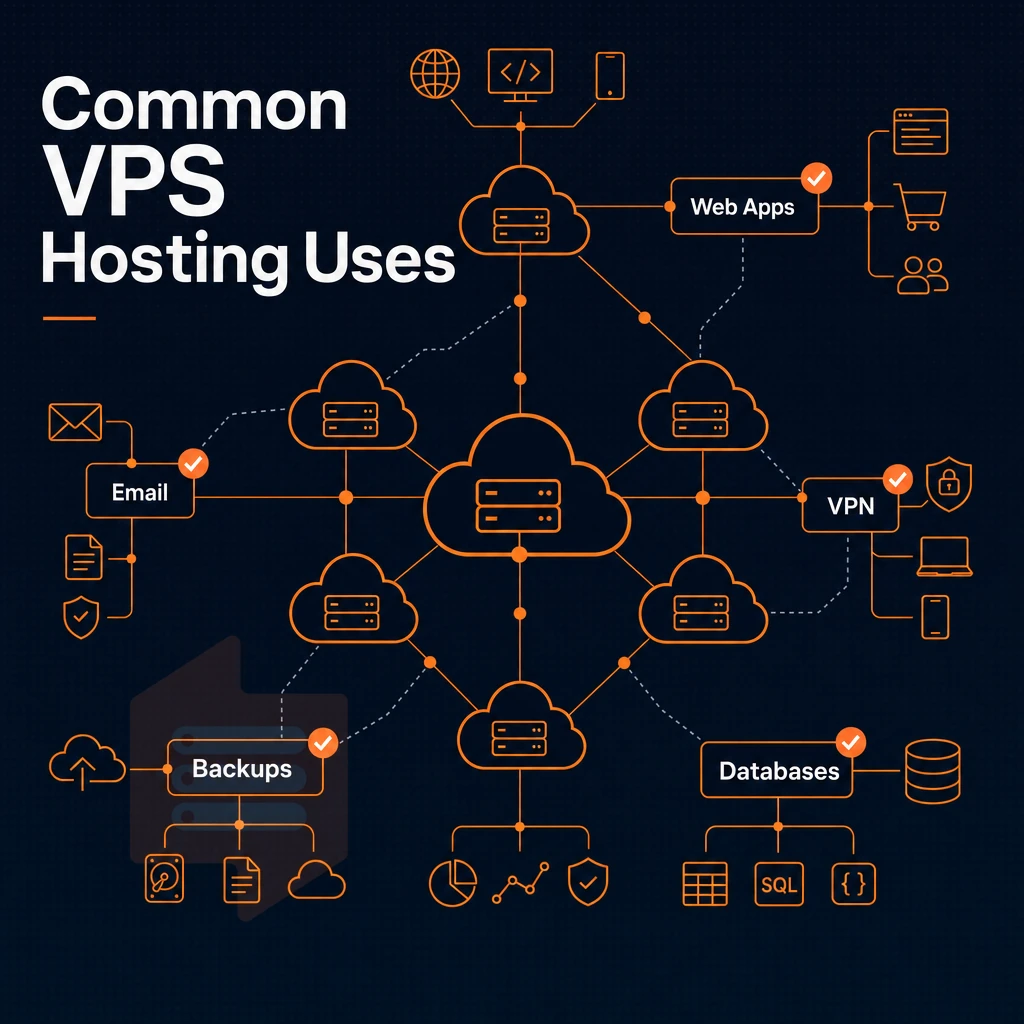
Additionally, Once you have a plan set up you can determine what you can put on it.
What is VPS hosting used for?
VPS hosting provides a private, isolated hosting environment that can’t be provided by shared hosting. Because each VPS operates independently, users get dedicated resources, superuser access, and the ability to install almost any software package or configuration, making it suitable for a wide variety of workloads.
Common use cases for VPS hosting
Workloads requiring more control than shared hosting typically run on a VPS.
- Web server hosting, Host multiple sites off of one server with full configuration control for each site.
- Development and staging environments, mirror production exactly and tear it down again later to test without affecting live traffic.
- Game servers, low-latency, dedicated resources for consistent player experience.
- VPN endpoints, run your own private tunnel with custom security measures.
- Database servers, isolate database workloads and tune kernel parameters directly to optimize database performance.
When you've outgrown shared hosting
Shared hosting runs all users on the same kernel, so noisy neighbors can hurt everyone. If your traffic grows or your software needs more than a shared hosting account allows, a VPS is the natural next step. For community perspectives, see hi, i have absolutely no idea about what is VPS so is there ...
E-commerce platforms often need custom PHP extensions, Redis caching, and specific firewall rules that shared hosting accounts from typical hosting companies don't allow.
Managed VPS hosting as an alternative
A managed VPS means OS patching, monitoring and security hardening are handled by the provider. This means developers can enjoy web hosting flexibility without having to run a full sysadmin function in-house. BuyVPS's engineer-led support means we can cover this gap for you, if that's what you're looking for.
The question of whether you want to hand over control of your servers to VPS hosting providers and run them as you would or take full control of the stack yourself is one we can help with, with the next section helping you make that decision.
Managed VPS hosting vs. Unmanaged VPS hosting
VPS hosting can be offered in two different models for managing a server. Understanding where VPS hosting sits in terms of control and responsibility helps you choose a package that matches how much you want to manage and maintain a server.
What managed VPS hosting covers
Managed VPS hosting is like having a dedicated server but without the sysadmin overhead. You get the high performance you need but hosting company looks after the Operating System updates, security patches, firewall settings and server errors. This type of hosting is ideal for web design and development agencies, e-commerce retailers and their development teams. They want to focus on developing and delivering their code, not managing the underlying hosting infrastructure.
The trade off for using managed environments is loss of control.
Install custom software with unmanaged VPS hosting
Unmanaged VPS hosting is setup so that you have full administrator access from the time that your VPS instance boots up. You will have full control of every layer of the hosting, including package management, security hardening, monitoring and recovery. This VPS hosting offers complete flexibility that makes it very popular with developers and DevOps teams, allowing for the installation of any software, on any version, and on any stack.
Self managed hosting is not a job for a Linux newbie. Instead of waiting for your managed hosting provider to silently apply updates to the server kernel, implement log rotation. Set up intrusion detection, etc., you and your team will have to handle these server management tasks.
Which model fits your team
We provision KVM VPS instances that come with full administrator-level access and a separate kernel for each server.
| Dimension | Managed VPS | Unmanaged VPS (BuyVPS) |
|---|---|---|
| Root access | Restricted or none | Full root, always |
| Security patches | Provider-applied | User-applied |
| Kernel control | Locked | Separate kernel per VPS |
| Best for | Non-technical teams | Developers, DevOps, sysadmins |
| Uptime SLA | Varies by provider | 99.8% |
The following section outlines the benefits of a well-engineered VPS.
Key benefits of a VPS server
The VPS offers a slice of the physical server for your own use. It is given a portion of the server resources and the web hosting environment is isolated from other users on the server. Once you move on from the shared hosting, the advantages offered by the VPS hosting compound quickly.
Core resource and access benefits
- Dedicated resources prevent noisy-neighbor problems. Your allocated CPU cores. RAM and storage are dedicated to your workload and you will not experience any effect from noisy neighbors as others on the same server will not be able to spike your CPU or fill your disk queue.
- Full system access unlocks every layer of configuration.
You are able to set up the server as you need (install required packages, tune the kernel, harden the server stack etc.) and Full privileged access is provided by default for any Basic VPS. - Operating system choice is unrestricted.
You can deploy any supported Linux distribution or Windows Server image. You can swap distributions between deployments without requesting permission from a host.
Scalability and performance
- Scale vertically without moving to a new physical machine.
In place upgrades of CPU and RAM with out IP change and no migration time frame. BuyVPS’s upgrade is a true scaling of your resources to keep up with your growing performance needs. - Isolated environments reduce server errors caused by shared processes.
Each VPS is running its own kernel. Therefore, a misbehaving neighbor won’t be able to make your VPS crash or cause any resource problems.
Security isolation
- Kernel-level isolation makes VPS hosting secure by design.
Each tenant is running in their own KVM environment. This means you can implement the security measures of your choice (like a custom firewall, intrusion detection, custom kernel modules etc.) without affecting other tenants.
Note: unrestricted server access means you are responsible for OS-level patching. Unpatched kernels remain the most common vector for privilege escalation on self-managed VPS instances.
These benefits only materialize when the provider’s infrastructure is built to deliver them.
Why choose BuyVPS for virtual private server hosting
BuyVPS is a founder-run virtual private server hosting provider operating since 2002, with data centers in Amsterdam and New York, built on one principle: your VPS server gets the resources it was sold, no exceptions.
- True KVM isolation: every virtual private server runs its own independent kernel, so your virtual machine never shares kernel space with other users on the same physical server.
- No-oversell policy: hard memory caps and low node density on every physical machine deliver consistent performance, unlike shared hosting, where other sites can starve your server resources.
- NVMe RAID10 storage: PCIe-direct drives, benchmarked at 122,959 4K read IOPS (fio median). Not estimated, measured.
- Full server control on every plan: install custom software, apply your own security patches, choose any Linux distribution, or upload a custom ISO.
- In-place upgrades, no IP rotation: scale your VPS hosting solution without migration headaches or firewall rewrites.
- Dual-stack networking: IPv4 + IPv6 included on all VPS instances across Amsterdam and New York.
If you've outgrown shared hosting and need dedicated resources without the cost of an entire dedicated server. Explore our plans at BuyVPS.com/VPS or reach out to our engineering team to discuss the right fit for your workload.
Frequently asked questions
What do VPS hosting providers offer compared to shared and dedicated hosting, and what is VPS?
VPS is an acronym for Virtual Private Server. It is a virtualized machine running on physical server hardware, isolated from other virtual machines on the same host. Each VPS gets its own dedicated resources, operating system, and superuser privileges.
What is VPS hosting used for?
It suits any workload that needs more control and consistent resources than shared hosting but does not require a full dedicated server. Developers and businesses use VPS hosting to run production workloads with full admin privileges and a predictable performance baseline.
What does VPS mean in virtualization technology?
In technology, VPS refers to a virtualization model where a single physical server is partitioned into multiple isolated virtual machines using a hypervisor such as KVM. Each virtual machine behaves like an independent server with its own CPU allocation, RAM, storage, and network interface. The term distinguishes this model from shared hosting, where resources are pooled, and from bare-metal servers, where no virtualization layer exists.
What does VPS mean in text?
In everyday text and online conversation, VPS almost always means Virtual Private Server. If you encounter it in a technical discussion, forum, or support ticket, Virtual Private Server is the correct interpretation.
What is the difference between a VPS server and a dedicated server?
A dedicated server gives you exclusive use of an entire physical machine, no hypervisor, no other tenants, no shared hardware. A VPS runs as a virtual machine on shared hardware, isolated by a hypervisor.
For most web hosting scenarios, applications, databases, and SaaS workloads, a well-configured VPS, especially one with pinned CPU cores like BuyVPS's Dedicated CPU tier on AMD EPYC Genoa, closes the performance gap significantly.
What is a KVM VPS server?
A KVM VPS is a virtual server built on the Kernel-based Virtual Machine hypervisor, a technology built into the Linux kernel. This means you can run any compatible operating system, load custom kernel modules, and expect behavior that closely mirrors a dedicated machine.
What is a VPS server short for?
VPS is short for Virtual Private Server. The three words capture exactly what any hosting provider means by the product: a server environment that is virtualized (software-defined, running on shared hardware), private (isolated from other users with its own resources and OS), and a server (a full computing environment with root-level access, a public IP address, and independent network connectivity), closer to dedicated hosting than a typical shared environment.
A VPS (Virtual Private Server) is a form of hosting, using a Virtual Private Server, with your own Dedicated Server resources, full root privileges, and completely isolated from other customers on the same server. It is in the middle ground between shared web hosting and a fully dedicated server. Not being as expensive as a Physical server but with the same complete administrative control and full control as you would get with a bare metal bare-metal server.
Predictability is the core advantage of VPS.
Take a look at the VPS vs other hosting plans that BuyVPS offer, specifically the VPS plans (Standard, Dedicated CPU and High Memory) built on modern virtualization technology and running on AMD EPYC processors in Amsterdam and New York datacentres. These offer a viable alternative to shared hosting and to oversold cloud servers.