


Deciding between VPS hosting and cloud hosting affects many aspects of your infrastructure and thus a multitude of decisions. The degree of performance, a failover solution, cost and scalability, all of these are crucial and play a much bigger role than most people attribute to them when comparing VPS hosting vs cloud hosting. The comparison is often limited to a single criterion: price. This, however, is not the essence of the matter.
On the one hand, a VPS gives you a fixed, dedicated chunk of a server (performance predictable, root access, etc).
Alternatively, They don't, depending on your specific workload, your team, and how you expect to grow in the short- to medium-term.
Below we dive deeper into both hosting service models, outlining the key dimensions for evaluation: performance consistency, scaling, operational overhead, hosting infrastructure and server network reach, and total cost of ownership. For community perspectives, see What exactly is the difference between cloud computing ....
What is VPS hosting and how does it work?
A Virtual Private Server, or VPS, is between shared hosting and a full dedicated server. The big advantage of a VPS is that you get dedicated resources such as CPU, memory and storage, yet you don’t have to pay for a whole server. Instead, a physical server is split into multiple virtual servers using virtualization technology. This makes VPS an ideal solution for businesses that need to host multiple websites while maintaining dedicated resources for each site without the expense of separate physical machines.
First month $1
Then the normal monthly price. One per customer. No setup fee, and a 30-day performance guarantee on your first order.
See the plans“Perfect and fast VPS with good support.”
How virtualization lets you host multiple websites on one machine
Each VPS runs as a complete Virtual Machine with its own kernel, memory and CPU allocation. KVM, the (kernel-based Virtual Machine, is a complete emulation of a machine and creates a hard boundary between users. This isolation allows each tenant to install and configure their own operating system independently, ensuring complete control over the software stack.
This level of isolation is particularly valuable for applications handling sensitive data, where strict tenant boundaries are essential for compliance and security. Running a virtual machine with KVM provides hardware-level virtualization that delivers near-native performance for compute-intensive workloads requiring strong isolation guarantees.
Our fio benchmarks measure 122,959 4K read IOPS under load.
What resources each VPS controls
Each VPS receives dedicated resources which are not shared with other VPSes at runtime. This architecture ensures that your VPS has exclusive access to all the resources assigned to it, preventing resource contention from neighboring tenants.
- A fixed RAM allocation with hard memory caps.
- Pinned or shared vCPU threads depending on the plan tier.
- An isolated NVMe storage volume.
- This is a complete operating system instance that you have root access on.
How VPS and cloud hosting differ from shared hosting
When you're on shared hosting, every account on the server is fighting for the same CPU power and RAM. This means that one very busy website can affect the performance of absolutely every other website on the same server. For high traffic websites, this resource contention becomes especially problematic during peak usage periods when multiple sites experience simultaneous visitor spikes.
The basis of the VPS hosting model is isolation. As opposed to that, Cloud hosting loads distribute across multiple servers, as opposed to partitioning one server.
What is cloud hosting and how does it work?

Cloud hosting uses a pool of interconnected servers to draw on for extra compute resources, rather than relying on a single server.
What cloud hosting plans actually do
In cloud hosting, multiple servers run your work load. Each virtual server in a pool of servers contributes CPU power, memory and storage to shared resources. Unlike traditional hosting, accounts in cloud hosting never actually use the same server, all is abstracted away from you.
Automatic redistribution of workloads to other physical servers by the orchestration layer ensures near-zero downtime in case a single physical server fails. This is the main advantage of cloud-based infrastructure compared to setups with a single server. Organizations with mission-critical applications often prioritize cloud architectures specifically because the distributed nature of the server infrastructure minimizes single points of failure.
How a virtual server scales on demand
The consumer of Cloud services uses APIs and/or control panel interfaces to provision required amounts of resources (e.g.
Cloud-based provisioning makes it easy to set up multiple virtual servers behind a load balancer.
Cloud computing trade-offs to weigh
Performance can vary when using shared resource pools.
BuyVPS gives you more resources where it counts, Dedicated CPU, "pinned" cores, strict memory caps, and low node density, delivering predictable performance under any operating system load, not just a benchmark number.
With both the cloud VPS and the other hosting services model defined in detail, we can now compare them and weigh up the advantages and disadvantages of both models against the respective dimensions.
VPS and cloud hosting: pros, cons, and key differences

When choosing between VPS hosting and cloud hosting, there are three key factors to consider: control, cost and resilience. Read on to learn more about the key differences between the two types of hosting and choose the right one for your workload. Evaluating cloud hosting plans requires understanding how each provider handles resource allocation, scaling mechanisms, and the trade-offs between flexibility and performance consistency.
Evaluating cloud plans requires understanding how each provider handles resource allocation, scaling mechanisms, and the trade-offs between flexibility and performance consistency. Different cloud providers implement these resource allocation strategies with varying degrees of transparency, so comparing SLAs and architectural documentation is essential before committing to a platform. Understanding these distinctions has become increasingly important as the hosting industry continues to evolve with new hybrid models and specialized offerings.
VPS hosting: what you gain and where it has limits
- Determine your need for fixed resources. VPS virtual servers are running on physical servers with known configurations (vCPU, RAM and NVMe storage). Unlike cloud servers that can incur unexpected charges during high usage, you know exactly what your monthly bill will be for a VPS server.
- Assess the level of root access and OS control provided by VPS. Full admin access, custom ISO upload and full control of the Operating System are key features for developers and companies who deal with sensitive information and cannot accept a shared tenancy on unknown infrastructure.
- It is essential to understand the single-server risk. A VPS on a host server fails until the host server node has come back online. In contrast to cloud servers, a VPS in a cluster requires a plan upgrade to achieve vertical scaling instead of being able to instantly scale with required resources.
Note: On BuyVPS Dedicated CPU plans, pinned cores eliminate noisy-neighbor CPU contention, but the single server risk still applies at the node level.
Cloud hosting: what you gain and where it has limits
- Map out your scalability requirements. When you put applications in the cloud, you distribute the load of the application across multiple servers, or nodes. This means that if one server fails, the traffic automatically gets redirected to another server. This type of redundancy is especially helpful for applications that have very unpredictable usage or very rapid growth in usage.
- Managed overhead has significant trade-off in terms of managed cloud cost. The cost of having managed cloud options is reduced control. You typically have no idea where your data center or servers are for your workloads.
- Be sure to monitor metered billing. Cloud pricing is typically scaled based off of consumption. Even though it provides a lot of flexibility for variable traffic, it can rapidly increase in price during very large traffic spikes. Thus, steady-state workloads typically end up costing less with a VPS.
Note: If your compliance requirements demand knowing exactly where server resources reside, cloud's abstracted multi-tenancy can complicate audits. A VPS in a defined location, Amsterdam or New York on BuyVPS, gives you a concrete answer.
The trade-offs outlined above are summarized in a table below so you can compare them at a glance.
VPS hosting vs cloud hosting: side-by-side comparison
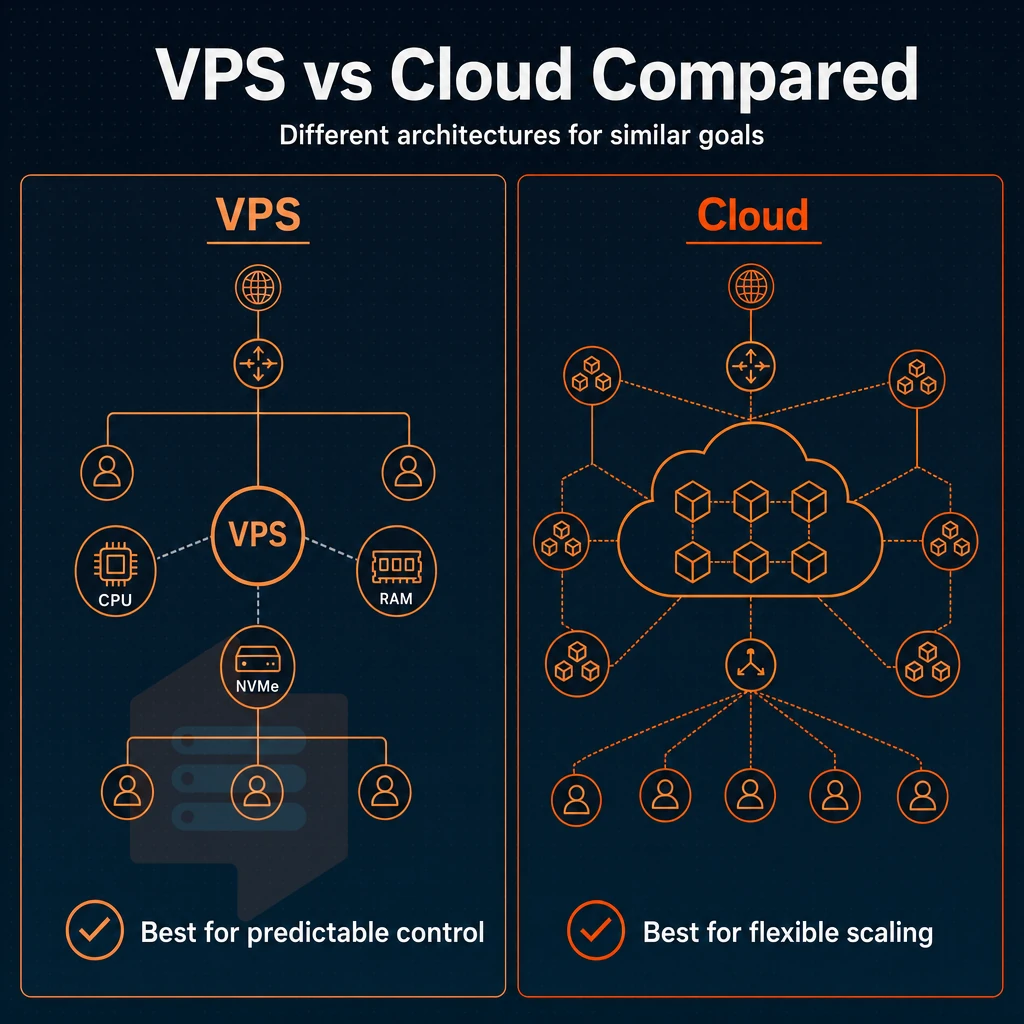
While solving similar problems for different needs, VPS hosting and cloud hosting use completely different architectures.
Resource allocation and control for high traffic websites
A VPS runs on a single physical server with hard-partitioned resources (e.g. fixed amounts of RAM, vCPUs and NVMe storage) and typically comes with full superuser access to a fully customizable OS. Because your allocated resources are not shared with other users, VPS hosting provides a consistent and predictable performance level. This level of control extends to all server settings, allowing administrators to fine-tune kernel parameters, network configurations, and security policies without restrictions imposed by shared infrastructure.
Most cloud hosting plans spread workloads across several nodes and use abstraction to enable dynamic reallocation of resources. This enables scaling in horizontal direction within seconds, but as with shared hosting, your virtual servers share the hypervisor with other environments. The abstraction layer in a cloud environment allows for rapid provisioning but can introduce performance variability compared to isolated resource allocation.
In managed cloud environments, cloud providers manage the underlying infrastructure, patching, and hardware maintenance, freeing teams from operational overhead. Organizations seeking the performance isolation of VPS without operational complexity often opt for managed VPS solutions that combine dedicated resources with provider-handled system administration.
Dedicated server hosting vs. Cloud server redundancy
bare-metal hosting limits you to one physical server and thus provides top performance, yet it’s a single point of failure. VPS hosting sits in the middle: like cloud hosting, it provides you with isolated resources, but they’re running on shared servers.
BuyVPS offers VPS hosting with a 99.8% uptime SLA.
Dedicated hosting and best-fit use cases
In the world of web hosting, any reputable web hosting provider will tell you that dedicated servers are best for raw compute power, VPS for workloads that are stable and predictable, and cloud for workloads that burst from time to time or are spread across multiple geographic locations.
| Dimension | VPS hosting | Cloud hosting |
|---|---|---|
| Resource allocation | Fixed, hard-partitioned | Pooled, dynamically assigned |
| Scaling model | Vertical (in-place upgrades) | Horizontal and vertical |
| Pricing model | Fixed monthly cost | Variable, consumption-based |
| Root access / OS control | Full root, custom ISO | Varies by provider and tier |
| Redundancy / uptime | 99.8% SLA (BuyVPS) | Typically higher redundancy |
| Technical expertise required | Moderate, self-managed | Low to high, depending on abstraction layer |
| Best fit | Stable apps, databases, dev environments | Burst traffic, microservices, global distribution |
The architectural differences among the models translate into workload fit. In the following section, we will see how each of the models is best suited for certain use cases. For more context, see Virtual private server.
Common use cases: when to choose VPS vs cloud

Choosing the right hosting solution for your application depends on several factors including the traffic pattern of your workload, the level of technical expertise your team has. Additionally, The level of control you require over server parameters. While VPS and cloud hosting are both suitable options, each solution has its own advantages and is typically best suited for specific use cases.
VPS: stable environments and predictable workloads
For consistent traffic and use of administrator access, VPS hosting is a good option. Developers running databases, game servers, or staging sites for web applications can benefit from dedicated cloud hosting accounts that provide a locked-down environment not shared with other noisy users who have potential for resource contention.
Another customer class is people who want to run many websites from one server.
- Database servers (PostgreSQL, MySQL) with steady query loads.
- Game servers requiring low-latency, pinned resources.
- CI/CD pipelines and staging environments.
- Multi-site setups on a fixed monthly budget.
At BuyVPS, our Dedicated CPU tier is a simple model where we pin a number of dedicated CPU cores to your VPS account. The servers are managed with shared scheduling (no burst overcommit) and are distributed across two locations: Amsterdam and New York. We run identical hardware and configurations in both locations.
When users prefer cloud hosting
Most users prefer cloud hosting because of unexpected traffic spikes and the need for auto-scaling. Cloud services enable such applications to scale up to needed elastic capacity on demand.
Teams that want cloud providers to manage the underlying IT infrastructure (e.g. patching servers, replacing hardware, growing capacity) also generally prefer cloud hosting services over self-managed VPS.
Matching the model to the workload
For consistent traffic with well-defined resource requirements, VPS offers more control and cost predictability than renting cloud resources. Spikes in unexpected traffic with zero tolerance for manual scaling of server resources are better served with cloud hosting. Most site owners fall into the first category and with proper specifications, a VPS will perform much better than cloud hosting for them.
In the next section, we will introduce you to a concrete framework for making that determination.
How to choose between VPS and cloud hosting
Answer the questions truthfully and the right decision becomes clear.
The four questions for choosing a virtual server
Constant workloads such as databases, APIs and internal applications typically do not require scaling, whereas very variable or 'spiky' traffic is typically better served by a cloud hosting provider's ability to scale resources as needed. 2.
While many cloud providers offer Virtual Private Servers (VPS) that function similarly to traditional VPS hosting, server-level infrastructure is typically abstracted away in cloud hosting.
Choosing between cloud providers for your hosting
A dedicated-core VPS provider like BuyVPS (running AMD EPYC hardware with KVM isolation in a modern data center) can close most of the performance gap with cloud hosting for non-variable workloads. You get fixed core counts on a dedicated physical machine, top tier storage on NVMe RAID10, 99.8% SLA'd uptime, and a fixed, predictable monthly charge, none of the price variability that defines cloud hosting. BuyVPS’ hosting infrastructure is optimized for steady state performance, not bursty activity.
For everything else, VPS provides superior control, predictability, and cost effectiveness.
Virtual server decision table
| Factor | VPS hosting | Cloud hosting |
|---|---|---|
| Traffic pattern | Steady, predictable | Variable, spiky |
| Root access | Full, always | Varies by tier |
| Billing | Flat, no surprises | Usage-based, can spike |
| Technical skill needed | Moderate to high | Low to high |
| Best for | Databases, APIs, SaaS | Auto-scaling apps |
Here’s what we can do for you.
Why choose BuyVPS for VPS hosting
If you've decided that VPS hosting is the right model, the next question is which hosting provider actually delivers on isolated, predictable performance.
- True KVM isolation. Every virtual private server runs its own kernel. No noisy neighbors sharing your virtual machine's memory or CPU cycles on the same physical server.
- No-oversell policy. Hard memory caps and low node density mean your dedicated resources stay yours, even under load.
- Dedicated-core D-tier on AMD EPYC Genoa. Pinned cores close the performance gap between VPS hosting and cloud hosting for CPU-bound workloads. Predictable latency, not best-effort.
- NVMe RAID10 PCIe-direct storage. Published benchmark: 122,959 4K read IOPS. Not a marketing estimate, a measured result.
- In-place upgrades, no IP rotation. Scale resources without migration headaches or DNS changes.
- Amsterdam and New York data centers with identical hardware, pricing, and full system access on every VPS server plan. IPv4 + IPv6 dual-stack included. Same price in year five, no renewal hike.
Founder-run since 2002.
The core differences between VPS and cloud hosting
VPS (Virtual Private Server) hosting provides you with a VPS hosted on a known physical server and with dedicated resources. Thus, VPS hosting delivers the consistency of dedicated hosting, full privileged access and cost effective pricing, but without the hassle of managing a cloud environment. If you need control and cost predictability and do not necessarily require the ability to scale your environment up and down at will, then VPS hosting is the hosting solution for you.
While VPS hosting spreads consistent loads across multiple servers, cloud hosting offers on-demand scalability with load balancing and failovers all built-in by default. As with many aspects of IT, whether VPS hosting is better than cloud hosting or not will depend on your specific needs. Such as typical traffic, level of technical expertise and the specific architecture of your hosting provider.
Frequently asked questions
What are the downsides of a virtual server compared to cloud hosting services?
You also carry more operational responsibility than with a managed cloud service: OS patching, security hardening, and performance tuning are yours to handle.
Is a VPS considered a virtual server in cloud hosting?
A VPS and a cloud server overlap but are not identical. Both run virtual machines on shared physical hardware using hypervisors like KVM. The difference is infrastructure design: cloud web hosting platforms abstract resources into elastic, on-demand pools billed by the second, while a VPS server gives you a dedicated slice of a specific host with predictable, fixed specs.
The term "cloud VPS" is often marketing language for a VPS hosted on modern, redundant infrastructure.
Is paying for a virtual server hosting plan actually worth it?
Yes, for the right workload. A VPS delivers sudo access, predictable performance, and full control at a lower cost than equivalent cloud compute, making it the practical choice for production web apps, databases, game servers, and dev environments. The value is highest when your resource needs are stable and you do not require auto-scaling across dozens of nodes. Providers like BuyVPS reinforce that value with no-oversell policies, NVMe RAID10 storage, and in-place upgrades that avoid IP rotation or downtime.
What are the four types of hosting provider?
The four standard types are shared server environment, VPS hosting, single-tenant server hosting, and cloud hosting. multi-tenant hosting puts multiple sites on one OS instance with no resource isolation, it is the cheapest option and the least controllable. VPS hosting carves a physical server into isolated virtual machines, each with guaranteed CPU, RAM, and storage.
bare-metal hosting gives you an entire physical machine to yourself. Cloud hosting distributes workloads across a dynamic pool of servers, enabling elastic scaling and more resources on demand, but typically at higher per-unit cost and with less predictable latency than a well-configured VPS.
Instead of predictable performance, isolated resources and clear pricing, with VPS hosting you have full control of your servers and are able to plan for your workload. If your traffic is unpredictable then cloud hosting with elastic scaling is a better option.
For production workloads such as databases, APIs, development environments and business applications, a well configured VPS hosting services setup out performs a similarly configured cloud server for cost.
The decision comes down to one question: do you need to scale horizontally on demand, or do you need consistent, dedicated resources at a known cost? If it's the latter, a VPS is the right tool. BuyVPS runs KVM-isolated servers on AMD EPYC hardware with NVMe RAID10 storage across Amsterdam and New York, no overselling, no renewal surprises. Browse the plans at BuyVPS.com and find the tier that fits your stack.