

When considering web hosting and VPS hosting, the main difference between the two is the level of isolation provided to you. Additionally, there is a big difference in performance predictability and root level access to your server.
When choosing a tier of hosting, you don’t want to pay for resources that you don’t need. However, you also don't want to hit a ceiling with your hosting plans and find that your site isn't performing as expected, whether serving ssl certificates, handling a traffic spike, or running workloads that require consistent CPU and memory from the entire physical server.
VPS hosting becomes particularly valuable when your applications demand predictable performance for resource intensive workloads that cannot tolerate the variability inherent in shared environments. Monitoring your website's performance metrics regularly helps identify when resource constraints begin affecting user experience and indicates the optimal time to upgrade hosting tiers.
Shared hosting will have dozens to hundreds of accounts on a single server. A VPS is able to give a client dedicated resources for their account by running as isolated accounts on a server with hypervisor level isolation. BuyVPS.com enforces hard memory caps per node as well as low node density for all of our VPS plans.
Each virtual machine operates with its own allocated resources, ensuring that performance remains consistent regardless of activity on neighboring accounts. The hypervisor leverages virtualization technology to create isolated environments where each VPS functions as an independent server with guaranteed resource allocation.
Because of this, along with the use of KVM virtualization, many production databases, API servers, and high traffic websites are run on a VPS hosting plan instead of shared hosting servers. Below are scenarios in which shared hosting is not sufficient, what to look for in a VPS provider, and how to match a client up with the right hosting plans for their needs.
Selecting a reliable provider with transparent resource allocation and proven uptime guarantees becomes essential when migrating from shared infrastructure to VPS solutions. Modern web applications with dynamic content, real-time features, or backend processing requirements typically exceed the capabilities of shared hosting and benefit from VPS infrastructure.
What is shared web hosting and how does it work?
Shared web hosting is where many websites are hosted on a single physical server and compete for the server’s CPU, RAM and storage space. While it is the lowest cost way to get into hosting, it is also the most restrictive form of hosting. For community perspectives, see VPS vs Shared Hosting : r/webhosting.
First month $1
Then the normal monthly price. One per customer. No setup fee, and a 30-day performance guarantee on your first order.
See the plans“Sjoerd helped me with the setup of my VPS, super helpful team, smooth onboarding, and overall a great experience, thanks again”
Shared web hosting plan: how the environment works
Resources for a machine hosting multiple websites are shared with no guarantee of a specific amount of resources to a website. This is a key trade-off of shared hosting.
Most plans come with a control panel, SSL certificates and required software stacks all bundled together.
Who it suits when multiple websites share resources
Personal blogs, portfolios, and small business websites with low, predictable traffic are best suited for shared hosting.
Where it breaks down
As your site grows in traffic or requires more resources to run intensive applications, shared server management cannot scale the way a virtual private server can, making VPS hosting a natural next step.
How VPS hosting shares the same physical server virtually
Typically, in shared hosting, dozens of websites are hosted on one single physical server, using 100% of the CPU, RAM and storage. Sites are impacted by slow performing ‘noisy neighbor s’ without prior warning. Virtual Private Servers are hosted differently.
How virtualization works
We run a KVM hypervisor on your physical server to create multiple virtual servers. Each virtual server will have been allocated specific resources and will run its own kernel. Importantly, a kernel boundary isolates each virtual server on high traffic sites, meaning the resources of one VPS cannot be consumed by another, nor can one VPS crash another. We run this setup on AMD EPYC hardware with NVMe RAID10 storage (measured at 122,959 4K read IOPS).
What you control
VPS hosting typically provides a server with full root access.
Choosing the right VPS tier
| Tier | CPU model | Best for |
|---|---|---|
| Standard (shared vCPU) | AMD EPYC Milan | Web apps, dev environments |
| Dedicated core | AMD EPYC Genoa, pinned | Latency-sensitive workloads |
| High Memory | AMD EPYC Milan, 1:8 ratio | Databases, in-memory caches |
Dedicated resources on a VPS plan typically come in fixed tiers and it’s worth quickly matching up what you need with what’s available.
Now that we have the VPS model clear, let’s map out these advantages against shared hosting to see where the differences are most relevant. Understanding the key differences in resource allocation, isolation, and scalability will clarify which hosting model aligns with your technical requirements and growth trajectory. Evaluating your server environment needs early helps prevent costly migrations during critical growth phases when downtime could impact revenue or user trust.
Shared hosting vs VPS: pros, cons, and key differences
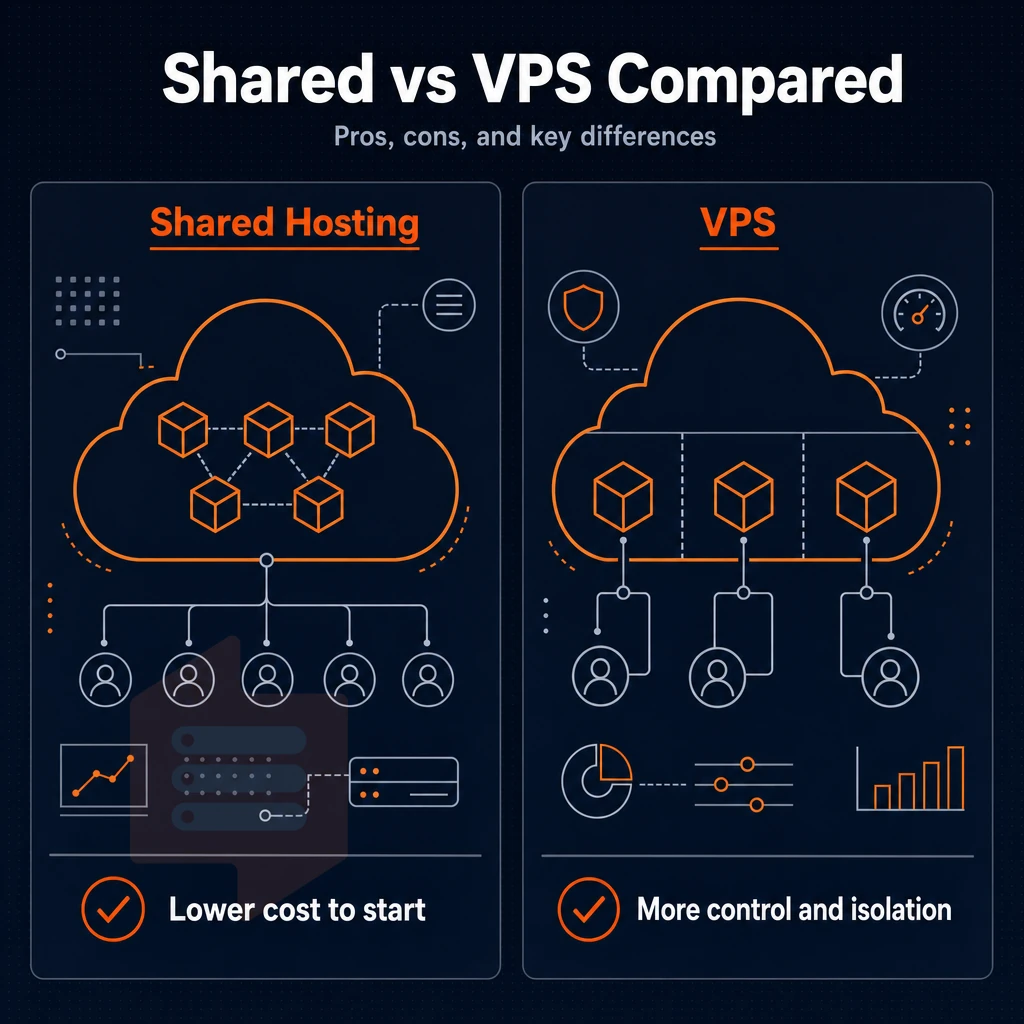
The decision between a shared hosting account and a Virtual Private Server (VPS) hosting account generally comes down to one question: how much control and performance do you actually need?
Web hosting vs VPS: what each gives you
By placing your website on a server with dozens of other websites, resources such as disk space and bandwidth are pooled. Most shared hosting plans come with server administration included, which means no setup and no maintenance. For simple websites with small amounts of predictable traffic, shared hosting provides a low barrier to entry. This makes shared hosting a cost effective solution for users who prioritize simplicity and affordability over advanced customization or guaranteed performance.
A VPS gives you a fixed amount of CPU power, RAM and NVMe storage space. You get root access to your very own server and can fully manage the server stack. In addition to the features of our shared hosting, a VPS also includes several advanced security features. Even under high loads, performance remains stable.
Where each model falls short
The main problem with shared hosting is that you are a noisy neighbor. When another account has a lot of traffic then that uses up all the shared resources. Often you can not even change server settings, and you can not install any custom software.
VPS hosting is not for novices.
Note: If your site outgrows shared hosting mid-traffic spike, you can't burst on demand. Plan the migration to VPS before you hit the ceiling, not after.
Which workload fits which tier
For basic brochure sites, simple blogs or other low traffic sites we recommend a shared hosting environment. Once you need custom runtimes, constant response times or more security then it is time to move to a VPS. A small business website with modest traffic and standard content management needs typically thrives on shared hosting without requiring VPS-level resources.
All nodes have a hard memory cap to prevent resource bottlenecks caused by other users on the same node.
Side-by-side comparison: shared vs VPS web hosting plan
Shared hosting and VPS hosting are two ends of the spectrum when it comes to control. A thorough explanation of the key architecture differences will help you make an informed decision about available web hosting solutions before you outgrow a shared account. Understanding these architectural distinctions allows businesses to evaluate hosting solutions based on technical requirements rather than marketing claims alone.
Hosting vs VPS: resource allocation and isolation
A shared account has dozens of accounts on one server, fighting for CPU, RAM and I/O. One badly behaved site can bring down many others. In contrast, a VPS account has guaranteed resources and access to more server resources such as CPU and RAM, all of which are isolated from other accounts on the same server using a hypervisor, and have hard memory limits set by the kernel.
| Dimension | Shared hosting | VPS hosting |
|---|---|---|
| Resource allocation | Shared pool | VPS hosting dedicated resources, guaranteed slices |
| Root access | No | Yes, full sudo |
| Operating system control | Provider-managed; no choice | Choose and configure your own operating system |
| Server configuration flexibility | Locked to panel defaults | Full stack, kernel params, daemons, firewall rules |
| Scalability | Upgrade means migrating to a new plan | In-place resize, no IP rotation |
| Security isolation | Shared kernel; cross-tenant risk | Separate kernel per VPS (KVM) |
| Typical use cases | Brochure sites, low-traffic blogs | APIs, databases, staging environments, SaaS apps |
| Technical expertise required | Minimal | Intermediate to advanced |
Dedicated server hosting and the full spectrum
The VPS offers a middle ground in the hosting options, between shared hosting and dedicated hosting. While dedicated hosting grants a full server to a single customer, without the overhead of virtualization, the raw power of the server can be fully utilized. The table below details all of the tiers of hosting.
| Tier | Isolation model | Best for |
|---|---|---|
| Shared hosting | Same server, shared kernel | Static or low-traffic sites |
| VPS hosting | Hypervisor-isolated, guaranteed resources | Growing apps, dev/staging, APIs |
| Dedicated hosting | Entire server, no neighbors | High-throughput, compliance-sensitive workloads |
The VPS tier is covered by BuyVPS for shared-vCPU ‘Standard’ type hosting plans as well as pinned-core ‘Dedicated CPU’ hosting plans. All VPS nodes are located in Amsterdam and New York and are isolated using KVM with a no-oversell policy applied to all of them. This makes it easier to position each tier against other hosts that serve similar tiers of workload.
Common use cases: when to choose each hosting provider type
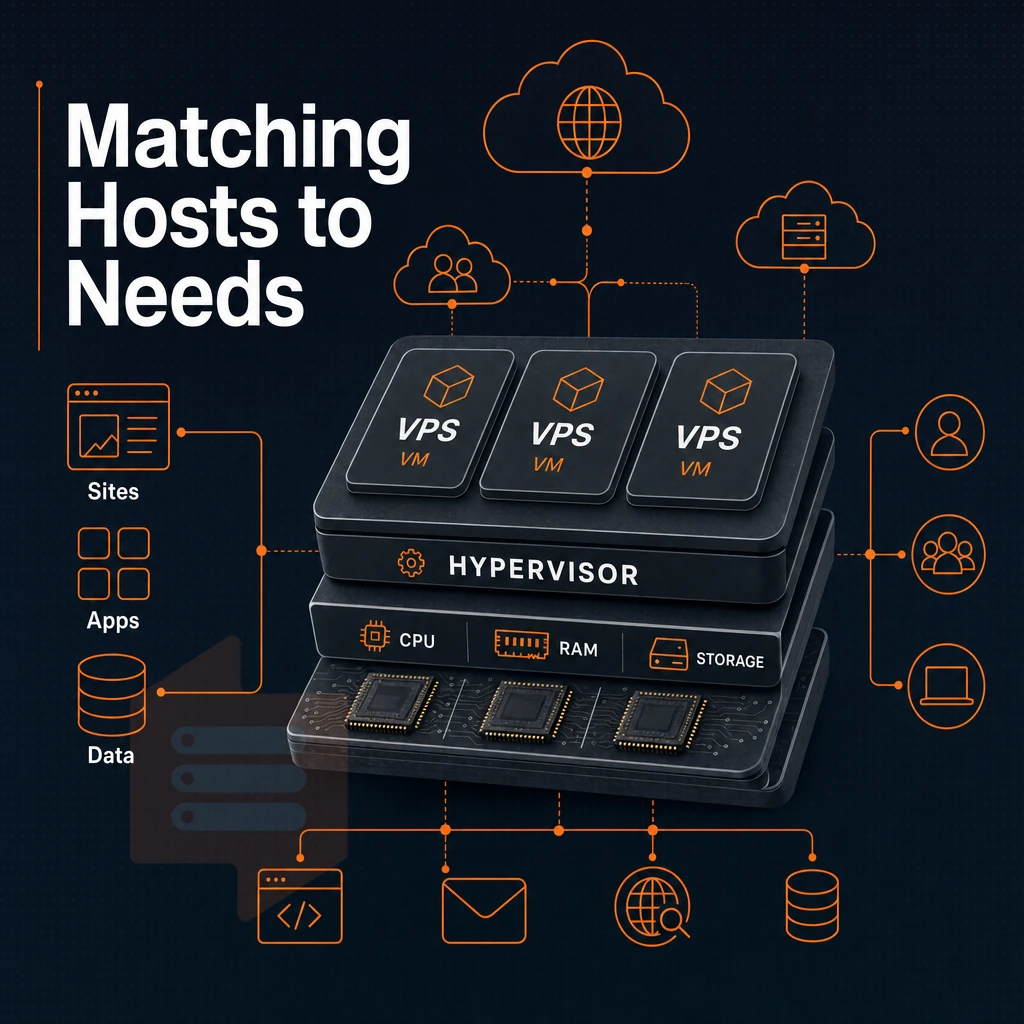
You need to choose a plan based on your usage, not your budget. The main difference between shared hosting and VPS hosting are the scenarios in which they are used optimally. The wrong plan will either cost too much to use or cap your growth.
When most shared hosting plans fit your needs
The shared hosting solution is perfect for web sites with modest, predictable traffic. A shared hosting plan is best for:
- Personal blogs and portfolio sites.
- Early-stage small business websites.
- Simple brochure sites with no dynamic back end.
- Low-traffic web apps under active development.
Shared resources keep costs down and get you up and running in no time.
When VPS is the right hosting provider tier
A VPS suits high-traffic sites or complex workloads.
We recommend VPS hosting for strong use cases such as larger e-commerce sites, high traffic websites and development environments that require custom servers with full root access, pinned dependencies and quiet neighbors.
Matching a web hosting provider to your stage
We have nodes in Amsterdam and New York.
How to choose between web hosting and VPS hosting
When deciding between web hosting and a VPS, there are three critical factors to consider.
Hosting and VPS: the core trade-off
With shared hosting, many websites are hosted on one server. Because resources are shared with other accounts on the same server, websites can be impacted negatively by neighboring accounts, unlike the isolation VPS hosting offers, and may also experience decreased performance during high traffic or load spikes. A VPS guarantees a set amount of RAM, CPU power and storage, allowing your website to function consistently as traffic increases.
Hosting plans and who they suit
An entry-level hosting plan is sufficient for low traffic websites with no special server configurations or root access required.
Cloud hosting solutions as a third option
cloud infrastructure is in between: it scales well and doesn’t have fixed nodes anymore, but is often more expensive per unit and has more unstable latency. For burst loads, cloud hosting is often the best option. However, for sustainable and constant traffic loads where a shared hosting plan spreads resources across many sites, a KVM VPS (like what BuyVPS offers in their Amsterdam and New York locations) is generally more efficient and cheaper in the long run.
| Factor | Shared hosting | VPS |
|---|---|---|
| Resource guarantee | None, shared pool | Fixed allocation per node |
| Root access | No | Full root access |
| Uptime SLA | Varies | 99.8% (BuyVPS) |
| Best for | Brochure sites, low traffic | Apps, APIs, growing traffic |
Decision rule for multiple websites
BuyVPS could be worth your time to look into if you require root access to your servers, consistent performance with your own dedicated resources, and scalability without having to move to a completely different infrastructure.
Why choose BuyVPS as your VPS hosting provider
BuyVPS is a founder-run VPS hosting provider operating since 2002, with data centers in Amsterdam and New York. When the web hosting vs VPS decision points toward a virtual private server, we give you dedicated resources without the cost of a full dedicated server.
- Three tiers for every workload: Standard CPU (shared vCPU, AMD EPYC Milan), Dedicated CPU (pinned cores, EPYC Genoa, DDR5 ECC), and High Memory, each with full root access and custom ISO support.
- No-oversell, hard memory caps: your server resources stay yours. Low node density means consistent performance across the hosting environment.
- NVMe RAID10 storage: 122,959 4K read IOPS measured (fio median). Published Geekbench 6 and pgbench results back every claim.
- KVM isolation: a separate kernel per VPS server, stronger than a typical shared hosting environment.
- In-place upgrades, no IP rotation: scale server resources without migration. Same price in year five, no renewal hike.
Ready to move beyond shared hosting? Compare our VPS plans or reach out to our engineering team at support@buyvps.com.
Frequently asked questions
What are the main disadvantages of managing a VPS server's operating system for hosting?
VPS hosting costs more than shared hosting and requires you to manage the server yourself, installing software, applying security patches, and monitoring resource usage.
That said, providers like BuyVPS offset the server administration burden with full root access, an in-browser VNC console, and engineer-led support rather than scripted first-tier responses.
Does a VPS with its own operating system outperform shared hosting?
Shared hosting puts hundreds of sites on one machine with no resource guarantees, so a traffic spike from a neighbor slows your site down. A VPS gives you dedicated RAM, isolated CPU time, and full root access, meaning your performance is not at the mercy of other tenants.
If you run a database, an API, or any application with real traffic, a VPS is the better choice.
Can i use a VPS to host multiple websites?
You install a web server such as Nginx or Apache, configure your domain's DNS to point to the VPS IP, and deploy your application.
BuyVPS hosting solutions include full root access, IPv4 and IPv6 dual-stack networking, and KVM virtualization with a separate kernel per VPS, giving you a clean, isolated environment for any stack along with additional resources to support your setup. In-place upgrades mean you can scale resources as traffic grows without changing your IP address or migrating data.
Is cloud hosting better than VPS?
A VPS gives you a fixed, predictable monthly cost, dedicated resources, and full control over the OS and kernel.
For teams running steady-state workloads, web apps, databases, game servers, or development environments, VPS web hosting from BuyVPS typically delivers better raw performance per dollar and simpler operations than a comparable cloud instance. Cloud wins when you need burst capacity measured in minutes; a VPS wins when you need consistent, provable performance day after day.
For low traffic websites with simple needs, shared hosting is the way to go. VPS hosting provides you with dedicated resources, full sudo access and stable performance. It is ideal when your website outgrows the shared hosting environment or your website requires a constant amount of CPU and RAM power.
Inability to install new software, hosting provider throttling back your site because your neighbor is spiking). Shared hosting that results in these sorts of problems is not a cost savings, it is a problem.
If you're ready to move to VPS, BuyVPS runs KVM-isolated servers on AMD EPYC hardware with NVMe RAID10 storage across Amsterdam and New York. Full full sudo access, no-oversell architecture, and in-place upgrades with no IP rotation. Browse the plans and see which tier fits your workload.