


I’m having a tough time finding a cost-effective VPS with cPanel that delivers value rather than sacrificing performance for the lowest upfront cost. Far too many cheap VPS options obscure the true cost in a variety of ways, including hidden price increases for renewals, over-sold servers and even the unexpected control panel license fee.
There’s a smarter way to look at VPS pricing, and the cPanel licensing that’s often added on. Additionally, you can make an informed choice about the VPS that best meets your needs, securing an affordable price that remains cost-effective long after the initial invoice. We examine what to look for when choosing a VPS provider.
Including our own BuyVPS offer that's powered by AMD EPYC hardware in Amsterdam and New York data centers, featuring a cpanel control panel alongside key design parameters like hard memory caps per node and no price increases on renewal. This infrastructure combines high performance hardware with enterprise-grade reliability, ensuring consistent uptime and rapid response times for demanding workloads. The AMD EPYC processors deliver maximum performance through their multi-core architecture, enabling seamless handling of concurrent requests and resource-intensive applications.
What is a VPS with cPanel and why it matters
For most websites, the first step is to host on a shared server, which is easy to set up and cheap. A virtual private server (VPS) running cPanel provides the full power of a server, but without the tedium of managing bare metal. While shared hosting plans remain the most economical entry point for beginners, a VPS becomes necessary when resource limits or administrative restrictions begin to constrain site growth.
First month $1
Then the normal monthly price. One per customer. No setup fee, and a 30-day performance guarantee on your first order.
See the plans“Good servers, thanks.”

What a VPS hosting plan actually gives you
A Virtual Private Server (or VPS) is a slice of a physical server machine that has been isolated from the other slices on the same server, using virtualization. In a shared hosting environment, your account share would be affected by a noisy neighbor or a burst of traffic from another account.
In a VPS environment, the CPU, RAM and storage are all dedicated to your use and no one else’s. Each VPS receives a guaranteed allocation of disk space that cannot be consumed by neighboring accounts, ensuring predictable storage availability for your applications and databases.
Virtual private server hosting explained
With a VPS you also get full root access. With shared hosting you are often restricted from running specific servers.
What the cPanel control panel adds
cPanel is a web-based interface that sits on top of your server. It allows you to manage email accounts, DNS zones, files and much more.
cPanel VPS hosting is for teams who manage multiple client websites. From within the cPanel layer. WHM (Web Host Manager) allows the hosting admin on a VPS plan to provision and fully isolate a client's website accounts from the rest of the hosted website accounts on the VPS within the one admin interface. This architecture proves particularly valuable for agencies and developers managing business applications that require strict resource boundaries and independent scaling capabilities.
Virtual private server power without the dedicated server cost
Dedicated servers offer you a full physical server, and VPS offers near-iso for much less physical resource usage.
We run all our KVM-based VPS hosting on servers with hard memory caps and low node density. Thus cheap cPanel VPS hosting of superior quality as opposed to cheap VPS hosting based on oversold servers but with a nice control panel. Below is a detailed explanation of how resource isolation on the level of the hypervisor works and how it performs under high load.
How cPanel hosting works under the hood on a VPS
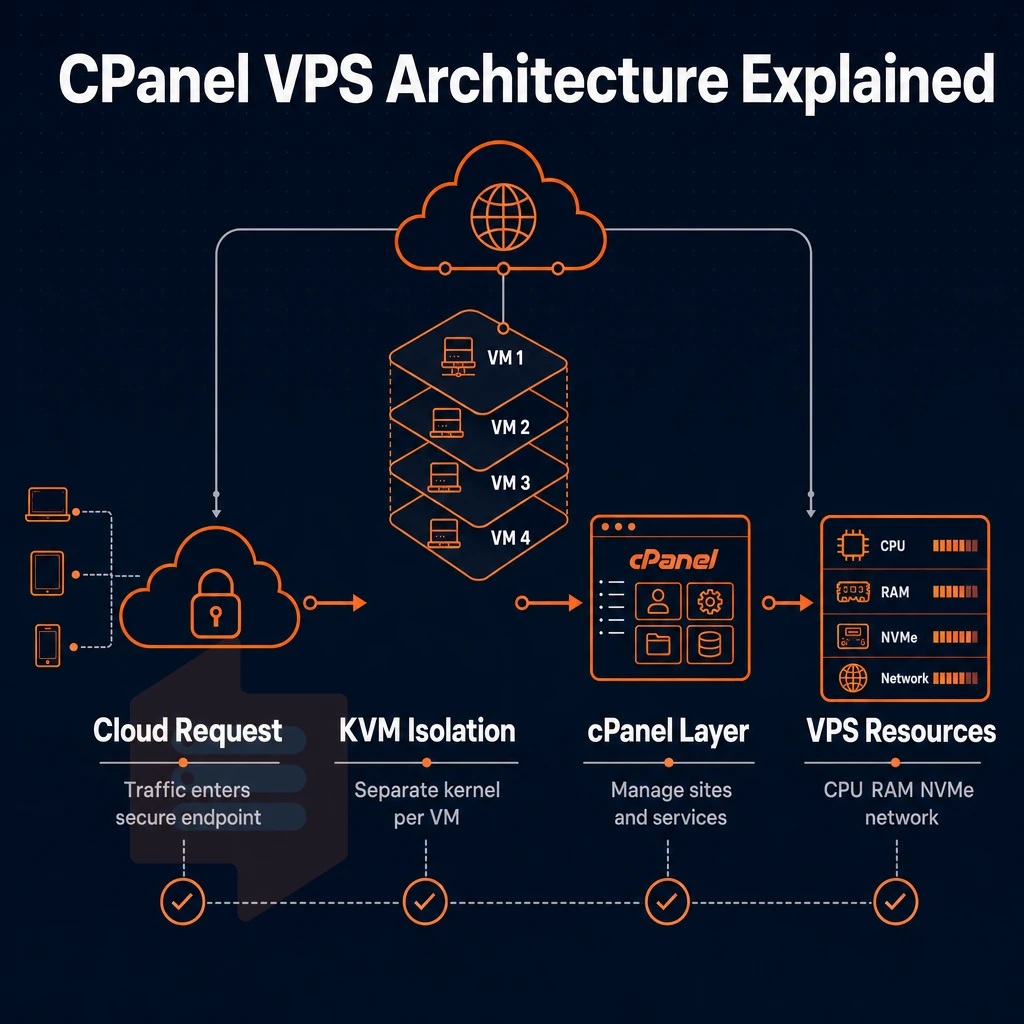
KVM virtualization enables you to run multiple isolated virtual machines on a single physical server, each with its own kernel. cPanel then is installed on top of the operating system that is running on a particular virtual machine.
The cPanel interface sits between the user and the operating system and provides a browser-based interface to the Linux machine that is hiding all of the underlying Linux commands from you. Thus, when you get a cPanel VPS, you need to understand the above virtualization stack and the resulting limitations of what you can do on your virtual server.
The KVM isolation layer
KVM VPS servers run their own kernel. A noisy neighbor with a runaway process will not affect your VPS in any way. In contrast to shared hosting with “hard” limits which are still allocated in advance, the hard limits for your VPS at the hypervisor level guarantee constant and stable performance even under high load.
The same isolation also has a security advantage: A kernel-level exploit on a VPS will not spread to other VPSes on the same host node. Modern VPS environments often include ddos protection at the network edge to mitigate volumetric attacks before they reach individual virtual machines.
Operating system and cPanel placement
cPanel runs on top of the Operating System, not on top of the Hypervisor. AlmaLinux and Rocky Linux are the two Operating Systems cPanel officially supports best at an affordable price, as they are RHEL derivatives and the best base for a stable cPanel server.
Full root access is preserved. cPanel does not restrict access to your shell. You can edit files, install packages using your system package manager, and modify kernel parameters as you would normally. cPanel simply provides a GUI on top for you. This combination of GUI convenience and command-line flexibility gives administrators complete control over their server environment without sacrificing ease of use. This dual-layer approach ensures administrators have more control over server configurations while maintaining the simplicity needed for day-to-day operations.
What cPanel actually simplifies
An unmanaged VPS with cPanel still needs updates, hardening and monitoring to be done by the operator. However, cPanel removes a lot of the manual work that would need to be done by the server administrator if the hosting plan was unmanaged and would require CLI (command line interface) skills to administer. The cPanel interface streamlines routine maintenance tasks such as software updates, security patches, and backup scheduling through automated workflows and one-click operations.
| Task | Without cPanel | With cPanel |
|---|---|---|
| File management | SFTP client or CLI | Browser-based File Manager |
| SSL certificates | Certbot + manual renewal | AutoSSL, one-click issuance |
| Email accounts | Postfix + Dovecot config | GUI mailbox creation |
| DNS zones | Manual BIND edits | Zone editor in WHM |
Starting from a base of AlmaLinux or Rocky Linux, with cPanel on top, you get a hosting environment that offers root-level access yet is easily managed via a GUI.
cPanel cheap VPS: what you actually get for the price
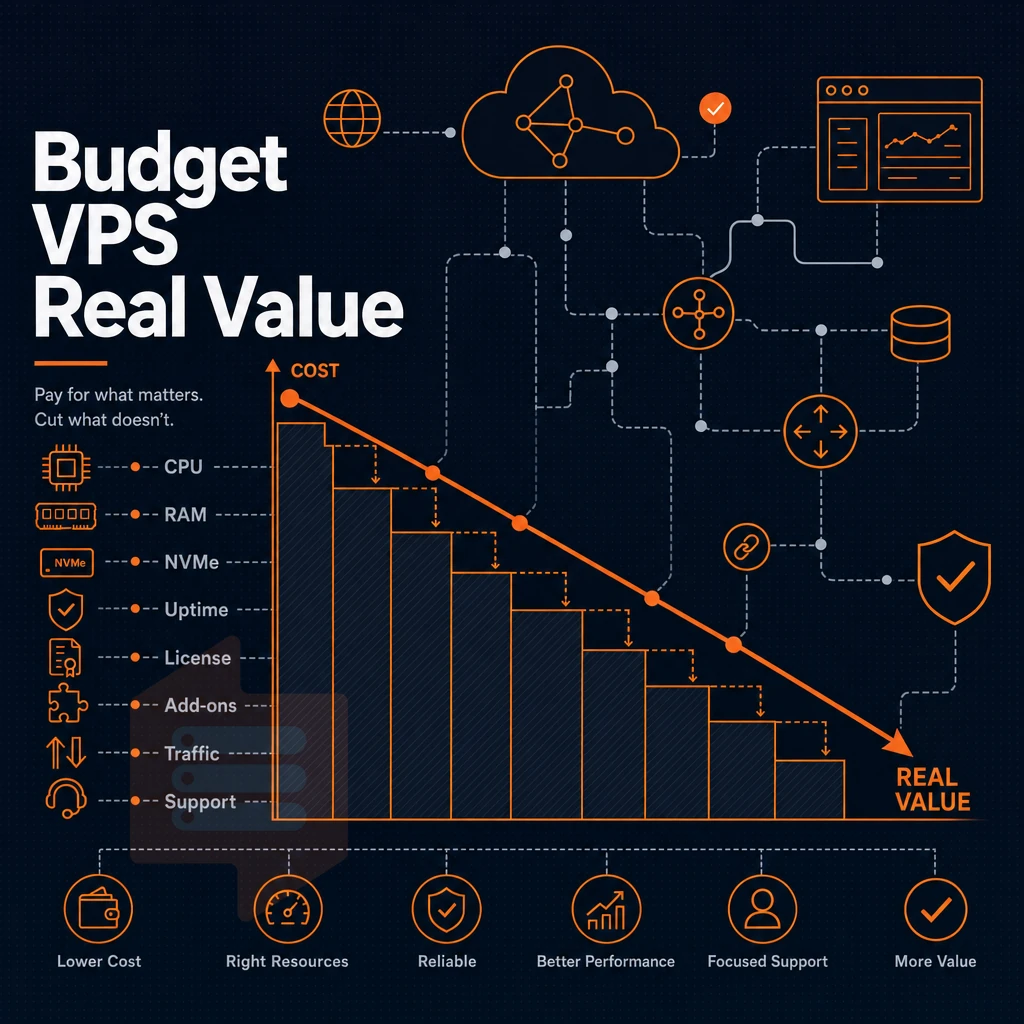
Budget cPanel VPS hosting looks cheap on the surface, but the actual price after you factor in the cost of the license, the cost of the different tiers of storage. Providers offering cheap cpanel VPS hosting often bundle promotional rates that expire after the first billing cycle, making long-term cost projections essential before committing to a plan. Evaluating competitive pricing requires comparing the total cost of ownership across providers, not just the advertised monthly rate.
What the base plan actually includes
This type of hosting differs from shared hosting in that a VPS provides dedicated resources and superuser access. Most hosting providers offer user-friendly control panels with their VPS hosting packages, and will provide NVMe SSDs and an IPv4 address. However, the space and RAM provided with the cheapest VPS plans is very restricted, typically ranging from 20-40GB of storage space and 1-2GB of RAM. Geographic location of data centers can significantly impact latency and compliance requirements, particularly for businesses serving specific regional markets or subject to data residency regulations. Providers with a global network of data centers enable businesses to deploy VPS instances closer to their end users, reducing latency and improving site performance across different regions.
The user friendly control panel simplifies server administration tasks, allowing even those with limited technical expertise to configure domains, databases, and security settings efficiently. Organizations deploying resource-intensive business applications often require VPS configurations with higher RAM allocations and faster processors to maintain optimal performance under sustained workloads. Enterprise-grade VPS plans typically include ddos protection to safeguard against volumetric attacks that could otherwise overwhelm network infrastructure and cause prolonged downtime. Upgrading to plans with additional disk space becomes necessary as websites grow, particularly when hosting media-rich content or maintaining extensive databases.
Note that some web hosting providers advertise free domains with new sign-ups. These free domain names will generally need to be renewed at the regular list price for the domain after the first year. When evaluating promotional offers, verify whether the hosting provider includes transparent renewal pricing in their terms of service to avoid unexpected cost increases. Reputable providers often include a money back guarantee period, typically 30 days, allowing customers to test the service risk-free before committing long-term.
Note: A cPanel license is billed separately by most hosts, it adds a recurring monthly cost on top of the server fee. cPanel's published tier pricing scales with the number of accounts, so even a solo VPS incurs the base tier charge. Always confirm whether it is bundled or billed as a line item.
Free SSL certificates and storage trade-offs
Typically included in entry-level plans are free SSL certificates for basic HTTPS support. Even though NVMe SSD storage is standard for most reliable web hosting providers, cheaper offers sometimes secretly use SATA SSDs or a mix of storage types. Providers may allocate anywhere from 20 GB to 200 GB of disk space depending on the plan tier, with scalability options available as your storage requirements expand.
A typical bandwidth allocation offered at reasonable prices is in the region of 1-2 TB per month. This would be adequate for a simple blog or small game server but not for a very high traffic site. Some providers advertise unlimited traffic to attract customers, though these plans typically include acceptable use policies that define reasonable consumption thresholds for shared infrastructure.
Renewal hikes and predictable pricing
The biggest trap of cheap VPS hosting is the price for renewal. A lot of introductory prices for a first term double or even triple after this time. For us at BuyVPS, there are no hidden surcharges in the 5th year as there are in the 1st year. A free domain for promotion of a VPS server is worth nothing if the price of the server itself increases by 80% on renewal.
Calculate the total cost over two years, not just the introductory offer price. It’s surprising how many allegedly affordable VPS hosting services become expensive in the long run. Only after you’ve calculated the total cost of the services can you determine whether a VPS is the appropriate hosting tier for you, or whether you actually need a dedicated server.
Comparing renewal rates across different hosting provider options reveals significant price variations that can double or triple your annual expenses after promotional periods expire. Reputable providers typically offer a money back guarantee during the first 30 to 60 days, allowing you to test performance and support quality before committing long-term.
VPS with cPanel vs. Dedicated server: server management compared
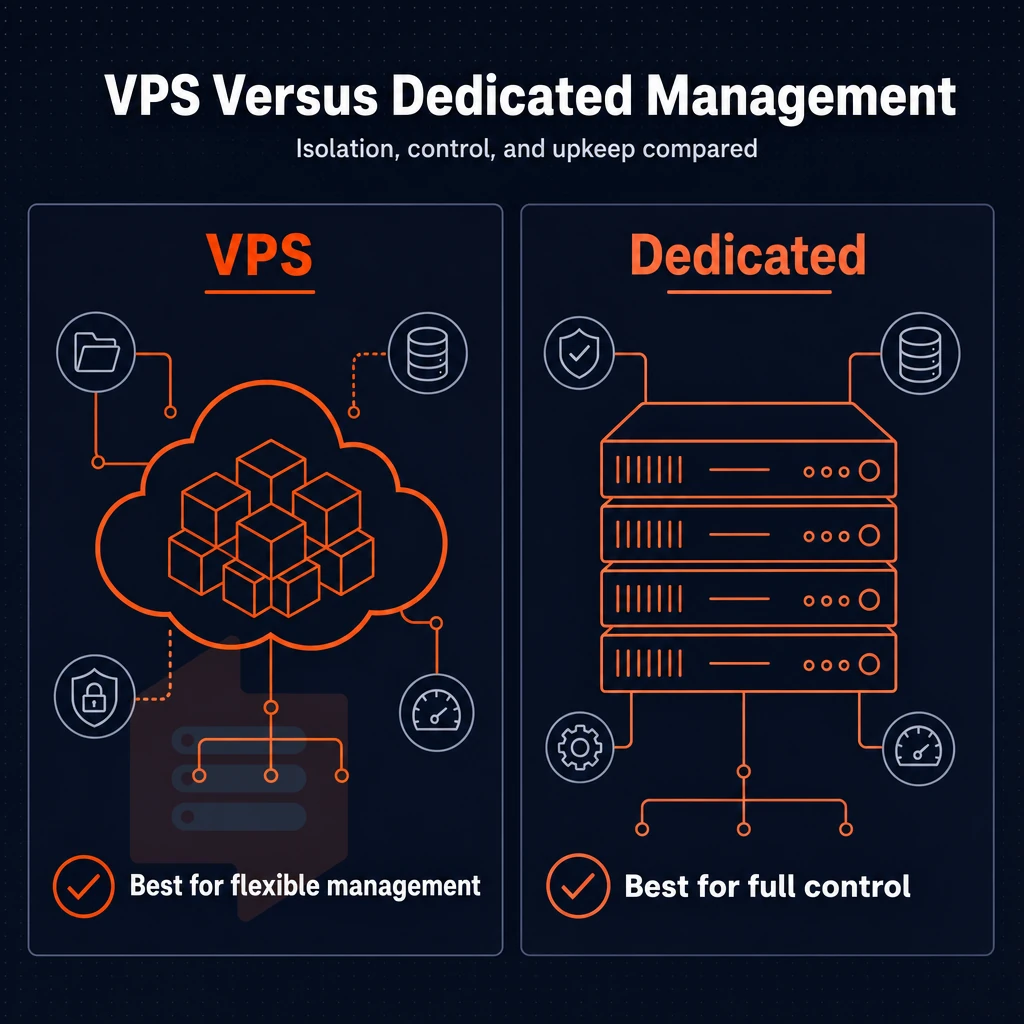
When choosing between a VPS hosting plan and a dedicated server, there are three key factors to consider: the amount of isolation you require, how quickly your resources will grow. Additionally, The amount of management burden that your team can handle. Both offer full system access and full control over the server, but they are architected very differently.
Architecture: server management on one vs. Shared hardware
A dedicated server delivers dedicated tenant space on a physical server. Yet, there’s a hard ceiling defined by the server’s hardware and you must then migrate to a more suitable dedicated server when you grow beyond it.
Most VPS hosts use a Hypervisor to divide up the physical servers into virtual servers. Each virtual server gets guaranteed server resources such as a kernel-enforced memory cap, CPU pins and scheduling, 100% dedicated NVMe storage, etc.
cPanel VPS: server management layer on top of isolation
The cPanel VPS includes WHM and cPanel hosting on a KVM isolated virtual server. You get to run a secure hosting environment with a graphical interface to administer your server, manage DNS and more. This allows for a full hosting service to be administered from one interface without the expense of a full dedicated server chassis. cPanel VPS servers are typically used by small to medium sized hosting companies and web design agencies with dozens of client sites to administer.
Horizontal scaling for VPS with cPanel: just upgrade to a higher plan for more clients, without IP address rearrangement or migration windows. Scaling up a dedicated server with cPanel requires a forklift or a second server.
When dedicated hardware is the right call
The typical use case for dedicated hardware is a single very high usage workload which uses up the entire power of modern servers. The vast majority of hosting services, SaaS products and web sites run fine on good quality VPS's with guaranteed, no-oversell resources.
For most workloads, a no-overselling VPS with hard memory caps will give you the isolation of dedicated hardware at a fraction of the complexity and scalability without having to move servers.
BuyVPS Dedicated CPU VPS plans run on AMD EPYC Genoa processor with pinned cores and DDR5 ECC memory. Unlike shared VPS accounts, Dedicated CPU VPSes from a hosting provider use non-shared cores, thus closing the performance gap with bare metal for the majority of CPU-intense workloads, and allowing for in-place upgrades and for dual-stack networking to be preserved. The gap in performance is much greater between shared hosting and Dedicated CPU VPSes as opposed to dedicated servers.
Shared hosting vs. Cheap VPS hosting: key differences
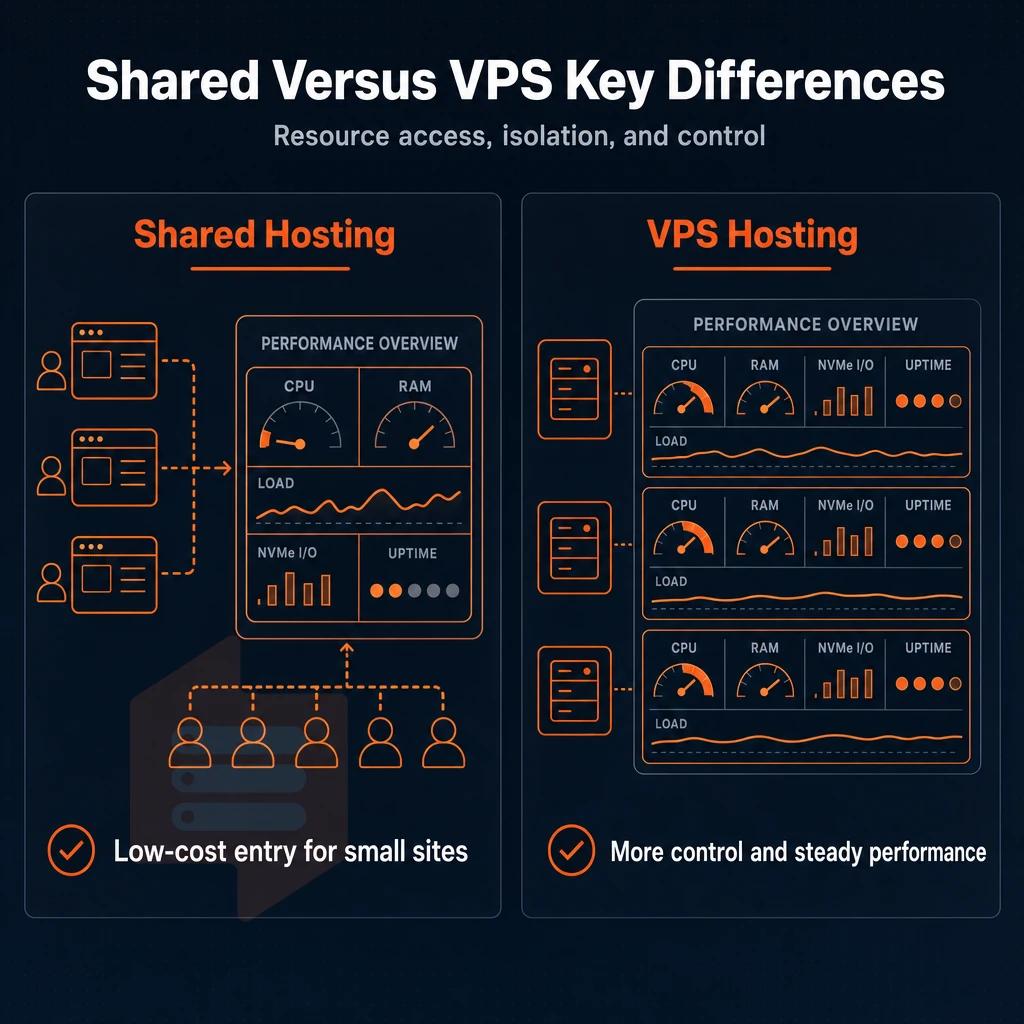
When we talk about shared hosting and VPS hosting, we’re talking about two different problems. A shared hosting plan may host dozens of websites on a single server for a low price. A VPS on the other hand hosts your website on a virtual private server with its own resources as if it was on its own server.
Resource contention on shared hosting account plans
On shared hosting accounts, you and all other tenants are fighting for the same CPU cycles, RAM and I/O operations.
This translates into one simple fact: in practice such databases are unable to deliver inconsistent performance under real load. Only relatively small web projects are able to grow above this level of performance.
What a cheap VPS hosting plan actually changes
A VPS hosting plan typically comes with a fixed amount of CPU power and RAM which is allocated to your VPS environment. This resource is not shared with other tenants and as such ensures consistent performance even when other accounts are peaking.
For a few bucks a month you can also get a VPS and have root user privileges, which is not available with cheap shared hosting. With full root privileges you can install whatever OS and software stack you like, as well as tweak all the kernel parameters. Instead of being locked into your web host’s web interface for server management, you can manage your server as you see fit.
- Sélectionnez votre distribution Linux (Ubuntu, Debian, AlmaLinux, Rocky Linux).
- Install custom runtimes, compilers, or daemons.
- Configure firewall rules at the OS level.
- Upgrade the VPS plan in place, keep the same IP, no migration required.
When shared hosting stops being enough
Typically, one of three factors will trigger the need for cheap VPS hosting: rising traffic, unique software that requires specific hosting, or compliance requirements that demand dedicated hosting in an isolated environment.
Even though such hosting is only marginally more expensive than cheap VPS hosting, the relief of removal of all the limitations that had been holding you back is massive. What to look for when evaluating hosting providers that offer VPS hosting once you have determined you need it is another matter altogether.
How to find the best VPS for cPanel without overpaying
Not all cheap VPS hosting with cPanel is equal. Checking out the hardware generation, storage type, virtualization and even the license transparency of a potential hosting provider can help you to avoid cheap up-front payments that skyrocket on renewal. We show you what to look out for.
Hardware and storage in data centers
First, prioritize current-generation AMD EPYC CPUs over outdated Xeon CPU generations. Second, select a VPS with NVMe storage (such as 122,959 4K read IOPS on BuyVPS nodes) over older SATA SSD storage, which maxes out at far lower IOPS values. The I/O headroom is crucial for actual website management on multiple websites.
KVM Virtualization provides each VPS its own kernel and dedicated resources. For cPanel hosted sites, KVM is the preferred option.
Licensing and renewal transparency
The cost of a cPanel license on most hosting platforms is listed as a separate item to the main hosting fee. Be sure to clarify with any prospective host whether the initial purchase price you are quoted includes the cPanel license, and also the subsequent monthly fee after that.
Most hosting companies increase their charges after the first year. At BuyVPS we charge the same price for a cPanel subscription in year 5 as we do in year 1, no surprise when the bill arrives!
Web projects that scale require scalable resources.
Managed vs. Unmanaged, and support quality
Managed VPS packages include server-level administration such as patches, monitoring and recovery. self-managed VPS packages require technical expertise to administer such tasks.
Support quality is where most providers fail to impress. Resolving cPanel config issues quickly via engineer-led responses rather than queuing up for a chatbot is a big plus for us. And claims of unlimited traffic need to be scrutinized for hidden fair-use clauses.
| Criterion | What to look for | Red flag |
|---|---|---|
| CPU generation | EPYC Milan / Genoa | Older Xeon E5 silicon |
| Storage | NVMe RAID10 | SATA SSD or spinning disk |
| Virtualization | KVM with separate kernel | OpenVZ / container-based |
| Renewal pricing | Locked rate, no hike | Introductory discount only |
| Support | Engineers on tickets | Chatbot-first triage |
By having these criteria to go by, it’s a lot easier to pick out the correct plan for your workload and many workloads are covered by cPanel VPS hosting plans.
Common use cases for cheap cPanel hosting on VPS
A cheap cPanel VPS can serve more than just one website. With a full control panel, superuser privileges and plenty of dedicated resources, a cheap cPanel VPS is perfect for several different types of workloads.
Managing sites and hosting provider accounts
- Host multiple websites from one server. In cPanel, you can add as many domains and subdomains as you like, with each hosted in your single account. You can manage the files, databases and email accounts for each of your websites too.
- Setting up a reseller account with WHM. WHM is on top of cPanel, so you can create one account per client for your hosting service. Many small web design companies use this to bill their customers for web hosting while not having to manage any bare metal servers.
- We serve e-commerce stores. Your online store’s checkout process will not get disturbed by noisy neighbor processes. In combination with NVMe storage, this results in consistent page-load times even under high traffic load.
Note: cPanel licenses are tiered by account count. Confirm the tier before provisioning, upgrading later may require a plan change.
Development and business projects
- Run staging environments. Set up a separate cPanel account for your staging environment that mirrors your production environment. Test and make changes on your staging environment first and then move it to live. This will help keep your web projects safe from untested code deploys.
- Support small business web hosting. A cheap cPanel VPS is enough to host email, CMS and light databases for several very small businesses. The VPS solutions offered at this tier of spend are better than shared hosting on every measure of resources.
- Adjacent use, game servers. You can run a very small game server on a VPS running cPanel, if it has a lot of spare CPU capacity to use. You would run it off another user account to isolate the resource usage.
Our BuyVPS KVM VPS servers in Amsterdam and New York are set up with isolated resources for such workloads.
Why choose BuyVPS for your cPanel VPS hosting
Full root-level control on every plan means you can install cPanel, or any control panel, without restrictions. Our VPS hosting infrastructure is built for the performance and isolation that cPanel VPS workloads demand.
- KVM with a separate kernel per VPS. True isolation at the hypervisor level. Your server environment is never shared with noisy neighbors, unlike shared hosting, where resources are split across accounts.
- AMD EPYC hardware across all tiers. Standard, Dedicated-core, and High Memory plans run on high-performance hardware with DDR4 or DDR5 ECC RAM and dedicated resources scaled to your workload.
- NVMe RAID10 PCIe-direct storage. We measured 122,959 4K read IOPS in fio testing. Disk-intensive cPanel operations, backups, database queries, email accounts, run fast on NVMe SSD storage.
- No-oversell policy with hard memory caps. Every VPS plan enforces strict resource limits per node. Consistent performance is guaranteed, not just promised.
- In-place upgrades, no IP rotation. Scale your VPS hosting plan without migrating data or updating DNS records. Your hosting environment stays stable as your web projects grow.
- Data centers in Amsterdam and New York. Identical hardware and predictable pricing in both locations. Choose EU or US East Coast coverage for your hosting needs, or deploy in both.
We have operated founder-run hosting services since 2002. Reach out to compare plans or ask our engineers which VPS tier fits your cPanel setup. Before you do, here's a direct summary of how a cPanel VPS stacks up against shared hosting on the metrics that matter most.
The core differences between cPanel VPS and shared hosting plans
With shared hosting your site will be hosted on a very busy physical server. With a cheap VPS hosting package with cPanel you could be hosting your own site(s) on your very own virtual private server.
Each VPS will have its own dedicated amount of CPU, RAM and NVMe SSD storage, which cannot be used by any other account. cPanel sits on top of a dedicated OS instance, making server administration very familiar, while still giving you full system-level access to alter the server at OS level as required.
Combining isolated resources with a user-friendly control panel and full root account access, cPanel VPS hosting offers far more to growing sites than is possible with shared hosting. With cheap VPS hosting, you get scalable resources and a smooth upgrade path.
Key advantages of cheap VPS with cPanel hosting
You can have a very cheap VPS hosting with cPanel and still get a good web hosting control panel, and at the same time retain full control on your web hosting server. Your VPS hosting comes with dedicated resources, full administrative access, full control on the Operating System and also on the web hosting software stack, on top of industry proven VPS hosting infrastructure.
Scalable resources mean your VPS plan grows with traffic, not against it. Cheap cPanel VPS hosting keeps server administration accessible whether you run one site or manage multiple sites from a single hosting account. Ready to compare VPS solutions? See every available plan on the BuyVPS cheap VPS page.
Frequently asked questions
Does a VPS hosting plan require cPanel, and what exactly is it?
cPanel is a Linux-based web hosting control panel that provides a graphical interface for managing websites, email accounts, databases, DNS zones, and file permissions. It sits on top of your VPS and replaces the need to run every administrative task from the command line.
You need it if you are hosting several websites or client accounts and want a point-and-click workflow. If your VPS solutions run a single application, a Node.js API, a database server, or a containerized stack, you almost certainly do not need it, and skipping it reduces both cost and attack surface.
Does a cheap VPS hosting plan include free cPanel?
No. cPanel is proprietary software sold under a separate license, and its vendor charges per server plus per account. Providers who advertise "cPanel VPS" are either bundling the license cost into the plan price or offering a trial period.
Always check whether the cPanel licensing fee is included or billed as an add-on, the license alone can be a significant recurring expense on top of your VPS cost. If budget is the priority, consider open-source alternatives such as HestiaCP, CyberPanel, or Webmin, which are free to install on any VPS server environment with unrestricted server access.
How does a managed hosting plan differ from an unmanaged VPS hosting plan?
A self-administered VPS gives you a bare server with full control, meaning the operating system installation, security hardening, software setup, and ongoing maintenance are entirely your responsibility. A managed VPS includes provider-side administration: patching, monitoring, cPanel installation and updates, and often proactive support when something breaks.
Managed plans cost more because you are paying for engineering time, not just hardware. For most developers and sysadmins comfortable at the command line, an self-managed VPS with full root shell access is the better value; managed plans suit agencies or businesses without in-house Linux expertise.
Can i install cPanel on any VPS with root access?
You can install cPanel on any KVM or similar VPS running a supported Linux distribution, currently AlmaLinux, Rocky Linux, or CloudLinux, as long as you have full complete system control and a clean OS install. cPanel does not support Debian or Ubuntu, so if your VPS ships with those by default, you need to reinstall with a supported distro first.
You also need a valid cPanel control panel license before the installer will activate. BuyVPS provides full root-level permissions and supports AlmaLinux and Rocky Linux on every plan at an affordable price, making it straightforward to run a licensed cPanel instance.
Which VPS hosting providers offer the best deals for cPanel users?
The best deal for cPanel users combines reliable hardware, full superuser access, a supported OS, and predictable pricing with no mid-contract hikes. BuyVPS fits that profile: every plan runs on KVM with a separate kernel per VPS, supports AlmaLinux and Rocky Linux out of the box, includes complete root access, and carries a no-renewal-hike pricing commitment, so the cost you budget in year one is the same in year five.
Both the Amsterdam and New York locations run identical hardware, which matters if you need a second cPanel node for redundancy. Providers that oversell nodes or rotate IPs on upgrades are a poor fit for cPanel, because IP changes break SSL certificates and DNS records across all hosted domains.
What is the most reliable VPS for running cPanel?
Reliability for cPanel comes down to three factors: storage I/O, memory stability, and network uptime. cPanel is I/O-intensive on any VPS plan, as it writes logs, rebuilds mail queues, and runs cron jobs continuously, so NVMe storage with strong random-read performance matters more than raw sequential speed.
BuyVPS, which bundles a free domain with its plans, uses NVMe RAID10 with PCIe-direct attachment, measured at over 120,000 4K read IOPS, and enforces hard memory caps per node so a noisy neighbor cannot compress your cPanel processes.
Do i need technical knowledge to manage a VPS with cPanel?
cPanel reduces, but does not eliminate, the Linux knowledge required. Day-to-day tasks like adding domains, creating email accounts, and managing databases are handled through the GUI. However, initial server setup, cPanel installation, firewall configuration (typically via CSF/LFD), and SSL automation still require command-line work.
You should be comfortable with SSH, basic Linux file permissions, and reading error logs. If you have that foundation, cPanel handles the repetitive hosting administration so you can focus on the applications running on top of it.
Get the power of isolation, full administrative control and a control cPanel on a VPS that costs a fraction of a dedicated server. The difference between cheap shared hosting and a low-cost VPS is performance headroom, guaranteed resources and the ability to host many websites or applications, without being affected by other users on the same server.
Before buying a plan for cloud servers, check a few key points.
BuyVPS runs KVM with hard memory caps, NVMe RAID10 storage, and no-oversell node density across both Amsterdam and New York. If you're ready to move beyond shared hosting, explore the plans at BuyVPS.com and pick the tier that matches your workload.